Overview
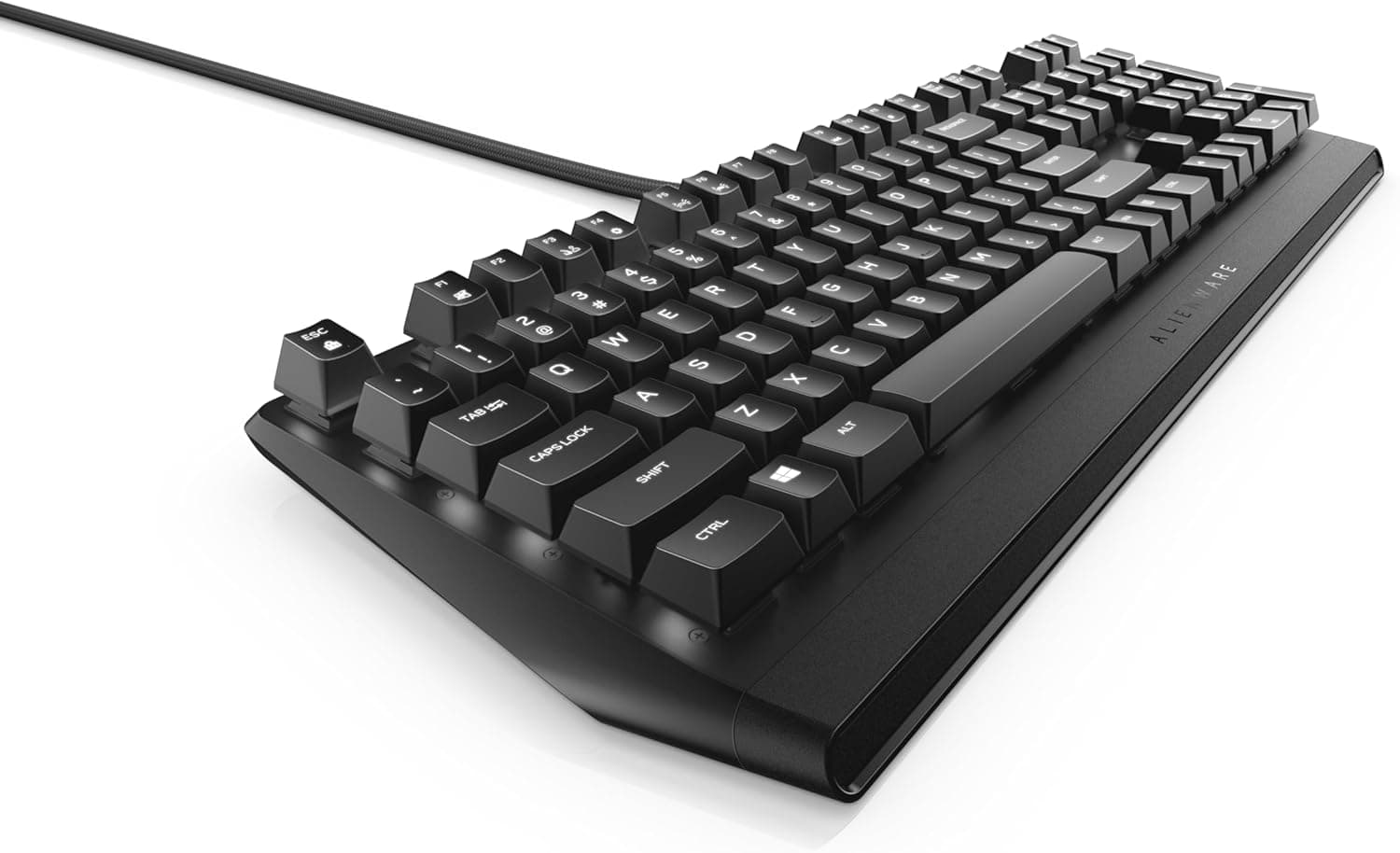
The Alienware AW310K is an entry-level, full-size mechanical gaming keyboard from Dell's Alienware brand. The short verdict: it is a keyboard for people who value fundamentals over flash.
It pairs Cherry MX Red linear switches with a 5000-series aluminum chassis — a genuinely solid foundation for the price — but the backlight is white-only (no RGB), there is no wireless option, and the switches are not hot-swappable.
The key specifications are: Cherry MX Red (linear) switches, N-key rollover (full-key rollover), per-key adjustable white LED backlighting, a 5000-series aluminum chassis, wired USB connection, five onboard profiles, dedicated media control keys, and one USB pass-through port.
On reception, Amazon.co.Check the retailer's page for the latest user reviews.
Still, a 4.3 average captures this product well: no landmines, but not a perfect score either.
How It Actually Types
Cherry MX Red is effectively the reference standard for linear switches. There is no tactile bump and no click — the travel is smooth from actuation to bottom-out.
That helps with rapid repeated presses: strafe reversals in an FPS, or fast inputs in fighting games. The flip side is that you get no tactile feedback telling you the key registered, so many people bottom out hard during long typing sessions and report finger fatigue at first.
That is a property of linear switches in general, not a flaw specific to this board.
The 5000-series aluminum top plate matters more than it sounds. Cheap plastic-chassis mechanical keyboards tend to flex and ring when struck hard; this one largely avoids that, and the sound stays more contained.
But do not confuse this with the muted, cushioned acoustics of a modern gasket-mounted, foam-damped custom board. The AW310K sounds like bare Cherry MX Red, and since the switches are not hot-swappable, you cannot change that later.
If quiet operation or switch experimentation matters to you, a hot-swappable 75% board is a better fit.
N-key rollover is essentially non-negotiable for gaming, and the AW310K delivers it. Move plus crouch plus reload plus sprint — four or five simultaneous keys — all register without drops.
Compatibility Guide
The supported environment is Windows laptops and desktop PCs. The connection is wired USB only and plug-and-play, so it types as a standard HID keyboard with no driver installed.
Because it is wired USB, it also works in BIOS/UEFI setup screens — a common pain point with wireless boards.
However, per-key backlight customization and saving or switching among the five onboard profiles require the Alienware Command Center software. This is the most practically important compatibility caveat.
Command Center is built around Alienware and Dell systems, and behavior on a self-built PC or a third-party laptop can vary. If your plan is to plug this into a custom build and fine-tune the lighting, check the current version's supported environments on the product or support page before buying.
Because the profiles are stored onboard, you can configure them once and then use the keyboard on another PC without keeping the software resident.
There is one USB pass-through port. Pass-through power is drawn through the keyboard from your PC's USB port, so treat it as a home for low-draw devices: a mouse, a flash drive, a wireless headset dongle.
Do not expect it to reliably run bus-powered external hard drives or high-throughput devices. Also note that pass-through designs typically occupy two USB ports on the host PC, which is worth checking if you are working with a port-constrained mini PC or laptop.
Physically, this is a full-size layout with a numpad. You need desk width for both the board and your mouse.
A full-size keyboard typically occupies around 440 mm of width, which pushes the mouse further right — noticeable if you play at low sensitivity and sweep your arm. If that concerns you, a TKL or 75% board with similar linear switches is worth considering.
Product Info
rmation
All prices below are capture-time values and will change. As of June 1, 2026, Amazon.co.jp listed ¥17,703; as of August 17, 2026, Rakuten (Rupinasu) listed ¥15,400; as of July 15, 2026, eBay US listed $81.80.
The AW310K launched around 2020, so several years on, stock is a mix of new units, used units, and parallel imports — which is exactly why domestic and overseas marketplace prices diverge. Before buying, confirm on the listing whether the unit is new or used, whether it carries a domestic warranty, and whether the layout is US ANSI or Japanese JIS.
Layout deserves particular attention. Model numbers ending in "-US" are US ANSI layout.
If you are used to a Japanese layout, you will hit the differences daily: the @ key sits elsewhere, there are no henkan/muhenkan keys, and the Enter key is a different shape. You can switch the Windows keyboard layout to English so the legends match, but IME toggling moves to a different shortcut.
It is all learnable — it just badly hurts satisfaction if you did not expect it.
Where It Sits Against the Competition
By 2026 standards, the AW310K's feature set is solid but a generation behind. At similar prices you can find 75% boards with hot-swap sockets, gasket mounts, triple connectivity (wired, 2.4GHz, Bluetooth), and full RGB.
On a feature checklist, the AW310K loses outright.
Three things still argue for it. First, the switches are genuine Cherry MX Red — house-brand linears have improved a great deal, but Cherry's known, predictable feel remains a real advantage.
Second, the aluminum chassis and the rigidity it buys. Third, visual consistency if you already run Alienware hardware.
If none of those three matter to you, a newer design will likely leave you happier.
Best Use Cases
- People building an Alienware/Dell setup — since some features assume Alienware Command Center, an Alienware host machine means fewer configuration headaches, plus a consistent look.
- First-time mechanical buyers who care more about feel than lighting — you give up RGB and wireless, but the budget went into the switches and chassis, the parts you cannot change later.
- Anyone who uses a numpad daily — the full-size layout covers data entry and spreadsheet work without a separate accessory.
It is a poor fit if you prioritize quiet operation, want to experiment with hot-swappable switches, or need wireless multi-device switching.
Things to Check Before Buying
Cherry MX Red is the only switch option. There is no tactile (MX Brown-style) or clicky (MX Blue-style) variant, and no hot-swap, so the typing feel you buy is the typing feel you keep.
If this is your first mechanical keyboard and you do not yet know whether you prefer linear or tactile, try a switch tester or an in-store unit first. Get this wrong and the board goes unused regardless of how well it performs.
The backlight is white LED only, not RGB. You can adjust per-key brightness, but not color.
If you expected saturated gaming lighting, this is where marketing photos and reality diverge most. Conversely, if lighting is just about seeing legends in a dark room, single-color white is easier on the eyes and keeps your desk visually calmer.
Budget for the real cost of a full-size layout. The numpad adds width and pushes your mouse right.
Low-sensitivity FPS players are the ones who feel it, since large arm sweeps start to open the shoulder. On a desk under about 1000 mm wide, or if you want a large mousepad, a TKL or smaller layout will probably be more comfortable.
The software has an ongoing footprint. Per-key lighting and profile management require Alienware Command Center, which consumes disk space and background system resources.
You can configure profiles, save them onboard, and uninstall the software — but then every future change means reinstalling it.
Factor in the product's age. Being a 2020-era model, availability has shifted toward marketplace listings.
The Amazon.co.jp listing referenced here is sold and shipped by a third-party seller, "niki select shop," not by the manufacturer.
Third-party listings are normal, but warranty handling, DOA support, and included accessories vary by seller, so read the listing's warranty terms before ordering.
Listing metadata is sometimes wrong. This is not specific to the AW310K — it is common for long-tail products.
Verify that the listed manufacturer, model number, and layout (US vs. Japanese) match the product you actually want, using both the title and the product images.
Layout mismatches in particular are a hassle to return once the box is open.
Frequently Asked Questions
Q. Is it a Japanese or US layout? A.
It depends on the listing. Even domestically sold units are sometimes US layout, so check the Enter key shape and legends in the listing photos.
Q. Does it work on a Mac? A.
The officially stated supported environment is Windows laptops and desktops. As a wired USB HID keyboard, basic typing will likely be recognized on other operating systems, but Alienware Command Center — needed for per-key lighting and profiles — is a Windows application.
For a Mac-first setup, choose a different keyboard.
Q. Can I change the keycaps? A.
It uses Cherry MX-style cross stems, so MX-compatible caps will physically fit. Some Alienware-specific legends and the unit widths of the spacebar and modifiers may not match every aftermarket set, so check the kit's compatibility chart first.
Q. Can I swap the switches later? A.
No — it is not hot-swappable. Changing switches would require disassembly and soldering, and would void the warranty.
If future switch changes matter, buy a hot-swap board instead.
Q. What can I plug into the USB pass-through? A.
Low-draw devices: a mouse, a flash drive, a wireless headset dongle. Bus-powered external storage and other high-draw devices are more stable plugged directly into the PC.
Q. Is it quiet? A.
Cherry MX Red has no click, but you still hear bottom-out and spring noise. It is clearly louder than modern foam-damped, gasket-mounted boards.
If microphone pickup during voice chat is a concern, look at a silent-switch model.
Q. Is it still worth buying? A.
If you value the Cherry MX Red and aluminum-chassis fundamentals and do not need RGB, wireless, or hot-swap, it remains a reasonable pick at the right price. If even one of those features matters to you, a newer design in the same price range will serve you better.
Product Disclosure (Amazon)
- Manufacturer: Alienware
- Seller: niki select shop
- Fulfilled by: niki select shop
- ASIN: B07V4FYHDJ
- Note: This article covers a manufacturer-made product based on Amazon listing details.