Overview
The AFHSWL — Aluminum heatsink for M.2 SSD and audio components is sold by the Japanese brand オーディオファン.
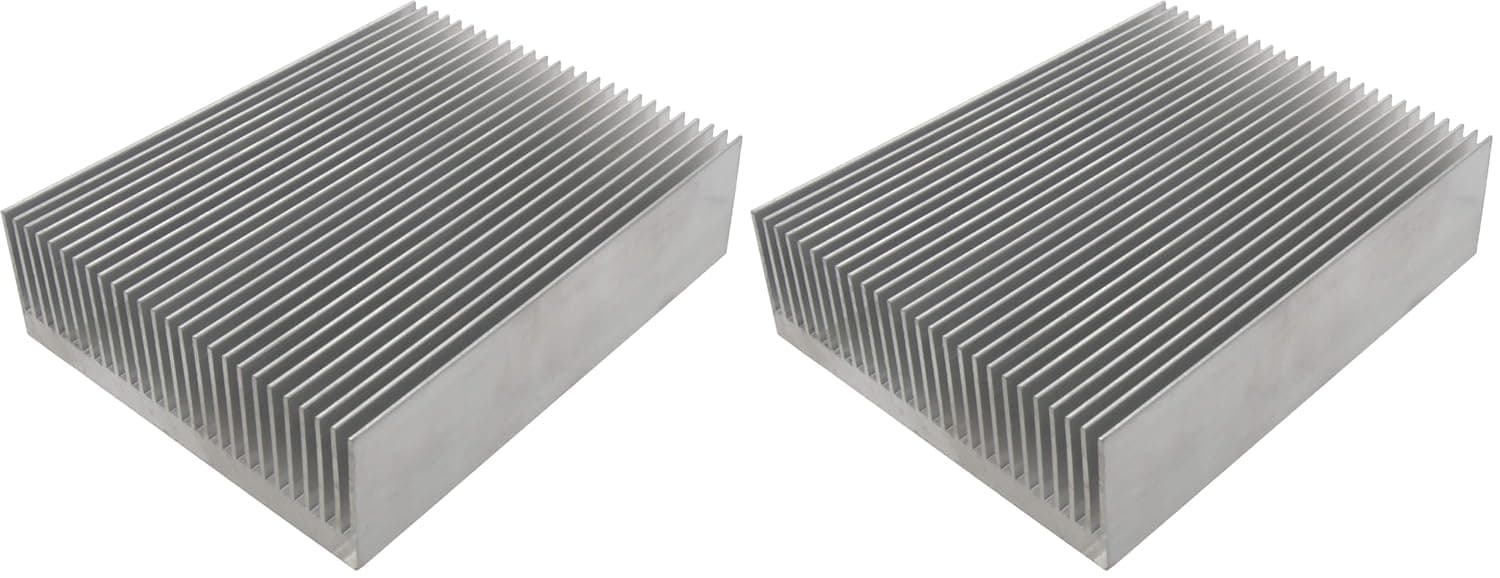
It is an aluminum heatsink, and each piece measures 80mm wide, 100mm deep and 27mm tall. It has no power or cables, so it is a fully passive cooling part.
The short version: it is easy to use for DIY amplifiers, power modules and other boards with room around them. It is too large, though, for an M.2 SSD sitting on a desktop motherboard.
It has a finned design to increase surface area, a silver finish, and comes as two pieces. You attach it with a thermal pad or thermal double-sided tape.
Neither is included, so plan to buy one along with the heatsink. On Amazon.co.jp it was rated 4.2 out of 5 from 218 reviews (84%) when the data was captured in June 2026.
The listing mentions M.2 SSDs, network gear, audio amplifiers and LED drivers as uses.
This article checks which of those the dimensions actually allow. It also covers the pitfalls that come with adhesive-only mounting.
Where It Fits and Where It Doesn't
| Use | Verdict | Why |
|---|---|---|
| DIY amp and power-module regulators | Good fit | Easy to find 80x100mm of space, and easy to drill for screws |
| LED drivers and small hot parts on a board | Good fit | Works well as spot cooling if the enclosure has 27mm+ of height |
| Chips inside routers and switches | Conditional | Needs 27mm of clearance and some airflow |
| Bare-board M.2 enclosures or open test benches | Conditional | Overhangs a 22mm-wide SSD by a lot, so mounting is unstable |
| M.2 SSD on a motherboard | Usually unsuitable | Width and height tend to collide with the GPU or other parts |
| PlayStation 5 expansion slot | No | Exceeds the height limit for the heatsink |
| Main CPU or GPU cooling | No | Not enough capacity, and the mounting method doesn't suit it |
Every 'good fit' use has open space around the board, so some overhang causes no problem. A passive heatsink's performance depends mostly on surface area and airflow.
That makes 80x100mm an advantage whenever it actually fits. Inside a cramped PC, the same size becomes a drawback.
Before buying, first check whether you can really fit this footprint and height.
Compatibility Guide
Physical size: Each piece needs an 80mm x 100mm footprint and stands 27mm tall. The thermal pad or tape underneath adds its own thickness.
That varies by product, and 0.5 to 2mm is common.
Measure your clearance against 27mm plus that thickness.
M.2 SSDs: A common M.2 2280 drive is 22mm wide and 80mm long.
Even with the heatsink's 80mm side along the drive, it overhangs by about 78mm across the width. On desktop boards, the M.2 slot often sits under or next to the graphics card or expansion cards.
Both the width and the 27mm height are then likely to collide. In practice, M.2 use makes sense only in open setups such as bare-board external enclosures or test benches.
Mounting: Only adhesive mounting is supported; no screws or clips are included. The product data itself notes that it is not suited to high-vibration environments.
Gravity is easy to overlook. In a vertical tower case or a wall-mounted device, the heatsink hangs sideways off the board, and the adhesive is under constant peel stress.
Whether thermal tape alone can hold a block of aluminum this size long term depends on the tape. If in doubt, drill holes and use screws.
Electrical safety: Aluminum conducts electricity. If an edge touches exposed pins or small components on the board, it can cause a short circuit.
The data does not say whether the surface is anodized or otherwise insulated, so do not assume it is.
Contact surface: The heatsink needs flat, full contact. If you cover several chips of different heights with one piece, matching the tallest chip leaves the others floating.
Use a thicker pad to fill the gap, or cool just one chip.
Product Info
rmation
| Item | Detail |
|---|---|
| Model number | AFHSWL |
| Material | Aluminum |
| Dimensions (per piece) | 80mm x 100mm x 27mm |
| Color | Silver |
| Quantity per pack | 2 |
| Mounting | Thermal pad or double-sided tape (sold separately) |
| Warranty | 1 month from delivery |
On Amazon.co.jp, the price was ¥2,730 when captured in June 2026 and ¥1,160 when captured in August 2026.
That is more than a twofold gap on the same listing. The data cannot tell us whether this reflects a sale or listing variants with different quantities.
Prices move a lot, so check the current price and the pack quantity on the product page before you buy.
The warranty is short at one month. A simple part like this won't suddenly stop working, but inspect it on arrival for bent fins, a warped base or burrs.
It does not compete with large stock heatsinks or liquid cooling. It is a spot-cooling retrofit, or a spare part to keep on hand for electronics projects.
Installation Steps and What Affects Performance
- Degrease both surfaces. Wipe the chip and the heatsink base with isopropyl alcohol.
Skipping this step noticeably reduces both adhesion and heat transfer. 2.
Choose the interface. If you may remove it later, use a thermal pad and hold the heatsink down with screws or a strap.
If it will stay on for good, use thermal tape. For the most secure hold, two-part thermal adhesive works, but removal becomes nearly impossible.
- Orient the fins. Without a fan, warm air rises.
Mounting the fins vertically (channels running up and down) helps natural convection. 4.
Press and verify. Tape bonds better if you hold it in place for a while.
Measure temperatures under the same load before and after installation, so you can judge the effect with real numbers.
Note that in a sealed box, even a large heatsink has nowhere to dump heat. Without air exchange, it tends to just soak up heat.
A small fan or a vent in the enclosure can make a big difference with the same heatsink.
Recommended Users
DIY audio and electronics hobbyists: This is the best match. Amp output stages, linear regulators and power modules usually have room around them, so you can use the full 80x100mm.
Aluminum is easy to drill or cut to fit your board. Because adhesive mounting is weak against vibration and drops, use screws on gear that gets moved around.
Anyone improving network-gear cooling: If a router or switch chip runs hot and the case has 27mm of free height, this is an option. A drop of a few degrees is possible, but it depends on airflow.
Mounted where it blocks the vents, it can make things worse, so use it only where air can still pass.
Users with hot M.2 drives in external or open setups: With no neighboring parts, the large surface becomes a plus.
It is worth trying on NVMe drives whose controllers heat up under load. It is not for M.2 slots on a motherboard or height-limited devices like the PlayStation 5.
Budget-minded users stocking spares: With two pieces in the pack, you can keep one on hand for sudden heat problems. It does not replace CPU or GPU cooling, so treat it strictly as a supplementary part.
Before You Buy
If you buy it for an M.2 SSD, the size will almost certainly not fit. Listings often put M.2 SSDs first among the uses.
Yet an 80x100mm plate is in a different size class from a 22mm-wide board. For a motherboard M.2 slot, a slim heatsink made for M.2 is the safer choice.
Think of this product as meant for boards with open space around them.
You need to buy mounting material separately. Only the heatsink is included.
Ordinary double-sided tape barely conducts heat, so use a pad or tape that is sold as thermal. As noted above, for vertical or upside-down mounting, don't rely on tape alone.
Short circuits are a pitfall people often notice only after buying. Placing a large aluminum plate on a small board makes it easy for an edge to touch component leads or exposed pins.
Before attaching it, look at the board from the side and check what sits under the heatsink's edges. Putting Kapton or other insulating tape on risky spots adds peace of mind.
Check the quantity and price. The title says '1個 (× 2)' (one piece, x2) while the specs say two per pack, so it is unclear how many you receive.
The captured prices also varied between ¥2,730 and ¥1,160 at different times. Quantity may differ between listing variants, so check the quantity text and photos before ordering.
In addition, one price entry in the data is labeled 'Amazon US', but its link actually points to Amazon.co.jp.
Don't assume the product is available from an overseas store.
It is not for high-power parts. A single passive stick-on heatsink cannot cool CPUs, GPUs or high-current power circuits that dissipate tens of watts.
Use a dedicated cooler or a fan-driven setup for those.
FAQ
Q. Can I use it on an M.2 SSD? A.
You can physically attach it. But the heatsink is 80x100mm and an M.2 2280 drive is 22mm wide, so it overhangs a lot.
It can work in bare-board enclosures or open test benches, but not on a motherboard M.2 slot or a PlayStation 5.
Q. How thick should the thermal pad be? A.
If the chip and the heatsink base meet flat, a thinner pad (roughly 0.5 to 1mm) transfers heat better.
If there are parts of different heights, or the chip sits slightly low, use a thicker pad to fill the gap.
Q. Will double-sided tape hold it? A.
On a horizontal board with the heatsink on top, thermal tape usually holds. Mounted vertically or upside down, or in gear that vibrates, there is constant peel stress.
Adding screws or a strap is safer.
Q. Can I cut or drill it? A.
It is aluminum, so standard metalworking tools will do. Remove every bit of swarf afterward, because metal dust left on a board can cause shorts.
Q. Do I need a fan? A.
Not necessarily. But in a sealed enclosure the heatsink loses much of its effect.
If temperatures don't drop enough, adding a small fan usually helps.
Product Disclosure (Amazon)
- Manufacturer: オーディオファン
- Seller: オーディオファン(自社出荷品に限り午後2時までのご注文は当日、日本国内千葉県より発送いたします)
- Fulfilled by: Amazon
- Model: AFHSWL
- ASIN: B0GYK5Y8QP
- Note: This article covers a manufacturer-made product based on Amazon listing details.