This article covers the ORICO M2PV-C3, a USB-C enclosure that turns an M.2 NVMe SSD into a portable external drive — what it does well, and what to check before buying.
Overview
The ORICO M2PV-C3 is built for one job: giving a spare M.2 NVMe SSD a second life as an external drive.
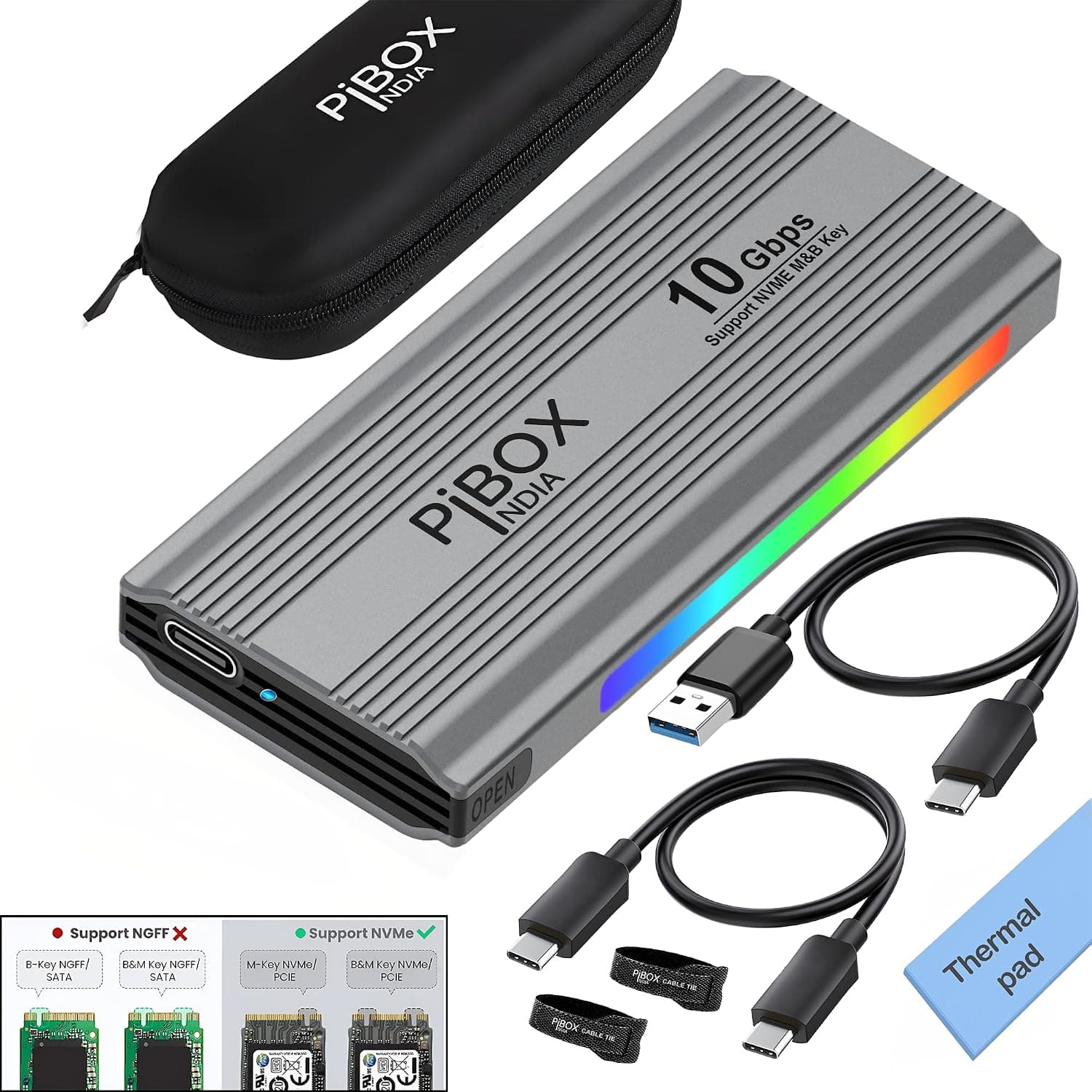
It runs at USB 3.2 Gen 2 (10Gbps), uses a tool-less design so no screwdriver is needed, and accepts M.2 2280, 2260, 2242, and 2230 drives.
The shell is aluminum alloy and a silicone thermal pad is included.
At 108 x 34 x 11.5 mm and roughly 45 g, it is genuinely pocketable — long enough for an 80 mm 2280 drive, thin enough to share a laptop sleeve.
That is a very different ownership experience from a desk-bound 3.5-inch HDD enclosure.
It is equally clear who should skip it: anyone wanting Thunderbolt-class speed, anyone hoping to reuse a SATA M.2 SSD, and anyone building an always-on desktop storage box with its own power supply.
Understanding the Speed
10Gbps is a theoretical 1,250 MB/s. After protocol overhead, real-world results generally land in the 900–1,000 MB/s range, and hitting that figure means the enclosure is behaving normally.
The key point is that the bridge, not the SSD, is the bottleneck. A PCIe 3.0 drive is internally capable of around 3,000 MB/s and a PCIe 4.0 drive around 7,000 MB/s, and almost none of that surplus survives the 10Gbps link.
Buying a fast Gen4 drive specifically for this enclosure makes little sense; reusing a Gen3 drive you already own is by far the best value.
On long sustained writes, speed will drop once the SSD's SLC cache is exhausted. That is drive behavior, not an enclosure fault.
The aluminum body and thermal pad exist to limit thermal throttling, so always fit the pad before assembly.
Compatibility Guide
Only NVMe M.2 SSDs with an M-key edge are supported.
SATA M.2 SSDs (B-key or B&M key) are explicitly not compatible, and this is the single most common buying mistake.
| Check | Requirement | How to tell |
|---|---|---|
| Protocol | NVMe only | Label says NVMe / PCIe. Anything marked SATA will not work |
| Key | M-key | One notch on the connector. Two notches (B&M) usually means SATA |
| Length | 2280 / 2260 / 2242 / 2230 | Last four digits: 22 mm wide, then the length |
| Host port | USB Type-C | Must be a Gen 2 port to reach full speed |
Support down to 2230 means short drives pulled from handhelds or compact laptops also fit. With shorter drives the standoff moves, so confirm the board sits flat and fully seated — a half-inserted connector causes drop-outs or a drive that never appears at all.
The host side matters too. Windows, macOS, and Linux are supported.
A USB 3.2 Gen 1 port caps you at 5Gbps and a USB 2.0 port at 480Mbps, and laptop Type-C ports often differ from one another despite looking identical — check the port table in your machine's spec sheet.
The cable counts as well: charge-only or older USB 2.0-era Type-C cables will not deliver 10Gbps.
For formatting, use NTFS for Windows-only, APFS for macOS-only, and exFAT if you move between both. exFAT is the most portable but has no journaling, so unplugging mid-transfer risks corruption.
Product Details
The listed specifications are below. These are published figures, not measured results.
| Item | Specification |
|---|---|
| Interface | USB 3.2 Gen 2 (10Gbps) |
| Supported SSD interface | NVMe (M-key) |
| Max transfer speed | 10Gbps |
| Enclosure material | Aluminum alloy + silicone pad |
| Connector | USB Type-C |
| Supported OS | Windows / macOS / Linux |
| Form factors | M.2 2280 / 2260 / 2242 / 2230 |
| Dimensions | 108 x 34 x 11.5 mm |
| Weight | Approx. 45 g |
The tool-less opening mechanism sounds minor but pays off whenever you swap drives repeatedly — pulling data off several old SSDs, or testing a second drive to isolate a fault, is far quicker than with a screwed-down enclosure. The aluminum shell doubles as a heatsink, so a warm case during heavy transfers is expected behavior.
No price is quoted here: the source data for this article contained pricing that appears to belong to a different product entirely, so please check the current price on the product page instead. For the same reason, review counts and rating scores are not cited.
Recommended Users
The best fit is a PC builder with a leftover M.2 NVMe SSD after an upgrade.
One inexpensive enclosure converts an otherwise idle drive into roughly 1,000 MB/s portable storage — usually cheaper than buying a new portable SSD outright.
Second, anyone regularly moving large files: video footage, RAW photos, VM images, or game installs. Once you are shifting tens of gigabytes at a time, the gap versus a USB flash drive or an HDD enclosure is obvious, and 45 g is easy to carry daily.
It also suits backups. Backups fail mainly because they are inconvenient, so having one fast drive you simply plug in has real value — and the tool-less design lets you upgrade to a larger SSD later.
Before You Buy
SATA M.2 SSDs will not work. If the drive you pulled from an older laptop is SATA-based, this enclosure will not detect it.
Check the model number first; two notches on the connector is a warning sign.
10Gbps is a ceiling. Fitting a fast Gen4 drive will not raise the external throughput.
Conversely, an affordable Gen3 drive already saturates the link.
Heat and placement. The metal body spreads heat deliberately, so it gets warm under sustained writes.
Running long transfers while the enclosure is buried in a bag or under a cable bundle traps that heat and invites throttling. Leave it in open air.
Connection stability. It draws power from the port, so weak USB hubs or long extension cables can cause intermittent detection.
If it misbehaves, plug directly into the computer first. Note also that SMART data and vendor firmware tools often do not work through a USB bridge — checking drive health may require putting the SSD back in an internal M.2 slot.
Game console use is not part of the stated specification. Consoles that accept external USB storage may work in general terms, but do not buy on that assumption; verify the console maker's storage requirements.
Watch for mismatched listing data. The listing information attached to this product has, in places, been mixed with metadata from an entirely different category (wireless keyboard and mouse products).
Readers opening the same page may see the same inconsistency, so confirm the product images, title, and the NVMe/form-factor claims match this article before ordering. Listing errors are not rare.
FAQ
Q. What happens if I install a SATA M.2 SSD? A.
It will not be recognized. Only NVMe (M-key) drives are supported, so verify the model number beforehand.
Q. What does 10Gbps mean in practice? A.
A theoretical 1,250 MB/s, with roughly 900–1,000 MB/s realistic. A Gen 1 port halves that; USB 2.0 is far lower.
Q. Can I use a short 2230 drive? A.
Yes — 2280, 2260, 2242, and 2230 are all supported. The standoff position changes, so check the drive is fully seated.
Q. Can I share it between macOS and Windows? A.
Both are supported. Format as exFAT for cross-platform use, and always eject through the OS before unplugging.
Q. Do I have to use the silicone pad? A.
Yes, it is recommended. It carries heat from the SSD into the aluminum shell; without it, long transfers throttle more easily.
Q. Can I use a third-party cable? A.
Yes, provided it is rated for USB 3.2 Gen 2 (10Gbps).
Charge-only or older Type-C cables may be slow or fail to connect.