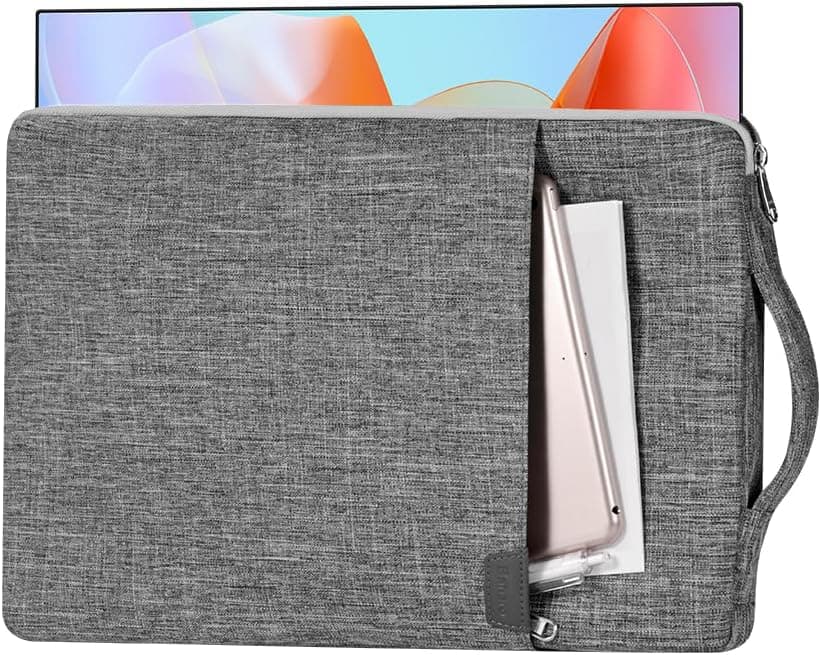
When you commute with a portable monitor, the panel usually takes damage long before the electronics do. This article looks at the CaseDeer Portable Monitor Case 17.3 Inch Carry Computer Bag (ASUS / ViewSonic compatible, space gray) from the angle that actually matters: will your specific monitor fit, and what are you giving up by choosing a soft case?
Overview
This is a dedicated soft carrying case for 17.3-inch class portable monitors.
The short version: it makes sense if you already own a mobile display and take it out of the house at least a couple of times a week. If your monitor lives permanently on a desk, you do not need it.
Think of it as a padded sleeve that prevents scuffing and squeezing inside a bag, not as a rigid hard-shell that survives drops.
The shell is waterproof canvas with a soft anti-static lining. A front pocket takes USB-C cables, a power adapter, or a stylus, and a side handle lets you carry it by hand for short distances.
It is thin enough that the intended use is bag-in-bag: standing upright inside a backpack or briefcase.
As captured in late August 2026, the Amazon.co.Check the retailer's page for the latest user reviews.
With a sample that size, chronic problems such as gross size mismatch or fabric failure would normally surface in the score.
Compatibility Guide
There are no ports, no power, and no signal standards here.
| Item | Value |
|---|---|
| Internal dimensions | 410 x 295 x 25 mm |
| External dimensions | 420 x 305 x 30 mm |
| Target monitor size | 17.3 inch |
A 17.3-inch 16:9 panel has a diagonal of roughly 439 mm, giving an active area of about 383 x 215 mm.
Once bezels and frame are added, most 17.3-inch mobile monitors land near 390-400 mm wide and 240-260 mm tall, so a 410 x 295 mm interior leaves deliberate margin.
That extra vertical room absorbs folded stands and padding bulge.
The number to watch is the 25 mm depth. A bare mobile panel is often around 10 mm thick and fits easily, but the depth gets consumed quickly when you have:
- a magnetic smart cover or folding stand left attached
- an integrated kickstand protruding from the back
- an added screen protector or silicone bumper
- cables and adapters stuffed into the main compartment alongside the panel
The most common complaint pattern with cases like this is "it fits without the cover, not with it." Measure your monitor's real width, height, and thickness and compare against 410 / 295 / 25 mm rather than trusting the marketed diagonal. ASUS ZenScreen models, ViewSonic 17-inch mobile displays, and generic 17.3-inch units from Bimawen, NexiGo, or EVICIV are the intended targets, but two monitors both labeled 17.3 inch can differ by 20-30 mm in outer size depending on bezel width.
A 15.6-inch monitor will physically go in, but it slides around in the leftover space, which defeats the padding.
Buy a 15.6-inch case for a 15.6-inch panel.
Product Info
Check the retailer's page for the latest price.co.jp as captured on 1 September 2026** (ASIN B0BRC1CCXP). Amazon pricing moves constantly with sales and seller changes, so confirm the current figure on the product page before ordering. The eBay entry is only a search link with no confirmed price.
No release date is officially published, and warranty terms and bundled accessories are not documented. The package is simply the case plus its front pocket - do not expect a strap or a hard insert.
Positioning is entry to mid tier. Around 5,000 yen is mid-pack for a laptop sleeve and typical for a purpose-built mobile monitor case.
The dedicated shape fits better than a generic sleeve, while the material and rigidity fall short of premium leather options.
How It Compares
There are effectively three ways to transport a 17.3-inch mobile display:
- A generic 17-inch laptop sleeve - cheapest, but sized for a thick laptop, so the monitor swims inside and corner protection is weak.
- A dedicated soft case like this one - interior close to the panel's shape, minimal slack, cables consolidated in the front pocket. Protection is limited to what fabric and foam can do.
- A hard-shell case - the safest option for checked luggage or crowded transit, but thicker, heavier, and more expensive.
The deciding factor is whether your commute applies crushing force. Home-to-office in a backpack is well within this case's remit.
Airport check-in or a job site where the case gets knocked around calls for a hard shell, or at minimum using this case inside a bag with rigid dividers.
In Practical Use
The front pocket matters more than it sounds. A mobile monitor needs one or two USB-C cables and sometimes a power adapter and HDMI cable.
Storing them apart from the display is how you end up on site with a screen and no cable. Keeping case and cables as one unit reduces packing to a single yes-or-no decision.
The side handle is genuinely useful for walking to a meeting room, but it is not built for extended hand-carry. Treat it as an assist for short hops and rely on a backpack or tote for real distance.
Likewise, read "waterproof canvas" as water-repellent against drizzle and condensation, not as submersion-proof.
Best Use Cases
Hybrid workers commuting between home and office are the core audience. Carrying a monitor loose alongside a laptop every day accumulates back-panel scratches and pressure on the screen.
This case is thin enough to add to an existing bag and cuts down that daily wear.
Frequent business travelers and creatives benefit too. Showing documents on a bigger screen at a client site or doing a color check on the road only works if the panel arrives intact, and consolidating cables into the pocket reduces the number of loose items to track.
Students and casual dual-screen users get good value: protection plus storage for around 5,000 yen is reasonable for a dorm or library dual-display setup.
Conversely, if your monitor never leaves the desk, skip it. A case for a stationary display just fills a closet.
Before You Buy
1. "17.3-inch compatible" is not a fit guarantee. The classic mistake is buying on diagonal alone and discovering that a thick-bezel or integrated-stand model will not go in.
Measure first and compare to 410 x 295 x 25 mm. The 25 mm depth is easy to exceed with a cover attached.
2. Soft cases have a protection ceiling. Fabric and padding absorb scuffs and light knocks; they do not stop drops or heavy compression.
Crushing it in a packed train or stacking weight on it in a suitcase can still crack a panel. If you need rigidity, buy a hard shell.
3. Listing metadata can disagree with reality. In the data for this product, the price is quoted in Japanese yen while the seller label reads "Amazon US" - the kind of inconsistency that shows up regularly in marketplace listings, where manufacturer, seller, and model number fields are sometimes simply wrong.
4. Do not expect warranty coverage or extras. No warranty period is stated, and the package is the case alone.
Buying it expecting a shoulder strap or hard insert will disappoint.
5. Prices move. The ¥5,172 figure is from 1 September 2026 and will shift with sales and seller changes.
A few hundred yen can reshuffle the ranking against generic sleeves and hard cases, so compare again at purchase time.
FAQ
Q. Will a 15.6-inch monitor work? A.
It fits physically, but there is a lot of slack in a 410 x 295 mm interior and the panel will slide and hit corners. Buy a 15.6-inch case instead.
Q. Can I carry a laptop in it too? A.
No. The 25 mm depth is sized for one panel; adding a laptop either prevents closing or applies pressure to the screen.
Use a separate sleeve.
Q. Can I leave a folding stand or smart cover attached? A.
Depends on the model. If total thickness stays under 25 mm, yes; magnetic covers and integrated kickstands often exceed it.
Measure to be sure.
Q. It says waterproof - is rain fine? A.
The canvas is intended to shed light rain and droplets. Do not assume submersion resistance; in heavy rain, carry it inside a backpack.
Q. How much can I trust the review score? A.
Fit with your specific monitor, however, rarely shows up in ratings - check dimensions yourself.
Q. What actually fits in the front pocket? A.
Thin items: USB-C cables, a compact adapter, a pen. A bulky power brick will bulge the case and make it harder to slide into another bag.
Product Disclosure (Amazon)
- Manufacturer: CaseDeer
- Seller: Amazon US
- Fulfilled by: Amazon US
- ASIN: B0BRC1CCXP
- Note: This article covers a manufacturer-made product based on Amazon listing details.