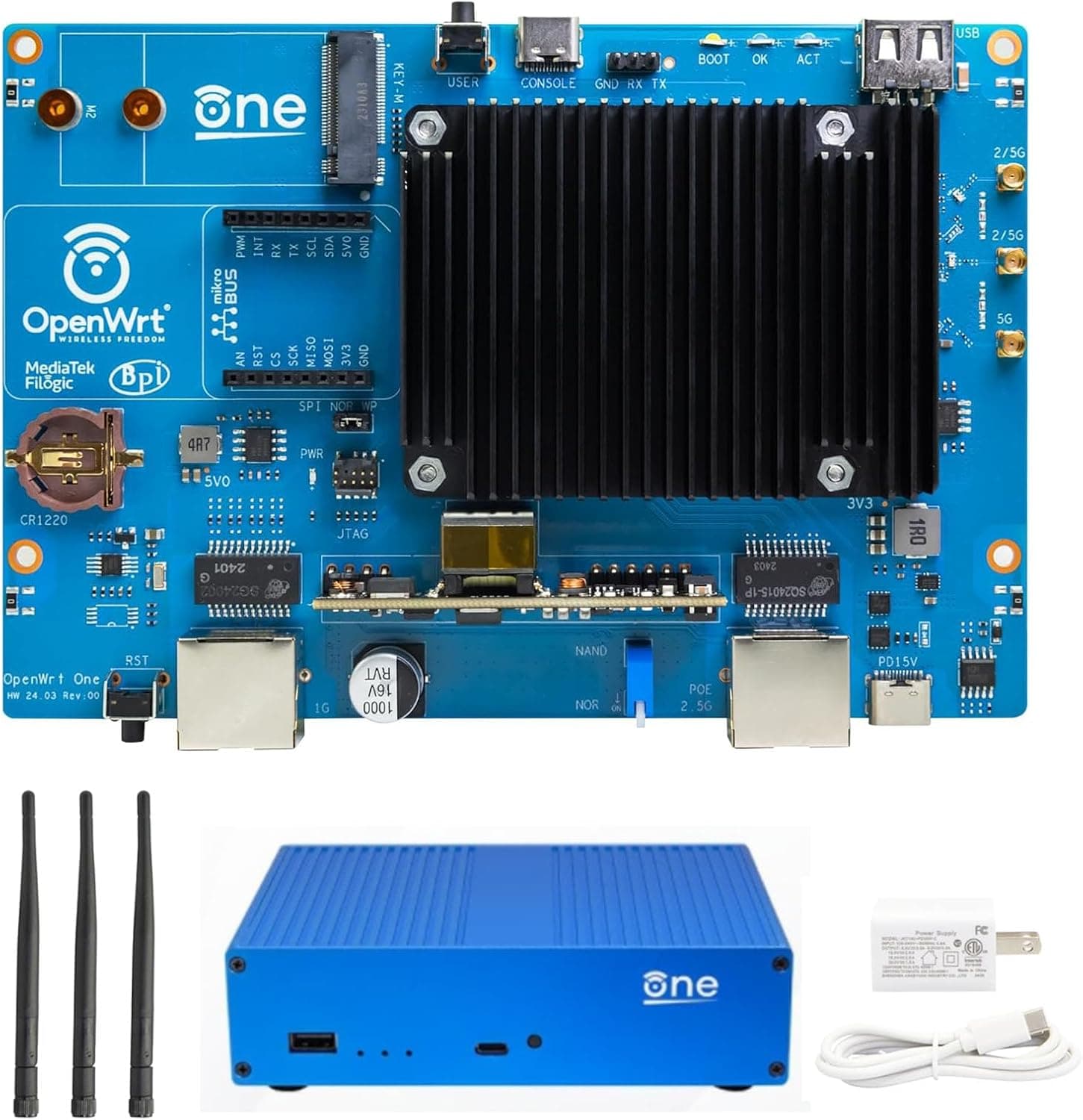
This article covers youyeetoo バナナ Pi OpenWrt One. The youyeetoo Banana Pi OpenWrt One is an officially supported open-source router co-designed by the OpenWrt project and Banana Pi.
Powered by the MediaTek MT7981B (Filogic 820) SoC, it delivers dual-band WiFi 6 connectivity, a 2.5GbE WAN port, and a gigabit LAN port.
With 1GB DDR4 RAM and a dual-flash setup (256 MiB NAND + 16 MiB NOR), it is built for experimentation without the risk of bricking the device. Shipped with OpenWrt pre-installed and backed by mainline kernel support, this router is ideal for users who want full control over their network.
Whether you are setting up a custom VPN, running ad-blocking software, or building an IoT hub, the OpenWrt One offers a level of flexibility that consumer routers simply cannot match. Wired: 2.5GbE RJ45 WAN × 1, Gigabit RJ45 LAN × 1 Wireless: WiFi 6 dual-band (2.4GHz 2×2 + 5GHz 3×3 via MediaTek MT7976C) Expansion: M.2 2242/2230 slot (PCIe Gen 2 x1, NVMe SSD support) Other: USB 2.0 port, MikroBUS socket (for expansion modules), PoE support, RTC * OS: OpenWrt pre-installed, official mainline kernel support
Product Info
Check the retailer's page for the latest price. Warranty is provided by youyeetoo (check details before purchase). The package includes the OpenWrt One board, power adapter, and a quick-start guide. Positioned as an entry-to-mid-range open-source router, its key differentiator is software freedom. Unlike typical home routers, users can customize every aspect of the firmware, install packages, and receive long-term updates directly from the OpenWrt community. This makes it a trusted choice among networking enthusiasts.
Home network tinkerers: If you enjoy fine-tuning QoS, setting up a VPN server, or blocking ads at the router level, the OpenWrt One gives you complete control. However, basic Linux familiarity is recommended for initial setup. IoT and small server hosts: With an M.2 SSD slot and USB 2.0, you can run lightweight services like Home Assistant, a Pi-hole DNS sinkhole, or a personal web server. Low power consumption makes it suitable for 24/7 operation. * Privacy-conscious users: By managing your own firmware updates, you can respond quickly to security vulnerabilities without waiting for vendor patches. Just be prepared to take responsibility for the update process.
This is not a plug-and-play consumer router. Setting it up requires using the LuCI web interface or command line. Beginners may find the learning curve steep. The M.2 slot runs at PCIe Gen 2 x1, so don't expect blazing-fast NVMe performance. It is adequate for storage but not for speed-critical applications. The 2.5GbE port is WAN-only; LAN is limited to gigabit. To achieve 2.5GbE speeds internally, you will need an additional switch. Compared to mainstream WiFi 6 routers (e.g., TP-Link Archer AX73), the OpenWrt One may have less wireless range and fewer antennas. Its value lies in software flexibility, not raw hardware specs.
Q: Can I build a mesh network with this router? A: Yes, using OpenWrt's 802.11s or Fast Roaming features, you can create a mesh with multiple OpenWrt devices. However, the built-in antennas mean coverage may not match dedicated mesh systems. Q: How do I update the firmware? A: You can update via the LuCI web interface under System > Backup / Flash Firmware, or use the opkg command in the terminal. Mainline support ensures regular, stable updates. Q: Will this router be slower than a typical consumer WiFi 6 router? A: In terms of raw throughput, the hardware is capable of WiFi 6 speeds (around 1.2Gbps theoretical). OpenWrt's default settings prioritize stability and power efficiency, so real-world performance is comparable to mainstream routers in most scenarios.
Product Disclosure (Amazon)
- Manufacturer: youyeetoo
- Seller: youyeetoo geek shop
- ASIN: B0DJS7STYL
- Note: This article covers a manufacturer-made product based on Amazon listing details.