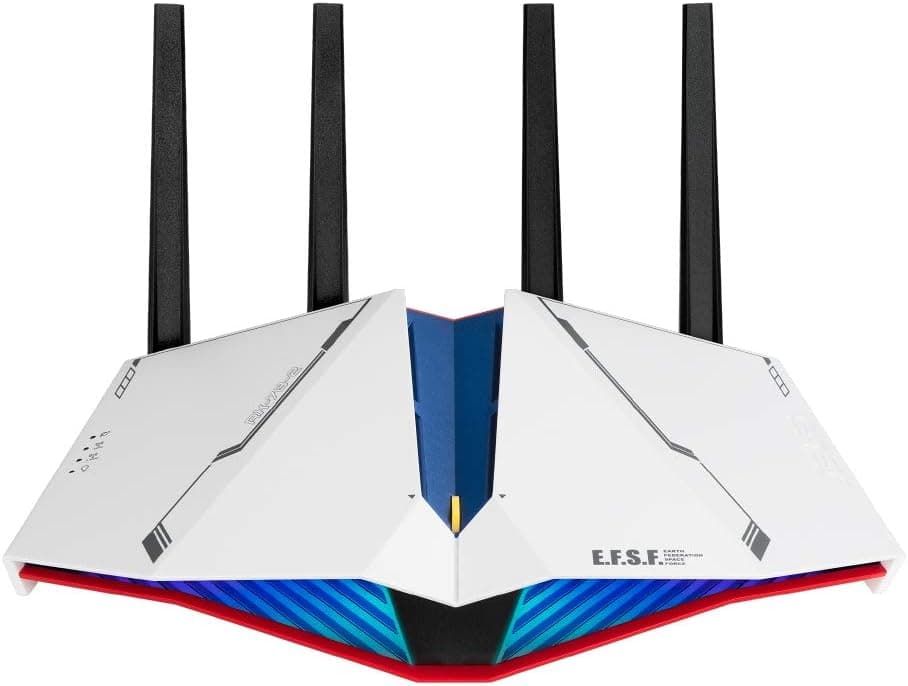
This article takes a detailed look at the ASUSTek RT-AX82U GUNDAM EDITION WiFi 6 dual-band gaming router (4804 + 574 Mbps), based on its published specifications and review record. It may look like a design-first limited edition, but the hardware inside is a well-established ASUS gaming router.
Below is what you need to know before buying, including how it differs from the standard model.
Overview
The RT-AX82U GUNDAM EDITION is a WiFi 6 (IEEE 802.11ax) dual-band gaming router wrapped in a chassis themed after the RX-78-2 Gundam.
It offers up to 4804 Mbps on 5 GHz and 574 Mbps on 2.4 GHz, four external antennas, a 1.5 GHz tri-core processor and 512 MB of RAM, placing it in the mid-to-high-end tier.
On Amazon.co.jp it holds 4.5 out of 5 stars across 49 reviews (90% positive, as captured in September 2026) — a small sample, but a consistent one.
The short version: this is a router for people who value the Gundam styling and do not want to compromise on function to get it. If you only care about networking performance, the standard RT-AX82U delivers essentially the same capability in a different paint job.
How you value the design is close to the entire purchase decision.
Compatibility Guide
Router compatibility problems rarely come from the wireless standard. They come from your line contract, the wired port speeds, and the physical space where the unit will sit.
Line and ISP
The router supports both IPv4 and IPv6 and works with standard broadband connections. On Japanese fiber lines using IPv6 IPoE (IPv4 over IPv6), the configuration method varies by ISP, so confirm that the ASUS firmware supports your provider's scheme before purchase.
If your ONU or home gateway already includes routing functions, run this unit in access point (bridge) mode to avoid double NAT. Double NAT still gives you internet access, but it is the classic cause of a strict NAT type on consoles, which breaks voice chat and peer-to-peer matchmaking.
Wired port ceiling
| Item | Spec | What it means in practice |
|---|---|---|
| WAN | 1x Gigabit | Caps internet throughput at about 1 Gbps |
| LAN | 4x Gigabit | Wired PS5 and PC links max out at 1 Gbps |
| USB | 1x USB 3.2 Gen1 | Basic file and printer sharing |
| 5 GHz | Up to 4804 Mbps | Theoretical; real-world varies |
| 2.4 GHz | Up to 574 Mbps | Range and IoT devices |
This is the most commonly overlooked point. The 4804 Mbps figure describes the wireless link only; your internet side is capped by the Gigabit WAN port.
If you have — or plan to get — a multi-gigabit line, this router is already out of the running. On a 1 Gbps or slower line, the WAN port will not hold you back.
Size and placement
With antennas, the unit measures 275.5 x 184.4 x 165 mm and weighs 740 g.
The four antennas splay outward, so cramming it into a narrow AV rack forces you to fold them flat and costs you range. Measure the space first.
Metal shelving, floor placement, and proximity to a microwave all tend to destabilize the 2.4 GHz band.
What your devices need
To benefit from WiFi 6 features such as OFDMA and MU-MIMO, your client devices must also support WiFi 6. The PS5 does, as do recent flagship phones and laptops with Intel AX200/AX201 or newer.
The Nintendo Switch (original and OLED) tops out at WiFi 5, so connecting it here will not raise its ceiling — though a WiFi 6 router handles crowded networks more efficiently, which can indirectly improve how older clients feel in a busy household.
Product Info
The model launched in March 2021. As captured in September 2026, it was listed at ¥39,990 on Amazon.co.jp.
Router pricing moves with exchange rates and sales, so treat that as a point-in-time figure and check the product page for the current price. ASUS provides a standard 3-year warranty, and the box includes the router, power adapter, a LAN cable, and a quick start guide.
| Item | Value |
|---|---|
| WiFi standard | IEEE 802.11a/b/g/n/ac/ax |
| 5 GHz max speed | 4804 Mbps |
| 2.4 GHz max speed | 574 Mbps |
| Antennas | 4x external |
| Processor | 1.5 GHz tri-core |
| Memory | 256 MB flash / 512 MB RAM |
| Wired ports | 1x WAN, 4x LAN (all Gigabit) |
| USB | 1x USB 3.2 Gen1 |
| Dimensions (with antennas) | 275.5 x 184.4 x 165 mm |
| Weight | 740 g |
A 1.5 GHz tri-core CPU with 512 MB of RAM is generous for this price bracket.
Router memory matters for session handling when many clients are connected, and for stability once QoS and security features are switched on. That figure shapes everyday reliability more than the headline link rate does.
The USB 3.2 Gen1 port supports basic file sharing from an attached drive and printer sharing, but do not expect NAS-class speed or features.
Treat it as a way to pass photos around the house, nothing more.
How It Differs from the Standard RT-AX82U
This is usually the deciding question. The GUNDAM EDITION and the standard RT-AX82U share the same wireless standards, bands, and port layout.
The differences are the color scheme, the RX-78-2-inspired face design, and the packaging. There is no performance reason to choose the GUNDAM EDITION.
So the test is simple: if the design is worth the premium to you, buy it; if not, the standard model is the rational pick. Limited-color models also tend to drift upward in price as stock thins, so it is worth walking away when the gap versus the standard version widens.
Living With It
ASUS routers ship with a polished web interface (ASUSWRT) and a mobile app; initial setup typically takes 10 to 15 minutes following the guide. Gaming features include QoS prioritization for specific devices and a mobile game mode aimed at reducing latency for phone games.
Keep in mind these features organize traffic inside your home — they cannot fix ISP-side congestion or the route to a game server. If your ping does not improve, the cause is usually the line, not the router.
Amazon.co.jp shows 4.5 stars across 49 reviews (90% positive, captured September 2026).
With only 49 reviews, that average is less statistically solid than a mainstream model with thousands. Read it as a directional signal.
Best Use Cases
- Gundam fans who want a coherent desk setup. You are not sacrificing function for the aesthetic here.
- PS5 or gaming PC owners on a 1 Gbps or slower fiber line. The WAN ceiling never becomes an issue and WiFi 6 pays off.
- Households with ten or more phones, tablets, and IoT devices. OFDMA, MU-MIMO, and 512 MB of RAM keep things stable under load.
- Anyone still on a WiFi 5 (11ac) or older router. This is where the generational jump is most noticeable.
Things to Check Before Buying
The 1 Gbps WAN port is the biggest constraint. If you have or plan to get a 5 or 10 gigabit line, this router is a bottleneck from day one.
Check your line speed before anything else.
If you are eyeing the Wi-Fi 7 generation, reconsider the timing. This is a 2021 WiFi 6 product.
Buying for the long term, put Wi-Fi 6E and Wi-Fi 7 models on your comparison list — though a WiFi 6 router remains practical for the foreseeable future and offers better value per yen.
It is physically larger than photos suggest. 275.5 mm deep, 165 mm tall with antennas, 740 g. Measure your shelf.
Limited editions have their own pricing behavior. Once stock dries up, listings can exceed the original retail price.
On marketplaces, verify that the item is genuine and that the seller can honor the warranty. In the data behind this article the overseas price field repeats the same yen figure as the Japanese listing, which suggests the domestic price was carried over.
If you are buying from outside Japan, confirm the actual local currency and price on that storefront.
Listing metadata does not always match the physical product. Amazon listing details are compiled automatically, and model numbers or accessory lists sometimes belong to a different variant.
Cross-check the product images, title, and seller to confirm you are getting the GUNDAM EDITION and not the standard model by mistake.
If the Gundam design does not appeal to you, buy the standard version. Same performance, less money.
That is the most practical conclusion in this article.
FAQ
Q. Is it faster than the standard RT-AX82U? A.
No. The wireless standards, bands, and ports are the same; the difference is the exterior design.
Do not choose it for performance.
Q. Does it work with the PS5, and will online play feel better? A.
The PS5 supports WiFi 6, so it benefits wirelessly. But competitive feel depends on ping, which is determined more by your line and route to the server.
The surest improvement is a wired connection to one of the four Gigabit LAN ports.
Q. Can I use it on a 10 gigabit line? A.
It will connect, but the Gigabit WAN port caps you at about 1 Gbps. You will not see the line's full speed.
Q. Will my Nintendo Switch get faster? A.
The Switch supports WiFi 5 at most, so it will not reach WiFi 6 speeds. In a crowded network, however, the router's better multi-client handling can still improve how it feels.
Q. Can I keep my ISP's home gateway? A.
Yes. If you keep the gateway's routing function, set this unit to access point (bridge) mode.
Stacking two routers is a common cause of strict NAT types on consoles.
Q. Can I use a USB drive as a NAS? A.
You can do simple file sharing over the USB 3.2 Gen1 port, but speed and features fall short of a dedicated NAS.
Think light household sharing.
Product Disclosure (Amazon)
- Manufacturer: ASUS
- ASIN: B08TB93M76
- Note: This article covers a manufacturer-made product based on Amazon listing details.