This article covers USB Type C HDMI 変換ケーブル 0.5M【4K@60Hz UHD映像出力】USB C HDMI 変換【単方向通信】タイプC to HDMIケーブル Thunderbolt 3, a single-piece USB-C to HDMI video cable from MAXGROUP.
The three questions that actually decide whether you should buy it are: will it work with your device, what has to be true for 4K@60Hz to appear, and can you live with 0.5 meters.
This article works through all three.
Overview
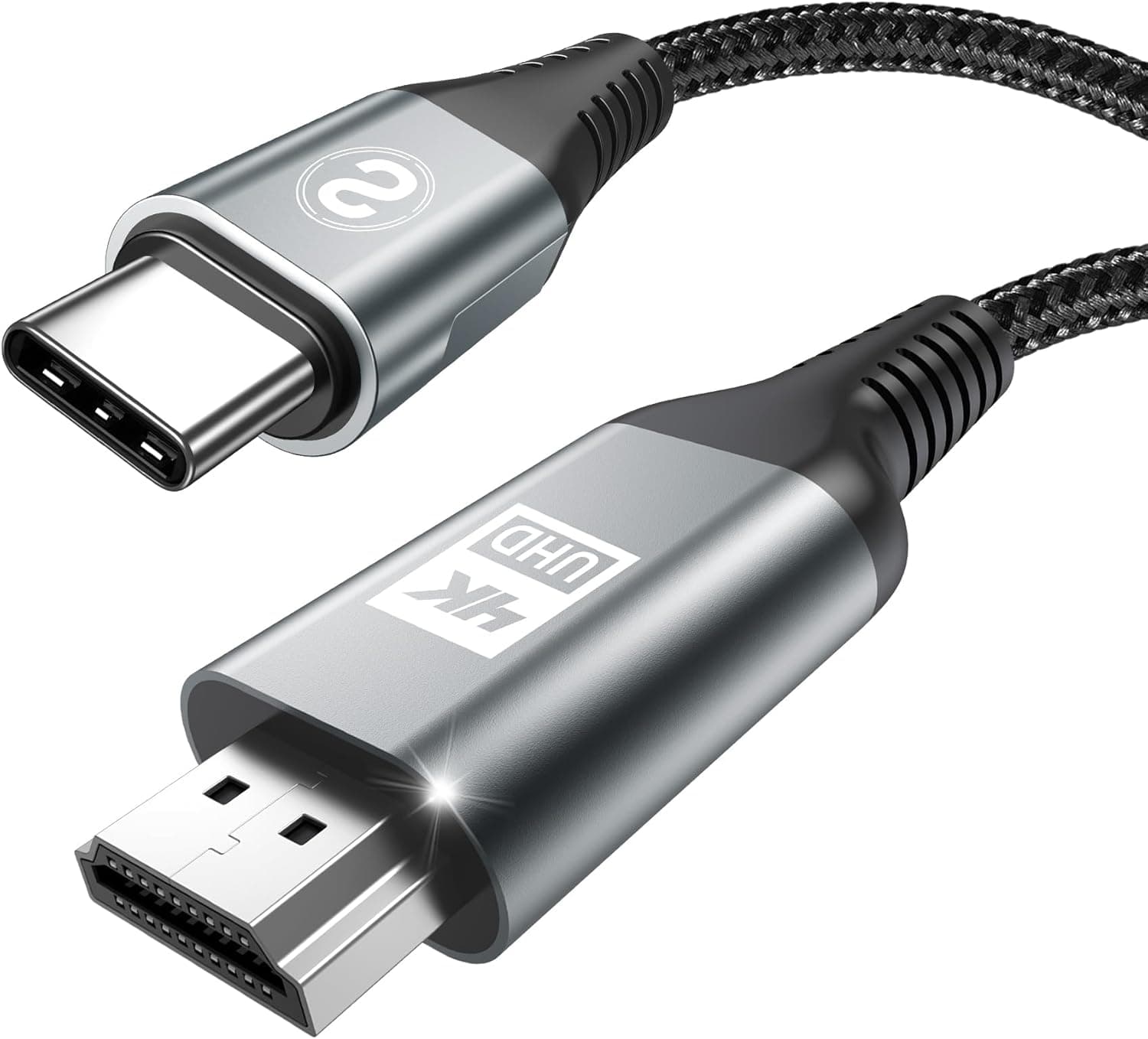
The cable connects USB-C (male) directly to HDMI (male) over a 0.5 m run, carrying up to 3840×2160@60Hz (4K UHD).
Transmission is one-way only, from USB-C out to HDMI in, and the source device's USB-C port must support DisplayPort Alt Mode. No drivers or apps are required — it is plug and play.
As captured on 16 June 2026 the listed price was ¥1,699; a later capture on 26 August 2026 showed ¥1,614. Both are snapshots, so check the product page for the current price.
Amazon reviews stood at 541 ratings and 4.5 out of 5 stars (90% favorable) as captured on 17 June 2026 — solid numbers for an inexpensive adapter cable.
The short verdict: if your device is confirmed DP Alt Mode capable and the display sits right next to it, this cable does the job with nothing wasted. Outside that narrow case, a different product shape usually fits better.
What 4K@60Hz Actually Requires
Resolution and refresh rate are decided by three things together: the source, the cable, and the display. The spec here guarantees only that the cable itself handles 3840×2160@60Hz.
If your phone or laptop caps out at 4K@30Hz, or the TV's HDMI input is not set to its full-bandwidth mode, you will get 30Hz regardless of the cable.
The three symptoms people hit most often are: picture appears but the pointer stutters at 30Hz; nothing appears at all; or the picture flashes on and drops. The first two are almost always configuration or compatibility issues rather than a defective cable.
Change the display's per-input HDMI bandwidth setting (called "HDMI signal format", "enhanced mode", or similar depending on the brand) first, then question the source device's DP Alt Mode support.
Note also that transmission is strictly one-way. You cannot feed a console, camera, or set-top box's HDMI output into a USB-C port with this cable.
That is by design, not a fault.
Compatibility Guide
The requirement is simple: the source USB-C port must support DisplayPort Alt Mode. The manufacturer lists iPhone 17/16/15 Pro Max, MacBook Pro/Air, iPad Pro, and Samsung Galaxy S26/S25/S24/S23 among supported devices.
Thunderbolt 3 and later ports include DP Alt Mode, so a PC port marked Thunderbolt will generally output video.
Explicitly unsupported: most Sony Xperia, Xiaomi, and Sharp Aquos models, plus iPhone 17e/16e and iPhone Air. This is where most purchases go wrong.
A USB-C connector is a shape, not a promise of video output.
| What to check | What to look for | If it fails |
|---|---|---|
| Source USB-C port | DisplayPort Alt Mode / Thunderbolt support | No picture; you need a different method |
| HDMI input on display | 4K@60Hz support and per-input bandwidth mode | Drops to 4K@30Hz |
| Physical distance | Device within 0.5 m of the display | Needs an extension or a longer cable |
| Charging at the same time | Device has only one USB-C port | No PD passthrough is listed; consider a hub |
That last row is the one people forget. On a phone or tablet with a single USB-C port, this cable occupies it for as long as you are mirroring.
For long sessions with charging, a PD passthrough hub or dock is the better tool; nothing about power delivery is stated in this product's specs.
Physically, the connectors are aluminum alloy and the jacket is nylon braid. That combination resists bending damage and looks good, but it is stiffer than a thin silicone cable and does not like tight radius bends in cramped spaces.
As with most braided cables, a thick phone case can stop the USB-C plug from seating fully.
Product Info
Specs in brief: USB-C (male) to HDMI (male), 0.5 m, up to 3840×2160@60Hz, one-way transmission, DP Alt Mode required, aluminum alloy connectors with a nylon braided jacket, plug and play with no drivers.
The box contains the cable and nothing else.
Pricing was ¥1,699 as captured on 16 June 2026 and ¥1,614 as captured on 26 August 2026. One of the price entries is labeled with an overseas store name, but the link and currency both point to the Japanese Amazon listing (ASIN B0H4L7LCMY) for the same product.
Confirm the price you will actually pay on the product page.
Reviews were 541 ratings at 4.5 out of 5 (90% favorable) as captured on 17 June 2026.
A count in the high hundreds holding at 4.5 is genuinely good for this class.
Expect a share of the low ratings to be compatibility complaints — people whose devices never supported DP Alt Mode in the first place. Checking before you buy is what determines satisfaction here.
Comparison: Which Form Factor Fits
| Form | Best for | Weakness |
|---|---|---|
| One-piece cable (this product) | Source and display close together; minimal kit | Fixed length; no power path |
| Adapter + your own HDMI cable | Any length you like; reuses existing cables | More connection points and more items to carry |
| Hub with PD passthrough | Long sessions with charging | Costs more, runs warmer |
| USB display adapter (DisplayLink-type) | Devices without DP Alt Mode | Needs drivers; OS support limits |
This product is row one, wholly committed to the shortest possible signal path. It cannot rescue a device that lacks DP Alt Mode — for that, look at row four.
Best Use Cases
- Presenters connecting a laptop in meeting rooms: With a Thunderbolt or DP Alt Mode USB-C port, it just works, no drivers. The 0.5 m length keeps the desk clean and the bag light. Bring something longer if the room's display is far from the table.
- Sharing phone photos and video on a TV: Mirroring works with no app on supported handsets. Confirm your model first — most Xperia, Xiaomi, and Aquos devices, plus iPhone 17e/16e and iPhone Air, are excluded.
- Dual-display setups with the monitor beside the laptop: If the monitor's HDMI port sits within 0.5 m, this is the tidiest way to add a second 4K screen. Planning a monitor arm? Buy longer from the start.
- Anyone who wants a spare in the bag: Under ¥2,000 at the time of capture, it is cheap insurance against a missing HDMI cable on the road.
Before You Buy
The 0.5 m length is the biggest trap. Marketing calls it compact; in practice it only reaches when the source device sits directly beside the display.
TV HDMI ports are usually recessed on the back or side panel, and 0.5 m will not span from there to a sofa or table.
For TV use, pick a ~2 m cable or an adapter plus a long HDMI cable instead. Getting this wrong means buying a second cable.
A device without DP Alt Mode will never work. Buying on the assumption that a USB-C port implies video output is the single most common failure.
Even outside the explicitly excluded brands, budget laptops and tablets often wire USB-C for charge and data only. Look for "DisplayPort Alt Mode", "video output", or "Thunderbolt" in your device's spec sheet first.
One-way means one-way. Capturing a console or camera's HDMI output onto a PC is not possible with this cable; that needs a capture device.
Charging alongside video needs separate hardware. No power delivery is listed in the specs, so on a single-port device, plan on a hub or dock for long sessions.
Verify the listing against the images and title. Amazon listing metadata — manufacturer, seller, and price labels — is sometimes registered inconsistently; here, one price entry carries an overseas store label while pointing at the yen-denominated Japanese listing.
Check the ASIN, the product photos, and that the length says 0.5 m before ordering.
FAQ
Q. How do I tell whether my device works? A.
Look for "DisplayPort Alt Mode", "Thunderbolt 3/4", or "USB-C video output" in the spec sheet. Without one of those, this cable will not produce a picture.
Most Xperia, Xiaomi, and Aquos models, plus iPhone 17e/16e and iPhone Air, are listed as unsupported.
Q. I only get 30Hz at 4K. Why? A.
Check the display's per-input HDMI bandwidth setting first — many TVs ship with the reduced-bandwidth mode enabled. If that does not fix it, confirm the source device can output 4K@60Hz at all.
Q. Does audio pass through too? A.
HDMI carries audio along with video, so sound normally comes from the display. If it does not, check that the OS output device has not stayed on the internal speakers.
Q. Can I charge while it is connected? A.
The specs say nothing about power delivery, and the cable occupies the USB-C port. Use a PD passthrough hub or dock if you need both.
Q. Can I capture a game console with it?
A. No. It is USB-C to HDMI only, in one direction. Capture requires dedicated hardware.
Q. Can I extend it past 0.5 m? A.
You can add an HDMI extension, but extra connection points can make 4K@60Hz unstable. Buying the right length up front, or using an adapter with a properly rated HDMI cable, is more reliable.
Product Disclosure (Amazon)
- Manufacturer: MAXGROUP
- Seller: META-JP
- Fulfilled by: Amazon
- ASIN: B0H4L7LCMY
- Note: This article covers a manufacturer-made product based on Amazon listing details.