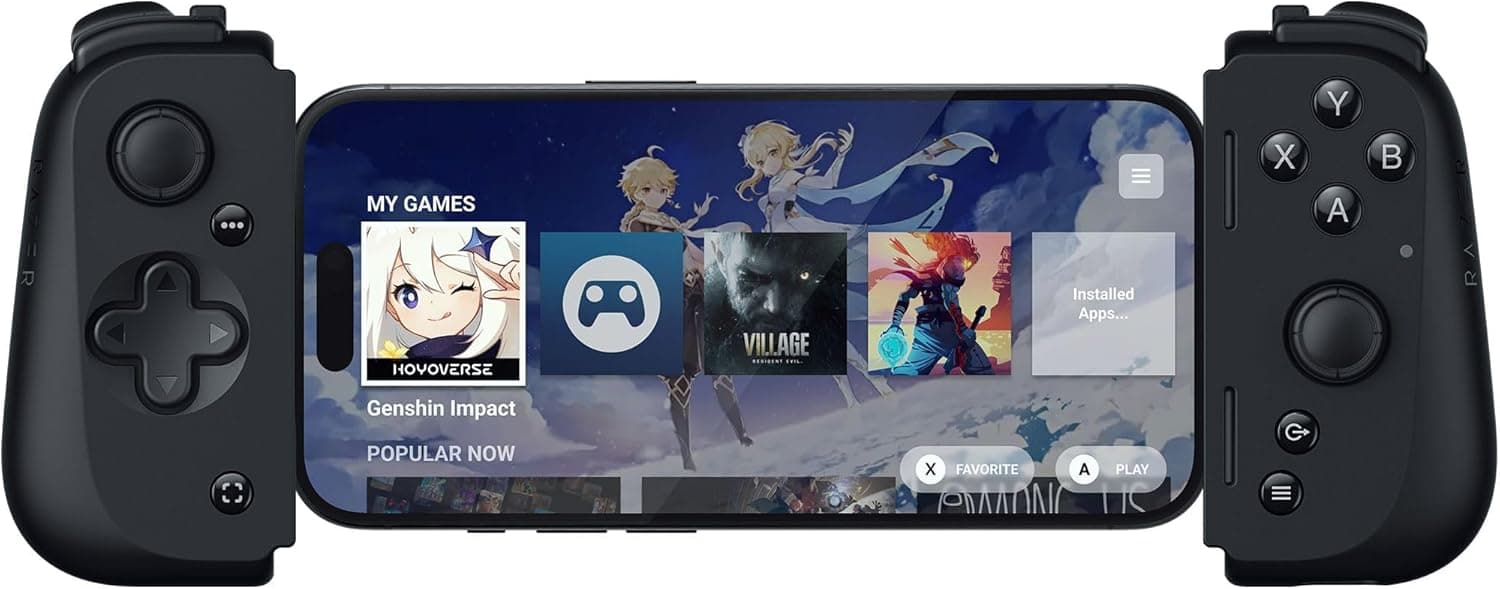
The Razer Kishi V2 for Android USB Type-C Mobile Gaming Controller clamps around an Android phone from both sides so you can carry a console-style control layout with you. This article works from the published specifications and the pricing and review data captured at a specific point in time, to answer two practical questions: which phones it actually fits, and what you have to give up in exchange.
Overview
The short version: this is a tool for people who want to play cloud gaming or remote play sessions on a phone without worrying about input lag. The connection is a wired USB Type-C link with no Bluetooth stack in between, which shortens the input path enough that competitive titles stay responsive.
The flip side is structural — if you want to prop the phone on a desk and sit back, or share one controller across several devices, this shape is the wrong answer.
The face buttons use microswitches, which give a far more defined click than the rubber-dome pads common in this category. It also has a multi-function button, passthrough charging over USB Type-C, and support for the Razer Nexus companion app.
As the name suggests it succeeds the original Kishi, and the microswitch change is the part of that generational update you feel most directly.
About the ratings, plainly: as captured on June 3, 2026, Amazon.co.Check the retailer's page for the latest user reviews.
Forty-nine is a small sample for an average score — a handful of extreme ratings moves it by 0.2 to 0.3 without much effort.
What actually determines satisfaction here is whether your specific phone, with its case on, physically fits.
Compatibility Guide
Start with the hard yes/no list. If anything here is a no, stop and look elsewhere.
| Item | Detail |
|---|---|
| Connection | USB Type-C (wired, direct) |
| Supported OS | Android |
| Supported devices | Android phones with a USB-C port |
| Not supported | iPhone; Android devices without USB-C |
| Power | Passthrough charging (USB Type-C) |
Check the height listed in your phone's spec sheet against Razer's published device list. Assuming any Android phone will fit is the most expensive mistake in this category.
Cases are the single most common problem. As the compatibility notes state, thin cases may stay on, but thick or rugged cases must come off.
Phones with a tall, protruding camera island also tend to sit unevenly or fight the bridge. If your routine becomes remove-case, play, reinstall-case, you will simply stop using the controller — so measure your case thickness before you order.
One more easy thing to miss: the USB-C port position. This design assumes the port sits near the bottom center of the phone.
If yours is noticeably off-center, forcing the phone in puts sideways stress on the connector. If it feels tight, reseat the phone rather than pushing harder.
In use, the main targets are cloud services that recognize a standard USB controller — NVIDIA GeForce NOW, Xbox Game Pass cloud, Amazon Luna — plus remote play apps such as PS Remote Play, Xbox Remote Play and Steam Link, and native Android titles with controller support. Connected to a PC over USB it may be recognized as a generic gamepad, but that depends on the host OS and cable, so confirm against official information before relying on it.
Product Info
rmation
The published specifications, unchanged:
| Spec | Value |
|---|---|
| Weight | 122.6 g |
| Connection type | USB Type-C (wired, direct) |
| Button type | Microswitch |
| Multi-function button | Yes |
| Passthrough charging | Yes (USB-C) |
| Companion app | Razer Nexus |
| Supported OS | Android |
| Release date | July 22, 2022 |
Pricing is time-stamped. The Razer official store listed $79.99 as captured on June 3, 2026, and Amazon.co.jp listed JPY 14,980 as captured on August 27, 2026.
Those two captures are roughly three months apart, so converting one into the other to decide which is cheaper tells you nothing useful. Accessories in this class swing hard during sales — check the live price on the product page before buying.
Four stars is unremarkable for a phone clamp controller, and in this category a large share of low ratings comes from physical fit — it did not fit my phone, I had to remove my case — rather than build quality. A low score is not proof of a bad product, and a high score is no guarantee your phone will fit.
Bundle contents and warranty terms vary by seller and by period. Even when sold through an authorized distributor, the listing page is the authoritative source for the warranty length and support contact, so read it there.
This article does not state a number it cannot verify.
How It Compares
Among clamp-style controllers, the decision usually comes down to three axes: button feel, app polish, and stick technology. The Kishi V2 leans on microswitches, which suit anyone who wants to feel an input register — fighting games, action titles, anything where a mushy press costs you.
Razer Nexus handles remapping and game launching.
Among rivals, the GameSir X2 Pro is an Xbox-styled USB-C model with a clear path into Xbox cloud services. The GameSir X2S uses Hall effect thumbsticks, which are structurally resistant to stick drift — unwanted input with your thumb off the stick — because drift comes from wear on contact-based sensors.
If you plan to use one controller hard for years, that difference matters. The Backbone One is usually praised for the polish of its app experience.
Generation is worth weighing too. The Kishi V2 launched in July 2022, and newer generations now exist.
If you also need a USB-C iPhone to work, or want to mount a larger device, look at those first. If Android-only is fine and you want a mature, lower-priced option, the Kishi V2 still makes sense.
Setup Notes
Getting started is trivial: extend the bridge, seat the phone, plug into USB-C, and inputs work. The first connection usually prompts you to install Razer Nexus, which is worth having if you want to remap buttons or pick up firmware distributed through the app.
The controller functions without it.
The real stumbles are mechanical. Pushing a cased phone in at an angle, or seating the phone before the bridge is fully extended, stresses both the connector and the housing.
When removing the phone, extend the bridge first instead of prying at the grips.
On the software side, check each game's controller settings once. If Android gesture navigation causes stray edge inputs, a game's fullscreen setting or disabling gestures on the device usually fixes it.
Cloud services have their own button mapping screens — look there first if a layout feels inverted.
Who It's For
- Cloud gaming regulars — with network latency already in the chain, not adding more at your hands is exactly where a wired USB-C link pays off on GeForce NOW or Xbox Game Pass.
- Remote play users — PS Remote Play, Xbox Remote Play and Steam Link map naturally onto a console-style layout, so switching from your usual pad takes no relearning.
- Commuters — at 122.6 g with no pairing wait, the time from sitting down to playing is as short as it gets. Plug in and go beats any wireless pad on a train.
- Button-feel enthusiasts — the defined microswitch click is the clearest upgrade over rubber-dome pads if you want to feel inputs confirm.
Before You Buy
Physical fit is the biggest trap. iPhone is not supported at all, as the compatibility notes state.
Even on Android, thick cases and tall camera bumps often mean removing the case every session. Picture that routine honestly before buying — if it sounds like a chore, this entire product shape is wrong for you.
Then there is the cost of being wired. The phone's USB-C port is occupied, so USB-C wired headsets cannot be used at the same time.
Know that trade before it surprises you.
Weight deserves a mention too. At 122.6 g the controller is light on its own, but the phone adds to it: pair it with a 200 g handset and you are holding roughly 320 g, which your wrists notice over long sessions.
The folded dimensions are not published, so whether it fits a particular pocket is something to test in person.
Finally, treat the listing itself with care. Registered product details on shopping pages — manufacturer, model number, compatibility notes — are sometimes wrong or mixed with related items, and prices differ from any captured figure.
Before ordering, confirm from the product image and title that you are buying the Android version of the Kishi V2, and check the current price yourself.
FAQ
Q. Does it work with an iPhone? A.
No. This model is Android-only, and the compatibility data states iPhone is unsupported.
If you need an iPhone version, look at a USB-C generation model designed for it.
Q. Can I leave my phone case on? A.
Thin cases sometimes fit; thick and rugged cases must be removed. If you would have to remove it every session, you will use the controller less — check your case thickness first.
Q. Can I charge while playing? A.
Yes. Passthrough charging over USB Type-C lets you keep a cable plugged into the controller during play.
Charge rate depends on your phone and charger, and demanding titles can still drain faster than it charges.
Q. Can I use wired earphones? A.
Not USB-C ones — the controller occupies that port. With Bluetooth earbuds, expect wireless latency on the audio side.
Q. What can I play on it, and does it work on PC? A.
Controller-enabled Android games, plus cloud services that recognize a USB controller such as GeForce NOW, Xbox Game Pass cloud and Amazon Luna, and remote play apps like PS Remote Play and Steam Link. Touch-only games will not respond.
Over USB a PC may see it as a generic gamepad, but that depends on the host OS and cable, so verify against official information.