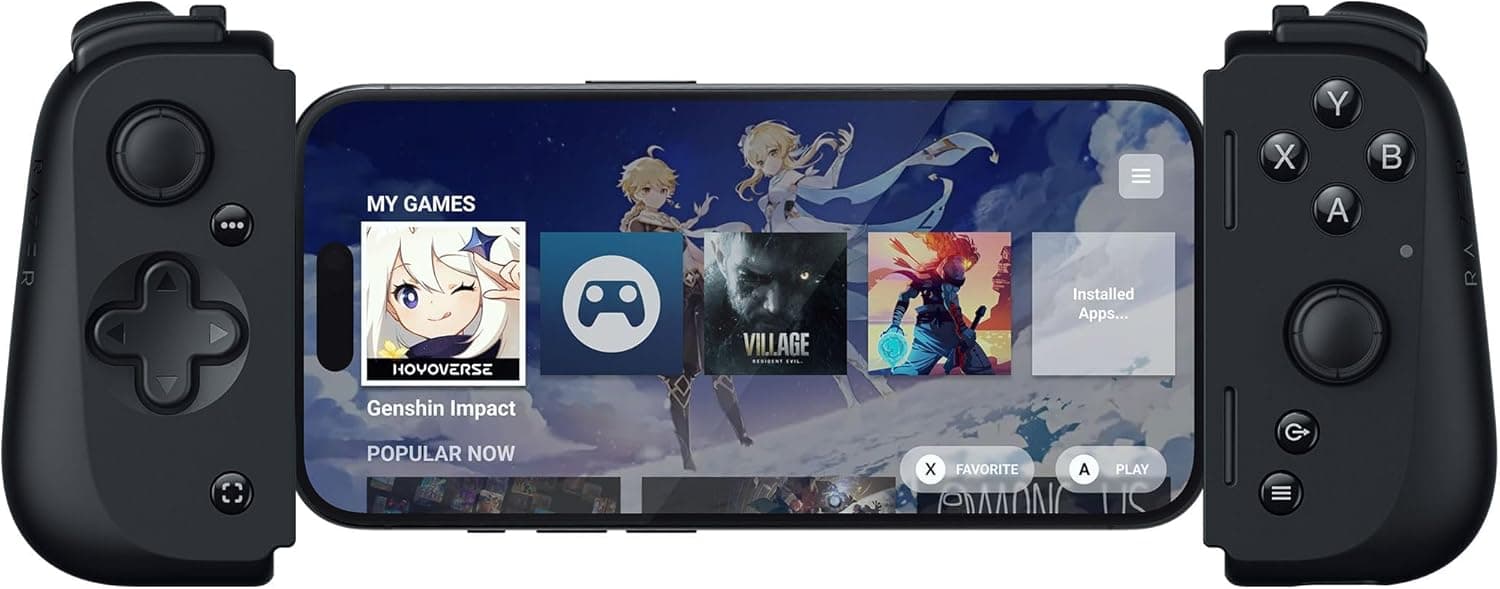
Overview
The Razer Kishi V2 USB-C is a wired clamp-style mobile controller that grips a USB-C phone from both sides to deliver a console-like grip and layout. The short verdict: it is built for people who want cloud gaming and remote play without added latency or mistaps, and it is a poor fit for anyone who also wants to pair a controller with a PC or tablet.
The USB-C-only wired design defines both its strengths and its limits.
Key specs are microswitch buttons, analog triggers, an extendable bridge, and passthrough charging. The unit measures 181×33×92 mm and weighs 126 g — light on its own, but noticeably heavier once a phone is clamped in.
On Amazon.co.jp it holds 4.1 out of 5 stars (82% positive) across 78 reviews as of June 2026: respectable for the category, but a small enough sample that the average can still move.
Compatibility Guide
Official support covers Android 12 or later and iOS 17 or later (iPhone 15 series). The "USB-C" in the product name is the requirement: Lightning-era iPhones (iPhone 14 and earlier) cannot connect at all.
In practice this is a product you consider once you have moved to an iPhone 15 or newer.
The more common failure point is physical fit rather than OS version. The extendable bridge handles a range of widths, but three things decide whether your phone actually works:
| Check | What to look at |
|---|---|
| Case thickness | Rugged and folio cases almost always have to come off |
| USB-C port position | Ports offset far from the bottom center may not line up |
| Cutout depth | A narrow case opening stops the connector seating fully |
Razer's own compatibility note warns about fit with a case attached. Decide before buying whether removing your case every session is acceptable.
Thin TPU cases sometimes work, but that depends on the exact phone-and-case combination and cannot be promised in advance.
The controller carries no internal battery; it draws power from the phone's USB-C port. That means nothing to charge, but slightly higher phone battery drain.
For long sessions, plan on plugging a power bank into the passthrough USB-C port on the controller.
Product Info
Model number RZ06-05110100-R3M1, released January 2024. Connection is wired USB-C only, with microswitch face buttons and analog triggers.
The box contains the controller alone — no carrying case. Since clamp-style controllers leave the sticks exposed, budget for a pouch if you toss gear straight into a bag.
Captured prices are below. All figures are point-in-time values and move with sales and exchange rates.
| Retailer | Price | Captured |
|---|---|---|
| Amazon.co.jp | ¥20,831 | Aug 2026 |
| Amazon (earlier capture) | ¥22,196 | Jun 2026 |
| eBay US | $39.75 | Jul 2026 |
Note the large gap between the Japanese listings and the overseas marketplace. No exchange rate explains $39.75 against the domestic figures, and the data cannot tell us whether the overseas market is simply cheaper or the listing is a different revision, generation, or a used unit.
If you import, confirm the model number (RZ06-05110100-R3M1) and that it is the USB-C version. Buying domestically, treat the table as a rough band and re-check the live price.
With only 78 reviews behind the 4.1-star average, the score is still provisional.
Lower ratings cluster around case interference and worries about strain on the phone's port.
How It Compares
Mobile controllers split into wired clamp models and Bluetooth models. The Kishi V2 USB-C is a flagship example of the former: minimal latency and nothing to charge, at the cost of being tied to your phone's port placement.
GameSir's X2 line occupies the same wired-clamp category, usually at a lower price.
Bluetooth models such as the GameSir X2S have one clear advantage — they also work with PCs and tablets. If your goal is one controller for everything, a wired-only unit is hard to recommend.
If your goal is a dedicated, zero-added-latency cloud gaming rig on your phone, the wired approach earns its keep.
Within Razer's own lineup, the newer Kishi V3 Pro and V3 Pro XL exist. Later generations generally widen device support and improve the stick and trigger mechanisms, so compare the current generation before committing.
The case for the V2 rests largely on how far its street price has fallen.
In Use
Microswitch buttons snap back instantly, which helps in fighting games and anything requiring rapid inputs. The flip side is that they are audibly clicky — not ideal on a quiet train or late at night.
If silence matters most, a membrane-based controller suits you better.
Analog triggers pay off in racing games and shooters, but a clamp-style body is thin, so travel is shallower than on a console pad. The realistic expectation for this whole product class is "vastly better than touch controls, not equal to an Xbox controller."
The Razer Nexus app handles button remapping plus gameplay capture and sharing. App features change across updates, so verify current functionality before buying for a specific feature.
Best Use Cases
- Cloud gaming and remote play as the main use — with Xbox Cloud Gaming, GeForce NOW, or Steam Link, not adding latency at the controller matters a great deal. A wired link fits this job well.
- Serious mobile FPS, action, and fighting game players — touch controls block the screen and make precise aiming hard. This is where physical sticks and triggers help most.
- Commuters and travelers — no battery, no pairing; clamp it on and play. Low friction between pulling it out and starting matters for short sessions.
- Anyone who just moved to an iPhone 15 or newer — the USB-C switch is what puts this controller on the table at all.
Before You Buy
Cases come first. With a case on, the connector may not seat, or may sit loose enough to cut out mid-game.
If removing your case every session sounds tedious, this will grate. Also remember you are then holding a bare phone — mind the drop risk.
There is no Bluetooth. That is a deliberate trade for lower latency, but it rules out PCs, tablets, and consoles.
If your use case might broaden, buy a wireless model instead.
Port strain is a real trade-off. A clamp design loads the phone's USB-C connector directly, so avoid rough handling while attached, and expect frequent insertions over the product's life.
Watch for listing mismatches. As noted, domestic and overseas prices diverge sharply.
Razer also sells the Kishi V2, Kishi V2 Pro, Kishi Ultra, and the V3 family under very similar names, and retail pages sometimes mix photos or reviews across models. Product page metadata is occasionally wrong, so confirm the model number (RZ06-05110100-R3M1) and the USB-C designation from both the images and the title before ordering.
Factor in the small review count. 4.1 stars from 78 reviews is a current trend, not a settled verdict.
Read the negative reviews for specifics — which phone, which case, what failed — rather than trusting the average alone.
FAQ
Q. Does it work with an iPhone 14 or older? A.
No. This is the USB-C model, supporting iPhone 15 series (iOS 17+) onward.
Lightning devices cannot connect physically.
Q. Can I keep my case on? A.
It depends on the phone and case. Thin TPU cases sometimes fit; rugged and folio cases generally must come off.
Razer's compatibility note recommends removing the case for the best fit.
Q. Can I charge the phone while playing? A.
Yes. A passthrough USB-C port on the controller feeds power to the phone during play.
For long cloud gaming sessions, plan on a power bank.
Q. Does the controller need charging? A.
No. It has no internal battery and draws power from the phone's USB-C port, which does increase phone battery drain slightly.
Q. Can I use it with a Switch or PC? A.
It is designed to clamp onto a phone and has no Bluetooth. For multi-device use, choose a wireless model.
Q. Will any Android phone work? A.
Android 12 or later is required, plus a USB-C port near the bottom center and a width that fits the bridge. Phones with unusual port placement may not seat properly.