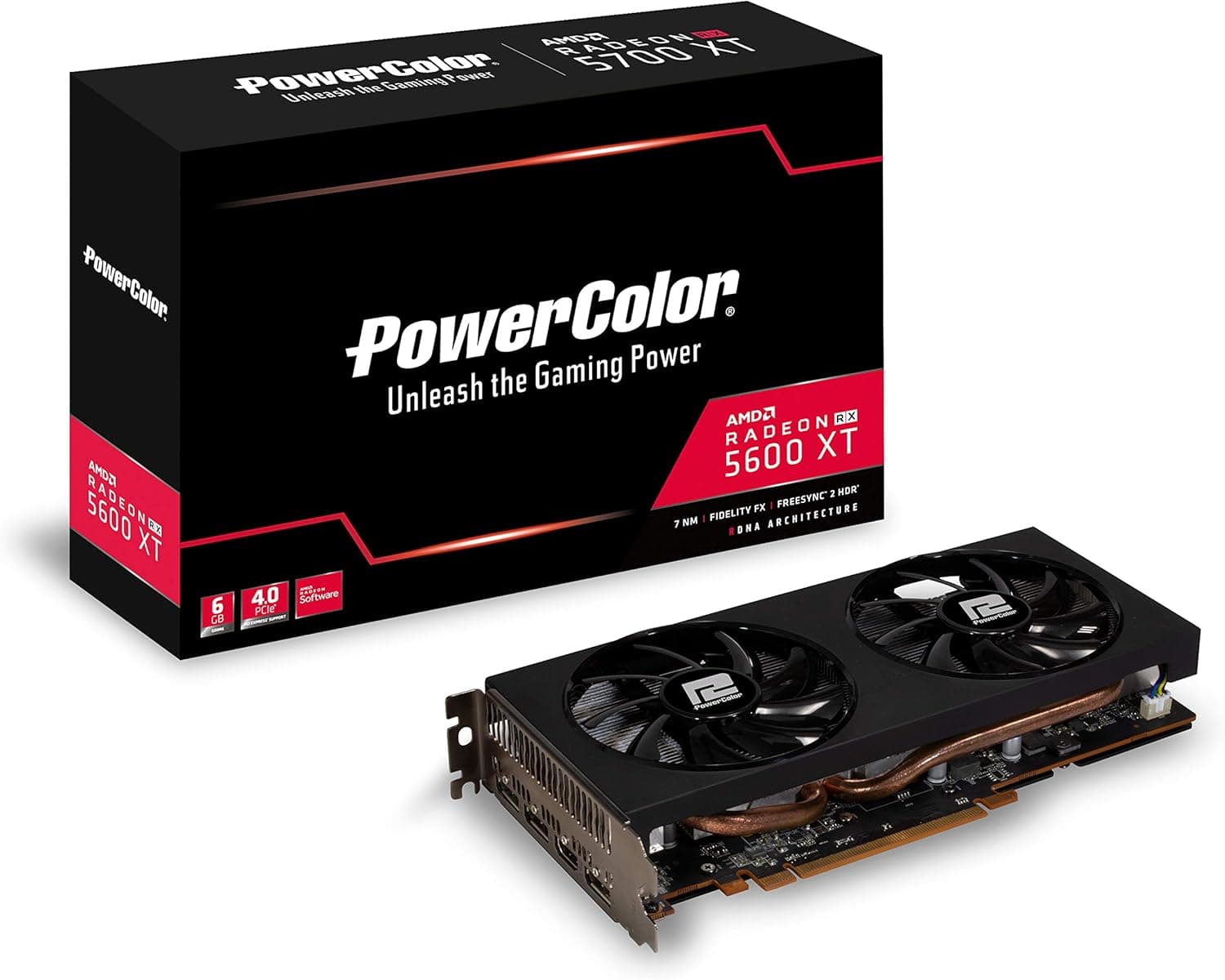
This article goes through the PowerColor Radeon™ RX 5600 XT 6GB GDDR6 (model AXRX 5600 XT 6GBD6-3DH/OC) using what the maker's official page states.
Overview
The official page lists the Graphics Engine as "Radeon™ RX 5600 XT", the Model Name as "AXRX 5600 XT 6GBD6-3DH/OC" and Video Memory as 6GB GDDR6.
Dimensions, slot, power connector, system power and bus standard are in the Compatibility Guide. The stream processor and memory values, the clock and the display outputs are in Product Info.
Compatibility Guide
These are the checks to make before installing, taken from the official values.
- Case space: Board Dimensions reads "230mm98mm40mm". The entry does not say which value is the length, the width or the thickness. Compare it with the dimensions of the GPU space in your case.
- Slot: The Slot entry reads only "2". Check the free expansion slots in your case.
- Power connector: Extension Power Connector reads "One 8-pin PCI Express Power connector". Check that your power supply has a cable for a connector written this way.
- System power: Minimum System Power requirement (W) reads "500W". Compare it with the capacity of your power supply.
- Motherboard side: Bus Standard reads "PCIE 4.0".
Product Info
These are the main official values, with how to read them when you check a listing.
- Stream processor and memory: Stream Processor reads "2304 Units", Memory Speed reads 12.0 Gbps and Memory Interface reads 192-bit.
- Engine clock: Engine Clock(STD/Silent) reads "up to 1560MHz(Game) up to 1620MHz(Boost)". When you compare a listing's clock with it, match whether the figure is a Game value or a Boost value.
- Display outputs: Standard Display Connectors reads "HDMI/ DisplayPort x3".
- Maximum resolution: Maximum Resolution reads "4096x2160" for DisplayPort and "4096x2160" for HDMI.
- Graphics API: DirectX® Support reads "12".
Features
These come from the Features section and the cooling description on the official page, and are not in the spec table.
- Cooling design: The page says the card adds more fins and enlarges the heatsink surface, and uses direct touch heatpipe technology. The heatpipes touch the GPU directly and carry the heat to the fins.
- Backplate: The wraparound backplate is described as a metal plate that prevents the PCB from bending.
- Power stage: Dr.Mos is listed as providing better power efficiency and thermal protection.
- Heatpipes and heatsink: Copper heatpipes in direct contact and a full-coverage aluminum heatsink are listed.
- Fans: The page says the card uses two fans optimized for static pressure.
- Visuals and responsiveness: Radeon FreeSync, Radeon Anti-Lag, Radeon Boost, Radeon Image Sharpening and Integer Display Scaling are listed. Radeon Boost is described as dynamically lowering the resolution of the entire frame when fast motion by mouse input is detected. Radeon Anti-Lag is described as minimizing the time between pressing a key or moving a mouse and the response appearing on screen.
- APIs and HDMI: Vulkan and DirectX support, and an integrated high speed HDMI output, are listed in the Features section.
- OS and drivers: The Features section lists Microsoft Windows support. The Accessories section lists a Manual and a Driver.
Clock Notes
The Remark section of the official page has notes on the kinds of clock.
- Game: The Game Clock is described as the GPU clock expected when running typical gaming applications, set to the typical TGP. The page says actual results in individual games may vary.
- Boost: The Boost Clock is described as the maximum frequency the GPU can reach on a bursty workload. The page says whether it can be reached, the frequency and how long it is sustained vary with several factors, including thermal conditions and variation in applications and workloads.
- Content: The Remark also says the information is for reference only and that PowerColor may modify the content at any time without prior notice.
Best Use Cases
- Buyers who want to match the case and the power supply. If you want to confirm size, slot and power connector against the official values before deciding, the Compatibility Guide items give you something to check against.
- Buyers who want to check display outputs and resolution. The way the connectors are written and the maximum resolution are listed on the official page.
- Buyers who want to check the model name against a listing. The official page has a Model Name entry.
Things to Consider
Here is what to check before buying, following the official page.
First, the model name. The official Model Name is AXRX 5600 XT 6GBD6-3DH/OC.
Make sure the listing's model name matches all the way to its ending.
Second, how the clock is written. The official Engine Clock entry lines up a Game value and a Boost value.
When you compare it with a listing's figures, match the kind.
Third, the display connectors. The official page writes them on one line as "HDMI/ DisplayPort x3".
Finally, the system power. Compare the official Minimum System Power requirement (W) with the capacity of your power supply.
See the maker's official spec table for full details.
FAQ
Q. Which power connector does it need? A.
The wording of the official Extension Power Connector entry is quoted under "Power connector" in the Compatibility Guide. Compare it with the cables on your own power supply.
Q. How many watts does the power supply need? A.
The value of the official Minimum System Power requirement (W) is written under "System power" in the Compatibility Guide.
Q. What is the maximum resolution?
A. The official Maximum Resolution is written under "Maximum resolution" in Product Info.
Q. What is the bus standard?
A. The official Bus Standard is quoted under "Motherboard side" in the Compatibility Guide.
Product Disclosure (Amazon)
- Manufacturer: POWERCOLOR
- Seller and fulfilled by: New Oriental Technology
- ASIN: B083TS27SF
- Note: This article covers a manufacturer-made product based on Amazon listing details.