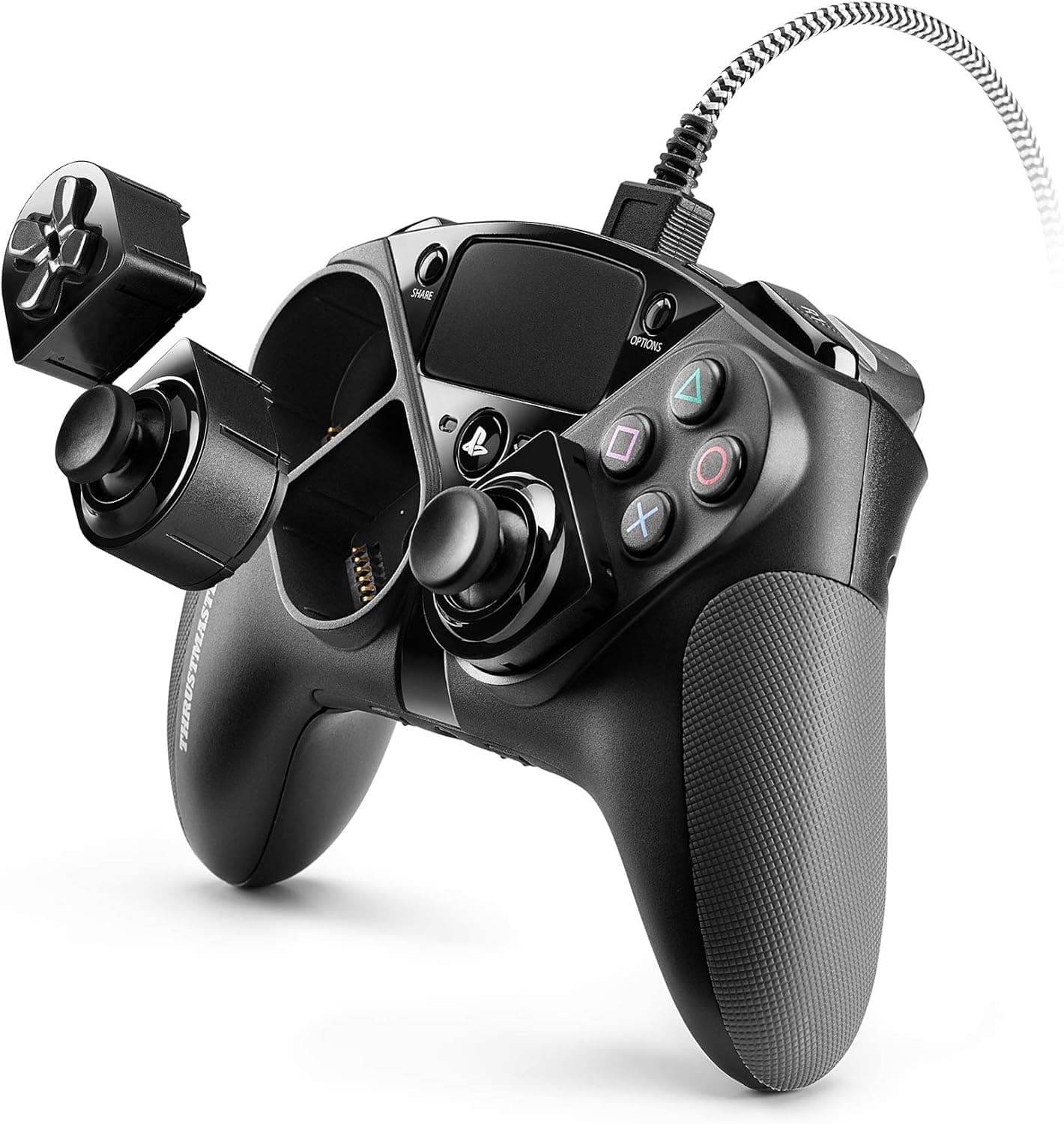
The Thrustmaster eSwap Pro Controller is an officially licensed PlayStation 4 wired gamepad built around a modular design. This article works from the published specs and the Amazon.co.Check the retailer's page for the latest user reviews.
Overview
The core of this product is the T-MOD hot-swap system. The analog sticks and D-pad are modules you can pull and reposition without tools and without restarting the console.
Switching from an Xbox-style offset layout to a symmetrical PlayStation-style layout is a matter of seconds.
The second pillar is extra input. Four remappable rear buttons let you jump, crouch, or reload without lifting a thumb off the sticks.
The controller also stores two onboard profiles you can switch between in real time — one for FPS and one for racing, or aggressive and defensive layouts inside the same game.
Positioning is clear: it targets players who find stock pads limiting but do not need a fully bespoke custom controller. Being wired-only removes latency and battery anxiety.
It also means the buying decision comes down almost entirely to whether you can accept a cable.
How to Read the Rating
The data referenced here shows 162 Amazon.co.
For a pro-grade pad in this price bracket, that is honestly not a strong score, and it would be misleading to present the controller as a universally praised classic.
The breakdown behind that 3.2 is not included in the data available here, so the causes cannot be stated as fact.
Generally speaking, products that depend on modules, companion software, and a wired connection tend to attract ratings that reflect a gap between expectation and daily use. Read a handful of the low-star reviews yourself and judge whether the complaints apply to how you play.
What matters more than the average is fit. If you genuinely use four rear buttons and profile switching, nothing a stock pad offers replaces that.
If you play with the default layout and never touch the software, very little justifies the price gap.
Connectivity & Compatibility
Supported platforms are PlayStation 4 and Windows 10/11. The connection is wired USB only — there is no Bluetooth or dongle option.
On PC it presents as an XInput device, so most Steam titles detect it without extra drivers.
| Check | What to know |
|---|---|
| USB port | Wired-only means one port stays occupied. Plan your cable routing for long sessions |
| USB hubs | Bus-powered hubs can cause unstable detection. Connect directly to the console or PC when possible |
| PS5 use | This is a PS4-licensed product. PS5 behavior depends on platform-side rules, so verify on the product page before buying for PS5 |
| Steam Input | Leaving Steam Input active while also mapping rear buttons in THRUSTMAPPER can double up inputs |
| Extra modules | Color kits and custom modules are sold separately and add to the total cost |
Button mapping, trigger sensitivity, and vibration strength are configured through THRUSTMAPPER. You can play with the controller alone, but roughly half its value lives in the software — worth knowing if you have no PC available.
Product Info
| Item | Detail |
|---|---|
| Platforms | PlayStation 4, Windows 10/11 |
| Connection | Wired USB |
| Modular system | T-MOD hot-swap |
| Rear buttons | 4 (remappable) |
| Trigger sensitivity | Software adjustable |
| Profiles | 2 presets, switchable in real time |
| Software | THRUSTMAPPER |
| Warranty | Japanese authorized-distributor warranty |
Check the retailer's page for the latest price.co.jp (captured 6 June 2026) and ¥19,500 at a later capture (27 August 2026).
Both are prices at the time of capture and will move with sales and stock. Always confirm the current price on the product page.
A swing of only a few hundred yen across roughly three months suggests a stable price band rather than steep discounting.
The unit ships with a Japanese authorized-distributor warranty. Given how many moving parts and contacts a modular pad has, paying a little more for domestic warranty coverage is a defensible choice.
Where It Sits Against Rivals
This segment splits three ways: first-party premium pads, third-party pro pads with rear buttons or modularity like this one, and newer budget-to-mid models built around Hall-effect sticks.
The eSwap Pro's differentiators are specific — swappable stick placement on the fly, plus four rear buttons and two onboard profiles. What it does not offer is wireless freedom, charging docks, or the convenience features wireless pads compete on.
Think of it as a controller that spends its entire budget on input tuning.
If you are weighing it against mobile or wireless options, you are comparing different categories. Any requirement for phone use, Switch support, or a cable-free desk should push you toward a wireless model instead.
Setup and Getting the Most From It
Start by committing to one module layout for the genre you actually play most. Trying every configuration in the first week makes it impossible to tell what suits you.
With rear buttons, resist assigning all four immediately. Map two — jump and crouch, for example — and live with them for a week.
Rear buttons only improve results once pressing them is unconscious; over-assigning causes misfires that cost you more than the buttons gain.
With only two profile slots, pick a single axis for how you use them: per-game or per-role. Adjust trigger sensitivity one variable at a time, since it interacts with in-game deadzone settings.
Best Use Cases
- Competitive FPS and TPS players — Offloading jump, crouch, and reload to the rear paddles keeps your thumb on the right stick, which is where the gap against a stock pad shows most.
- Players who move between PS4 and PC — One controller covers both, and XInput support means most Steam titles work with no configuration.
- Players who want to tune their layout — Stick position, mapping, trigger sensitivity, and vibration are all adjustable. The more the stock layout has annoyed you, the better the return.
- Anyone tired of battery management — Wired-only means no low-battery warning mid-match, which matters for long sessions.
Things to Consider
The wired-only design is the biggest constraint. In a living room where the TV sits far from the sofa, cable routing hurts comfort in a way no setting can fix.
If wireless is non-negotiable, look elsewhere.
If you will not use the modules or the software, the price gap is not recoverable. The value here is concentrated in customization.
Buying it for a default layout leaves you with a large, wired pad and little else.
Check the size. It is somewhat larger than a stock DualShock 4, so smaller hands or a palm-wrapping grip should be tested in person if possible.
Extra modules cost extra. Buying the controller does not unlock every possible configuration; color kits and custom modules are separate purchases.
** Read several low-star reviews and decide whether those complaints apply to your usage before committing.
Watch the listing details too. Amazon listings can carry manufacturer, model, or platform information that disagrees with the physical product, depending on the seller.
Because this pad is marketed for PS4 while also supporting PC, confirm the exact model and bundle from the product images and title before ordering, and expect pricing to vary by seller.
FAQ
Q. Does it work on PS5? A.
It is a PlayStation 4 licensed product. PS5 behavior depends on platform-side rules and may be limited, so check the manufacturer's product page if PS5 is your main target.
Q. Can it be used wirelessly?
A. No. The connection is wired USB only.
Q. Can I customize it without a PC? A.
Physical module swapping works standalone, but mapping, trigger sensitivity, and vibration adjustments require THRUSTMAPPER on a PC.
Q. How many rear buttons can I assign?
A. Four, all remappable, plus two onboard profiles switchable in real time during play.
Q. Will Steam games recognize it? A.
It presents as an XInput device, so most titles work without extra drivers. Keep your mapping in either Steam Input or THRUSTMAPPER — not both — to avoid doubled inputs.
Q. What about warranty? A.
It carries a Japanese authorized-distributor warranty, which is worth having on a product with this many moving parts.
Product Disclosure (Amazon)
- Manufacturer: Thrustmaster
- ASIN: B08614SV79
- Note: This article covers a manufacturer-made product based on Amazon listing details.