Overview
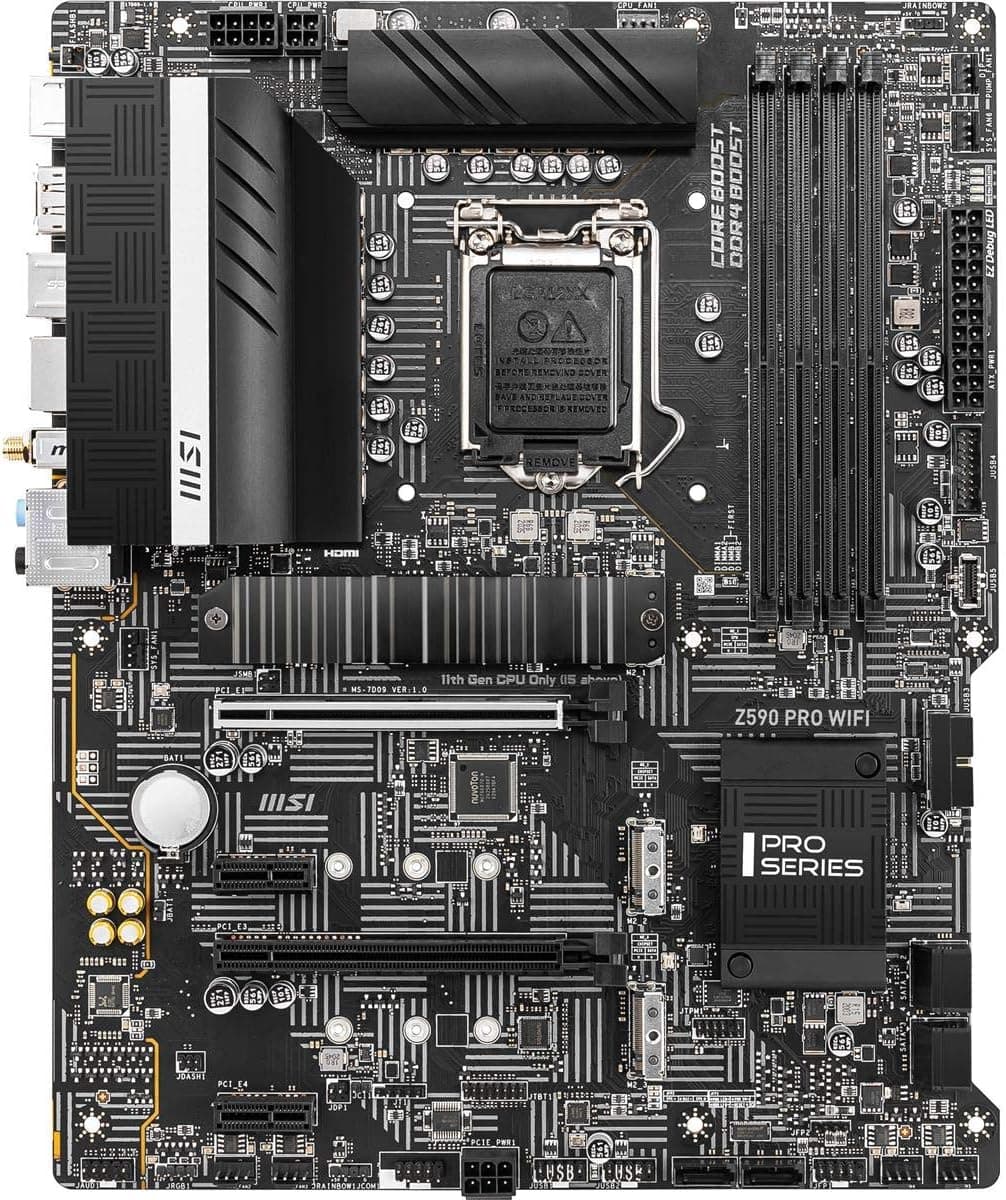
The MSI Z590 PRO WiFi Pro ATX LGA1200 Motherboard is an ATX board built on Intel's Z590 chipset with an LGA1200 socket. It supports 10th-gen (Comet Lake) and 11th-gen (Rocket Lake) Intel Core processors and uses DDR4 memory only.
Intel Wi-Fi 6E (AX210) and 2.5Gbps wired LAN are built in.
The short version: it is a sensible pick if you already own a 10th- or 11th-gen CPU and want to replace or rebuild around the motherboard. If you are building from scratch in 2026, it is not the board to start from.
The listing repeats "Pro" in the product name, but the model name in the spec data is "MSI Z590 PRO WIFI." It belongs to MSI's mainstream PRO series, one step below the gaming-focused MPG line, and sits in the middle of the Z590 lineup.
It works for office machines, mainstream gaming, and light creative work, and it balances expansion and price.
Check the retailer's page for the latest user reviews. For a board from a generation that is no longer current, that is a solid track record.
What Changes Between 10th and 11th Gen
The most common misunderstanding with this board is that the features you get depend on which CPU generation you install. PCIe 4.0 is advertised, but you only get it with an 11th-gen CPU.
| Item | 11th Gen (Rocket Lake) | 10th Gen (Comet Lake) |
|---|---|---|
| CPU-attached PCIe x16 slot | PCIe 4.0 | PCIe 3.0 |
| M.2_1 slot | PCIe 4.0 x4 | Limited to PCIe 3.0 |
| CPU rated memory speed (typical) | DDR4-3200 | DDR4-2933 on Core i7/i9, DDR4-2666 on i5 and below |
| Integrated graphics | Intel UHD 750 (none on F models) | Intel UHD 630 (none on F models) |
Graphics cards rarely lose much performance on PCIe 3.0, so the bigger impact is NVMe SSD speed.
If you plan to use a 10th-gen CPU, a premium PCIe 4.0 SSD will only run at PCIe 3.0 speed.
If you want to spend on storage, either move to an 11th-gen CPU or stick with a PCIe 3.0-class SSD.
Compatibility Guide
CPU: The LGA1200 socket supports 10th- and 11th-gen Intel Core processors. 12th-gen and newer (LGA1700) chips physically will not fit.
Models ending in F (for example, the Core i5-11400F) have no integrated graphics, so you need a graphics card.
Memory: Four DDR4 DIMM slots, up to 128GB. The rated range is DDR4-2133 to 5333 (OC), but 5333 is the upper limit the board is designed for, not a guarantee.
The speed you actually reach depends on the CPU's memory controller and your specific memory kit. DDR5 is not supported.
Storage: Two M.2 slots: one PCIe 4.0 x4 (with an 11th-gen CPU) and one PCIe 3.0 x4.
There are six SATA III ports. On some boards, installing a SATA-mode M.2 drive disables certain SATA ports, so if you plan to connect a lot of SATA devices, check the lane-sharing table in the manual.
Expansion: One PCIe 4.0 x16 slot and one full-length PCIe 3.0 slot that runs at x4.
The second slot looks like x16 but is electrically x4, so it is not suited to a second graphics card. Treat it as a slot for a capture card or an NVMe adapter.
Power: You need a 24-pin ATX main connector and an 8-pin CPU connector. The recommended PSU is 650W, which covers a mid-range CPU and graphics card.
If you pair a high-end CPU with a large graphics card, get a PSU with more headroom.
Case and cooler: Standard ATX (305 x 244 mm) fits ATX-capable mid-towers and larger. LGA1200 uses the same cooler mounting-hole spacing as LGA115x, so LGA1151-era coolers can often be reused.
LGA1700-only coolers will not mount as-is. Before reusing a cooler, check its supported-socket list.
Product Info
rmation
| Item | Details |
|---|---|
| Chipset | Intel Z590 |
| Socket | LGA1200 |
| Form factor | ATX |
| Memory | 4 x DDR4 DIMM, up to 128GB, DDR4-2133 to 5333 (OC) |
| M.2 | 2 (1 x PCIe 4.0 x4, 1 x PCIe 3.0 x4) |
| SATA | 6 x SATA III |
| Wired LAN | 2.5Gbps (Realtek RTL8125B) |
| Wireless | Intel Wi-Fi 6E (AX210) |
| Rear USB | USB 3.2 Gen 2 Type-A x3, Type-C x1, USB 3.2 Gen 1 x2, USB 2.0 x2 |
| Audio | Realtek ALC897 (7.1ch) |
There are eight rear USB ports, four of them 10Gbps USB 3.2 Gen 2.
That is plenty for external SSDs, with room left for a keyboard, mouse, and headset. The AX210 Wi-Fi 6E module supports the 6GHz band, so with a 6E router you can use less congested channels.
The ALC897 is an entry-to-mid-level codec that is fine for everyday use. If sound quality matters to you, plan on adding a USB DAC.
Check the retailer's page for the latest price. On July 15, 2026, there was an eBay listing at $155.00.
Both are prices at the time they were collected and change a lot, so check the product page for current pricing before buying.
Alternatives
Other Z590 boards to compare are the ASUS TUF GAMING Z590-PLUS WIFI and the Gigabyte Z590 AORUS PRO AX. The TUF board focuses on power-delivery headroom and is often recommended for sustained heavy loads, but its wireless is Wi-Fi 6, not 6E.
The AORUS PRO AX has three M.2 slots but costs more.
Details can differ by production batch, so confirm on each product page.
Within MSI's lineup, the MPG Z590 Gaming Force sits above this board. It has stronger power delivery and more features and is worth a look if you plan to run a Core i9 hard for long stretches.
If you want to stay on LGA1200 for less money, Z490 or H410 boards such as the ASRock Z490M Pro4 or ASUS PRIME H410M-A are options. However, Z490 and H410 do not support PCIe 4.0, and H410 does not allow memory overclocking.
This board's strength is combining Wi-Fi 6E, 2.5G LAN, and PCIe 4.0 on one board without flagship pricing.
If a fresh build is on the table, compare it against B660 boards that still use DDR4, such as the ASUS Prime B660-Plus D4. You keep your memory and can run 12th- to 14th-gen CPUs, which gives you a longer useful life than buying an LGA1200 board now.
Recommended Users
- Owners of a 10th- or 11th-gen CPU whose board failed or needs replacing: The biggest advantage is not having to buy a new CPU and memory.
- Anyone who doesn't want a separate Wi-Fi card: Wi-Fi 6E and 2.5G LAN are onboard, so you get fast networking and keep a PCIe slot free.
- Gamers rebuilding around an 11th-gen Core i5 or i7: You can use PCIe 4.0 for both the graphics card and an NVMe SSD.
- People who like tuning memory: Z590 allows memory overclocking, and with 11th-gen CPUs you can raise memory speed even on non-K chips.
Before You Buy
There is no CPU upgrade path. LGA1200 ended with 11th gen and does not support 12th gen or newer.
If you buy now, the fastest CPU this board will ever run is already fixed. Don't expect to boost performance later by swapping only the CPU.
**Check whether the price is inflated. Boards from discontinued generations are in short supply and often get more expensive. If the same budget gets you a new LGA1700 board and CPU, that setup usually lasts longer. Used and overseas listings such as eBay differ in condition, included accessories, and warranty, so read each one carefully.
Warranty coverage depends on where you buy. Units not sold through an official local distributor may not be covered by distributor warranty.
Ask the seller who handles warranty claims before you buy.
DDR4-5333 is not a promised speed. Buying very fast memory does not help if the CPU can't run it stably.
Start at the CPU's rated speed (DDR4-3200 for 11th gen), confirm it is stable, then raise it step by step. That is the least error-prone approach.
Consider a higher-tier board for sustained Core i9 loads. This board has mid-range power delivery and is a natural match for Core i5 and i7.
If you will run an i9 hard for long periods, such as video exports, make sure the case has good airflow or pick a higher-end board.
There are only two M.2 slots. If you want three or more NVMe SSDs, choose a board with more M.2 slots or put an adapter card in the second (x4) PCIe slot.
Check the listing for the right product. Amazon listings can have inconsistent names, such as the repeated "Pro" here.
Use the images and model number to confirm it is the MSI Z590 PRO WIFI before buying.
FAQ
Q. Can I use 12th-gen or newer Intel CPUs? A.
No. The socket is LGA1200, so LGA1700 chips from 12th to 14th gen will not physically fit.
Q. Can I use a PCIe 4.0 SSD with a 10th-gen CPU? A.
It will work, but only at PCIe 3.0 speed.
M.2_1 runs at PCIe 4.0 only with an 11th-gen CPU.
Q. Does it run Windows 11? A.
10th- and 11th-gen Intel Core CPUs are on Windows 11's supported list. TPM 2.0 is provided by Intel PTT, so check that it is enabled in the BIOS.
Q. Can I reuse my LGA1151 CPU cooler? A.
Often yes, since LGA1200 shares the LGA115x mounting-hole spacing. To be safe, check that LGA1200 appears in the cooler's supported-socket list.
Q. If I buy DDR4-5333 memory, will it run at that speed? A.
Not necessarily. 5333 is the overclocking ceiling, and the real speed depends on your CPU and memory.
For value, DDR4-3200 to 3600 is a realistic target.
Product Disclosure (Amazon)
- Manufacturer: MSI
- Seller: Reg shop
- Fulfilled by: Reg shop
- ASIN: B08WBYQQ8C
- Note: This article covers a manufacturer-made product based on Amazon listing details.