This article covers the Logitech G G903h LIGHTSPEED — Flagship wireless gaming mouse with HERO 25K sensor, sold in Japan as the Logicool G G903h. Rather than repeating the spec sheet, it explains who this mouse suits, who it does not, and what to check before buying.
Overview
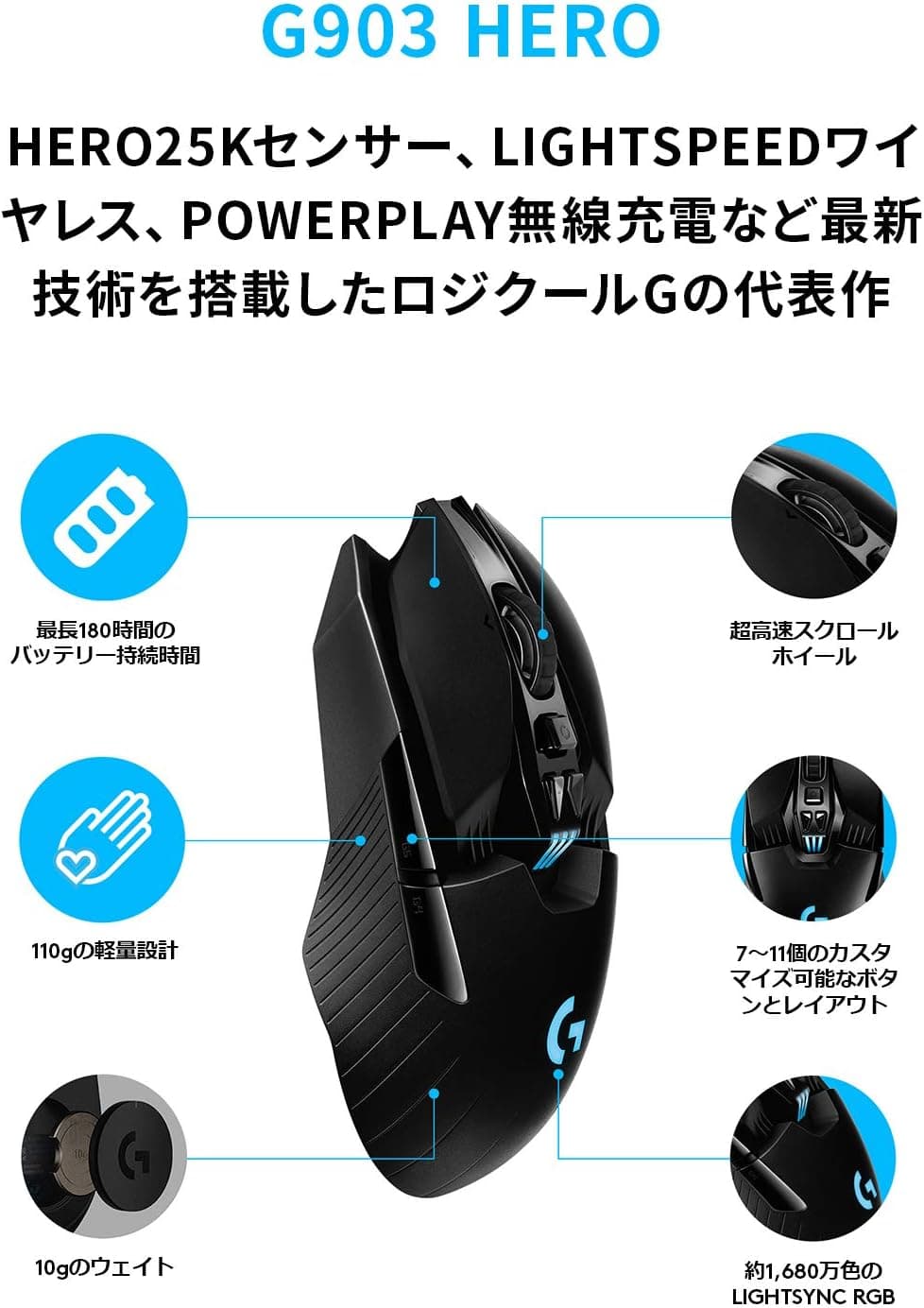
The short answer: the G903h suits buyers who care more about lots of buttons, an ambidextrous shape and hands-off POWERPLAY charging than about low weight. It uses Logitech G's in-house HERO 25K sensor (up to 25,000 DPI), has 11 programmable buttons and is rated for 180 hours of battery life, which puts it near the top of Logitech G's wireless range for features.
At 110g, though, it follows a very different design philosophy from the 50-60g lightweight mice that now dominate the market.
It connects over LIGHTSPEED, Logitech's proprietary 2.4GHz wireless link, which promises latency on par with a wired mouse (a 1ms response).
If you add the separately sold POWERPLAY wireless charging mouse pad, the mouse charges while it sits on the pad, even mid-game, so you never have to think about charging. LIGHTSYNC RGB lighting (around 16.8 million colors) can be synced with other Logitech G gear through G HUB.
On Amazon.co.Check the retailer's page for the latest user reviews.
The rating is steady, but this kind of product often draws complaints about weight and price, so the sections below separate the people it suits from those it does not.
Compatibility Guide
The G903h supports Windows 10 or later and macOS 10.11 or later.
Plug the included nano receiver into a USB port and the mouse is recognized. Button mapping, DPI and lighting are set in the G HUB software.
| Item | G903h spec | What to watch |
|---|---|---|
| Connection | LIGHTSPEED 2.4GHz wireless | The only connection listed in the specs; laptops need the receiver too |
| OS | Windows 10+ / macOS 10.11+ | G HUB support changes with OS updates, so check for the latest version |
| Charging | USB-C / POWERPLAY compatible | The POWERPLAY pad is sold separately |
| Weight | 110g | Feels heavy if you are coming from a lightweight mouse |
The included receiver extension adapter is useful in practice. If your PC sits under the desk, a metal case or the desktop itself can block the signal between the rear-port receiver and the mouse, causing dropouts.
Putting the receiver on the desk near the mouse with the extension helps avoid 2.4GHz interference and cursor skipping.
With POWERPLAY, the pad's base also acts as the receiver. Charging works through a module fitted to the underside of the mouse, so check what comes in the box when you buy the pad.
Only some mice work with POWERPLAY, so if you might use the pad with another mouse later, check the list of supported models.
Product Info
rmation
Key specs: HERO 25K sensor (up to 25,000 DPI), 11 buttons, 180-hour battery life, LIGHTSPEED 2.4GHz wireless, 110g weight, LIGHTSYNC RGB (about 16.8 million colors) and charging via USB-C or POWERPLAY.
The HERO 25K sensor was added after launch through a firmware update.
Check the retailer's page for the latest price.co.jp as of August 27, 2026 (the same as on June 1, 2026).
Prices change with sales and point promotions, so check the product page for the current price. If you also plan to buy a POWERPLAY pad, include its cost in your budget.
In the box: the mouse, a nano receiver, a USB charging/data cable, a receiver extension adapter, an accessory case, side button caps (two per side), side button covers (left and right), a quick-start guide and a warranty card. The Japanese domestic version comes with a 2-year warranty.
Because the shape is symmetrical and the side buttons can go on either side, left-handed users can use it as-is.
What Matters in Daily Use
How to read the 180-hour figure. The rated battery life is often quoted with lighting turned off, and it drops with the RGB on.
To get the most out of each charge, turn the lighting off or dim it in G HUB. Even with lighting on, a few hours of play a day still means infrequent charging, and with POWERPLAY you can stop thinking about it entirely.
The side-button setup changes the feel. You can fit side buttons on both sides, but if you hold the mouse right-handed with buttons on the right side too, your ring or little finger can press them by accident.
Covering the side you do not use steadies your grip and prevents misclicks.
Putting the extra buttons to work. Mapping skills or macros to the 11 buttons means fewer trips back to the keyboard in MMOs and RPGs.
Settings can be saved to the mouse itself, so your basic mappings still work when you move the receiver to another PC.
Comparison with Alternatives
| Product | Key traits | Best for |
|---|---|---|
| G903h | 110g, 11 buttons, ambidextrous, POWERPLAY | Buyers who want many buttons and easy charging |
| Logicool G G304 X SUPERLIGHT | Wireless model built around low weight | Buyers who want a lighter mouse from the same brand |
| Logicool G G604 | 15-button MMO mouse, LIGHTSPEED and Bluetooth | Buyers who want more buttons and Bluetooth |
| Pulsar X2H | 54g ambidextrous, PAW3395 sensor | FPS players who put weight first |
Both are symmetrical wireless mice, but a 50g-class model like the Pulsar X2H feels completely different in fast flicks from the 110g G903h. What the G903h offers in exchange for the extra weight is more buttons, wireless charging and a well-stocked box.
If you want even more buttons, look at the G604. If you want less weight, look at the G304 X SUPERLIGHT.
Who Should Buy
- Gamers who play long sessions: The rated 180-hour battery means you will rarely lose a session to a flat battery, and POWERPLAY removes charging from the picture altogether.
- Players who worry about wireless lag: LIGHTSPEED promises latency on par with wired, with no cable to drag and a tidier desk.
- Power users who like to customize: 11 programmable buttons, DPI switching and RGB lighting are all set in G HUB. Macros for complex inputs make RPGs and MMOs easier to play.
- Left-handed users: The symmetrical shape and swappable side buttons make it a rare option among wireless mice for left-handers.
Before You Buy
Weight is the main concern. At 110g, it is a poor match for low-sensitivity FPS play where you move your whole arm.
If you are happy with a 50-60g mouse now, switching to the G903h is likely to feel like a burden. If you aim better with some heft, or mostly play games other than shooters, the weight is less of a drawback.
Check the charging port on the actual product. The spec data in this article lists charging as USB-C / POWERPLAY compatible.
Connector types can differ between production runs, so if you plan to reuse cables you already have, confirm the port on the product page's accessory or spec section.
POWERPLAY costs extra. Wireless charging only applies if you own a POWERPLAY pad.
Buy the mouse alone and you will charge it with a cable. If hands-off charging is the main draw, factor in the pad's price.
It relies on the 2.4GHz receiver. LIGHTSPEED is the only connection listed in the specs, so it is not suited to connecting to a tablet over Bluetooth without the receiver.
On laptops with few USB ports, the receiver takes up one of them.
Heavy RGB use shortens battery life. With the lighting on all the time, you will get noticeably less than the rated 180 hours, so do not count on that figure.
FAQ
Q. Does it work on a Mac? A.
It supports macOS 10.11 or later.
Detailed settings need G HUB, so check that a G HUB version supports your macOS release.
Q. Can left-handed users use it? A.
Yes. The shape is symmetrical and the side buttons can go on either side, with covers for the side you do not use.
Q. Do I need a POWERPLAY pad?
A. No. The mouse charges over a cable. POWERPLAY is an optional add-on for charging while you play.
Q. How much does it cost?
A. ¥13,582 on Amazon.co.jp as of August 27, 2026. Prices change, so check the product page before you buy.
Q. Is it good for competitive FPS? A.
Latency is not a problem, but opinions on the 110g weight are split. If low weight matters to you, compare it with 50g-class lightweight models.
Product Disclosure (Amazon)
- Manufacturer: Logicool G(ロジクール G)
- Seller: Amazon.co.jp
- Fulfilled by: Amazon.co.jp
- ASIN: B07T36TLS5
- Note: This article covers a manufacturer-made product based on Amazon listing details.