This article takes a closer look at the LG ゲーミングモニター UltraGear 27GP750-B 27インチ (UltraGear 27GP750-B), covering its specs, connection requirements and the pitfalls buyers tend to hit.
Overview
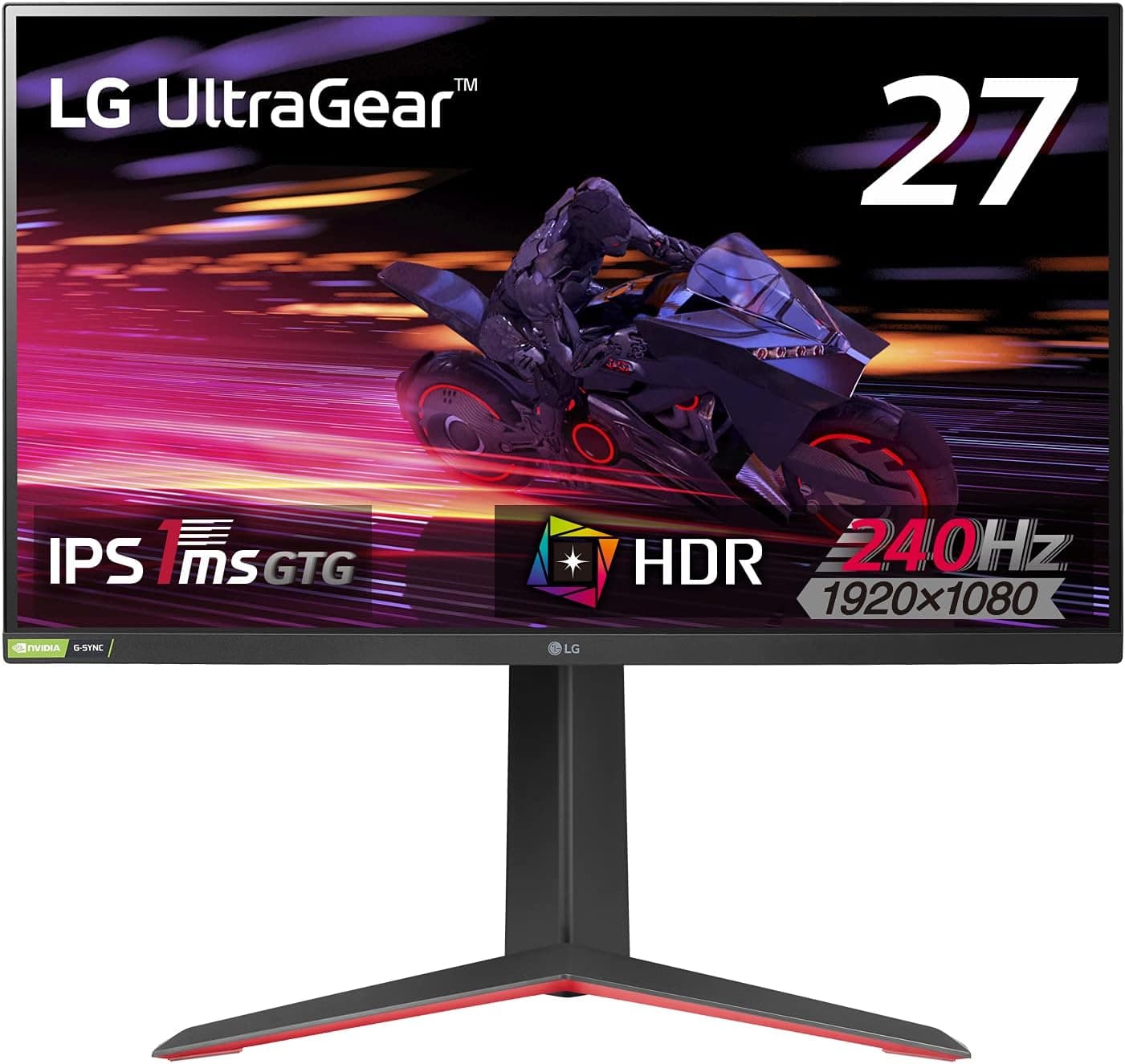
The 27GP750-B is a 27-inch Full HD (1920×1080) gaming monitor with a 240Hz refresh rate and an IPS panel. The short version: it suits people who accept a lower resolution in exchange for smooth motion and fast response at a modest price.
Response time is 1ms (GtG), and adaptive sync covers both AMD FreeSync Premium and NVIDIA G-SYNC Compatible.
This combination helps most in fast-moving games such as FPS and battle royale titles. The IPS panel offers wide viewing angles and a listed sRGB coverage of 99%, so colors look better than on many budget panels, which makes it usable for everyday work and light photo checks too.
The flip side is pixel density. At 27 inches, Full HD looks coarser than WQHD or 4K, and people who sit close to the screen may notice it.
Think of this as a monitor you pick for competitive play, and you will avoid most disappointment.
| Item | Detail |
|---|---|
| Screen size | 27 inches |
| Resolution | 1920×1080 (FHD) |
| Refresh rate | 240Hz |
| Response time | 1ms (GtG) |
| Panel | IPS |
| Color gamut | sRGB 99% |
| Adaptive sync | FreeSync Premium / G-SYNC Compatible |
| HDR | HDR10 |
Compatibility Guide
There are two HDMI inputs and one DisplayPort input. Plan on DisplayPort to run at 240Hz. Over HDMI the refresh rate may be capped, so assume roughly 120Hz as the safe ceiling.
A common mistake is plugging in and never changing the setting, leaving the screen at 60Hz.
On a PC, connect the DisplayPort cable to the graphics card, then set the refresh rate to 240Hz in the OS display settings and the GPU driver. Always check the current value on the settings screen after connecting.
Because both FreeSync Premium and G-SYNC Compatible are supported, Radeon and GeForce cards can both use variable refresh rate. If you switch GPU brands later, you will not need a new monitor.
Note that G-SYNC Compatible is a different method from monitors with a dedicated G-SYNC module.
On PlayStation 5 and Xbox Series X, you can use 1080p/120Hz output. The HDMI ports are HDMI 2.0 generation, so outputs that need HDMI 2.1, such as 4K120Hz, are not supported.
HDR10 is listed, but how HDR looks depends on brightness and contrast, so check the product page if HDR matters to you. A headphone jack is also included for simple desk audio.
Product Info
The model launched in early 2022 and has been on sale for a long time. The Amazon.co.Check the retailer's page for the latest price.
Prices change often and vary with sales, so check the product page for the current price before buying.
Check the retailer's page for the latest user reviews.
LG lists a 3-year manufacturer warranty plus a zero bright-dot guarantee (confirm the exact terms on the sales page). The box includes a power adapter, DisplayPort cable, HDMI cable and a quick setup guide.
The stand adjusts for height, tilt, swivel and pivot, so portrait use is possible, and the slim bezels suit dual-monitor setups.
Best Use Cases
It suits people who often play FPS or battle royale games. A 240Hz refresh rate and 1ms response help you follow fast motion, but your PC must be able to feed the display to benefit.
It also fits first-time buyers of a high-refresh monitor. Full HD puts less load on the GPU than WQHD or 4K, so even a mid-range graphics card can make use of it with sensible settings.
It works as a second monitor too. The thin bezels and IPS panel keep colors consistent, which helps with video editing or photo work on the side.
Strict color management for print is not its strength, since the gamut is sRGB-centered.
Console players who want 1080p/120Hz on PS5 and similar machines get a smoother picture, within the HDMI 2.0 limit.
Before You Buy
1. Check your ports and cable. You need DisplayPort for 240Hz.
If your graphics card only offers HDMI, you may not reach the full refresh rate.
2. Accept the resolution trade-off. Full HD at 27 inches looks coarse for long text work or detailed photo review.
If that is your main use, consider WQHD or higher.
3. Do not expect much from HDR. HDR10 support does not guarantee an impressive picture.
Check brightness figures on the product page if HDR matters.
4. It is overkill if you rarely play fast games. If you mostly watch video or do office work, a cheaper 60-144Hz monitor is enough.
5. Listing errors happen. Product page details can contain mistakes, so confirm the model is the 27GP750-B by checking the title and images.
How to Compare It
If you are torn between similar monitors, decide first whether you value resolution or refresh rate. Choose the 27GP750-B for refresh rate, and WQHD or higher for resolution.
For color or size priorities, curved or OLED models are alternatives, though prices rise accordingly.
FAQ
Q. Can I get 240Hz over HDMI?
A. The specification assumes DisplayPort for 240Hz. HDMI may be limited to a lower refresh rate.
Q. Does it work with both Radeon and GeForce?
A. Yes. FreeSync Premium and G-SYNC Compatible are both supported.
Q. Can I use it with PS5 or Xbox?
A. Yes, at 1080p/120Hz. It uses HDMI 2.0, so 4K120Hz is not supported.
Q. Can I mount it in portrait?
A. The stand supports pivot, so portrait use is possible.
Q. How much does it cost?
A. It changes, so check the product page.
Product Disclosure (Amazon)
- ASIN: B09GVDF31Q
- Note: This article covers a manufacturer-made product based on Amazon listing details.