This article covers iPhone用SDカードリーダー.
Overview
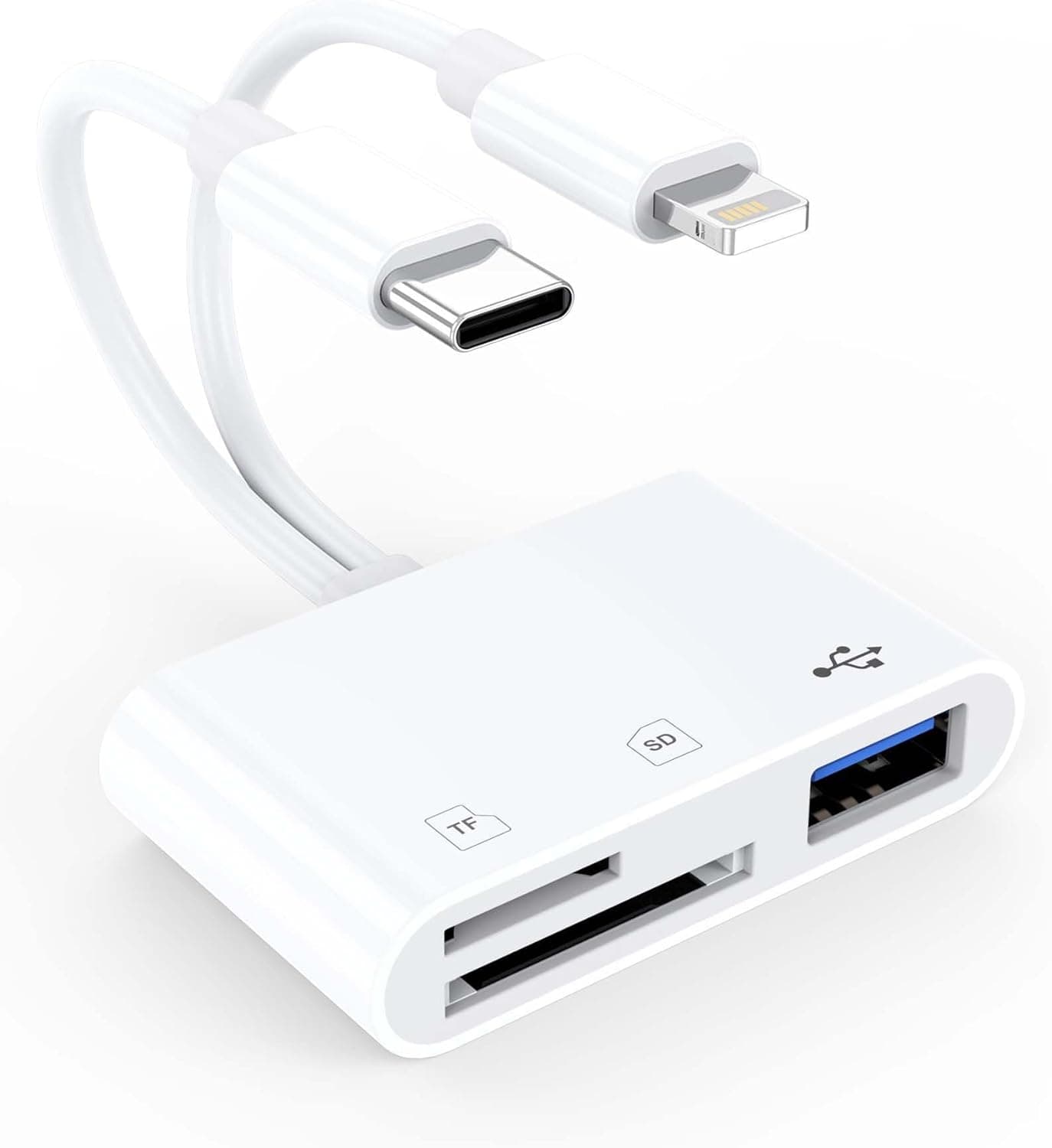
The URELEGAN iPhone SD Card Reader is a compact 3-in-1 memory card reader designed for photographers, travelers, and content creators who need to transfer photos and videos from a camera to their smartphone or computer on the go. It combines an SD card slot, a microSD/TF card slot, and a USB-A 3.0 port into a single device, with both Lightning and USB-C connectors built directly into the body. This dual-connector design means you can use the same reader with older Lightning-based iPhones (iPhone 14/13 and earlier) as well as newer USB-C devices like the iPhone 15/16/17 series, iPad Pro, MacBook, and Android smartphones. No drivers or apps are required — just plug it in and access your files through the native Photos or Files app. It supports bidirectional file transfer, so you can import photos from a memory card to your device, or export documents and videos from your device to a USB drive or SD card.
Connectivity & Compatibility
Card slots: SD (SDHC/SDXC) and microSD/TF (microSDHC/microSDXC) — one at a time USB port: USB-A 3.0 (female) for flash drives, keyboards, mice, and other peripherals Host connectors: Lightning (male) and USB-C (male) — both built-in, no adapter needed Supported OS: iOS, iPadOS, Android, Windows, macOS, Linux * Compatible devices: iPhone 17/16/15/14/13 series, iPad Pro/Air, MacBook, Android phones (Samsung, Google Pixel, etc.), Windows laptops/desktops The USB-A port and memory card slots can be used simultaneously, allowing you to, for example, import photos from an SD card while backing them up to a USB flash drive. Note that SD and microSD cards cannot be read at the same time — insert only one card at a time for stable performance.
Product Info
The URELEGAN iPhone SD Card Reader was released in late 2024 and is available on Japan for around ¥3,605. The package includes only the reader itself — no additional cables or adapters are required. The manufacturer provides 24/7 customer support. In terms of market positioning, this is an entry-to-mid-range product that stands out for its dual-connector design. Few card readers on the market support both Lightning and USB-C natively, making this a versatile choice for users who own devices with different ports. Compared to Apple's official Lightning to USB 3 Camera Adapter, this reader adds an SD/microSD slot and a USB-A port in one compact unit at a more affordable price.
Best Use Cases
Photographers and travelers: If you shoot with a digital camera and want to edit and share photos on your iPhone immediately, this reader is ideal. Just insert the SD card and import directly to the Photos app — no laptop required. It's especially useful for travel photography where carrying a full computer is impractical. Users with mixed iPhone generations: If you use a USB-C iPhone 15/16/17 as your daily driver but also have an older Lightning-based iPhone 14/13 for work or backup, this single reader covers both. No need to buy separate adapters for each connector type. Content creators and videographers: For those who shoot 4K video or high-resolution photos and need to transfer files to an iPhone for on-the-go editing, the USB 3.0 (5Gbps) interface provides fast enough transfer speeds for most workflows. You can then edit directly in apps like LumaFusion or Lightroom. Who should skip this: If you always manage your media on a PC, or never use SD cards, this product isn't for you. Also, if you need to read SD and microSD cards simultaneously, look for a multi-slot reader that supports concurrent access.
Things to Consider
No simultaneous SD/microSD reading: The reader can only access one memory card at a time. If you need to switch between cards, you'll have to physically swap them. Speed limitations with Lightning: While the reader supports USB 3.0 (5Gbps), the Lightning port on older iPhones has bandwidth limitations that may reduce real-world transfer speeds. For professional workflows involving large RAW files, a USB-C-only reader may offer better performance. Case interference: Thick or rugged phone cases may prevent the Lightning or USB-C connector from seating fully. You may need to remove the case before use. Third-party compatibility: This is not an Apple-certified accessory. While it works with current iOS versions, future iOS updates could temporarily break compatibility. If that happens, you may need to wait for a firmware update or contact the manufacturer. ## FAQ
Q: Does this work with the iPhone 17? A: Yes, the USB-C connector is fully compatible with the iPhone 17 series. Simply plug it in and open the Photos or Files app to access your SD card or USB drive. Q: Can I use this with a Windows PC? A: Absolutely. Connect via USB-C and it will be recognized as a standard card reader without any driver installation. Works with Windows, macOS, and Linux. Q: How fast is the transfer speed? A: The reader supports USB 3
Product Disclosure (Amazon)
- Manufacturer: URELEGAN
- Seller: Amazon US
- Fulfilled by: Amazon US
- ASIN: B0GHX4SY5N
- Note: This article covers a manufacturer-made product based on Amazon listing details.