The HUYUN マウスボタンボードマイクロスイッチ交換用 Logitech G900 is a repair part for fixing double-click and chatter problems on a G900 or G903 without buying a new mouse. This article covers what it can and cannot fix, where the job actually gets difficult, and who should skip it.
Overview
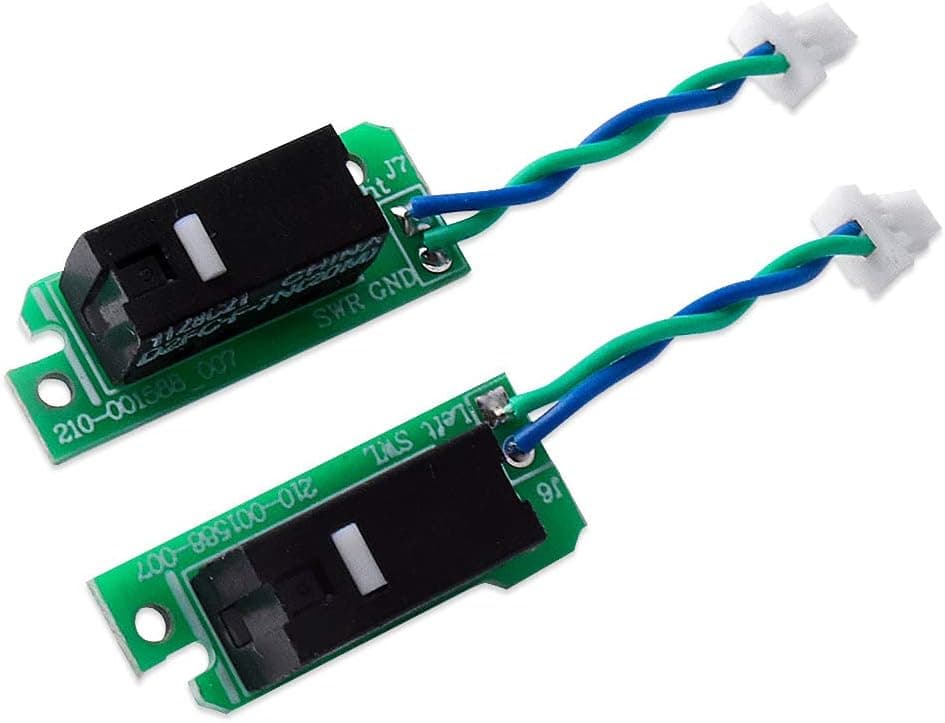
The HUYUN Mouse Button Board Micro Switch Replacement is a dedicated repair part for the Logitech G900 and G903 gaming mice. It ships as one pair of left/right button PCBs with D2FC-F-7N(20M) micro switches already installed — the same switch type used at the factory.
The simplest way to describe it: this is a switch swap with the soldering already done for you. Normally, replacing mouse micro switches means desoldering the old parts and soldering new ones onto the main button board.
Here you replace the whole populated board instead, so no soldering skill is required.
On Amazon.co.Check the retailer's page for the latest user reviews.
Prices change, so check the product page for the current figure. Against the cost of replacing the mouse itself, it is a reasonable way to extend the life of a unit whose only fault is worn switches.
Compatibility Guide
Fitment is limited to the Logitech G900 Chaos Spectrum and G903 Lightspeed (including the original model). It will not fit other Logitech mice such as the G502, G703, or G Pro Wireless.
Button boards differ per model in outline, screw positions, and connector placement, so "it's also a Logitech" is not a reason to expect it to fit.
The board connects to the mouse's internal ribbon cable through a micro-USB-shaped internal connector. This is an internal link only, not an externally accessible port.
Because of that design, the tools you need are a precision screwdriver and tweezers — no soldering iron.
| Item | Detail |
|---|---|
| Compatible mice | Logitech G900 Chaos Spectrum / G903 Lightspeed |
| Switches | D2FC-F-7N(20M), rated 20M clicks |
| Buttons | 2 (left and right) |
| Connector | Micro USB (internal) |
| Package | 1 pair of boards, switches pre-installed |
In practice, the risk lies in the teardown rather than in compatibility. On the G900/G903 the screws hide under the mouse feet, and peeling those feet weakens their adhesive — buying replacement feet at the same time is a smart move.
The ribbon connector uses a thin locking tab; pulling the cable without lifting that lock is the classic way to tear a conductor.
Later G903 units exist with different internals from the original release. If you are unsure which one you own, check the model markings on the underside before ordering.
Product Info
You get one pair of left/right button boards with the switches already mounted. The switches are D2FC-F-7N(20M) units rated for 20 million clicks — the same type fitted at the factory, so the post-repair click feel stays close to stock rather than becoming a different mouse.
Check the retailer's page for the latest price.co.jp as captured on 2026-08-31 and moves with sales, so confirm it on the listing.
The eBay search shows no fixed price; it depends on what sellers have posted.
Seventy-three reviews is a modest sample, so treat it as a signal rather than proof — though for a model-specific repair part it is a respectable count.
HUYUN does not clearly publish its own warranty terms. Assume the retailer's return window is your main protection and test the parts soon after they arrive.
Comparing Your Options
There are broadly three ways to attack the same symptom.
| Option | Skill needed | Main drawback |
|---|---|---|
| This board (whole-PCB swap) | Teardown only, no soldering | Fits only G900 / G903 |
| Loose micro switches | Soldering required | A slip can ruin the board |
| Buy a new mouse | None | Costliest; you lose a shape you know |
Loose switches are cheaper in parts, but they demand an iron, desoldering braid, and a workspace, with the risk of lifting a pad from the board. This product removes that step at the cost of a higher part price and narrow fitment.
It pays off when you like the G900/G903 shape and have no other complaint about the mouse.
Software chatter-filter tools can mask stray clicks, but they only hide the symptom while the switch keeps degrading, and some add input delay. For competitive play, a real repair is the better answer.
The Job, Step by Step
The sequence is: peel the feet, remove the screws, split the shells, disconnect the ribbon cable, swap the board, then reassemble in reverse. With soldering out of the picture, the hard parts are mechanical rather than electrical.
Disconnect the battery first and touch bare metal to discharge static before you start. Screw lengths can differ, so lay them out in removal order.
After reassembly, check that both buttons click with even force and that the shell seams sit flush. If one side feels stiff or unresponsive, the board is probably sitting slightly proud or the shells are misaligned.
Best Use Cases
Long-time G900/G903 owners with double-click or chatter. Replacing the whole button assembly addresses the actual failing component rather than papering over it, and factory service parts for these models are hard to source.
People comfortable opening hardware. No electronics experience is strictly required, but you do need a precision screwdriver, tweezers, and a workspace where small screws will not vanish.
If you have ever re-applied mouse feet, you can handle this.
Users who want the stock click feel back. Because the switches match the originals, the tactile response after the swap stays close to what you are used to — though micro switches vary slightly unit to unit.
Things to Know Before Buying
Skip it if you have never opened a mouse. The G900/G903 packs a lot into a small shell, and ribbon cables tear easily.
"No soldering" does not mean easy; it means the difficulty moved to the teardown. One bad move can kill a mouse worth far more than a ¥3,000-class part.
Diagnose before you order. Double-clicking can also come from firmware, drivers, or the receiver rather than the switches.
Test on another PC and reinstall G HUB first. Sensor faults and scroll-wheel problems will not be fixed by this board.
You replace both sides even if only one is bad. The kit is a left/right pair with no single-side option.
The left button usually wears out first, so doing both at once is arguably a bonus — but it is not the cheap one-side fix some people expect.
Opening the mouse ends any manufacturer warranty. If your unit is still covered, contact Logitech support before reaching for a screwdriver.
Read the listing details carefully. Amazon product pages sometimes carry manufacturer, model-number, or compatibility fields that do not match the physical item.
Before ordering, compare the product images and title against the markings on the bottom of your own mouse to confirm you are buying the right part. That one check prevents most "it arrived and doesn't fit" outcomes.
FAQ
Q. Is soldering really unnecessary? A.
Yes. You swap the populated board and reconnect the internal ribbon cable.
Disassembly is still required.
Q. Will it fit a G502 or G703?
A. No. Fitment is limited to the G900 Chaos Spectrum and G903 Lightspeed; board shapes differ per model.
Q. How long do the switches last? A.
The D2FC-F-7N(20M) is rated for 20 million clicks. Real-world life depends on how you click, so a rating is not a guaranteed lifespan.
Q. Will the click feel be identical? A.
Very close, since the switch type matches the original, but micro switches vary slightly between units.
Q. Can I buy just the left board?
A. The kit is sold as a left/right pair. Plan on refreshing both sides.
Q. What tools do I need? A.
A precision screwdriver, tweezers, and a thin spudger for the feet. Keep spare mouse feet on hand, since the originals lose grip once peeled.
Product Disclosure (Amazon)
- ASIN: B08GLYLT6T