This article looks at the GameSir T4 Pro — Multi-platform wireless gaming controller, focusing on what you should check before buying it.
Overview
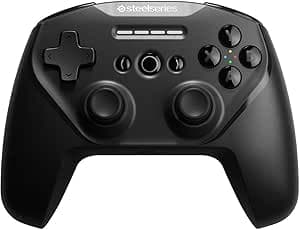
The GameSir T4 Pro is a wireless gamepad that works with Android, iOS, Windows PC, and Nintendo Switch. The short version: if you want one controller for Switch, PC, and phone, and you want gyro, turbo, and back buttons without paying for a first-party Pro Controller, the T4 Pro gives you a lot of features for the price.
It is a weaker fit if you play fighting or rhythm games wirelessly, or if you need every feature of the official hardware.
It connects three ways: Bluetooth 4.0, 2.4GHz wireless, and USB Type-C wired.
A 600mAh rechargeable battery is built in and charges over Type-C. The translucent shell and adjustable RGB backlight give it a distinctive look, and the asymmetric dual vibration motors have five intensity levels.
On top of that you get a 6-axis gyro sensor, a turbo function, and four programmable rear buttons (M1-M4). Budget controllers often drop either gyro or back buttons, so having both is what defines this product's position.
Compatibility Guide
Supported platforms are Android, iOS, Windows PC, and Nintendo Switch. According to the manufacturer, compatibility with Apple Arcade and MFi games improves on iOS 16 and later.
Keep in mind that OS support and game support are different things: a mobile game must support controllers itself, or the pad will connect but do nothing. Check that your games support controllers first.
| Platform | Best connection | What to check |
|---|---|---|
| Nintendo Switch | Bluetooth | Gyro and turbo work well; check which first-party-only features you need |
| Windows PC | Wired / 2.4GHz | Whether a 2.4GHz receiver is included; how your games detect it |
| Android | Bluetooth | Game-side controller support; how you will hold or mount the phone |
| iOS | Bluetooth | iOS 16 or later is the guideline; Apple Arcade / MFi titles |
Wireless range is about 10m, which is plenty for couch play with a Switch or PC on a TV. Bluetooth shares its frequency band with Wi-Fi routers and microwaves, though, so in some homes the stable range will be shorter.
On PC, start with the USB Type-C wired connection if you care about latency and stability. The 2.4GHz mode normally uses a dedicated USB receiver, so confirm on the product page that one is included.
Whether gyro works on PC depends on the connection mode and software such as Steam Input. The most reliable place to use the gyro is on the Switch.
Product Info
Key specs of the GameSir T4 Pro: Bluetooth 4.0 / 2.4GHz / USB Type-C wired connection, 600mAh battery, asymmetric dual-motor vibration with five levels, 6-axis gyro, four rear custom buttons (M1-M4), and turbo support.
The box contains a USB Type-C charging cable and a user manual.
As of August 2026 the price on Amazon.co.jp was ¥4,536.Check the retailer's page for the latest price.
These figures are snapshots, so check the product page for the current price.
Check the retailer's page for the latest user reviews. That is not a standout score.
It suggests most buyers feel they got fair value, but a noticeable share are unhappy. The complaints most likely come from the points listed under Before You Buy.
The manufacturer recommends a 5V2A charger and warns that long-term use of fast chargers may damage the charging port. Avoid charging it overnight on a high-output phone charger.
Warranty follows the manufacturer's policy.
Comparison With Alternatives
The usual alternatives in this price range are 8BitDo's Bluetooth controllers and phone-mounted pads such as GameSir's X series.
- 8BitDo (Pro 3, Lite SE, etc.): a common choice for Switch and PC. People choose between them based on back buttons and button layout. The T4 Pro stands out by combining a 6-axis gyro, turbo, and RGB in one pad
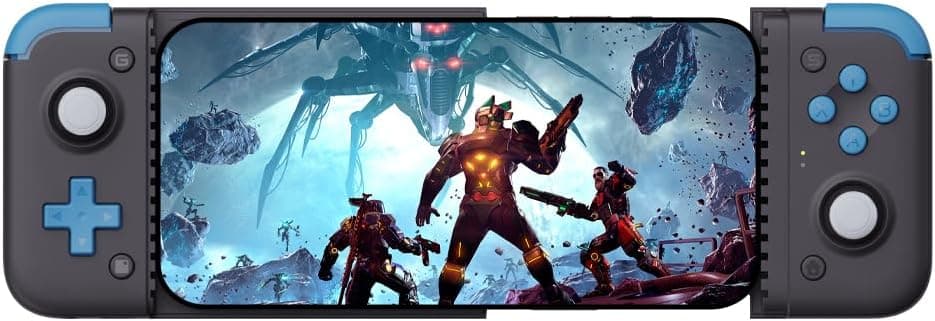
- Phone-mounted pads like the GameSir X2 line: they clamp around the phone so it plays like a handheld, which is better on the go. The T4 Pro is mainly for use at home, and on mobile you will need your own way to hold the phone
- Higher-end PC controllers: some offer higher polling rates and larger batteries. They are a better fit for serious competitive play
The T4 Pro is worth buying because it does everything reasonably well. If you have one specific use in mind, a controller built for that use will usually satisfy you more.
Best Use Cases
Switch players looking for a cheaper Pro Controller alternative. The 6-axis gyro handles gyro-aim games such as Splatoon, and turbo and back buttons are features the official controller does not have.
PC players who want to play Steam games on a TV. You can switch between wired and wireless: wired at the desk, wireless on the couch.
Mobile gamers moving from touch controls to physical buttons. In controller-supported action and shooter games on Android and iOS, physical sticks and buttons give much more precise control.
It also makes sense if you want one pad for several devices, or an inexpensive second controller for kids or guests.
Before You Buy
Treat "no latency" as marketing. The Japanese listing says "no latency," but wireless input is never as fast as wired, and Bluetooth 4.0 is an older version.
For fighting or rhythm games, plan to play wired or look at a higher-end pad.
Not a full replacement for first-party hardware. Third-party Switch controllers often lack features such as amiibo (NFC) reading or waking the console from the controller.
If you need those, check support on the product page. The vibration uses five-level asymmetric dual motors, which is not the same as Nintendo's HD Rumble.
Holding a phone. Only the charging cable and manual are listed as included.
If you want to watch your phone while holding the pad, you may need a separate stand or clip. If you mostly play on the go, a phone-mounted controller is more comfortable.
600mAh is not a large battery. If you keep RGB lighting and strong vibration on all the time, you will charge more often.
For long sessions, turn off the lighting or lower the vibration.
Pairing differs by platform. Switch, PC, iOS, and Android each use a different pairing mode.
If you skip the correct mode in the manual, you can end up with wrong button mappings or a gyro that does not respond.
Check the listing. There are similarly named models, color variants, and bundles.
Use the product images and title to confirm you are buying the right item. Some of the complaints behind the 3.9-star rating likely come from this kind of mismatch.
FAQ
Q. Does gyro work on the Switch? A.
Yes. It has a 6-axis gyro, so it works in games that support gyro controls, including gyro-aim titles like Splatoon.
Q. What is the best way to connect it to a PC? A.
Use USB Type-C wired if you want the lowest latency and the most stable connection. For wireless play, 2.4GHz is available, but check whether a receiver is included.
Q. Does it work with iPhone? A.
iOS is supported, and compatibility with Apple Arcade and MFi games improves on iOS 16 and later. Make sure your game supports controllers.
Q. What can the rear buttons do? A.
You can assign other button functions to M1-M4. This lets you jump or reload without taking your thumb off the stick.
Q. What charger should I use?
A. A 5V2A charger is recommended. Avoid long-term use of fast chargers.
Product Disclosure (Amazon)
- Manufacturer: GameSir
- ASIN: B08HJKDXS8
- Note: This article covers a manufacturer-made product based on Amazon listing details.