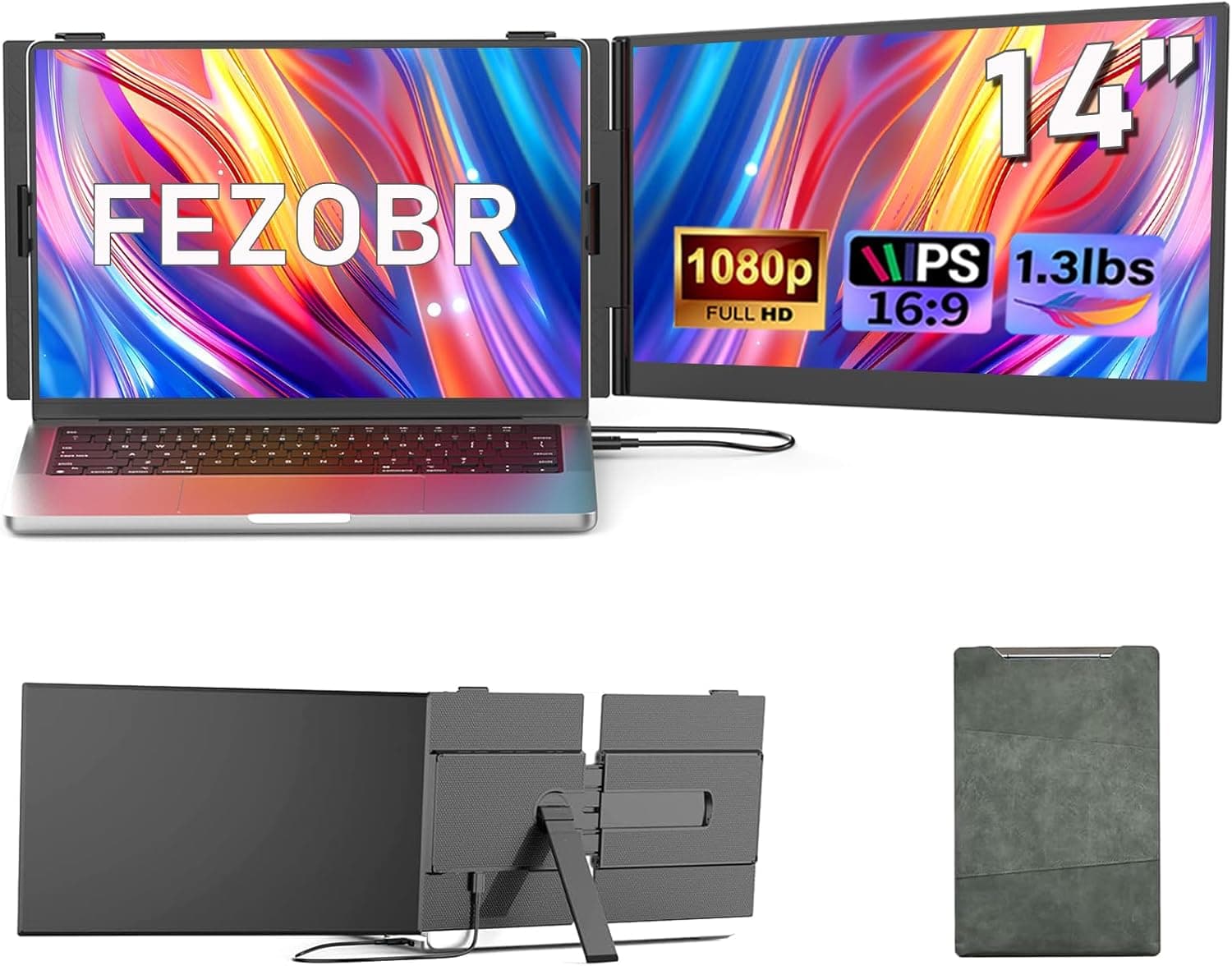
This article covers FEZOBR 14インチノートパソコンスクリーンエクステンダー 超薄型0.15インチ FHD 1080P IPS ポータブルモニター ノートパソコン用 デュアルモニターエクステンダー プラグアンドプレイ Windows.
Overview
The FEZOBR 14-inch Laptop Screen Extender is a clip-on portable monitor designed to attach directly to the side of a laptop, effectively creating a dual-screen setup without taking up extra desk space. The panel measures 0.15 inches (about 3.8mm) thin and weighs only 1.5 pounds (approx. 680g), making it easy to slip into a laptop bag. It uses a 14-inch FHD (1920×1080) IPS display with 300 nits brightness and a 1000:1 contrast ratio. The key selling point is the physical attachment: instead of placing a separate monitor next to your laptop, this screen latches onto the laptop lid using the included clip brackets. It supports plug-and-play via a single USB-C cable (USB-C Alt Mode required for video), and also works with USB-A + HDMI on older laptops. The extender is compatible with Windows, macOS, and ChromeOS, and fits laptops ranging from 13 to 17.3 inches.
Connectivity & Compatibility
For connectivity, the extender relies on a USB-C port that handles both video signal and power delivery when connected to a compatible host. If your laptop lacks USB-C with DisplayPort Alt Mode, you can use the bundled USB-A to HDMI adapter (or a direct HDMI connection) ?but note that separate power via USB-A may be needed in that case. The maximum supported resolution is 1920×1080 at 60Hz, and the IPS panel offers 178-degree viewing angles. Compatibility is broad: the manufacturer lists MacBook, Dell, HP, Lenovo, and other major brands as supported. However, laptops with very thin bezels or unusual hinge designs may not accept the clip attachment. Also, if the host’s USB-C port cannot deliver at least 15W, the extender may drain the laptop battery faster; using the included USB-A power adapter is recommended in that scenario.
Product Info
The FEZOBR screen extender launched in early 2025 and is priced at approximately ¥27,752 on Japan. The warranty typically covers one year of replacement service. In the box you get the monitor, a USB-C cable, a USB-A to HDMI adapter, clip brackets, and a quick-start guide. In terms of market positioning, this product sits between entry-level and mid-range. Compared to standalone portable monitors of similar price and size, its clip-on design eliminates the need for a separate stand and saves desk space?ideal for users who frequently work from coffee shops, co-working spaces, or hotel rooms. The 300-nit brightness is adequate for indoor use but not suitable for direct sunlight.
Best Use Cases
Remote workers and frequent travelers – You can set up a dual-monitor workstation anywhere without carrying a bulky second display. The single-cable connection and light weight (680g) make it convenient for on-the-go productivity. However, the 300-nit panel may be hard to read in brightly lit environments like airplane seats. Students and researchers – For writing papers or analyzing data, having a second screen reduces alt-tab switching and improves focus. Coding, spreadsheet work, and note-taking benefit from the extra real estate. But at 14 inches, it’s not large enough for high-end creative tasks such as video editing or color-critical work where a 15.6-inch or larger monitor would be better. * Users who want a space-saving dual-monitor setup – Because the extender clips onto the laptop lid, it doesn’t occupy any extra desk area?perfect for cramped dorm rooms or airplane tray tables. Just be sure your laptop’s lid thickness and hinge design are compatible; laptops over 17.3 inches won’t fit. Check the clamp width range before buying.