This article takes a close look at the CoolerMaster MasterBox CM695 — Mid-Tower Case with 5.25" Optical Drive Bay, focusing on compatibility and the pitfalls to check before buying.
Overview
The short version: the MasterBox CM695 is a mid-tower case for people who want an optical drive or a stack of hard drives inside one PC. Most modern cases drop the 5.25-inch bay to make room for glass panels and airflow, so there are few new cases that can hold an internal DVD or Blu-ray drive.
The CM695 is one of them. Alongside its single 5.25-inch bay, it has four 3.5-inch and five 2.5-inch mounts.
The case measures 477 x 209 x 488.5 mm (including protrusions) and supports ATX, Micro ATX and ITX motherboards.
It fits graphics cards up to 398 mm long and CPU coolers up to 166 mm tall, so it can still take today's large components while keeping its drive bays. Three ARGB fans come pre-installed, and there are dust filters on the top, front and bottom.
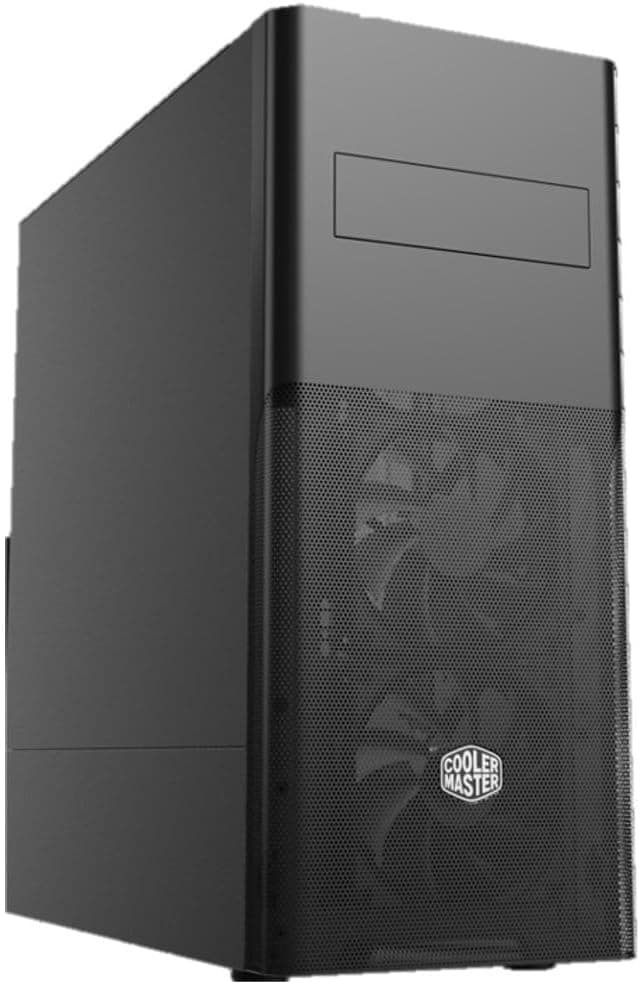
The side panel is solid steel with no window, so this is not a case built to show off the interior. The front I/O has only three USB 3.0 Type-A ports and no USB-C.
If you are building a gaming-only PC with no drives, another case may suit you better. The clearer your plans for internal drives, the more likely you are to be happy with this one.
Key Specs at a Glance
| Item | Value |
|---|---|
| Case type | Mid-tower |
| Motherboard support | ITX / Micro ATX / ATX |
| Dimensions (with protrusions) | 477 x 209 x 488.5 mm |
| Max GPU length | 398 mm |
| Max CPU cooler height | 166 mm |
| Max PSU length | 180 mm |
| Drive bays | 5.25-inch x1 / 3.5-inch x4 / 2.5-inch x5 |
| Front USB | USB 3.0 x3 (no USB-C) |
| Pre-installed fans | ARGB fans x3 |
| Front radiator | 120 / 140 / 240 / 280 mm |
On paper this looks like an ordinary mid-tower, but the total drive capacity is what stands out. Counting the 5.25-inch bay, you can physically mount up to ten drives, well beyond a typical gaming case.
Being able to mount a drive is not the same as being able to connect it, though. The Before You Buy section covers this in detail.
Compatibility Guide
Motherboard
The case supports ATX, Micro ATX and ITX. E-ATX and other larger formats are not on the list, so skip this case if you plan to reuse an oversized workstation board.
ITX boards will fit, but the case stays mid-tower sized, so it is the wrong pick if you want a smaller PC.
Graphics card
The maximum GPU length is 398 mm. Most current high-end cards are in the 300 mm range, so length is rarely a problem.
The data does not say whether you keep the full 398 mm once front fans or a radiator are installed. If you plan to use a 240 or 280 mm front radiator, check the product page for the GPU limit in that setup.
With thick cards, also check the room for bending power cables and the gap to the side panel.
CPU cooler and liquid cooling
CPU coolers can be up to 166 mm tall. Tower air coolers around 150 to 160 mm fit comfortably.
Large dual-tower coolers in the mid-160 mm range may fit on paper but leave almost no clearance, so confirm the cooler's listed height. For liquid cooling, the front takes 120, 140, 240 or 280 mm radiators.
Top radiator support is not in our data, so check the product page if you want a 360 mm radiator.
Power supply
The PSU can be up to 180 mm long. Most ATX units are roughly 140 to 180 mm, but some high-wattage models are longer.
If you are reusing a high-output PSU, measure its depth first. In a drive-heavy build, the number of SATA power connectors also matters when choosing a PSU.
Optical and storage drives
With one 5.25-inch bay, you can install one optical drive.
Current internal DVD and Blu-ray drives usually use SATA, so each needs one SATA port on the motherboard and one SATA power connector from the PSU. If you fill all four 3.5-inch and five 2.5-inch mounts and add an optical drive, you need up to ten SATA connections.
Product Info
rmation
These are the prices at the time they were collected. As of September 13, 2026, Amazon.co.jp listed the case at ¥22,980, and Rakuten (Maison Outre) listed it at ¥24,264 as of September 2026.
That is a gap of about ¥1,300 between stores, and sales or points can change what you actually pay. Prices change often, so check each store page for the current price before buying.
On Amazon.co.Check the retailer's page for the latest user reviews.
That is too few to judge quality from the score alone. Wait for more reviews before drawing conclusions about how easy it is to build in or how quiet it is.
The case is a mid-range mid-tower with three ARGB fans and dust filters as standard, and its main selling point is the 5.25-inch bay it keeps.
The model number is CM695-KN5N-S00, and the full Japanese product name states that this is the steel side panel version. Accessories and warranty terms may be described differently by different sellers, so confirm them on the product page before buying.
Recommended Users
- People who still use optical discs - A good fit if you regularly rip CDs, read or burn DVDs and Blu-rays, or install software that comes on disc. An external drive also works, but an internal one keeps your desk less cluttered.
- People who want lots of HDDs and SSDs - Four 3.5-inch and five 2.5-inch mounts suit photo and video archives, home file storage or recordings. This works well if you want everything in your main PC instead of a separate NAS.
- People who prefer a solid side panel - The windowless steel panel hides your cabling and needs less care than glass. You can also put a fan controller or another 5.25-inch device in the front bay.
- People moving existing parts into a new case - With room for a 398 mm GPU, a 166 mm air cooler and a 180 mm PSU, most large parts you already own should fit.
Before You Buy
Count your SATA ports first
Having many bays does not mean you can connect every drive. Typical ATX and Micro ATX boards have about four to six SATA ports, and on some boards, using an M.2 slot disables some of them.
If you plan to connect five or more SATA devices, including the optical drive, check the motherboard manual to see which ports are shared. If you run short, budget for a SATA expansion card.
Check how many SATA power connectors your PSU has as well.
No front USB-C
The front I/O is three USB 3.0 Type-A ports with no USB-C.
That is inconvenient if you often plug in a phone or external SSD over Type-C. The practical fixes are the rear USB-C port on your motherboard or a USB-C hub on your desk.
How the ARGB fans look and connect
With a windowless side panel, you cannot see the lighting inside the case. How much of the fan lighting shows depends on the front panel design, so check product photos if lighting matters to you.
ARGB fans usually connect to a 5V 3-pin header, and plugging them into a 12V 4-pin RGB header can damage them. Before buying, check whether a controller or hub is included, or whether your motherboard has a 5V ARGB header.
Blu-ray movies need extra software
Even with an internal drive, Windows cannot play commercial Blu-ray movies on its own. If you want to watch video discs, check whether your drive comes with playback software or buy some separately.
This does not matter if you only read or write data discs.
This is a case, not a complete PC
This product is only the case. You need to buy the CPU, motherboard, memory, storage, PSU and optical drive separately.
If you want a ready-to-use computer, choose a prebuilt desktop instead.
Check the store listing
Listings on Rakuten and Amazon sometimes show model numbers, accessories or panel details that do not match the actual product. Use the images and title to confirm that you are buying model CM695-KN5N-S00 with the steel side panel.
Who should skip it
If you rarely use drives and care most about gaming performance and cooling, an airflow-focused case without a 5.25-inch bay will give you more usable interior space.
If you want to show off your build through glass, this windowless model is not for you. If front USB-C is a must, compare other cases before deciding.
FAQ
Q. Does it come with an optical drive? A.
No. The CM695 has a 5.25-inch bay for mounting one, but you need to buy the DVD or Blu-ray drive separately.
Q. Is there a front USB-C port? A.
No. The front has three USB 3.0 Type-A ports.
If you need USB-C, use the rear motherboard port or a hub.
Q. Will a large air cooler fit? A.
Coolers up to 166 mm tall fit. Models around 150 to 160 mm are fine, while mid-160 mm coolers leave almost no room, so check the listed height.
Q. Will a high-end graphics card fit? A.
Cards up to 398 mm long fit, which covers most models. Check the product page for limits when a front radiator is installed.
Q. Can I use every drive bay? A.
You can physically mount up to ten drives, but motherboards often lack enough SATA ports. For a large number of drives, check for a SATA expansion card and enough SATA power connectors on your PSU.
Product Disclosure (Amazon)
- Manufacturer: Cooler Master
- Seller: QD STORE(適格請求書発行事業者)
- ASIN: B0FVDXJ361
- Note: This article covers a manufacturer-made product based on Amazon listing details.