Overview
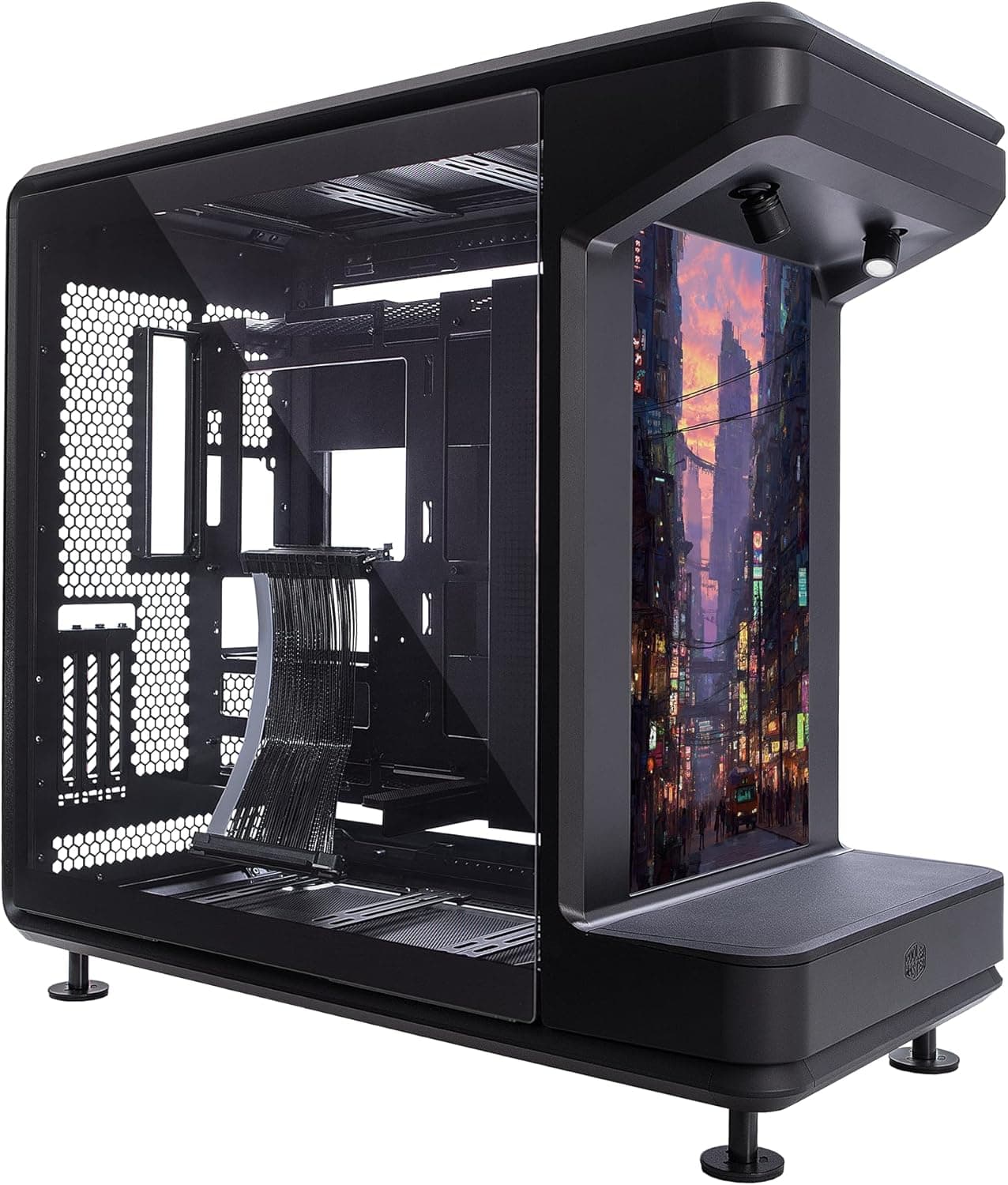
The Cooler Master MasterFrame 360 — ATX case with integrated LCD display is an open-frame full tower built to show off what is inside, with a 360mm LCD panel on the front. The short verdict: it is for people who are willing to pay for a showpiece build and want to use the front screen as part of the display.
It is not for anyone who puts quiet operation, dust control, or a small footprint first.
The frame is inspired by a concert stage, so the motherboard, graphics card, and radiators stay visible from almost every angle. It supports Mini-ITX, Micro-ATX, and ATX boards, plus BTF (back-connect) boards that move connectors to the rear.
GPUs up to 430mm, PSUs up to 210mm, and radiators up to 360mm fit, so most current high-end parts are not a size problem.
The main feature is the front LCD panel. The original listing describes it as a secondary screen that can show system information or play your own images and videos from a microSD card.
A PCIe 5.0 riser cable for vertical GPU mounting is included, so you can stand the card upright facing outward without buying extra parts.
This is a display case first, and it behaves very differently from a typical enclosed mid tower.
Compatibility Guide
The published specs, with what to check before you build:
| Item | Spec | What to check |
|---|---|---|
| Case type | Open-frame full tower | Desk space and safety around it |
| Motherboards | Mini-ITX / Micro-ATX / ATX / BTF | E-ATX is not listed |
| Max GPU length | 430mm | Clearance in vertical mode is separate |
| Max PSU length | 210mm | Leave room to bend modular cables |
| Max radiator | 360mm | 420mm is not listed |
| Max fans | 12x 120mm / 200mm | Fan hub and header count |
| Cable clearance | 110mm | Room for BTF wiring |
| Front I/O | USB 4.0 Type-C | How it connects to the board |
| PCIe riser | PCIe 5.0 (included) | PCIe generation setting in BIOS |
Motherboards: Anything up to ATX is covered, but E-ATX is not in the spec list. If you plan to reuse a wide workstation board, check the mounting holes and width on the product page.
BTF boards place connectors on the rear, but the layout differs by brand (ASUS BTF, MSI Project Zero, and others). Confirm that your board lines up with the case cutouts using the official compatibility list.
GPU and PSU: A 430mm GPU limit leaves room for nearly any large flagship card. With the included riser, a vertically mounted card has different clearances, both to the frame and to the front LCD.
If you plan to mount a thick 3–4 slot card upright, make sure its intake is not blocked. The 210mm PSU limit fits most high-wattage units, but leave extra room for bending the cables.
Cooling: You can fit up to twelve 120mm fans or 200mm fans, and radiators up to 360mm. If you want a 420mm radiator, this case is not for you.
CPU cooler height is not in the provided specs, so check the product page before choosing a tall air cooler. An open frame does not trap heat, but it also does not guide airflow, so you have to plan fan directions yourself.
Front I/O: The front panel has a USB 4.0 Type-C port, but the real speed depends on how it connects to the motherboard.
If it uses a standard front Type-C header (USB 3.2 class), that header's speed is the limit.
If you need full USB4 speed for external SSDs, check the wiring method in the manual.
Product Info
rmation
In the provided data, the Amazon.co.Check the retailer's page for the latest price.
That is clearly high-end for a PC case, enough to buy several typical mid towers. Prices change with sales and stock, so check the product page for the current price.
Check the retailer's page for the latest user reviews. The score is decent, but five reviews is too few to show a clear trend.
For LCD quality and how easy it is to build in, wait for more reviews or look at build logs and videos of the actual case.
The confirmed accessories are the PCIe 5.0 vertical GPU riser cable and the mounting hardware.
The microSD slot is described as a way to load images and videos onto the front LCD, but whether a card is included is not stated. Release timing and warranty length cannot be confirmed from the provided data, so check the product page or the retailer's listing.
Competitor Comparison
Many cases in this price range focus on looks, but this one takes a different approach.
| Priority | MasterFrame 360 Stage LCD | Alternative direction |
|---|---|---|
| Showing components | Open frame, visible from all sides | Pillarless glass cases show from front and side |
| Front display | LCD for images, video, system info | RGB fans are the usual approach |
| Dust and noise | Weak (no panels) | Enclosed or silent cases do better |
| Footprint | Full-tower class, large | Mid towers fit desks more easily |
Plenty of buyers will find that a glass mid tower is enough. Mid towers such as the NZXT H7 Flow RGB v2 or the CORSAIR iCUE 4000D RGB AIRFLOW show off components through glass while keeping dust out.
If back-connect boards interest you, MSI's PZ (Project Zero) cases are worth a look. If silence comes first, a quiet-oriented case such as the be quiet!
Silent Base 802 is a completely different answer.
Recommended Users
Builders who want their PC to be a display piece: The open frame and front LCD turn the build into part of the room. If you care about cable routing and color matching, the extra effort shows directly.
The 110mm cable clearance gives you room to keep the visible side clean.
Streamers and creators: Put logos, stream visuals, or system stats on the front LCD and the PC becomes part of what the camera sees. Content can be swapped through microSD, which suits people who change the look for each project.
If you plan to use the LCD as a secondary monitor, check how it gets its video signal first.
Custom loop and modding fans: 360mm radiator support, up to 12 fans, and an included vertical GPU riser give you what a show loop needs from the start. With a BTF board, you can hide almost all cables from the front.
Who should skip it: People who care about quiet operation or dust, homes with small children or pets, anyone who needs a compact case, and buyers on a budget. For people who just want a working PC, the price is hard to justify.
Before You Buy
Dust and cleaning: With no side or front panels, dust settles directly on components. Compared with a filtered, enclosed case, you will clean more often.
Since this is a display case, visible dust also ruins the look.
Noise: No panels means nothing blocks fan or pump noise, so the same parts will sound louder than in an enclosed case. Room for twelve fans is a plus, but more fans make noise harder to control.
In a quiet bedroom or study, plan for lower fan curves.
Safety: Spinning fans and hot parts are exposed. Keep it away from children, pets, and drinks on the desk.
External dimensions and weight are not in the provided data, so check them on the product page if your space is limited.
How the LCD works: Does the front LCD act as a real monitor, show stats through software, or only play images and videos from microSD? The answer can change what you need, such as whether it uses one of your GPU's video outputs or needs background software.
Check the manual for resolution and supported file formats before buying.
Vertical GPU pitfalls: With riser-based vertical mounting, the PCIe link can sometimes be unstable. Locking the PCIe generation in BIOS usually fixes it.
An upright card also gets air differently, so check temperatures and adjust.
Check the listing: In the Amazon details below, both seller and shipper are listed as Amazon US, and part of the price data is labeled Amazon US while pointing to the Japanese Amazon page. If this is an import listing, local warranty service and defect returns may work differently from a domestic retail unit.
Use the photos and product name to confirm it is the right item, then check the seller and warranty terms on the product page.
FAQ
Q. Can I use a 420mm radiator?
A. The listed maximum radiator size is 360mm. 420mm is not listed, so assume it will not fit.
Q. Does it fit E-ATX motherboards? A.
The listed boards are Mini-ITX, Micro-ATX, ATX, and BTF. E-ATX is not mentioned, so check the product page.
Q. Will any BTF motherboard work? A.
Rear connector layouts differ by brand and standard. Check the compatibility list to confirm your board, such as ASUS BTF or MSI Project Zero, matches the case cutouts.
Q. Does the front USB 4.0 Type-C always run at full speed?
A. It depends on how it connects to the motherboard.
Q. Do I need to buy anything extra for vertical GPU mounting? A.
A PCIe 5.0 riser cable is included, so you generally do not.
Check your card's thickness and the clearance around it first.
Product Disclosure (Amazon)
- Manufacturer: Cooler Master
- Seller: Amazon US
- Fulfilled by: Amazon US
- ASIN: B0GHSMJ9CR
- Note: This article covers a manufacturer-made product based on Amazon listing details.