Overview
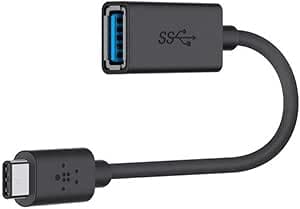
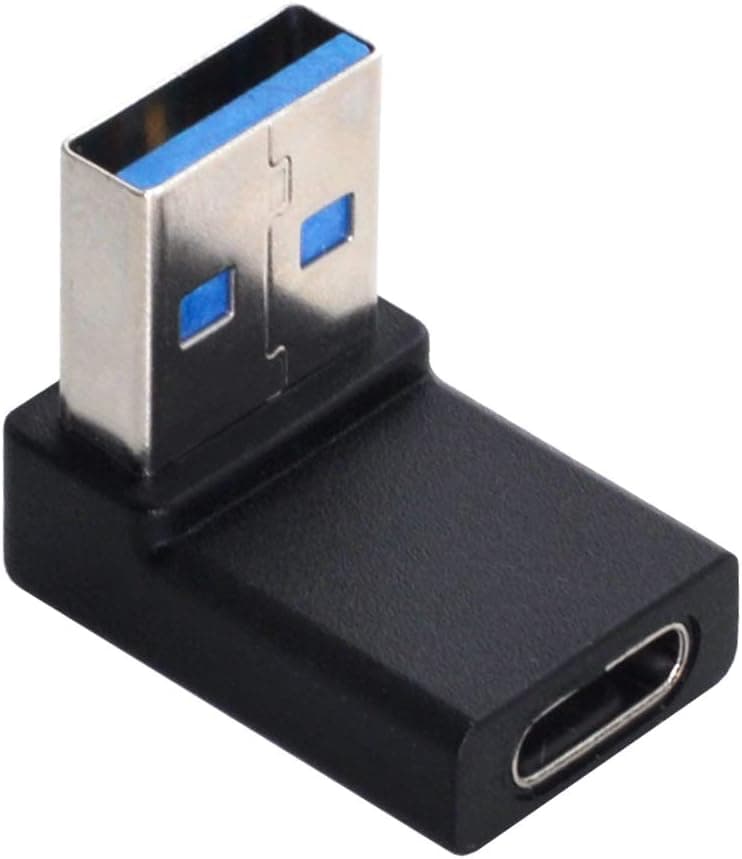
The Chenyang USB C Female to USB Male Adapter — USB Type-C to USB-A converter cable turns a USB Type-C female receptacle into a USB 3.0 USB-A male plug.
The short version: if you want to use your USB-C devices and USB-C cables with a PC or charger that only has USB-A ports, this is a cheap and simple fix. It does not add USB-C features, though.
There is no USB Power Delivery fast charging, no video output, and hitting 5Gbps depends on a few conditions.
Typical uses are moving photos from a USB-C phone or tablet to an older laptop, running a USB-C external SSD or card reader from the rear USB-A ports of a desktop, and charging a phone from a USB-A charger using the USB-C to USB-C cable you already carry. The main benefit is that you do not need to buy a separate USB-A to USB-C cable.
Why This Adapter Direction Is Unusual
Most converters on the market go the other way, USB-C male to USB-A female, so that a USB-C laptop can take a USB flash drive. The female-C to male-A direction used here is not one of the adapter types defined by the USB Type-C specification.
That is because it lets a USB-C to USB-C cable connect devices that should never be connected to each other.
For example, plug this adapter into a PC's USB-A port, then use a C-to-C cable to connect another PC, a USB-C charger, or the output of a power bank. You now have two power sources facing each other.
Protection circuits usually prevent any harm, but safe behavior is not guaranteed. Only connect devices that receive power, such as phones, SSDs, and peripherals.
That is the basic rule for using this kind of adapter safely.
Compatibility Guide
According to the compatibility data, it connects USB-C devices such as smartphones, tablets, and external SSDs to USB-A ports. It does not support USB PD fast charging or Alternate Mode (video output).
| Item | This adapter | Watch out for |
|---|---|---|
| Data transfer | USB 3.0 (up to 5Gbps) | Both the PC port and the USB-C cable must be USB 3.0 or better |
| Backward compatibility | Works on USB 2.0 / 1.1 ports | Speed drops to USB 2.0 (480Mbps max) |
| Charging | 5V from the USB-A side only | No USB PD fast charging |
| Video output | Not supported | Cannot replace a USB-C to HDMI/DP adapter |
| Thunderbolt | Not supported | USB-A ports do not carry those signals |
In short, this adapter only brings plain USB data and 5V power out in a USB-C shape. The USB-A port has no USB-C-specific features to begin with, and an adapter cannot add them.
Three conditions for 5Gbps
First, the PC's USB-A port must be USB 3.0 (or an equivalent such as USB 3.2 Gen 1).
A blue insert or an SS mark is a hint, but color coding varies by maker, so check your PC's spec sheet.
Second, the USB-C to USB-C cable between the adapter and your device must support USB 3.x data.
Many cables bundled with phones are USB 2.0 grade, which caps you at 480Mbps even though the adapter is rated for 5Gbps.
Third, plug orientation. With some adapters of this type, flipping the USB-C cable switches the link between USB 3.0 and USB 2.0.
If your SSD seems slow, flip the cable and try again first.
Even over a 5Gbps link, around 400MB/s is a realistic figure for an external SSD, well below what NVMe drives can do. The limit comes from the USB-A port's standard, not from the adapter.
Charging
You can plug the adapter into a USB-A charger or PC port and charge a phone over a C-to-C cable. Power depends on the USB-A source: roughly 5V/0.9A from a standard USB 3.0 port, or about 5V/1.5A from a charging port (USB BC 1.2).
The 20W-plus fast charging that modern phones support will not work this way. Expect charging to work, just slowly.
Product Info
This is a Chenyang (CHENYANG) product, ASIN B08JGVL4R4. Key listed specs:
| Item | Value |
|---|---|
| Connector type | USB-C female to USB-A male |
| Port count | 2 (1x USB-C female, 1x USB-A male) |
| USB standard | USB 3.0 (up to 5Gbps) |
| Dimensions | 10 x 10 x 1 cm |
| Weight | 20g |
The listed 10 x 10 x 1 cm is large for an adapter itself and may include the packaging. Given the 20g weight, the actual part is small enough to fit in your palm.
The collected data does not list any accessories.
Prices vary a lot by capture date. On Amazon.co.jp it was ¥2,824 as captured on June 21, 2026, and ¥1,199 as captured in late August 2026.
On eBay it was $10.00 as captured in August 2026.
The same ASIN has shown more than a 2x spread, and prices change with sales and sellers, so check the product page for the current price before buying.
As of June 2026, the Amazon rating was 4.5 out of 5 stars from 42 ratings.
That is a good score, but a small sample, so it says little about unit-to-unit variation or compatibility quirks.
Best Use Cases
Good fit for:
- Owners of older USB-A-only laptops or desktops who want to pull photos and videos from a USB-C phone or tablet
- People who want to use a USB-C external SSD or card reader on a desktop's rear USB-A ports
- Travelers who find only USB-A chargers at hotels and want to charge with a single C-to-C cable
- Anyone standardizing on USB-C to USB-C cables to carry fewer cable types
Not a fit if you expect 20W-plus fast charging, want video output to a monitor, or need your external SSD's full speed. For video, get a USB-C to HDMI adapter.
If your PC has USB-C ports and you want to plug in USB-A devices, you need the opposite type: USB-C male to USB-A female.
Before You Buy
Buying the wrong direction is the most common mistake with this kind of product. Here the USB-C receptacle is the female side, and the side that goes into the PC is a USB-A male plug.
If you want to put a flash drive into a USB-C laptop, this adapter will not work.
Be careful what you connect. As explained above, this adapter direction is not defined in the spec.
While it is plugged into a PC's USB-A port, do not use a C-to-C cable to connect a USB-C charger, a power bank's output, or another computer. Only connect devices that receive power.
5Gbps is a ceiling, not a promise. If the cable, the port, or the plug orientation is USB 2.0 grade, speed drops to about one tenth.
When it feels slow, the cause is usually somewhere other than the adapter.
No fast charging. Without USB PD, phones and tablets charge at normal speed.
Do not count on it to charge a USB-C laptop, because there is not enough power.
Mind the leverage. With a USB-C cable attached, the adapter sticks far out of the port and is easy to bend.
Unplug it before moving a laptop.
Check the listing. In the collected data, the seller was shown as Amazon US even though the page is on Amazon.co.jp.
Prices also vary widely. Before you buy, use the images and title to confirm it is a USB-C female to USB-A male product, and check the seller and price at that moment.
FAQ
Q. Can I connect a USB-C phone to a USB-A-only PC? A.
Yes, with a USB-C to USB-C cable. Data transfer and charging work normally, but fast charging does not.
Q. Will it work with a USB-C monitor or dock?
A. No. It does not support Alternate Mode, and a USB-A port cannot output video.
Q. Will my external SSD be slower? A.
The cap is USB 3.0 at 5Gbps, roughly 400MB/s in practice.
SSDs rated for 10Gbps or more will not reach their full speed.
Q. Can I use it to power a USB-A device from a USB-C charger? A.
Not recommended. The USB-A plug is meant to go into a port that supplies power, such as a PC or charger.
Pushing power into the USB-A end is not an intended use.
Q. Do game controllers work? A.
Controllers that connect over a wired USB-C cable are usually recognized as standard USB devices. Whether they actually work depends on the controller and the game.
Product Disclosure (Amazon)
- Manufacturer: CHENYANG
- Seller: Amazon US
- Fulfilled by: Amazon US
- ASIN: B08JGVL4R4
- Note: This article covers a manufacturer-made product based on Amazon listing details.