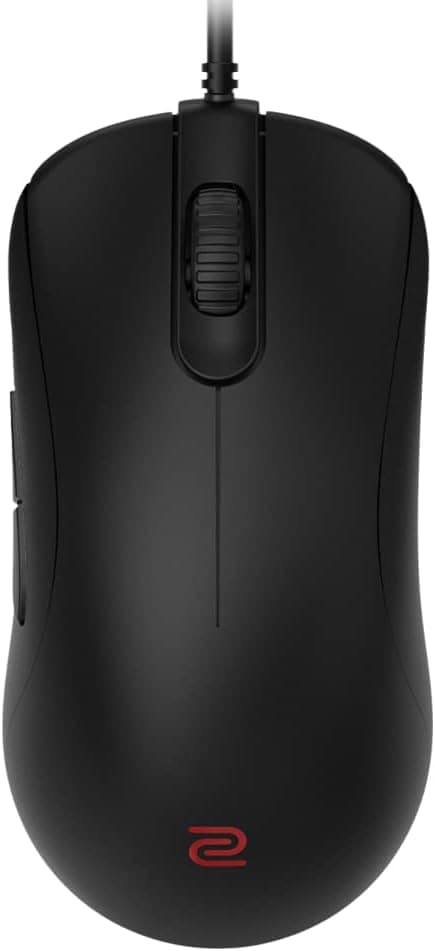
This article covers the BenQ ZOWIE ZA11-C ゲーミングマウス(左右対称デザイン), looking at its specs, captured street prices, review data, and — just as importantly — who should not buy it.
Overview
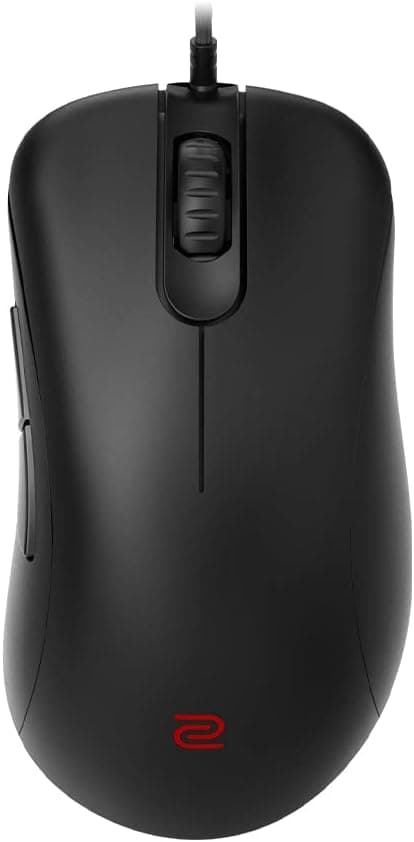
The BenQ ZOWIE ZA11-C is the current revision of a symmetrical gaming mouse line that has been a fixture in competitive play for years. Its slightly raised rear section supports both claw and palm grips, and it uses the well-proven PixArt PMW3360 optical sensor with a flexible paracord cable to cut drag on the mousepad.
The short verdict: this is a mouse for FPS players who want a wired device that behaves identically every time they plug it in, with no software involved. It has 5 buttons, works on Windows, macOS, and Linux, and needs no driver — any USB 2.0 or 3.0 port will do.
The flip side is that wireless, RGB, macros, and granular profile management were never part of the design brief.
On the Japanese Amazon store, it held a 4.2/5 average (84%) across 34 reviews as of 3 June 2026.
That is a solid score, but 34 is a small sample — more on that below.
Compatibility Guide
Requirements are about as simple as they get: one free USB-A port. The supplied compatibility note states plainly that it works with any USB-A port and needs no driver, and the supported OS list covers Windows, macOS, and Linux.
There is no "install the utility or you can't change DPI" trap, and no background process eating memory.
What actually trips people up is physical, not software:
- USB-A availability: many thin laptops and mini PCs now ship USB-C only. You would need a separate adapter, which is not included.
- Hub connections: weak bus-powered hubs or monitor-integrated hubs can cause unstable polling or dropped detection. For competitive use, plug directly into the motherboard.
- Hand size: the ZA line ships the same shape in several sizes, and ZA11-C sits toward the larger end. If your hands are on the smaller side, a lower number in the family may fit better. Compare the listed dimensions against your current mouse before ordering.
| Check | Requirement | Common pitfall |
|---|---|---|
| Connector | USB-A | USB-C-only PCs need an adapter |
| Driver | None (plug and play) | No software-side customization |
| OS | Windows / macOS / Linux | No extra OS setup needed |
| Buttons | 5 | Too few for macro-heavy use |
In short, almost nothing can go wrong on compatibility. The real question is whether the shape suits your hand.
Product Info
The listed specifications are the PixArt PMW3360 sensor, 5 buttons, and Windows / macOS / Linux support. The PMW3360 has been a competitive-mouse staple since around 2016.
It does not chase headline DPI figures, but in the range most FPS players actually use — roughly 400 to 1600 DPI — its tracking accuracy and low smoothing hold up fine. A newer sensor generation does not automatically mean better aim.
Captured prices, all valid only at the time of capture and subject to sales and currency swings:
- Amazon (Japan): ¥10,600 (captured 27 August 2026)
- Same ASIN, earlier capture: ¥11,600 (captured 3 June 2026)
That is roughly a ¥1,000 swing on the same listing in two to three months, so watching the page for a few weeks can save close to 10%. A marketplace listing at $135.00 (captured 15 July 2026) also appears in the data, but that is about double the domestic street price and almost certainly a reseller or import listing — do not use it as a price reference.
User rating stood at 4.2/5 (84%) from 34 reviews as of 3 June 2026.
The box contains the mouse only, with no extra accessories. A manufacturer warranty applies, but the term and support channel vary by retailer, so check the listing before you buy.
How It Compares
The same price bracket is crowded with lightweight wireless models and high-polling-rate mice. The ZA11-C's position is best described as "fewer variables rather than more features."
- Versus 50g-class wireless mice: it loses on weight and cable-free freedom. It wins on never needing a charge, never shifting balance as a battery drains, and never having dongle interference issues.
- Versus 8000Hz polling mice: it looks worse on paper. In practice high polling rates raise CPU load and can cost frames on mid-range systems, where 1000Hz is the more stable choice.
- Versus 12-button MMO mice: with 5 buttons it simply cannot compete for MMO or MOBA skill binding. Different category entirely.
What Matters In Daily Use
The paracord cable is noticeably softer than traditional rubber sleeving and snags far less. It is still not wireless, though.
If you want cable drag to effectively disappear, pair it with a mouse bungee — a small extra purchase that removes most of the downside of going wired.
The no-software design pays off if you use multiple PCs, or carry your mouse to LAN events and internet cafes: settings live on the device, so behavior is identical everywhere. It is a drawback if you want per-game DPI profiles.
Best Use Cases
The ZA11-C suits FPS players who value consistency above all else. The symmetrical shape with a raised rear works for palm users who want support and claw users who want quick flicks.
Good fits include:
- People happy with a cable in exchange for zero charging, pairing, or firmware maintenance
- People who cannot or will not install vendor software, including on shared or work machines
- People who carry a mouse to tournaments, friends' setups, or gaming cafes
- People who place no value on RGB lighting
- People with larger hands who lean toward a palm grip
If you want wireless, extra buttons, a 50g body, or deep software tuning, this is not your mouse.
Things to Check Before Buying
1. Only 34 reviews. A 4.2/5 average as of 3 June 2026 is good, but with that sample size a handful of poor ratings would move it sharply.
Treat the line's general reputation and this listing's score as separate signals.
2. Sizing is the main failure mode. Most complaints about the ZA11-C concern size rather than performance.
Sibling models differ by a single character in the model name and appear side by side in search results — confirm the title and image say ZA11-C before checking out.
3. Don't take listing metadata at face value. Here the listed manufacturer (BenQ Japan) and ASIN B09MZ52HLK are consistent with the product.
In general, though, Amazon listing fields can carry metadata from another item, and marketplace sellers can price far above retail. Verify the product image, title, and fulfiller before ordering.
4. Prices are timestamped for a reason. The same listing shows ¥10,600 (27 August 2026) and ¥11,600 (3 June 2026).
Any price you read in an article or comment is a snapshot.
5. Wired stays wired. Paracord is flexible, but the cable still exists.
On a cramped desk, or around monitor arms and headphone stands, it can be more annoying than expected. Plan the routing before you commit.
6. No software means no customization. Don't count on remapping side buttons or recording macros.
If you need that, check whether OS-level tools or in-game settings can cover it first.
FAQ
Q. Do I need to install a driver? A.
No. It is plug and play — connect it to a USB-A port and Windows, macOS, or Linux will recognize it immediately.
Q. Is the PMW3360 still good enough? A.
Within the 400–1600 DPI range most players use, yes. It loses spec-sheet comparisons to newer sensors but not aim consistency.
Q. How many buttons, and can I record macros? A.
Five buttons, and no — there is no companion software, so on-mouse macros are not part of the package.
Q. Does it work on macOS? A.
Yes, macOS is on the supported list and needs no additional driver. Configuration options are limited to what the OS provides.
Q. Is the cable annoying? A.
The paracord cable is much softer than rubber sleeving and rarely snags. A mouse bungee removes nearly all remaining drag.
Q. What does it cost? A.
¥10,600 on the Japanese Amazon store as of 27 August 2026, and ¥11,600 as of 3 June 2026. Prices move, so check the product page for the current figure.
Product Disclosure (Amazon)
- Manufacturer: ベンキュージャパン
- Seller: ホビーヘッジ(インボイス対応)
- Fulfilled by: Amazon
- ASIN: B09MZ52HLK
- Note: This article covers a manufacturer-made product based on Amazon listing details.