Overview
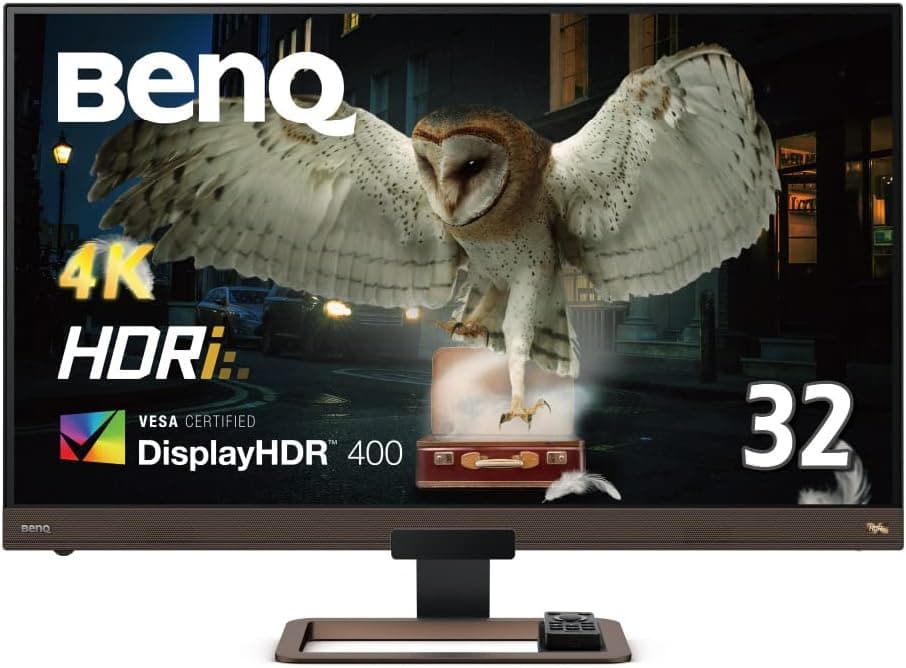
The BenQ EW3280U (ベンキュージャパン BenQ EW3280U 4K エンターテインメントモニター) is listed on BenQ's official product page as a 32 inch IPS monitor with a maximum resolution of 3840x2160. The aspect ratio is 16:9 and the PPI is 138.
The refresh rate is 60Hz and the response time is 5 ms (GtG).
For HDR, the official page lists HDR10 and VESA DisplayHDR 400. Typical brightness is 350 nits and the HDR peak is 400 nits.
The color gamut is listed as 95 percent P3 with 1.07 billion colors.
The built-in speakers are 2.1 Channel (2Wx2 + 5W woofer), and there is a headphone jack.
A remote control appears in the accessories list on the official page.
Compatibility Guide
The official connectivity section lists HDMI, DisplayPort, and USB C ports. If your PC or tablet has a USB C port, check that this single port covers both video input and charging.
The port counts and standard versions for HDMI and DisplayPort are given in the official connectivity section.
On the source side, confirm that your device has a video output that supports 3840x2160. The official signal cable entry lists HDMI and USB C and notes that this may vary by region, so check the cable included in your region's model.
For mounting, the VESA wall mount is 100x100 mm and the tilt range is -5˚ to 15˚. The official dimensions are 524.1 x 726.8 x 253.8 mm (H x W x D) with the base and 448.6 x 726.9 x 63.7 mm without it.
Compare these against your desk depth and any stand or arm. HDCP is 2.2, and the Gaming section lists FreeSync.
Product Info
rmation
The table below shows main items from BenQ's official specification page.
| Item | Official value |
|---|---|
| Screen size | 32 inch |
| Panel | IPS (LED backlight) |
| Max resolution | 3840x2160 |
| Refresh rate | 60Hz |
| Response time | 5 ms (GtG) |
| Native contrast | 1000:1 |
| Viewing angle | 178°/178° (CR>=10) |
| Screen coating | Matte |
| Color temperature | Bluish, Normal, Reddish, User Define |
| Gamma | 1.8 - 2.6 |
Because the coating is stated as Matte, it is worth checking in a room where reflections are a concern. The official color modes are Rec.709, HDR, M-book, Low Blue Light, Standard, User, Color Weakness, Cinema HDRi, and Game HDRi.
Super Resolution, Smart focus, and HDRi are all listed as Yes.
Eye care items listed as Yes are Flicker-free Technology, Low Blue Light, Brightness Intelligence Plus (B.I.+), Color Weakness, ePaper, and Eye Reminder.
The TUV certificate covers Flicker-free and Low Blue Light.
The power supply is built in, with a voltage rating of 100 - 240V. Power consumption is 33 W normal, 148 W max, and < 0.5 W in sleep mode.
Net weight is 8.5 kg with the base and 7.3 kg without it.
Japanese is among the OSD languages.
Recommended For
- People planning wall or arm mounting. The VESA 100x100 mm pattern and the 63.7 mm depth without the base are listed officially.
- People who want eye care features for long sessions. The official page lists TUV certification for Flicker-free and Low Blue Light.
Before You Buy
The refresh rate is 60Hz. If you plan to use a higher refresh rate, check whether this official specification meets your needs.
HDR is VESA DisplayHDR 400, with a 400 nits peak.
The HDMI and DisplayPort standard versions are listed in the official connectivity section. Confirm that the output ports on your PC or console are sufficient for them.
Check your notebook PC's own specification to see whether its power requirement exceeds that.
The unit weighs 8.5 kg with the base and is 253.8 mm deep.
Check your desk space and load capacity against these official values. The accessories list shows QSG, Warranty Card, and Remote Control.
Cables may vary by region, so confirm the contents on the sales page.
Price and stock should be confirmed on the sales page.
FAQ
Q. Can I connect a notebook PC with only USB C?
Whether your notebook's USB C port supports video output must be checked in the PC's own specification.
Q. Can it be wall mounted?
The official VESA wall mount is 100x100 mm and the net weight without the base is 7.3 kg.
Check the load capacity of your arm or wall against that value.
Q. Does it support a Japanese on-screen menu?
Japanese is included in the official OSD Language list.