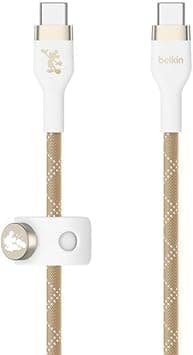
The Belkin BOOST↑CHARGE PRO Flex USB-C Cable (model CAB011qc2MWG-DY) is a 2-meter charge-and-sync cable rated for USB-C Power Delivery up to 60W. This article goes past the spec sheet to explain which use cases it fits and which ones will leave you disappointed.
Overview
The short version: this is a cable for people who charge phones, tablets, and 13-inch-class laptops from two meters away and want that cable to stay tidy. It is not the cable to buy for fast external-SSD transfers, for driving an external display, or for powering a large laptop that expects 96W or more.
The spec picture is simple. Maximum charging output is 60W (USB PD 3.0), data throughput is 480 Mbps (USB 2.0 class), length is 2 m, the jacket is double-braided nylon over a silicone inner layer, and the warranty runs five years.
In other words, the money went into durability and handling, not into bandwidth.
The other distinguishing feature is the bundled magnetic press-button strap and self-adhesive metal plate. Stick the plate to the side of a desk or a nightstand and the free end of the cable stays parked instead of sliding behind the furniture.
That accessory is a large part of why this cable costs more than a generic one.
How to Read the Specs
| Item | Value | What it means in practice |
|---|---|---|
| Connectors | USB Type-C (both ends) | Will not plug into a USB-A charger |
| Length | 2 m | Reaches a sofa, a bed, or a standing desk |
| Max power | 60 W (USB PD 3.0) | Phones, tablets, 13-inch laptops |
| Data rate | 480 Mbps (USB 2.0) | Fine for photos and documents, slow for video files |
| Construction | Double-braided nylon + silicone core | Resists tangling and set-in coil memory |
| Warranty | 5 years | Long coverage if the cable fails |
The key thing the table shows is that power and data are independent. USB-C cables all look alike, so buyers routinely assume a well-built cable is also a fast one.
Here, 480 Mbps is the USB 2.0 ceiling.
Plug a 10 Gbps portable SSD into this cable and the drive's own speed becomes irrelevant.
The 60W figure is typically reached as 20V at 3A. Cables rated for 100W or 240W carry an E-marker and support 5A; this one does not fall into that class.
Pairing it with a 65W or 100W charger does not raise the ceiling — the cable caps the delivery.
Compatibility Guide
The stated compatibility is any USB-C device — smartphones, tablets, laptops — with up to 60W fast charging on PD-capable hardware. Listed examples include MacBook, iPad Pro/Air/mini, Samsung Galaxy phones, and Android handsets.
These are the situations where people get it wrong:
- You only own USB-A chargers. Both ends are USB-C, so older bricks and power banks with USB-A outputs simply will not connect. You need a PD charger with a USB-C output.
- You want to charge a large laptop. 16-inch-class and GPU-equipped machines often ship with 96W–140W adapters. At 60W they will usually still charge, but under heavy load the battery can drain anyway. Choose a 100W or 240W cable for that job.
- You want video output. A USB 2.0-class cable is not the right basis for stable high-resolution DisplayPort Alt Mode output. Look at USB4/Thunderbolt cables instead.
- You want to feed a docking station. Docks ask for display bandwidth, networking, and power at once. Keep this cable in the charging role.
On the other hand, game controllers, earbud cases, USB-C keyboards, and similar accessories that only need power and light syncing are a perfect match. Two meters is also a comfortable length for using a device while it charges.
Product Info
On Amazon.co.jp the price was ¥2,600 as captured on 27 August 2026.
The same ASIN was also recorded at ¥2,600 on 5 June 2026, so pricing has been flat for several months. An eBay US listing showed $12.98 as captured on 14 July 2026.
All of these are point-in-time figures; sales and stock levels move them, so check the product page before buying.
Review sentiment, captured 5 June 2026, stands at 778 reviews with a 90% positive score (4.5 out of 5 stars).
Cables are a category where broken-strand reports drag ratings down quickly, so holding that level across 700-plus reviews is a solid result. Roughly one in ten reviews is still negative, and for cables that usually clusters around unit variance and unmet speed expectations — worth knowing before you order.
Whether the price is fair comes down to how you value the extras. On raw specs — 2 m, 60W, USB 2.0 — cheaper options exist in quantity.
What you pay extra for is the included magnetic strap and adhesive plate, which saves buying a separate cable clip, and the five-year manufacturer warranty.
How It Compares
Belkin's own lineup also includes a 240W PD 3.1 braided cable and a Thunderbolt 4 cable (40 Gbps, 100W, 8K).
Both cost more, and the premium buys bandwidth and headroom. Split by use case:
- Charging phones, tablets, 13-inch laptops → this cable is enough
- One cable that also feeds a big laptop → 240W class
- External SSDs, monitors, docks → Thunderbolt 4 / USB4 class
Against other braided nylon cables, the real differentiator here is not the weave but the silicone core that resists coil memory, plus the magnetic parking system. If neither matters to you, a cheaper equivalent is a rational choice.
Practical Tips
Wipe the surface clean before pressing the adhesive plate down, and leave it unloaded for a few hours so the bond sets. Removing it later can lift paint, so decide the position first.
Two meters is convenient but easy to trip over when left loose. Use the included strap to coil the slack in a figure-eight; that keeps strain off the connector necks, which is where nearly every cable eventually fails.
It is the cheapest way to never need the five-year warranty.
Best Use Cases
This cable suits anyone whose charging cable keeps tangling or disappearing behind the desk. The magnetic strap and plate give it a fixed home, so you stop hunting for it.
If you mostly charge a phone or tablet and occasionally top up a 13-inch laptop, 60W is exactly right — no more, no less. As a single travel cable, the double-braided jacket and five-year warranty are reassuring, and it stays untangled in a bag.
It also works well as a shared household charging point: two meters reaches from a table down to a floor outlet with slack to keep using the device.
Things to Check Before Buying
The data rate is the main trap. 480 Mbps is fine for photos and documents but clearly slow for portable SSDs and large video files.
Buying it because "Belkin makes good cables, so it must be fast" guarantees disappointment. If you need speed, buy a 40 Gbps USB4/Thunderbolt cable separately.
The 60W ceiling is the second trap. A 100W charger does not change it.
If you run a 16-inch or gaming laptop daily, this is underpowered. For everything else, 60W rarely runs short.
Do not buy it for display or dock duty. USB-C connectors look identical while their capabilities differ wildly; "nothing shows on the monitor" is usually a cable-choice error.
Watch the listing itself. The product title begins with a retailer-style prefix that makes the actual model name hard to read.
The Amazon listing's manufacturer field says Belkin, which matches this article's subject, but listings like this can obscure what you are actually receiving. Confirm from the product images and packaging that you are getting the 2 m, 60W, USB-C to USB-C version. If the seller is a marketplace vendor rather than the manufacturer, check who handles warranty claims.
Prices here are point-in-time. The ¥2,600 figure was captured on 27 August 2026 and moves with sales, exchange rates, and stock.
Verify the current price immediately before ordering.
FAQ
Q. Can it charge a 16-inch MacBook Pro? A.
It will connect and charge, but 60W is the ceiling, so under heavy load the battery may still drain. For daily use, choose a 100W-or-higher cable.
Q. Can I use it with an external SSD?
A. It connects, but transfers cap at 480 Mbps (USB 2.0). It cannot exploit the drive's speed.
Q. Will it drive a monitor?
A. It is not specified for video output. Use a USB4/Thunderbolt cable for display connections.
Q. Can the magnetic plate be repositioned? A.
The adhesive plate is not designed for repeated remounting, so pick the spot carefully. Removing it from painted surfaces may damage the finish.
Q. How does the warranty work? A.
Coverage runs five years. Proof of purchase is normally required, so keep your order record.
If you buy through a marketplace seller, confirm in advance whether claims go to the seller or to Belkin.
Q. Does it work with a USB-A charger?
A. No. Both ends are USB-C, so a PD charger with a USB-C output is required.
Product Disclosure (Amazon)
- Manufacturer: Belkin
- Seller: イーエスドラッグ
- Fulfilled by: Amazon
- ASIN: B0D8KG6X4H
- Note: This article covers a manufacturer-made product based on Amazon listing details.