This article covers 【国内正規代理店品】belkin ベルキン Thunderbolt™ 3ケーブル(20Gbps)F2CD081bt1M-BLK, going beyond the spec sheet to the things that actually decide whether it is the right cable for you.
Overview
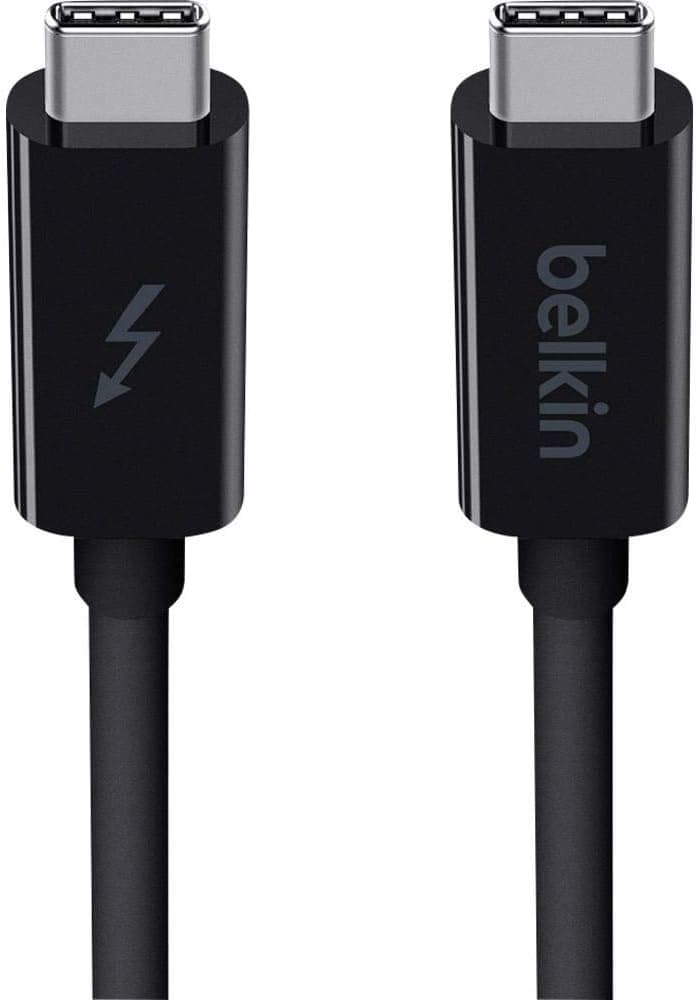
The Belkin F2CD081bt1M-BLK is a 1-meter Thunderbolt 3 cable rated at a maximum of 20Gbps. That number, not the "Thunderbolt 3" label, is the key fact: this is the half-bandwidth variant, not a 40Gbps cable, and its lower price follows directly from that.
Under the Thunderbolt 3 specification, passive cables generally hold full 40Gbps only up to roughly 0.5–0.8m.
Beyond that they either drop to 20Gbps or require active circuitry, which raises the cost substantially. This cable sits right at that boundary: 1m of reach in exchange for half the bandwidth.
One meter is comfortable for a dock or external drive sitting beside a laptop, and slightly short for routing behind a desk.
Buyer feedback on Amazon.co.jp is 4.6 out of 5 stars across 661 reviews (captured July 2026).
For a simple cable — a product category where defect reports tend to dominate ratings when quality is poor — that is a reassuring result.
Where 20Gbps Is Enough, and Where It Is Not
| Use case | Is 20Gbps enough? | Notes |
|---|---|---|
| SATA SSD / HDD enclosure | Yes | 6Gbps ceiling leaves headroom |
| NVMe SSD enclosure | Conditional | Real-world speed will be capped |
| Dock with Ethernet / USB hub | Yes | Power delivery matters more than bandwidth |
| Single 4K 60Hz display | Generally yes | Depends on the host and display |
| Dual 4K, 5K, or 8K output | Often not | Consider a 40Gbps cable |
| External GPU enclosure | Not recommended | Bandwidth maps directly to performance |
The pattern is clear: 20Gbps hurts when you are pushing lots of video or trying to saturate an NVMe drive. For hub functions, wired networking, SATA-based storage, and ordinary peripherals, you will rarely notice the difference against a 40Gbps cable.
Decide which row you are in before you compare prices.
Connectivity & Compatibility
The connector is USB-C, but identical shape does not mean identical capability. For Thunderbolt 3 operation, both connected devices must support Thunderbolt 3 (or the backward-compatible Thunderbolt 4 / USB4).
Look for the lightning-bolt icon beside the port, or check the specification sheet, before buying. If only one side supports it, the link falls back to USB speeds.
Plugging into a Thunderbolt 4 or USB4 port is fine, but the slowest element wins — meaning this cable's 20Gbps ceiling. A large share of "my Thunderbolt 4 laptop is slow" complaints trace back to the cable being the bottleneck.
Conversely, on a plain USB-C port the cable will generally still handle USB data and charging.
For power delivery, wattage support varies cable by cable, and the exact figure for this model cannot be confirmed from the available data. If you intend to charge a laptop over the same cable, verify the wattage on the product page first; when a 100W-class supply is essential, choose a cable that explicitly states 100W.
Physically, measure before you buy. Cables drop down behind a device before routing, so plan for 10–20cm more than the straight-line distance.
Avoid sharp bends at the connector base, and always unplug by gripping the connector body rather than pulling the cable.
Product Info
Manufacturer: Belkin. Model: F2CD081bt1M-BLK.
Length 1m, maximum 20Gbps, black. It is distributed as an authorized-import product in Japan, so warranty and support handling are clearer than with parallel imports.
On pricing, Amazon.co.jp showed ¥2,926 as captured in August 2026, while an earlier capture in July 2026 recorded ¥6,445.
The same listing varied by more than 2x between captures, so treat both figures as reference points only and check the live product page before ordering.
Note also that the data attached to this article contained specification fields belonging to an unrelated product (a smartphone case: material, weight, MagSafe support). None of it was used here.
See the cautions below.
Best Use Cases
This cable suits anyone connecting a Thunderbolt 3 SSD enclosure or dock at roughly one meter, with a clear use case that does not need 40Gbps. If the authorized-distributor warranty and a 4.6/5 rating across 661 reviews matter to you, it is a solid, unexciting choice — which is what you want from a cable.
It also fits people replacing a failing cable by exact model number. Cable quality varies widely even within the same standard, so buying from a named brand is worth something.
As a permanent desk-to-dock link or a spare in a laptop bag, the length and spec are practical.
Cautions Before Buying
The 20Gbps ceiling is the main trap. Buyers see "Thunderbolt 3," assume 40Gbps, and then find their external NVMe drive running at half the expected speed.
If your use case is fast storage or multiple displays, pay more for a 40Gbps cable now rather than buying twice.
Do not assume charging capability. Confirm the stated wattage before relying on this as a laptop charging cable.
If no figure is listed, use a separate cable for power.
Listing metadata can be wrong. The source data for this article had smartphone-case specifications mixed in.
Amazon listings can show the same kind of contamination, or merge reviews across similar products. Verify the product images and the model number F2CD081bt1M-BLK in the title before ordering — especially if the price differs sharply from what you saw previously, which often means a different variant or seller.
Who should skip it: anyone using an external GPU, driving two or more 4K displays, targeting 8K output over Thunderbolt, or needing more than one meter of reach. Those cases call for a higher-bandwidth or longer cable.
FAQ
Q. Will it work with a Thunderbolt 4 machine? A.
Yes, but the link tops out at this cable's 20Gbps. Use a 40Gbps cable to exploit Thunderbolt 4 fully.
Q. Can it act as a normal USB-C cable? A.
Generally yes for data and charging on non-Thunderbolt USB-C devices. Check the wattage rating on the product page.
Q. How does it differ from the 40Gbps version? A.
Half the bandwidth. Holding 40Gbps over 1m usually requires an active design, which costs more.
This model trades bandwidth for price.
Q. What speed will my external SSD reach? A.
It depends on the drive and enclosure. SATA-based units will not be limited; NVMe-based units will likely hit the 20Gbps ceiling.
Q. What does it cost? A.
¥2,926 as captured in August 2026, versus ¥6,445 at an earlier capture. Pricing moves a lot — check the listing.
Product Disclosure (Amazon)
- Manufacturer: Belkin
- ASIN: B01CEFESRO
- Note: This article covers a manufacturer-made product based on Amazon listing details.