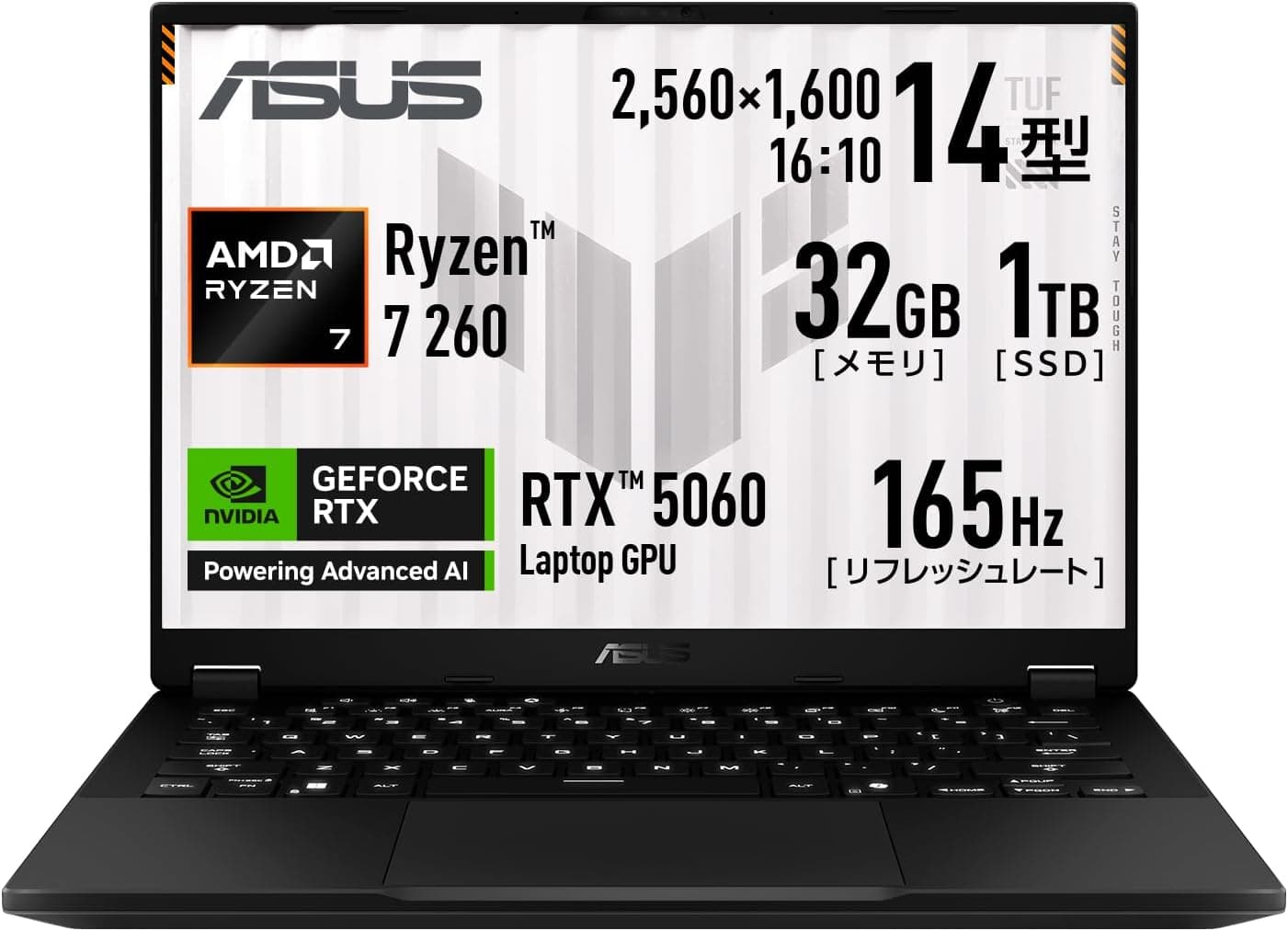
ASUS TUF Gaming A14 FA401UM-R7R5060 14-inch Ryzen 7 260 GeForce RTX 5060 32GB Memory 1TB SSD packs an RTX 5060 Laptop GPU and 32GB of memory into a 14-inch, 1.46kg chassis.
Plenty of 15.6- and 16-inch machines carry the same GPU, but very few 14-inch models do.
This article looks at what the spec sheet actually means in daily use, and where you will have to compromise.
Overview
This is not a dedicated gaming rig. It is a machine you carry that also games. The CPU is an AMD Ryzen 7 260 (8 cores, 16 threads, 3.8GHz base / 5.1GHz boost, 45W TDP, 4nm, Socket FP8), paired with an NVIDIA GeForce RTX 5060 Laptop GPU (8GB GDDR7, 128-bit bus, 2497MHz boost clock), 32GB of LPDDR5X-7500 memory and a 1TB PCIe 4.0 x4 NVMe M.2 SSD.
Parts-database reference scores are 28039 (PassMark CPU) and 20635 (PassMark GPU). Treat those as ballpark figures rather than absolutes: laptop GPU scores swing widely with the power budget each vendor assigns.
The display is a 14.0-inch WQXGA (2560x1600) 165Hz matte panel, roughly double the pixel count of 1920x1080 — a fact that directly shapes the settings advice below.
Quick Verdict by Use Case
| Use case | Verdict | Notes |
|---|---|---|
| Esports (FPS / MOBA) | Strong | 165Hz is usable with reduced settings |
| Latest AAA at native 2560x1600, max settings | Weak | Plan on upscaling and medium-high presets |
| Video editing / photo work | Strong | 32GB matters; long 4K exports take patience |
| 3D work in Blender | Conditional | 8GB VRAM caps scene complexity |
| Daily commuting | Strong | 1.46kg, though the adapter adds weight |
| Large local AI models | Weak | 8GB VRAM limits what will load |
The underlying point: a 14-inch chassis sets the cooling ceiling, and the same RTX 5060 Laptop GPU is typically configured more conservatively here than in larger machines. If raw frame rates matter most, a 16-inch model at the same budget is the honest answer.
Compatibility Guide
The biggest constraint is that memory is soldered and cannot be upgraded. The 32GB of LPDDR5X-7500 you buy is the 32GB you keep. On the upside, 32GB is generous enough for most creative and multitasking workloads, so buying the ceiling up front is a defensible choice — and with no upgrade path, it is the safer one.
Storage is a 1TB PCIe 4.0 x4 NVMe M.2 SSD.
A PCIe 5.0 drive would run at 4.0 speeds here, so a cooler-running Gen4 drive is the sensible replacement.
Whether a second M.2 slot exists depends on the internal layout, so check the product specifications before planning an expansion.
Replacing the drive means cloning or a clean Windows 11 install.
Plan on a 200W-class AC adapter. Ports are one USB4 Type-C with Power Delivery, one USB 3.2 Gen2 Type-C, two USB 3.2 Gen1 Type-A, one HDMI output and a combo audio jack.
PD charging works, but it will not cover the power draw of a gaming session — treat PD as travel convenience and the bundled adapter as the gaming requirement. External displays run from both HDMI and USB-C, so multi-monitor setups are fine.
Wireless is Wi-Fi 6E (802.11ax) plus Bluetooth 5.4.
Using the 6GHz band requires a 6E-class router, and this is not Wi-Fi 7. There is no Ethernet port, so competitive players and anyone heading to a LAN event should budget for a USB-C Ethernet adapter.
For some users that is not a nice-to-have, it is a required purchase.
Product Info
| Item | Detail |
|---|---|
| CPU | AMD Ryzen 7 260 (8C/16T, 3.8GHz / 5.1GHz, 45W TDP) |
| GPU | GeForce RTX 5060 Laptop GPU (8GB GDDR7, 128-bit, 2497MHz) |
| Memory | 32GB LPDDR5X-7500, soldered |
| Storage | 1TB PCIe 4.0 x4 NVMe M.2 SSD |
| Display | 14.0-inch WQXGA (2560x1600) 165Hz matte |
| Weight / Battery | approx. 1.46kg / 18.1h idle, 11.6h video playback |
| Wireless / OS | Wi-Fi 6E + Bluetooth 5.4 / Windows 11 Home |
The Japanese listing price was JPY 419,800 as captured on 2026-08-25. Prices move constantly with stock, sales, exchange rates and individual sellers, so treat that number as a snapshot of that date only.
The overseas marketplace entry is a search link with no fixed price attached, and imported units can differ in keyboard layout and warranty handling.
Review data was 4.5 out of 5 (90% positive) from 13 reviews as captured on 2026-07-23.
The score is high, but 13 reviews is far too small a sample to judge build consistency or failure rates. Read hands-on reviews alongside it.
Warranty coverage is 12 months international plus 12 months of domestic ASUS assurance, with product registration required within 30 days of purchase. Terms change over time, so confirm the current conditions on the listing before you buy.
Competitive Comparison
The closest comparison is the 16-inch ASUS TUF A16 with the same Ryzen 7 260 and RTX 5060. With near-identical internals, the differences come down to cooling headroom, keyboard layout, screen size and weight. Take the 16-inch for performance, this one for mobility — decide by whether it goes in a bag every day.
A tier down, the ASUS Gaming V16 V3607VH with an RTX 5050 weighs about 1.95kg.
Framing the price gap as paying for both 500g of weight savings and one GPU tier makes the decision clearer. If a discounted previous-generation 15.6-inch machine such as the TUF Gaming F15 FX507VV is available and 1080p is enough for you, it can win on total cost.
Conversely, anyone planning long high-setting AAA sessions will be happier with a thicker desktop-replacement design like the Acer Predator Helios 16 or ASUS ROG Strix G16. A 14-inch gaming laptop always loses on performance per yen; what you are buying is the size.
Who It's For
First, people who carry a laptop to campus or the office and still want to game. At 14 inches and roughly 1.46kg it fits a normal bag, and the 165Hz WQXGA panel pays off in fast-paced titles. That portability is real value that never shows up on a spec sheet.
Second, creators editing video or photos away from a desk. 32GB of memory plus a 1TB SSD handles projects with the source files still attached, and the RTX 5060 hardware encoder shortens exports.
If long 4K timelines or heavy rendering is your daily work, step up to a larger chassis and a stronger GPU.
Third, anyone who wants one machine for work and play. The 18.1-hour idle figure reflects genuinely efficient light-load behaviour.
Heavy gamers chasing maxed-out AAA at 2560x1600, however, should look at larger machines with higher-tier GPUs. What this laptop offers is the ceiling of performance you can carry, not the ceiling of performance.
Before You Buy
The listing metadata is inconsistent. This article covers an ASUS laptop, but the collected listing data included an unrelated manufacturer name (a storage brand) and an ASIN that does not match the product code attached to the pricing entry. Publishing an incorrect manufacturer as fact would be worse than omitting it, so that disclosure block has been removed here. You may hit the same inconsistency on the listing page, so verify the product images, the title and the FA401UM-R7R5060 model number yourself before ordering.
The memory stays at 32GB forever. It is soldered, so a shortfall three years from now has no fix short of replacing the machine.
If you foresee wanting 64GB, choose a model with SO-DIMM slots instead. This is a constraint you can only dodge before purchase.
8GB of VRAM is the first ceiling you will hit. Modern titles increasingly run out of VRAM before they run out of GPU horsepower, especially with high texture settings and ray tracing.
Since 2560x1600 is roughly twice the pixel count of 1080p, the realistic approach is upscaling plus medium-to-high presets rather than chasing max settings.
GPU power figures are reported inconsistently. The available data shows both a 145W TGP value and a description citing up to 105W.
Laptop GPU performance follows that power budget directly, so if benchmark comparisons are driving your decision, confirm the official TGP on the manufacturer specification page first.
Battery numbers differ wildly by workload. 18.1 hours is idle and 11.6 hours is video playback — neither is a gaming figure.
Gaming typically lands in the one-to-two-hour range, and most laptops throttle performance on battery anyway. Plan to game plugged in.
Also remember that a 200W-class adapter is bulky, so 1.46kg describes the laptop alone.
Cooling and noise are the 14-inch tax. Putting a 45W CPU next to a power-hungry GPU in a thin chassis means louder fans and a warmer keyboard deck than a 16-inch equivalent.
Finally, the captured JPY 419,800 looks high for this configuration, so confirm the seller and the exact configuration (memory, SSD capacity, colour) on the listing page before buying.
FAQ
Q. Can it really drive 2560x1600 at 165Hz?
A. It depends on the title. Lighter esports games can push high frame rates, but expecting 165fps at native resolution and max settings in a current AAA release is unrealistic for this GPU. Plan on upscaling and tuned settings.
Q. Can I upgrade to 64GB later?
A. No. The 32GB of LPDDR5X is soldered and there are no memory slots.
Q. Can I add or replace the SSD? A.
The interface is PCIe 4.0 x4 M.2.
Whether a spare slot exists depends on the internal layout, so check the specifications. Note that opening the chassis can affect warranty terms.
Q. Is there Ethernet? A.
Not built in. You will need a USB-C or USB-A Ethernet adapter, which is worth ordering alongside the laptop if connection stability matters to you.
Q. Can it replace a desktop with external monitors? A.
Yes — HDMI and USB-C both output video, and USB4 opens the door to single-cable dock setups, though dock compatibility varies by device and is worth confirming in advance.
Q. Should I trust the 4.5-star rating? A.
Only loosely. It came from just 13 reviews at capture time, which is too small a sample for statistical confidence.
Weigh it against hands-on reviews and the retailer's warranty terms.