Overview
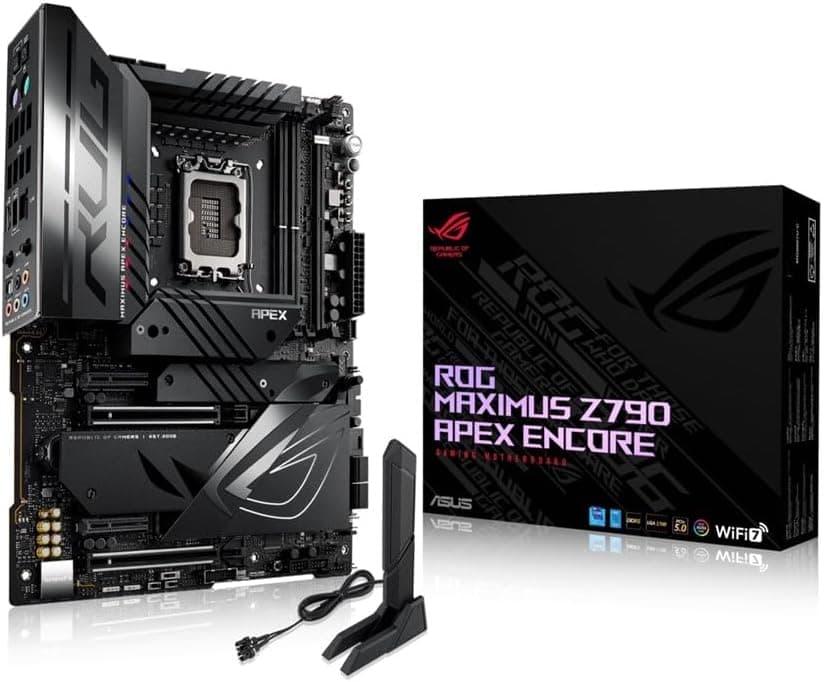
The ASUS ROG MAXIMUS Z790 APEX ENCORE intel 第14・13・12世代 CPU対応 LGA1700 Z790 搭載 DDR5 ATX マザーボード is an ATX board built on the Intel Z790 chipset for the LGA1700 socket, supporting 12th Gen (Alder Lake) through 14th Gen (Raptor Lake Refresh) Core processors with DDR5 memory only. The short version: this is not a board for building a fast PC — it is a board for pushing memory to its limit.
If you have no intention of tuning DDR5 frequency and subtimings yourself, there is very little reason to pay this much.
The APEX name means one specific thing: a two-slot DIMM layout. Where a typical ATX board carries four DIMM slots, this one has two (dual channel) and caps out at 96GB (48GB × 2).
Fewer slots means shorter, less branched memory traces and cleaner signalling, which is what makes DDR5-8400 and beyond realistic. Capacity is traded away for speed, and that trade is the entire point of the product.
The rest of the hardware matches its flagship position: a 24+2 phase power design (24 for the CPU, 2 for the SoC), dual 8-pin EPS connectors (ProCool II), two PCIe 5.0 x16 slots, five M.2 slots (one PCIe 5.0 x4 and four PCIe 4.0 x4), four SATA 6Gb/s ports, and Intel 2.5GbE wired networking.
Buyer feedback on Amazon.co.Check the retailer's page for the latest user reviews.
Compatibility Guide
| Item | Spec | What actually trips people up |
|---|---|---|
| CPU socket | LGA1700 | 12th/13th/14th Gen Core; some units need a BIOS update first |
| Memory | DDR5 only, 2 slots | DDR4 will not physically fit. 96GB max (48GB × 2) |
| Memory speed | DDR5-8400+ (OC) | Whether you reach it depends on your CPU's memory controller |
| Form factor | ATX (305 x 244 mm) | Fits standard ATX cases |
| PCIe | 2× PCIe 5.0 x16 (x16 or x8/x8) + PCIe 4.0 x4 | Using the second slot drops the first to x8 |
| Storage | 5× M.2 (1× PCIe 5.0 x4, 4× PCIe 4.0 x4) + 4× SATA 6Gb/s | Check the manual's lane-sharing table |
| Power | 24-pin ATX + 2× 8-pin EPS | 850W PSU or better recommended |
On the CPU side, any LGA1700 Core processor from the 12th to the 14th generation is in scope, but older retail stock may ship with a BIOS that predates your chip. ROG's high-end boards traditionally include a USB-based BIOS flash function that works without a CPU installed; confirm the exact procedure in the manual and on the ASUS support pages before you buy.
A board that powers on with no display is far more often a BIOS-generation problem than a dead component.
Memory is DDR5 exclusively — DDR4 modules have a different notch position and cannot be inserted. With only two slots, a four-stick kit is half wasted, so buy matched two-stick kits (2×24GB, 2×32GB or 2×48GB).
Treat "DDR5-8400+" as an overclocking target rather than a guarantee: the ceiling varies with the individual CPU's memory controller, so check the QVL before committing to an expensive high-frequency kit.
Physically, the ATX footprint (305 x 244 mm) fits standard cases, but the large VRM and M.2 heatsinks are worth measuring against a big air cooler before ordering.
The two PCIe 5.0 x16 slots split to x8/x8 when both are populated, and two triple-slot graphics cards will choke the lower card's intake, so plan airflow separately rather than assuming it works out.
Power delivery expects two genuinely independent 8-pin EPS cables. A PSU that ships only one CPU cable, or one cable daisy-chained to look like two, tends to sag under overclocked loads.
Capacity matters — 850W or more with a high-end GPU — but cable topology matters first, and getting it wrong produces instability only under sustained load, which is a miserable fault to diagnose.
Product Info
The ROG MAXIMUS Z790 APEX ENCORE arrived in October 2023.Check the retailer's page for the latest price.co.jp (captured 2026-05-28) and $670.00 on eBay US (captured 2026-07-09).
Both are point-in-time figures that move with stock and exchange rates, so check the product page for the current price before buying. Within the Z790 stack this sits at the very top — roughly three to four times a mid-range Z790 board.
Headline specs are the Z790 chipset, LGA1700 socket, two DDR5 slots (96GB max), a 24+2 phase VRM, two PCIe 5.0 x16 slots, five M.2 slots, four SATA 6Gb/s ports and Intel 2.5GbE.
The manufacturer warranty is listed as three years, with local support applying to units bought through an authorised domestic distributor.
Units bought through overseas marketplaces may be parallel imports without local warranty coverage even when the sticker price looks better. For a board you intend to overclock, that coverage is worth more than usual — read the warranty terms on the listing rather than comparing price alone.
How It Differs From Other Z790 Boards
| Type | DIMM slots | Strength | Who it suits |
|---|---|---|---|
| This board (APEX, 2-DIMM) | 2, 96GB max | Memory frequency headroom, VRM margin | People who overclock memory |
| High-end 4-DIMM (STRIX class) | 4 | Balance of capacity and features | People needing 128GB or more expansion |
| Mid-range Z790 | 4 | Performance per yen | Stock users spending on CPU/GPU instead |
Measured in frame rates or export times with the same CPU and GPU, the gap between this board and a mid-range Z790 falls within noise for most workloads. The difference appears when you raise memory clocks substantially or push high current through the CPU for long stretches.
The premium buys headroom, not everyday performance — keeping that straight makes the decision easy.
Best Use Cases
- Memory overclockers: the two-slot layout delivers something a four-slot board cannot match by design. If you regularly work above DDR5-8000, that alone justifies the choice.
- Sustained Core i9 workloads: the 24+2 phase VRM and dual EPS connectors give thermal margin during long rendering or encoding sessions.
- Multi-SSD builds: five M.2 slots, one of them PCIe 5.0 x4, make it straightforward to run several fast drives at once.
- Benchmark chasers: the overclocking toolset makes tuning itself the point rather than a side activity.
Things to Consider
Capacity is the headline compromise. Two slots means 96GB (48GB × 2) is the ceiling, full stop.
Large-scale 3D rendering, heavy virtualisation, or big in-memory datasets are off the table from day one, and there is no "add more later" path — raising capacity means replacing both modules outright.
Without overclocking, the price is hard to justify. Running at stock with XMP, real-world performance is close to that of a far cheaper Z790 board with the same CPU and GPU.
The BIOS is dense, and changing settings without understanding them is itself a common source of instability. If you are still early in building PCs, a friendlier high-end board such as the ROG STRIX line leaves budget for a better GPU or PSU.
LGA1700 is past its midpoint. Intel moved to LGA1851 for the Core Ultra (Series 2) generation, so there is no upgrade path to newer CPUs on this board.
Buy it as a platform that ends with 14th Gen, not as a foundation for future swaps.
Confirm clearance and PSU cabling before you build. Cooler-versus-heatsink interference, spacing between two graphics cards, and two independent EPS cables — all three cost you a return trip if discovered during assembly.
Listing data is sometimes wrong. Manufacturer, model number, and bundled-accessory fields occasionally carry another product's metadata, and parallel imports frequently share a page with domestic retail stock.
Check the product images, title, and warranty wording yourself before ordering, and remember that any price quoted here is a captured snapshot.
FAQ
Q. Can I use DDR4 memory? A.
No. This board is DDR5 only, and DDR4 modules are physically keyed differently.
If you want to reuse DDR4, pick a DDR4 LGA1700 board instead.
Q. Can I install 128GB?
A. No. Two slots, 96GB maximum (48GB × 2). Anything larger requires a four-slot board.
Q. Will a 12th Gen CPU work out of the box? A.
It is supported, but the shipping BIOS on a given unit may predate your chip. Check ASUS support for the CPU-to-BIOS mapping before assembly.
Q. What PSU wattage do I need? A.
850W or more is the guideline for a high-end GPU build. More importantly, make sure the PSU can supply two separate 8-pin EPS cables.
Q. I only game. Is it worth it? A.
Honestly, not really. With the same CPU and GPU, frame-rate differences land within noise in most titles.
Unless tuning memory appeals to you, that money does more in the GPU.
Q. Can I fill all five M.2 slots? A.
Physically yes, but some slots share PCIe lanes with other connectors. Check the lane allocation table in the manual to see what gets disabled before populating everything.