Overview
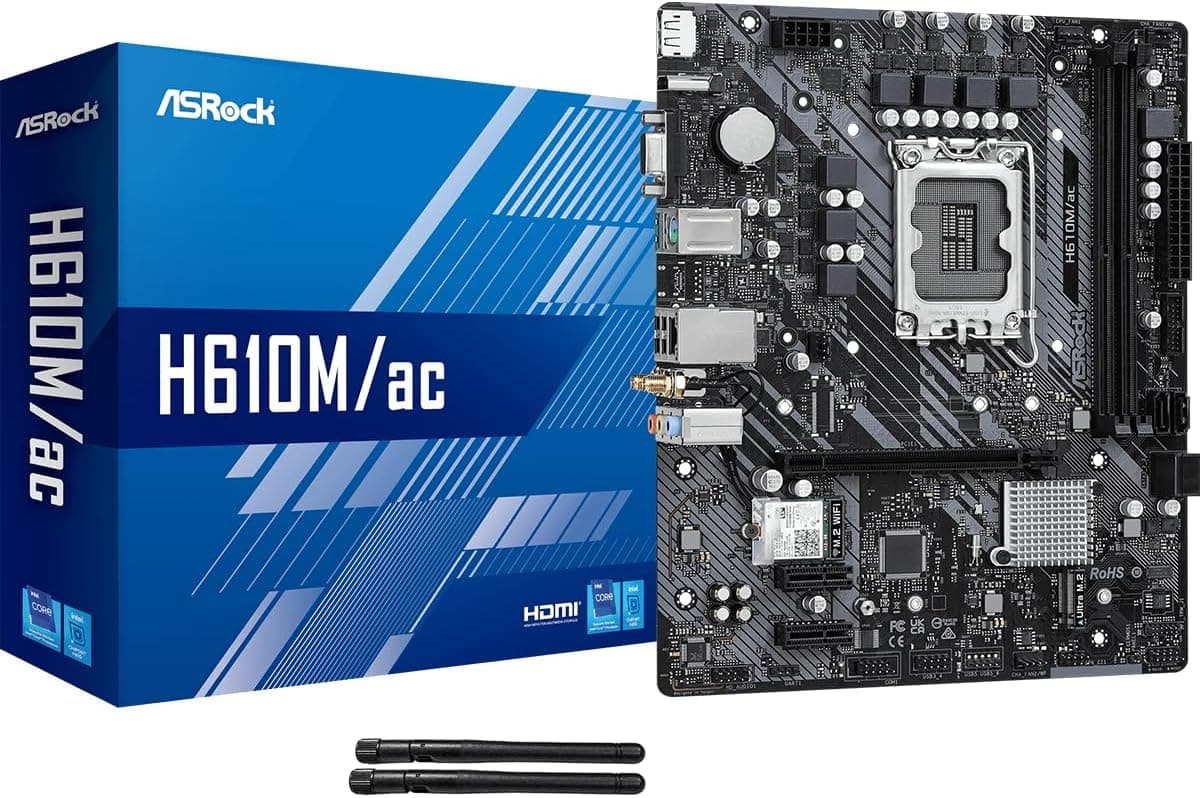
The ASRock H610M/AC is a Micro-ATX motherboard built around the Intel H610 chipset, supporting LGA1700 processors from the 12th and 13th generations. It’s positioned as an entry-level board, but it packs integrated Wi-Fi 5 and Bluetooth—features usually reserved for pricier models. With PCIe 4.0 for the primary graphics slot, DDR4 memory support, and a compact form factor, this board is a strong candidate for budget-conscious builders who don’t want to sacrifice connectivity. In practice, that means you can assemble a fully functional PC without ever plugging in an Ethernet cable. The H610M/AC handles everyday productivity, light gaming, and home-server duties with ease, especially when paired with a Core i3 or i5 processor. It’s a no-frills foundation that puts money where it matters: CPU and GPU.
Compatibility Guide
The H610M/AC fits Intel’s LGA1700 socket, covering Core 12th-gen (Alder Lake) and 13th-gen (Raptor Lake) CPUs. It runs on DDR4 memory up to 3200 MHz; no DDR5 support here. The board uses the standard 24-pin ATX power plus an 8-pin EPS connector, so most mainstream power supplies will work without adapters. Physically, it’s a Micro-ATX board (244 x 218 mm), making it compatible with almost any Micro-ATX or larger case. It has one PCIe 4.0 x16 slot, two PCIe 3.0 x1 slots, one Ultra M.2 slot (PCIe Gen3 x4 & SATA3), and four SATA 6Gbps ports. For storage, you get enough connectivity for a fast NVMe boot drive plus a couple of SATA hard drives or SSDs.
Product Info
Launched in late 2022, the ASRock H610M/AC is an entry-level motherboard that typically sells between ¥18,000 and ¥24,000 in Japan. It carries a standard 3-year manufacturer warranty. The 6-phase VRM design is modest but adequate for 65W TDP CPUs. Key features include Intel Gigabit LAN, Realtek ALC887/897 7.1-channel audio, and the built-in Intel 802.11ac Wi-Fi + Bluetooth module. Its market positioning is clear: an affordable, feature-complete platform for builders who want Wi-Fi out of the box without paying a premium. The H610 chipset restricts overclocking and PCIe 4.0 to the x16 slot only, but for the target audience—first-time builders, office PC users, and budget gamers—these limitations rarely matter.
Best Use Cases
- First-time PC builder on a tight budget The built-in Wi-Fi eliminates the need for a separate adapter, and DDR4 RAM keeps costs low. The BIOS is straightforward, making this a great learning board. Avoid if you plan to overclock or run multiple fast SSDs. - Low-power home server or media PC Pair it with a Pentium Gold or Core i3, add a small NVMe and a couple of hard drives, and you have a quiet, efficient file server or Plex box. Wi-Fi helps if your router is far away. Not ideal if you need ECC memory or multiple PCIe lanes. - Budget gaming rig with Core i5 Combine the H610M/AC with a Core i5-13400F and an RTX 3060 or RX 6600 for smooth 1080p gaming. The PCIe 4.0 x16 slot handles modern GPUs without bottleneck. Skip this board if you want to overclock your CPU or need Wi-Fi 6.
Things to Consider
The most notable limitation is the absence of PCIe 4.0 for the M.2 slot—it runs at Gen3 speeds, which still delivers fast boot times but doesn’t max out high-end Gen4 SSDs. The 6-phase VRM is fine for 65W CPUs but may struggle under sustained all-core loads with a Core i7 or i9. Overclocking is completely off the table because H610 doesn’t support it. Storage expansion is also limited: only one M.2 slot and four SATA ports. If you plan to use multiple M.2 NVMe drives, you’ll need a different motherboard. The Wi-Fi module is soldered on, so you cannot upgrade to a faster Intel AX210 later. Compared to the ASRock B660M Pro RS, the H610M/AC lacks PCIe 4.0 M.2 and more robust VRMs, but it compensates with built-in wireless connectivity. If you don’t need Wi-Fi, a cheaper H610 board like the H610M-HVS/M.2 might be a better value. ## FAQ
Q: Can I use this motherboard with a Core i7-13700K? A: Technically yes, but the 6-phase VRM is not designed for high-end CPUs under sustained load. Expect thermal throttling. Stick with Core i5 or below for stable performance. Q: Does it support DDR5 memory? A: No, this board is DDR4-only. The physical slots are different, so DDR5 sticks won’t fit. Q: How long a graphics card can I install? A: The PCIe x16 slot is positioned like any standard mATX board. Most dual-slot GPUs up to 300mm will fit, but always measure your case clearance and watch for interference with the front USB headers.
Product Disclosure (Amazon)
- Manufacturer: ASRock
- Seller: PENNY LANE
- Fulfilled by: PENNY LANE
- ASIN: B0BM4VSGP4
- Note: This article covers a manufacturer-made product based on Amazon listing details.