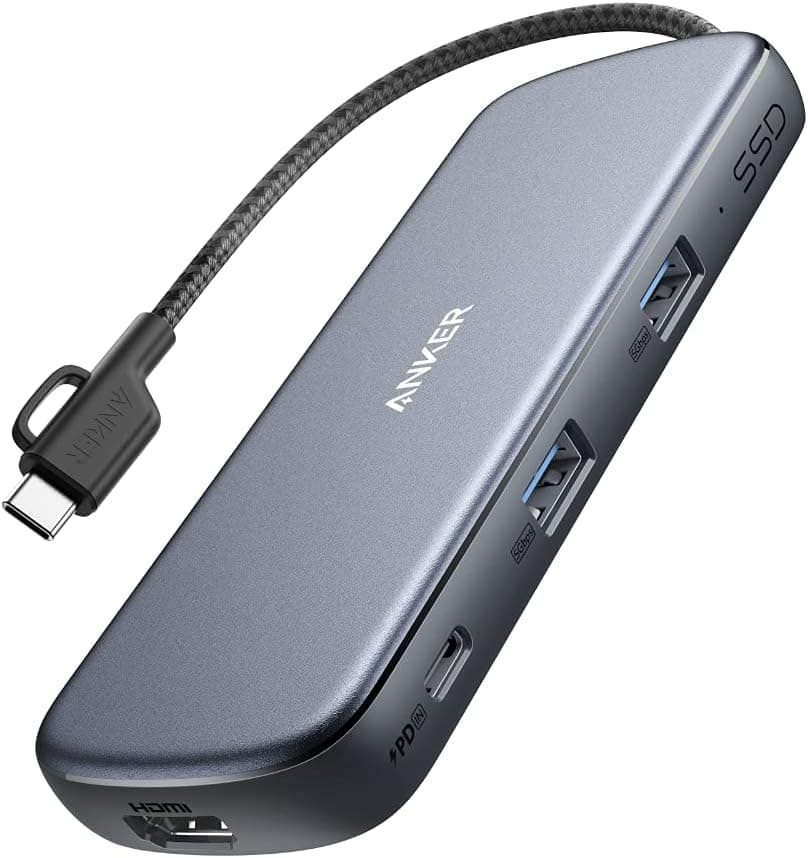
This article covers Anker PowerExpand 4-in-1 USB-C SSD ハブ(256GB).
Overview
The Anker PowerExpand 4-in-1 USB-C SSD Hub (256GB) is a clever all-in-one solution for USB-C laptops that need extra storage, video output, and charging from a single port. It integrates a 256GB SSD directly into the hub body, eliminating the need for a separate external drive. With 4K/30Hz HDMI output and 100W USB Power Delivery pass-through, it's designed for MacBook Pro, iPad Pro, and Chromebook users who want to keep their desk clean and their workflow efficient. This compact hub packs four ports — USB-C PD input, USB-C data, HDMI, and USB-A — into a small footprint. Anker's PowerIQ technology automatically detects connected devices to deliver optimal charging speeds. It's a practical choice for anyone who frequently moves between desk and coffee shop and doesn't want to carry multiple dongles.
Connectivity & Compatibility
Host connection: USB-C (USB 3.0, up to 5Gbps) Compatible devices: MacBook Pro (2016+), MacBook Air (2018+), iPad Pro (2018+), Chromebooks, Windows USB-C laptops HDMI output: up to 4K/30Hz (HDMI 1.4) USB PD input: up to 100W (20V/5A) — note that the hub itself consumes about 5-10W, so the laptop receives slightly less USB-A port: up to 5V/1.5A output (charging supported) Important: Thunderbolt 3/4 ports work but do not provide Thunderbolt-specific 40Gbps speeds. HDMI output requires the host to support DisplayPort Alt Mode over USB-C.
Product Info
Release: Late 2020 Price: Approximately $50-60 USD (varies by region and time) Warranty: 18 months from Anker (extendable via official registration) Box contents: Hub, USB-C to C cable (~30cm), manual * Market position: Mid-range. It competes with standalone USB-C hubs and external SSDs by combining both functions at a reasonable price. The 256GB built-in storage is enough for documents, photos, and light applications, making it a solid value for users who don't need massive capacity.
Best Use Cases
MacBook users running out of internal storage: The 256GB SSD provides a convenient overflow space for apps, media, and project files. It's especially useful for base-model MacBook Air or Pro with 256GB or 128GB internal drives. Frequent presenters and remote workers: The HDMI port lets you connect to projectors or monitors for 4K presentations, while USB PD keeps your laptop charged throughout the day. No need to hunt for a separate power outlet. Minimalist desk setup enthusiasts: One cable from the laptop to the hub handles charging, video, data, and storage. The USB-A port also accommodates a mouse or flash drive, reducing cable clutter. Not ideal for: Users who need Thunderbolt 3/4 speeds (40Gbps), multiple 4K displays, or high-refresh-rate gaming monitors. Also not suitable if you require more than 256GB of portable storage — the SSD is non-upgradable.
Things to Consider
The built-in 256GB SSD is fixed and cannot be upgraded or replaced. If you need more capacity, look for a hub with a larger SSD or a separate external drive. HDMI output is limited to 4K/30Hz — no 4K/60Hz, HDR, or high refresh rates. Gamers and video editors should consider a Thunderbolt dock or a dedicated HDMI adapter. USB PD pass-through delivers up to 100W input, but the hub consumes about 5-10W, so the laptop receives roughly 90W. For a MacBook Pro 16-inch (96W charging), this may result in slightly slower charging under heavy load. The USB-C data port runs at USB 3.0 (5Gbps), not USB 3.1 Gen2 (10Gbps) or USB4. For high-speed external SSDs, direct connection to the laptop is recommended. ## FAQ
Q: Can I use this hub with a Windows laptop? A: Yes, any USB-C laptop that supports DisplayPort Alt Mode (most modern Windows ultrabooks) will work. Check your laptop's specifications to confirm HDMI output compatibility. Q: How fast is the built-in SSD? A: Sequential read/write speeds are around 300-400 MB/s over USB 3.0. It's not NVMe-fast, but perfectly adequate for documents, photos, and application storage. Q: Can I charge my laptop, output video, and transfer data all at once? A: Yes, all functions work simultaneously. Connect a USB-C charger to the PD input, an HDMI monitor, a mouse to USB-A, and an external drive to the USB-C data port — everything runs together without issues.
Product Disclosure (Amazon)
- Manufacturer: Anker
- ASIN: B08NJXFVS5
- Note: This article covers a manufacturer-made product based on Amazon listing details.