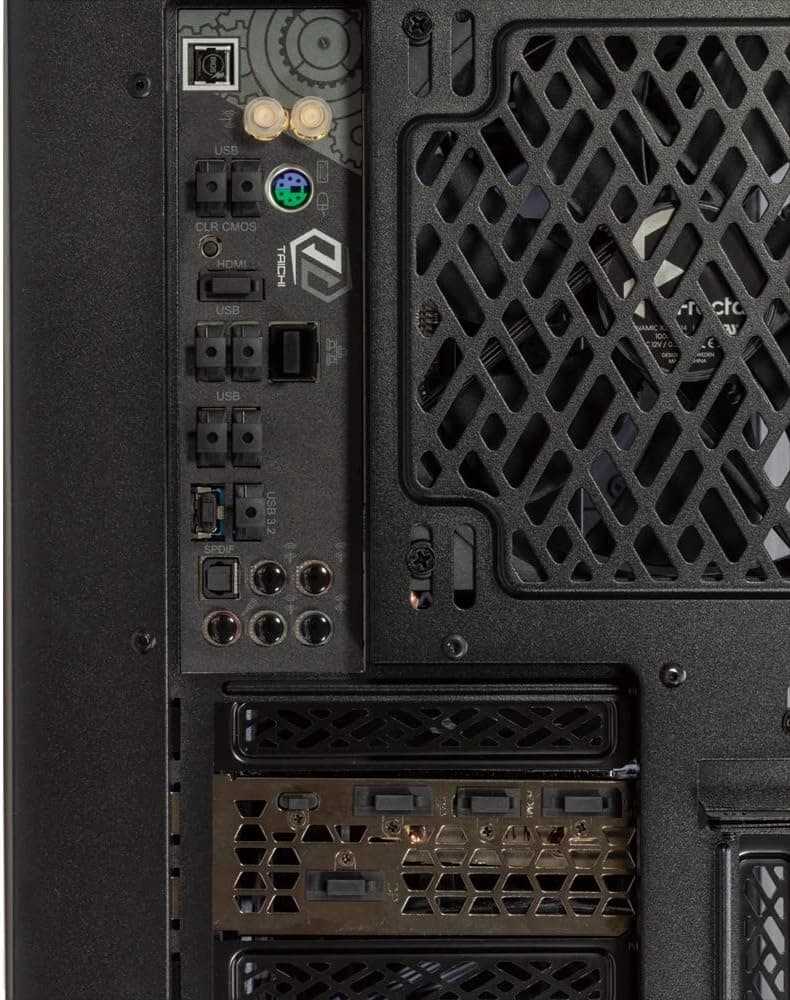
This article covers アイネックス(AINEX) コネクタカバー ゲーミングPC用 DC-023 ブラック (× 3). Dust caps are a crowded, cheap category; what makes this one worth writing about is that a single set covers ten different port types, and the package contains three of those sets.
Overview
The AINEX DC-023 Connector Cover Set protects unused ports on gaming PCs, workstations, and peripherals from dust, lint, pet hair, and stray objects. One set includes USB Type-C with tab (3 pcs), USB Type-A with tab (10 pcs), USB Type-A without tab (4 pcs), DisplayPort (4 pcs), HDMI Type A (3 pcs), DVI (1 pc), VGA mini D-Sub15 (1 pc), 3.5mm mini jack (8 pcs), RJ-45 LAN (2 pcs), and wireless LAN antenna (2 pcs).
Caps are black except the antenna caps, which are natural, and are molded from PE, PP, Nylon 66, or ABS depending on connector type. The product is RoHS compliant (10 substances).
Because the package contains three complete sets, you effectively receive 30 tabbed USB Type-A caps, 24 mini jack caps, and 12 DisplayPort caps. That is more than enough to finish one desktop's rear I/O and still cover a laptop, a monitor, a dock, and a router.
On Amazon.co.jp the listing showed 4.4 out of 5 (88%) across 364 reviews as of 13 July 2026.
For a sub-¥1,000-per-set accessory, that is a meaningful sample size and a reasonable signal that fitment is not a widespread problem.
Compatibility Guide
Fit follows the connector standard, so brand and generation do not matter. USB Type-C caps fit USB4 and Thunderbolt 4 ports because the physical shell is identical.
USB Type-A caps fit both USB 2.0 and 3.x ports.
DisplayPort and HDMI Type A caps cover GPU and monitor video outputs; DVI and VGA caps handle legacy ports. Mini jack caps fit 3.5mm headphone, microphone, and line jacks.
LAN caps fit RJ-45. Antenna caps fit the threaded connectors on Wi-Fi-equipped motherboards and cards.
What actually goes wrong is the surrounding geometry, not the standard itself.
| What to check | Failure mode | What to do |
|---|---|---|
| Recessed ports (behind a front panel, inside a monitor's sunken I/O area) | The pull tab hits the panel, so the cap will not seat or cannot be gripped | Use a tabless USB Type-A cap; for Type-C, which is tabbed only, skip that port |
| Densely packed I/O (stacked USB, three DisplayPorts in a row) | Adjacent tabs collide and one cap sits proud | Cap only the ports you genuinely will not use |
| Ports with shield metal or latches (some LAN jacks, DVI screw posts) | The cap seats but grips weakly and drops during cable work | Orient downward on the rear panel and note where a dropped cap could land |
The antenna caps only matter if you detach and store your Wi-Fi antennas. On a board without Wi-Fi, those two caps go unused.
No formal compatibility chart is supplied, so for unusual or industrial connectors, verify against the product page images and dimensions.
Product Info
The listing showed ¥2,067 on Amazon.co.jp as of 24 August 2026, and the same ¥2,067 in an earlier capture on 13 July 2026 for the same ASIN (B0H8DSL1PT) — stable across that window, but prices move, so confirm on the product page before buying.
The eBay entry is a search link only, with no captured price.
Three sets for ¥2,067 works out to roughly ¥690 per set, or somewhere in the mid-teens of yen per cap. Buying individual dust caps for each connector type costs far more, and that cost structure is the main reason to choose this product.
Nothing else is in the box — no tools, no instructions needed. Warranty is standard manufacturer defect coverage.
This is not a feature product; it is a consumable you keep on hand, and it pays off more the longer you keep a machine.
Product Disclosure (Amazon)
- Manufacturer: AINEX
- Brand: アイネックス(AINEX)
- Seller: Amazon.co.jp
- Fulfilled by: Amazon.co.jp
- ASIN: B0H8DSL1PT
- Note: This article covers a manufacturer-made product based on Amazon listing details.
What Capping Ports Actually Does
Three practical benefits, beyond tidiness. First, corrosion and contact reliability: dust holds moisture against metal contacts, and 3.5mm jacks in particular collect debris deep inside, which shows up later as noise or a dead channel.
Second, misinsertion prevention: plugging RJ-11 into an RJ-45 port, or confusing DisplayPort with HDMI in low light, happens often enough to matter, and a cap is a physical "not in use" marker. Third, cleaning cost: blowing compressed air into a connector can drive dust further in, so keeping it out in the first place is cheaper and safer.
The practical technique is to not cap everything. Cap only ports you have not touched in six months and leave daily-use ports open.
You will lose fewer caps and avoid the pattern where removal is annoying enough that the caps end up in a drawer.
How It Compares
This category splits into single-standard silicone packs, premium metal-and-resin plugs, and multi-standard kits like this one. Single-standard packs are cheapest when you need exactly one connector type, but covering video and antenna ports too means buying several packs.
Premium plugs look better but cost many times more per unit, which does not scale to ten ports. The DC-023 wins specifically on "one purchase, every common port, three times over."
If you only need two USB Type-C caps, this kit is overkill and a small single-standard pack is the cheaper answer.
Best Use Cases
- DIY PC builders — after a fresh build, half the rear I/O sits unused for years. Capping now, including the unused DisplayPorts on the GPU, changes the condition of those contacts later.
- Gamers who swap peripherals — tabbed caps come off one-handed, so they work on high-traffic front-panel ports, and the black finish disappears against most RGB builds.
- Office and creative desktops — machines cabled once and never touched benefit most, and the misinsertion protection matters on shared systems.
- People running several machines — three sets cover a desktop, a laptop, a monitor, a dock, and a router from one package.
- Dusty rooms and homes with pets — floor-standing towers pull in hair and fibers with their intake air.
Before You Buy
You will not cap every port. The common complaint is not "it doesn't fit" but "the tab collides." Recessed front-panel ports and sunken monitor I/O often reject tabbed caps, and only four tabless USB Type-A caps ship per set — not enough to do a dense rear panel entirely tabless.
Decide which ports you are capping before opening the package.
Verify the included quantities on the product page. The per-type counts above come from the manufacturer's breakdown, but published totals vary between sources.
If you need a specific quantity of one type, check the listing's own table yourself.
Do not drop caps into the case. Removing caps on a rear panel while the system is powered risks a cap falling through a vent.
It is only plastic, but a cap in a fan means noise or a stall. Power down first.
Amazon listing data can disagree with the item. Variations for color and set count are often managed on one page, so confirm at checkout that you are buying the three-set black version.
In the data used for this article, one price source was labeled "Amazon US" while linking to Amazon.co.jp with a yen price — treat the product page's own display as authoritative for price and seller.
Some people should skip it. If every port is in constant use, if your case has integrated port covers, or if the machine sits on a desk in a clean room, the benefit is hard to feel.
If tidiness alone is the goal, cable management is the better investment.
FAQ
Q. Will the caps get stuck? A.
No tools are needed. Tabbed caps pull out by hand; tabless ones come out with a fingernail.
Avoid putting tabless caps into recessed ports, where they are hard to grip.
Q. Do the Type-C caps fit Thunderbolt ports? A.
Yes. The shell is identical, and the cap has no electrical function, so port generation is irrelevant.
Q. Can I use these on a laptop? A.
Yes for matching standards, but laptop ports sit close together in thin chassis, so tabs often collide. Expect the four tabless caps per set to do most of the work there.
Q. Do I really need three sets? A.
One set covers a single PC comfortably. The three-pack pays off across multiple machines, or as spares if you expect to lose a few.
For one machine, a small single-standard pack is more rational.
Q. Any static or heat concerns? A.
These are ordinary resins (PE, PP, Nylon 66, ABS) sitting over non-powered contacts. Normal PC operation does not put those areas near problematic temperatures.
Q. What does it cost?
A. ¥2,067 on Amazon.co.jp as of 24 August 2026. Prices change, so confirm on the product page.