This article covers xdgeLoad USB C SDカードリーダー iPhone 15 16, looking at both what it does well and where it runs out of road.
Overview
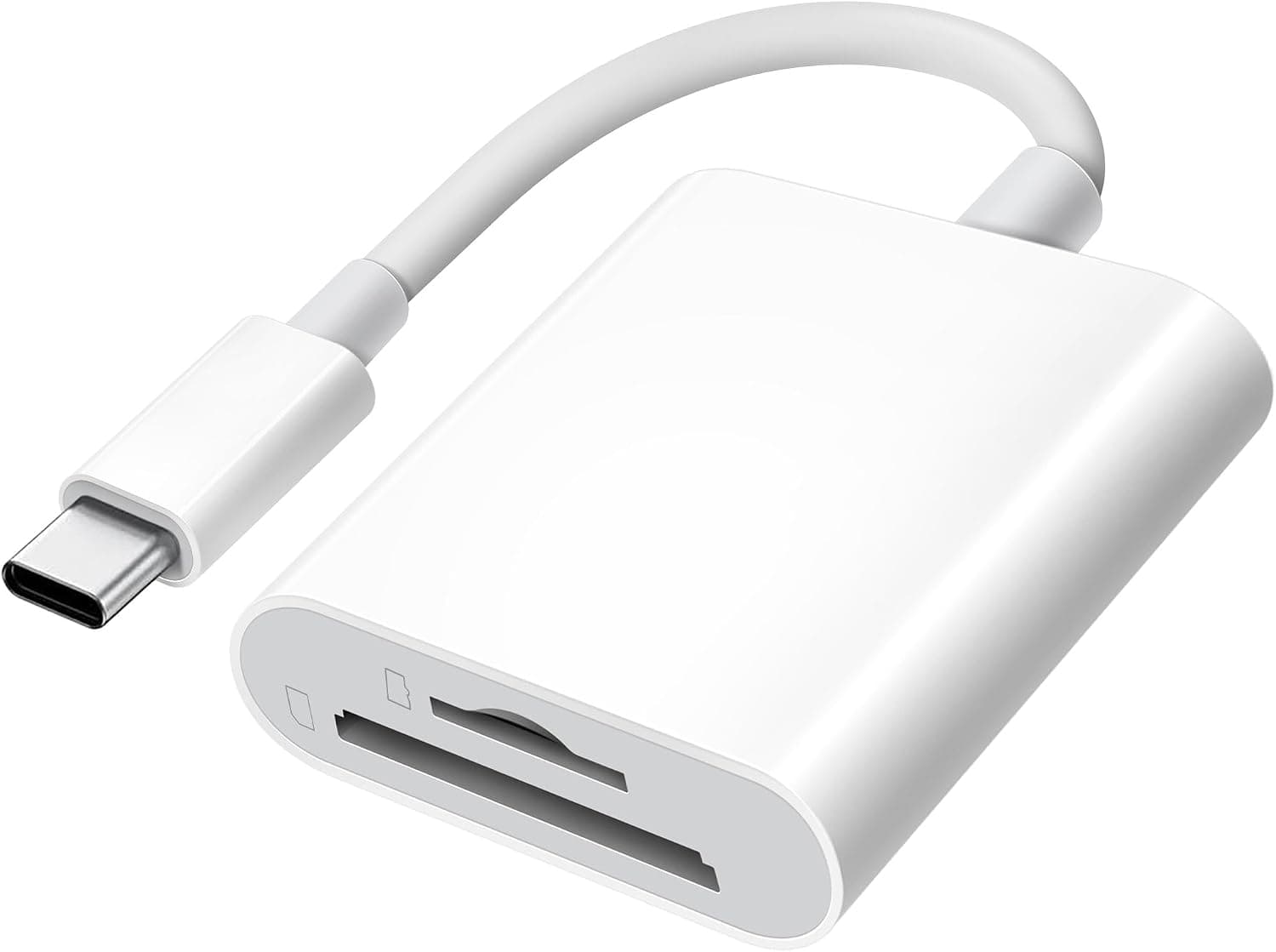
The xdgeLoad USB-C SD Card Reader is a two-slot reader that accepts both SD and microSD cards over a single attached USB-C cable. It targets iPhone 15/16, iPad, and MacBook users who want to pull photos and clips off camera, drone, or dash-cam memory cards without carrying a full desktop reader.
The cable is reinforced with 3.2mm TPE, the body is ABS, and operation is plug-and-play — no driver or vendor app required.
The short verdict: this is not a reader for ingesting tens of gigabytes of RAW every day. It is the reader you keep in the bag as insurance, for the day you need to move a few hundred photos onto a phone.
On Amazon.co.jp it was listed at ¥2,798 as captured on 2 September 2026 (sales and stock move that figure), with 2,809 reviews averaging 4.6 out of 5 — roughly a 92% positive rate.
That is a solid sample size for a budget accessory, but it means the product meets expectations for its price class, not that it competes with UHS-II or CFexpress hardware.
The single USB-C connector keeps neighbouring laptop ports free, and because the cable is captive there is no separate lead to leave at home.
Compatibility Guide
The only host interface is USB Type-C, on a cable moulded into the body. Supported media covers SD/SDHC/SDXC plus MicroSD/MicroSDHC/MicroSDXC, which spans essentially every card used in consumer cameras, action cams, and drones.
It is aimed at USB-C hosts — iPhone 15/16 series, iPad, MacBook — and supports OTG, so a phone can talk to the card directly.
Four things trip people up. Connector type: iPhone 14 and earlier use Lightning, so the reader will not physically fit.
Check whether your charging port is the oval USB-C shape before buying. Case interference: thick or ring-mounted cases can stop the plug seating fully, which shows up as a card that mounts but disconnects intermittently.
Hubs: inserting a USB-C hub or dock between reader and host can make enumeration unreliable — plug directly into the device first when diagnosing. File systems: SDXC cards ship formatted exFAT, which iOS Files and macOS read natively; cards formatted NTFS, or formatted oddly by a camera, may mount read-only or not show contents on iOS.
Format cards in the camera that will use them.
On iOS, use the Photos app import flow if you want images in the camera roll, or the Files app if you need the folder structure intact.
Understanding the Speed
Speed is the one specification the manufacturer does not publish — no MB/s figure, no USB generation. This article will not invent one.
Here are the reference points that let you reason about it.
| Standard | Theoretical ceiling | Practical range |
|---|---|---|
| USB 2.0 | 480Mbps | ~30–40MB/s |
| USB 3.2 Gen1 | 5Gbps | ~300–400MB/s |
| SD UHS-I bus | 104MB/s | ~80–95MB/s |
| SD UHS-II bus | ~312MB/s class | reader must support it |
The key point: even a USB 3.x reader is capped near 104MB/s by a UHS-I card, and a reader whose internals are USB 2.0 class will cap a fast card near 30–40MB/s.
At this price, plan for the lower assumption.
In practice, 300 five-megabyte JPEGs (about 1.5GB) finish in under a minute even at 40MB/s — a non-issue.
Video is different: 4K footage reaches several gigabytes per ten minutes, so dumping a 30GB card could take 10–20 minutes. Picking a few clips on a trip is comfortable; nightly full-card backups are not.
Versus the Alternatives
Branded two-slot USB-C readers from Lexar or TOMPOL state their USB generation, which makes throughput predictable — a fair reason to spend more. ProGrade Digital's dual-slot UHS-II and CFexpress readers are a different category entirely: tools for cutting ingest time in a paid workflow, at several times the price.
If you shoot CFexpress Type A or Type B, start there.
The xdgeLoad sits outside that ladder rather than on it. It is the spare that lives in a pouch and works when the main reader is forgotten or broken.
¥2,798 buys redundancy, not throughput.
Product Info
Specifications list two card slots, 3.2mm cable thickness, an ABS body, a USB Type-C connector, SD/SDHC/SDXC plus MicroSD/MicroSDHC/MicroSDXC media support, and compatibility with iPhone 15/16 series, iPad, and MacBook.
Only the reader is in the box; no drivers are needed.
Price was ¥2,798 on Amazon.co.jp as captured 2 September 2026.
Card readers see frequent coupons and swings, so confirm the current figure on the listing. Overseas marketplace listings for this model are inconsistent and not a reliable comparison.
User ratings, captured 1 September 2026, were 4.6 of 5 across 2,809 reviews (about 92% positive).
A sample that size suggests no catastrophic failure rate — but a 4.6 average implies a real tail of one-star reports, and for readers those cluster on "not recognised" and "drops mid-transfer".
Test every card you own as soon as it arrives, inside the return window. Warranty terms depend on the seller.
Best Use Cases
Travellers and outdoor shooters get the most from it: insert a card, review and transfer on an iPhone or iPad the same evening, post the keepers. The dual-slot layout suits anyone juggling SD from a mirrorless body and microSD from a drone, action cam, or dash cam.
MacBook owners without a built-in slot can plug straight into USB-C to preview footage before editing.
It is ideal for the "rarely needed, but definitely needed when needed" case — checking dash-cam footage after an incident, sharing a school event video on the spot. The 4.6/2,809 rating supports that light-duty use.
Things to Consider
Who should skip it. Anyone ingesting tens of gigabytes of RAW per session, anyone running UHS-II or V60/V90 cards who wants that speed, and anyone on CFexpress or XQD.
Building a paid workflow on a reader with no published throughput is a bad risk trade. Buy a reader that states its numbers.
Simultaneous slots are not guaranteed. Two slots does not mean both mount at once as separate volumes; budget readers often prioritise one slot internally.
Do not buy this expecting card-to-card copies.
Captive cable, captive lifespan. If the cable fails, the product fails.
The 3.2mm TPE reinforcement is conscientious for the price, but stuffing it into a bag with the strain relief folded over will still kill it.
Coil it loosely in a pouch.
USB-C only. USB-A desktops need an adapter, which adds another contact point and another failure mode.
Check the listing yourself. Amazon product pages in this category sometimes carry manufacturer, model, or compatibility fields that do not match the item shipped.
Do not rely on the registered details alone — confirm the connector shape and slot count from the product images. Listings advertising only "iPhone compatible" sometimes mix Lightning and USB-C variants on one page.
FAQ
Q: Does it work with iPhone?
A: Yes, with USB-C iPhone 15/16 models. Lightning iPhones (14 and earlier) cannot physically connect.
Q: Can I use SD and microSD at once? A: There are two slots, but simultaneous operation depends on the cards and host and is not a guaranteed feature.
Plan on one card at a time.
Q: How fast is it? A: The manufacturer publishes no figure, so no number can be stated.
Assume USB 2.0 class (roughly 30–40MB/s) at this price — under a minute for a few hundred photos, ten-plus minutes for a large 4K card.
Q: Can I use it with a PC?
A: Any USB-C MacBook or Windows laptop works directly. USB-A-only machines need an adapter.
Q: What if the card is not recognised? A: In order: remove the phone case and reseat, bypass any hub and plug in directly, reformat the card in the camera, then test a different card.
If it still fails, treat it as a defective unit and return it within the window.
Q: What does it cost?
A: ¥2,798 on Amazon.co.jp as captured 2 September 2026. Check the listing for the current price.
Product Disclosure (Amazon)
- Manufacturer: xdgeLoad
- Seller: Amazon US
- Fulfilled by: Amazon US
- ASIN: B0CKQTZB64
- Note: This article covers a manufacturer-made product based on Amazon listing details.