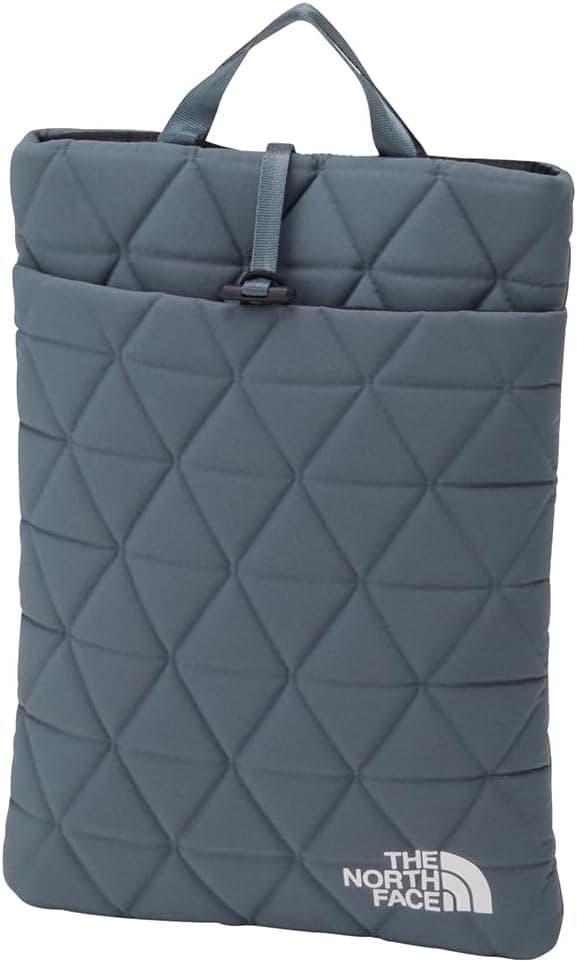
This article covers THE NORTH FACE(ザノースフェイス) PCケース Geoface PC Sleeve 13” スレートグレー, a slim sleeve for 13-inch class notebooks. Using only the published dimensions, weight, and review figures, this guide answers two practical questions: will your laptop actually fit, and what are you giving up by choosing a soft sleeve.
Overview
The short version: this is a light layer that protects a laptop inside a bag you already own. It is not a standalone commuter bag, and it is not a hard case built to survive a drop.
The stated figures are H32 x W23.5 cm outside, 125 g in weight, and a maximum laptop size of 31.4 x 21.9 x 1.8 cm.
Ratings are steady. The Amazon.co.jp listing shows 47 reviews at 4.1 stars (82% positive, captured 19 July 2026).
Note that 47 is a small sample: a handful of low scores can move the average by 0.1 to 0.2.
Confirm the fit before you weigh the star rating.
It carries outdoor-brand heritage, but what actually matters here is thinness and weight rather than field durability. Used as a bag-in-bag insert, it consumes almost none of the main bag's volume, and that is the core practical value.
Compatibility Guide
| Item | Stated value | What it means in practice |
|---|---|---|
| External size | H32 x W23.5 cm | Needs roughly 32 cm of straight vertical space in the host bag |
| Weight | 125 g | Under 10% of a typical 13-inch notebook |
| Max laptop size | 31.4 x 21.9 x 1.8 cm | All three dimensions must be at or under the limit |
The binding constraint is thickness: 1.8 cm.
Height and width can clear the limit and the laptop still will not go in if it is too thick. Slim 13-inch machines (the MacBook Air 13, ThinkPad X13, and Surface Laptop 13.5 families) generally land in the 1.1 to 1.6 cm range and have margin, but gaming 13-inch models and 2-in-1s with a bulky hinge often exceed 2 cm.
Check the thickness figure on the manufacturer's spec page for your exact model.
Next, look at the gap between the outer shell and the stated capacity. Against an outside size of H32 x W23.5 cm, the capacity is 31.4 x 21.9 cm, which leaves roughly 6 mm vertically and 16 mm horizontally.
Seams and padding live inside that gap, so a laptop sitting right at the limit will likely fit but slide in and out stiffly. If you are deciding by a few millimetres, a 14-inch-rated sleeve is worth considering.
Screen-size labels deserve care too. With 16:10 and 3:2 panels now common, a 13.5-inch machine can be taller than a 13.3-inch one.
Judge by measured dimensions, not by the inch number. Conversely, some 14-inch laptops physically fit if the chassis stays within 31.4 x 21.9 x 1.8 cm, though the rated support stops at 13 inches, so that is your own call.
The front slit pocket holds small items such as an AC adapter, a mouse, or cables. Be aware that bulky items there add to the sleeve's overall thickness and can stop it from sliding into a bag's laptop slot.
Keeping the adapter in a separate pouch often works out better.
Everyday Handling
At 125 g, the sleeve adds under 10% to a typical 1.0 to 1.3 kg notebook.
There is effectively no weight penalty for protecting the machine, which is the clearest thing this product gets right.
The strongest use case is rotating between bags. Keep the laptop in the sleeve permanently and moving between a tote, a backpack, and a carry-on no longer means handling a bare laptop.
You also stop caring whether each bag has a padded compartment.
What a sleeve protects is surfaces. It handles rubbing against other contents and the corner of a pen or adapter pressing in.
It is not designed for desk-height drops or heavy compression in a packed train. Buying it with those expectations will disappoint.
The supplied spec data says nothing about the closure type, lining material, or water resistance. If you plan to use it in the rain, check the product page, and in any case do not plan on carrying the sleeve alone through wet weather.
Product Info
Pricing varies by capture date. The listing showed 6,270 yen on 18 July 2026 and 4,389 yen on 19 August 2026 — roughly a 30% spread in about a month.
Treat either number as a snapshot only. If you are not in a hurry, watching the price for a few weeks can meaningfully change the outcome.
Both figures point to the same Amazon.co.jp ASIN (B0G4CSYMBC).
In the collected data one entry is labelled Amazon US, but the link resolves to Amazon.co.jp and the currency is Japanese yen, so do not read it as a US price.
The eBay entry is a search-results page, so no specific amount was captured.
On reception, the numbers are 47 reviews at 4.1 stars (82% positive, captured 19 July 2026).
That is above average for a sleeve in this bracket, but the sample is small enough that another few dozen reviews could move it. The Slate Gray colourway is plain apart from the logo, which keeps it unobtrusive in an office or a lecture hall.
Distribution is said to have started in late 2024, though the spec data does not state a release date, so confirm it on the product page. Nothing ships with it beyond the sleeve itself, and warranty terms vary by retailer — check the seller's defect policy before ordering.
How It Compares
| Option | What it protects against | Weakness |
|---|---|---|
| Slim sleeve (this product) | Abrasion, light knocks, shifting inside a bag | No real defence against drops or compression |
| Hard shell case | Drops and crushing | Thicker and heavier; limits which bags fit it |
| Backpack with a laptop compartment | Rear impacts, stability when set down | Requires replacing the bag |
| Snap-on shell (lid and base) | Scratches and daily scuffing | Model-specific and can affect cooling |
This product sits in the first row. It adds protection without changing the bag you already carry, at minimal cost and minimal added bulk.
If you need drop protection, buy a hard shell; if you want to rethink how you carry everything, a bag with a dedicated compartment is the better answer.
If you arrived here looking for a desktop PC chassis, note that the target is different: this is a fabric sleeve for notebooks, not an enclosure for a motherboard and power supply.
Best Use Cases
It suits commuters and students who carry a 13-inch laptop daily and already have a bag they like. You add protection without replacing anything, and at 125 g the total carry weight barely changes.
For the specific goal of stopping a laptop from sliding around inside a bag, it works directly.
It also helps people who rotate bags and those who walk to a cafe or library with the laptop alone. Keeping it sleeved avoids scuffing the lid when you set it on a table or shelf.
Creators who take a laptop outdoors will appreciate how little space it takes in a pack.
Skip it in three cases: your bag already has a padded laptop compartment (you gain only thickness), your laptop is thicker than 1.8 cm, or you want to carry the sleeve on its own as a bag.
That last use needs a handle, a strap, and genuine water resistance.
Before You Buy
Thickness is the trap. Buying on the 13-inch label alone fails for machines over 1.8 cm, which includes most gaming notebooks and hinge-heavy 2-in-1s.
Measure height, width, and thickness, and check each one against 31.4 x 21.9 x 1.8 cm.
Do not expect drop protection. The padding softens abrasion and small knocks inside a bag.
For a fall onto a hard floor or heavy weight pressing down, the laptop's own chassis is what saves it.
Prices move a lot. Two captured figures exist, 6,270 yen and 4,389 yen.
Any amount quoted in an article is a snapshot, so decide from the current price on the product page.
Watch for listing inconsistencies. In the source data this product was filed under a desktop PC case category, and a link to the Japanese Amazon store carried an Amazon US label.
Listing metadata can be wrong in the same way, so confirm the product from the images and title before ordering, and trust manufacturer figures over aggregated listing fields.
The review sample is small. Forty-seven reviews show a trend but not long-term durability.
Nothing conclusive can be said yet about stitching or the closure over years of use.
FAQ
Q. Will a 14-inch laptop fit? A.
Rated support stops at 13 inches, but the real test is dimensional: a chassis within 31.4 x 21.9 x 1.8 cm may physically fit.
If the margin is only a few millimetres, expect a tight slide.
Q. What if my laptop is slightly over 1.8 cm thick? A.
Fabric stretches a little, but forcing it loads the material and seams permanently. Above the limit, a 14-inch-rated sleeve will last longer.
Q. Can I carry the AC adapter too? A.
The front slit pocket takes a compact adapter, a mouse, or cables. A bulky adapter makes the whole sleeve thicker and may stop it fitting a bag's laptop slot.
Q. Can I add a tablet or documents? A.
Yes, if the combined thickness stays within the limit. Stacking a rigid tablet against the laptop tends to press anything trapped between them into the screen, so separate them when you can.
Q. How much does it cost? A.
Captured figures are 6,270 yen on 18 July 2026 and 4,389 yen on 19 August 2026. The spread is wide, so check the current price on the product page.