This article looks at the StarTech.com PEX1PLP parallel port expansion card: which systems it fits, and where people actually run into trouble.
Overview
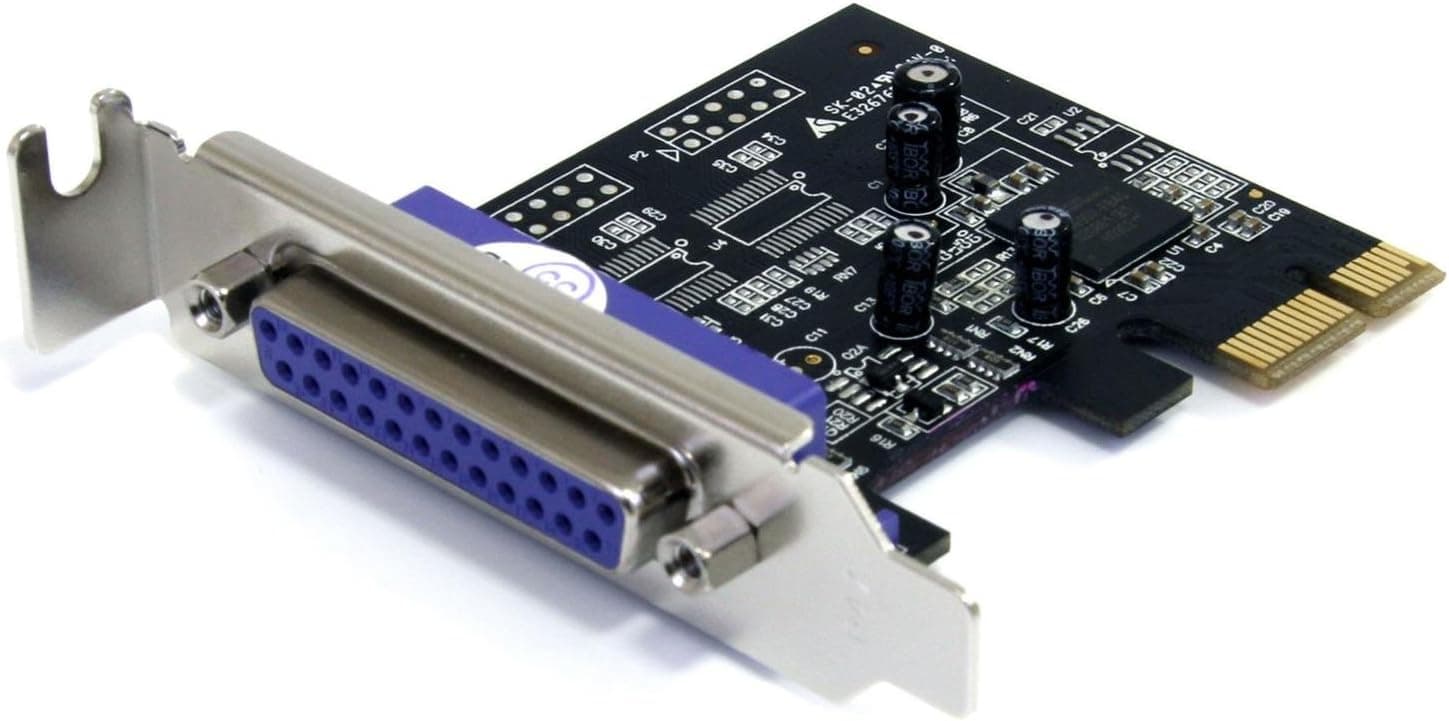
The PEX1PLP is a low-profile expansion card that adds one DB25 parallel port through a PCI Express x1 slot. To be clear about what it is: this is not a performance upgrade.
It exists so that parallel-port hardware you already own keeps working on a modern PC that no longer has an LPT header. For the people who need it there is no real substitute; for everyone else it is unnecessary.
The controller is the Oxford OXPCIe952, a native single-chip design that hangs the parallel port directly off PCIe rather than stacking bridge chips, and it supports SPP, EPP and ECP modes. On Amazon.co.Check the retailer's page for the latest user reviews.
The target buyer owns Centronics / IEEE 1284 equipment: dot-matrix and older laser printers, plotters, industrial controllers, EPROM programmers, or POS peripherals.
Compatibility Guide
The requirement list is short: one free PCIe x1 slot. Being an x1 card, it also drops into x4, x8 and x16 slots without issue.
It is rated to PCIe 1.1a, but parallel signalling tops out in the single-digit Mbps range, so the older PCIe revision costs you nothing on a current motherboard.
| Item | Spec | What it means in practice |
|---|---|---|
| Interface | PCI Express x1 (PCIe 1.1a) | Works in x4/x8/x16 slots too |
| Chipset | Oxford OXPCIe952 (single chip) | Recognised by in-box OS drivers |
| Port | 1x DB25 female / SPP, EPP, ECP | Standard printer cables fit |
| Brackets | Low-profile (pre-installed) / full-profile | Slim and ATX chassis both covered |
| Aux power | None required (slot powered) | No PSU headroom calculation needed |
| Weight | Approx. 70g | Bracket screw alone holds it fine |
One detail trips people up repeatedly: the card ships with the low-profile bracket already installed. If you are building into a normal ATX case, you must swap in the bundled full-profile bracket yourself — two screws, but plenty of buyers open the box and assume the bracket is wrong.
On the flip side, slim and 1U chassis take the card as-is, which is a genuine advantage.
Because it draws only slot power, there is no recommended PSU wattage to worry about. Do check physical clearance, though: a DB25 connector is bulky by modern standards, and a graphics card backplate, an oversized cooler, or SATA cable routing can eat the space beside the slot.
Windows and Linux are the supported platforms, and OXPCIe952 devices are generally picked up by in-box drivers. Even so, automatic recognition on the newest OS builds is not something to assume.
For business deployments on recent Windows releases, check the driver situation on the StarTech.com product page before ordering.
Product Info
Pricing moves a lot on this listing. The Amazon page showed ¥2,199 as captured on 2 June 2026 and ¥3,799 as captured on 27 August 2026 — about ¥1,600 of drift on the same product in a few months, driven by stock levels and which seller is active.
Treat both figures as snapshots from when this article was written, not current prices, and confirm the live price on the product page. Units also circulate on overseas marketplaces such as eBay, but once shipping and import handling are counted, buying domestically usually wins on total cost.
In the box: the card with the low-profile bracket fitted, a full-profile bracket, and installation documentation. StarTech.com covers the card with a 2-year warranty and unlimited free technical support.
That open-ended support matters more than it sounds for legacy gear, where isolating a fault between the PC, the card and the device is genuinely hard and having someone to ask has real value.
This is an entry-level part in market terms. Unbranded parallel cards sell for less, but their controllers are undocumented and reports of them dropping off after an OS update are common.
Best Use Cases
The card is a clear fit for:
- Keeping an older printer or plotter in service. The classic case: the hardware still works, but the replacement PC has no parallel port. Against the cost of a new printer, an expansion card is a rounding error.
- Refreshing industrial or lab control PCs. Controllers, measurement rigs and EPROM programmers still ship with parallel interfaces. When the instrument cannot be replaced, adding the port back on the PC side is the only practical route.
- Running POS peripherals. Receipt printers and cash-drawer interlocks let you swap the PC without disturbing a live system.
- Slim and small-form-factor builds. The low-profile bracket is already fitted, so nothing extra is needed.
- Retro computing and electronics projects that want real I/O rather than a translation layer.
Before You Buy
This is the part worth reading twice. Adding a parallel port and getting your specific device working are not the same thing.
First, understand how this differs from a USB-to-parallel cable. Most cheap USB adapters only present themselves as a printer class device and fail at direct device control — EPROM programmers, proprietary control protocols, or software that talks to port registers.
A PCIe card like this appears to the OS as addressable I/O, which is why it works where adapters do not. The corollary: if all you want is to print, a cheaper USB adapter may well be enough. Try one you already own before buying a card.
Second, do not count on the port landing on LPT1 / I/O address 0x378. The OS assigns resources to PCIe devices dynamically, and software written in the DOS era often hard-codes those values.
You may need to reassign the port number in Device Manager or point the application at the right port. "Plug it in and old software works" is not a safe assumption — this is inherent to running legacy gear on modern systems, not a flaw in the card.
Third, confirm the connector before ordering a cable. The spec sheet lists a DB25 female connector, which accepts the usual DB25-male to Centronics-36 printer cable, but some equipment needs something else.
If you do not already own the cable, order it alongside the card or you will not be connecting anything on delivery day.
Fourth, ISA-era assumptions and tightly timed control loops are not guaranteed. A parallel port behind PCIe does not behave identically to a Super I/O chip soldered to the motherboard.
Home-grown control code that depends on microsecond timing may misbehave. If that is your use case, plan a fallback — a dedicated control board, or keeping the old machine offline but intact.
Finally, be sceptical of the listing data itself. Expansion card part numbers look alike, and marketplace listings sometimes carry specs or manufacturer details belonging to a different product; the price, as shown above, also swings widely between captures.
Before checking out, look at the product photo — bracket shape, the part number printed on it, the single port — and confirm with your own eyes that it is a PEX1PLP.
Alternatives Compared
There are three realistic options: a PCIe parallel card, a USB-to-parallel adapter, or keeping the old PC alive. The adapter is cheapest and fine for printing, but fails outside that.
Keeping the old machine costs nothing up front while accumulating end-of-support and hardware-failure risk, and it should not stay on a network. The PCIe card is the middle path: you keep a current, supported PC and bolt the legacy I/O back on.
If you have a spare slot, start here.
StarTech.com also makes IEEE 1394 and serial (RS-232C) expansion cards.
Legacy migrations often need parallel and serial, so inventory the ports you need first and order together rather than opening the case twice.
FAQ
Q. Will it work in a laptop? A.
No. This is a desktop PCIe x1 card.
For laptops, look at a USB adapter or a Thunderbolt expansion chassis.
Q. Does it need auxiliary power?
A. No. It runs entirely on slot power, so there is no PSU calculation and no extra cable to route.
Q. Does it fit a standard ATX case?
A. Yes, but swap the pre-installed low-profile bracket for the bundled full-profile one first.
Q. Do I need drivers? A.
It is designed to work with in-box Windows and Linux drivers. Support varies by OS release, so check the manufacturer page for your version before buying.
Q. My old control software cannot find the port. A.
The assigned port number and I/O address most likely differ from what the software expects. Check and change the port number in Device Manager, or specify the port in the application.
Q. Can one card drive two parallel devices?
A. No — there is a single port. Fit two cards, or look for a multi-port model.
Product Disclosure (Amazon)
- Manufacturer: StarTech.com(スターテック)
- ASIN: B004G7O2AC
- Note: This article covers a manufacturer-made product based on Amazon listing details.