This article covers the STARGEAR Starlink Gen 3 Ehternetアダプター, focusing on two things: how to confirm your hardware generation, and what outdoor cabling actually involves.
Overview
This is a wired LAN accessory that lets Starlink Standard Gen3 equipment be connected over RJ45 instead of Wi-Fi. The stated compatibility list has exactly two entries, Starlink Standard Gen3 Dish and Starlink Standard Gen3 Router, and that single line decides almost everything about whether this product fits you.
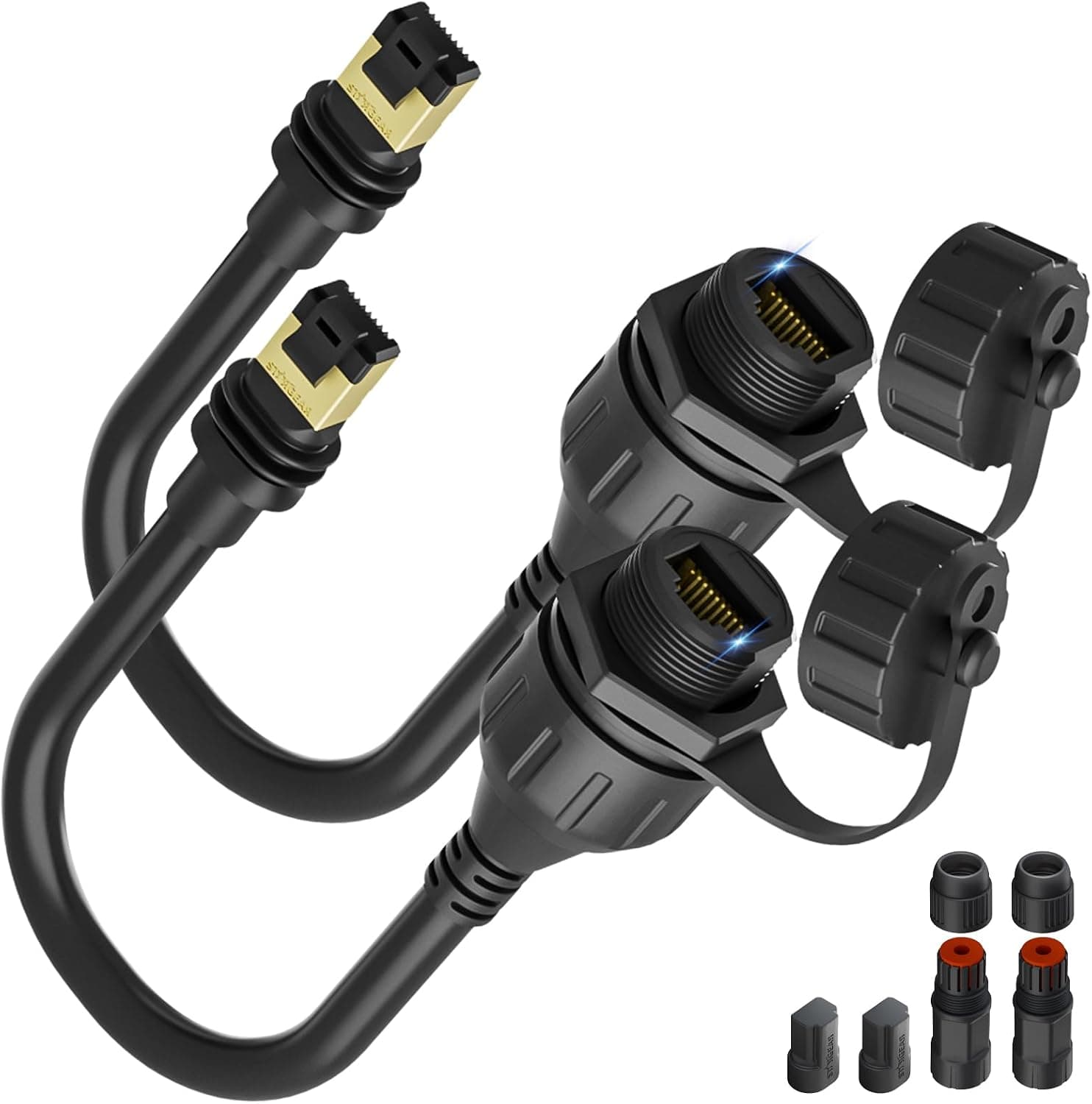
The connector is RJ45, the colour is black, the listed weight is 0.23 kg, and two waterproof extension cables are included.
For context on reception: as of 18 September 2026 the Amazon.co.Check the retailer's page for the latest user reviews.
Eighty-four is not a large sample, so read it as "no widespread reports of it failing" rather than "guaranteed good".
| Your situation | Where this product lands |
|---|---|
| You run Starlink Standard Gen3 and want wired links | Strong candidate |
| You run Gen2, Mini or another generation | Not supported |
| You need a cable run that goes outdoors | The two waterproof extension cables help |
| You want more LAN ports on a PC | Wrong product; look at PCIe or USB NICs |
| You want more wired ports around the house | Wrong product; that is a switch |
This is not a general-purpose LAN accessory. It is tied to one hardware generation.
Compatibility Guide
The manufacturer's note is blunt: Gen3 only, not compatible with other Starlink generations or standard routers. So the one check that matters before ordering is whether your hardware really is Standard Gen3.
Starlink has changed dish shapes and connector designs across generations, and accessories for older kits do not automatically carry over. Confirm the generation from your order history, the original box, or the device information in the Starlink app.
Judging by the dish's shape alone is risky.
On the indoor side this behaves like ordinary Ethernet. RJ45 means off-the-shelf Cat5e or Cat6 works, and 1000BASE-T runs up to 100 m by spec.
The cable between the Starlink dish and router, however, uses a proprietary connector and is not something to substitute with a generic LAN cable, however similar it looks.
Practical installation points that trip people up:
- Mounting: at 0.23 kg the unit is light enough to be dragged by cable tension. Have cable ties or clips ready if you are fixing it to a wall or shelf.
- Connector orientation: point outdoor connections downward and add a drip loop so water runs off before reaching the plug. A waterproof cable does not help an upward-facing connector that collects water.
- Wall penetration: seal the hole with putty or a grommet. Skipping this turns into condensation and insect problems years later.
- Surge protection: any metallic run that goes outdoors is an induced-lightning path. In storm-prone areas, an Ethernet surge protector right where the cable enters the building is standard practice. This is general outdoor-wiring hygiene, not specific to this product.
What Going Wired Does and Does Not Fix
Wired connections reliably remove indoor problems: 2.4 GHz congestion, interference from neighbouring access points, microwave noise, distance and wall attenuation.
Dropouts in video calls and VPN sessions often live in that layer, and they disappear once the device is on a cable.
What does not change is the satellite link itself. Obstructions, weather and congestion-hour slowdowns behave the same whether your gear is wired or wireless.
"I went wired and my game still spikes" is usually this confusion. Going wired subtracts local noise; it does not add link quality.
On bandwidth, a gigabit wired link is very unlikely to be the bottleneck for typical household Starlink use — the satellite link sets the pace. Expect fewer wobbles and the ability to attach wired devices (NAS, desktop, console, wired access point), not higher peak speeds.
Product Info
As of 18 September 2026 the Amazon.co.Check the retailer's page for the latest price.
Sales, exchange rates and seller changes move that, so check the listing at purchase time. The eBay entry is a search reference rather than a quoted figure.
To compare regions, look the product up in each store yourself.
| Item | Value |
|---|---|
| Compatible devices | Starlink Standard Gen3 Dish / Starlink Standard Gen3 Router |
| Connector type | RJ45 |
| Weight | 0.23 kg |
| Colour | Black |
The box contains the adapter and two waterproof extension cables. Two cables is quietly useful: you can split the run between the outdoor and indoor legs, or extend when the first length falls short.
The flip side is that you should measure the route first. A run that goes from the roof, down a wall and around a window frame is always longer than it feels.
How to Compare It With Official Parts
Official accessories, where you can get them, have the edge on tracking future changes to Starlink hardware. Which is right depends on what you can actually buy today and how much of the outdoor work you want to do yourself — not on price alone.
Who It's For
- Starlink Standard Gen3 owners consolidating the house onto cable. The more stationary devices you have — desktop, NAS, console, wired access point — the bigger the gain.
- Anyone who has to run cable outdoors. Two waterproof extension cables remove one sourcing decision.
- Remote workers and students who care about "not dropping" more than about peak throughput. For killing indoor instability, the cost-to-benefit is easy to see.
- Not for people unhappy with raw Wi-Fi speed. That is a link or router-placement problem, and a wired adapter will not solve it.
Before You Buy
If the generation is wrong, nothing else matters. Support covers Standard Gen3 dishes and routers only — not other generations, not ordinary home routers.
This is the most likely reason for a return, so confirm your hardware before ordering.
Watch the spelling in the product name. The listing spells it "Ehternet", a misspelling of Ethernet.
Searching the correct spelling may not surface it, so try both. If several similar listings appear, match them by image and ASIN.
**Do not take the listing metadata at face value. Amazon listings sometimes carry inconsistent registration details, and the shipper affects delivery time, customs and import fees, and return terms. Check the product images, title and shipper yourself before ordering.
The cables are weatherproof; the adapter is not. The unit's own water resistance is limited.
Plan the run so the adapter sits indoors, or at least out of direct rain. If you must use an outdoor enclosure, pick a vented rain-proof box with a drain — fully sealing it invites internal condensation.
The review base is 84 entries. A 4.6 average is good, but it is not enough accumulated history to judge long-term durability: UV degradation outdoors, connector contact issues, weatherproofing after several years.
Assume an annual visual inspection of the outdoor section.
Accept the third-party trade-off. This is not an official accessory, so there is no guarantee it tracks Starlink firmware or hardware changes the way first-party parts do, and support runs through the seller.
That is what the price buys you.
FAQ
Q. Will it work with a non-Gen3 dish or router? A.
No. Compatibility is limited to Starlink Standard Gen3 dishes and routers; other generations are out, physically included.
Q. Will it make my connection faster? A.
Not necessarily. The satellite link sets the speed; going wired fixes Wi-Fi interference and distance issues.
Expect stability, not higher peak numbers.
Q. Are the bundled cables enough for an outdoor run? A.
It depends on your route, so measure first. You will still need sealing at the wall penetration, downward-facing connectors with a drip loop, and surge protection.
Waterproof cable does not rescue sloppy installation.
Q. Can I attach it to a regular home router? A.
Compatibility is stated for Starlink Gen3 gear only. The house side is ordinary RJ45 Ethernet, but this is not a product to buy for non-Starlink use.
Q. What does it cost? A.
¥10,261 on Amazon.co.jp as captured on 18 September 2026.
Prices move a lot, so confirm on the product page when you buy.
Product Disclosure (Amazon)
- Manufacturer: STARGEAR
- Seller: Amazon US
- Fulfilled by: Amazon US
- ASIN: B0D9NB1SQC
- Note: This article covers a manufacturer-made product based on Amazon listing details.