Overview
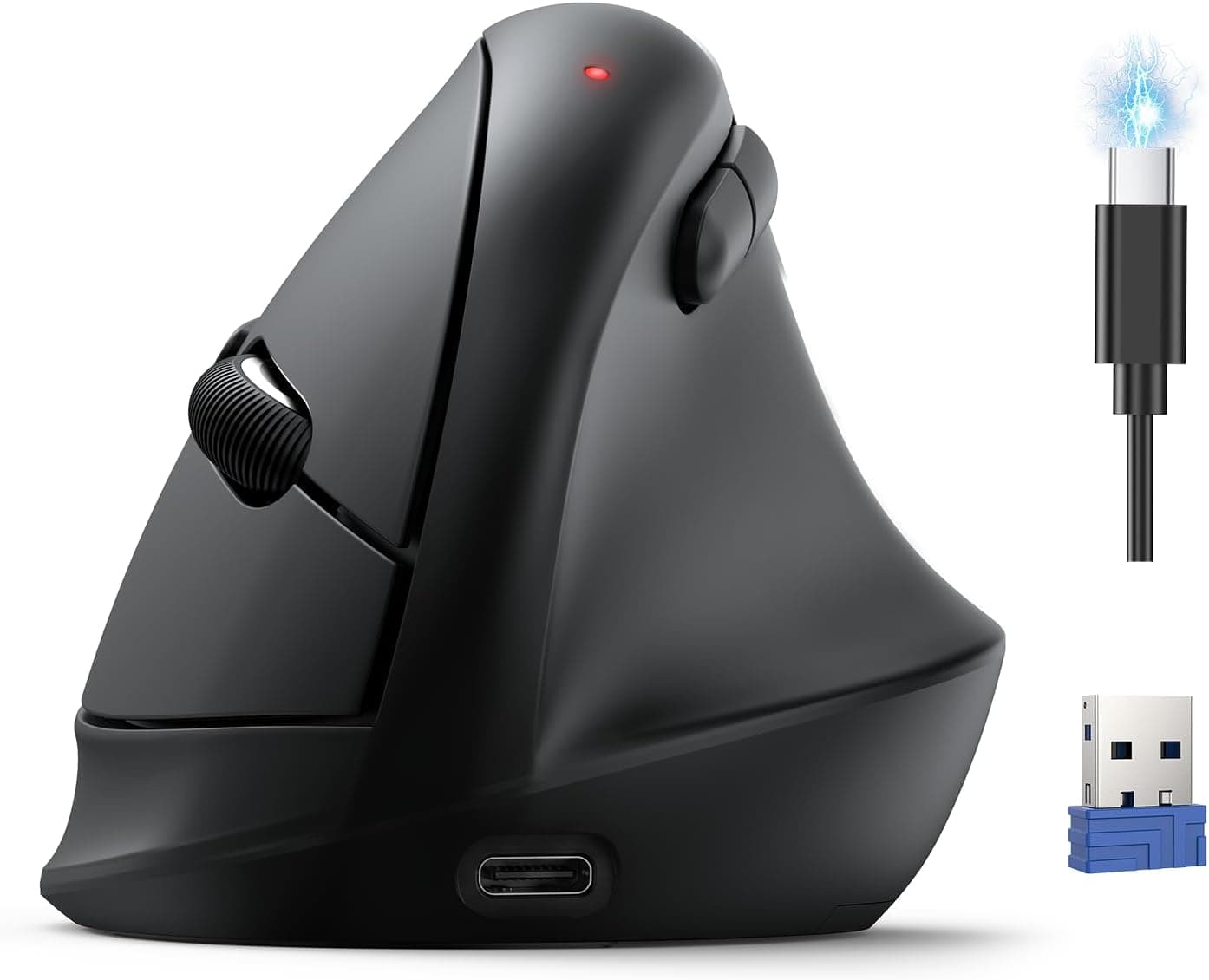
The seenda MOU-302 is a vertical wireless mouse that pairs a handshake-angle grip with a volume knob and silent switches. The short version: it is built for office and work-from-home users who spend all day moving between keyboard and mouse, not for gaming or precision work.
It uses an optical sensor with a 1600 DPI ceiling, seven buttons, a single AAA battery, and both 2.4GHz receiver and Bluetooth connectivity.
Amazon.co.Check the retailer's page for the latest user reviews.
What a Vertical Mouse Actually Changes
A vertical shape lets you hold the mouse without pronating your forearm. A conventional flat mouse locks your palm face-down for hours with the forearm bones crossed; a vertical grip approximates a handshake position, which many people find reduces tightness through the wrist and forearm.
Results vary. If the real cause is your elbow, shoulder, or desk height, a new mouse will not fix it.
There is also an adjustment period. For the first week or two, the cursor will overshoot and fine dragging or resizing will be noticeably slower.
Most people recover their old speed within two weeks, so this is not a switch to make the day before a deadline.
The MOU-302's distinguishing feature is the volume knob. Lowering volume during a call or nudging playback level while watching video no longer means moving your hand back to the function-key row.
It sounds minor, but reducing how often you leave the mouse fits the ergonomic goal well.
Compatibility Guide
The mouse works over 2.4GHz using the bundled USB receiver and over Bluetooth, with no driver installation required.
Supported operating systems are Windows, macOS, and Chrome OS. Multi-pairing covers up to three devices, switched with a button on the mouse itself.
The practical snags are physical. Thin laptops and tablets without a USB Type-A port cannot take the receiver directly, so plan on Bluetooth or a hub in that case.
On a desktop, plugging the receiver into a front port or a hub near your hand tends to be more stable than the rear I/O panel, where the metal case blocks signal.
OS differences are worth checking. Movement, left/right click, and the wheel behave the same everywhere, but the volume knob, forward/back buttons, and DPI switching depend on how the OS interprets them, and macOS or Chrome OS may not match Windows exactly.
If a Mac or Chromebook is your main machine, confirm which features are listed as supported on the product page before buying.
Power comes from one AAA battery — this is not a rechargeable mouse. That cuts both ways: a spare battery gets you running again in seconds, but people used to USB-C charging will find it a chore.
If you use NiMH rechargeables, note their 1.2V nominal output versus 1.5V, which can make battery indicators and runtime differ from spec.
Product Details
| Item | Value |
|---|---|
| Connectivity | 2.4GHz / Bluetooth |
| Sensor | Optical |
| Buttons | 7 |
| Max DPI | 1600 |
| Silent click | Yes |
| Multi-pairing | Up to 3 devices |
| Power | 1x AAA battery |
| OS support | Windows / macOS / Chrome OS |
Some context on those numbers. A 1600 DPI ceiling is plenty for one or two 1080p displays and everyday office work.
On a 4K panel or a multi-monitor desk, though, you will lift and reposition the mouse repeatedly to cross the screen, and the ceiling starts to feel low. Gaming mice advertising 8000 or 26000 DPI serve a different purpose — higher DPI is not automatically better build quality — but if you want to move fast across a wide desktop, the limit matters.
Seven buttons is roughly left, right, wheel click, forward, back, DPI, and device switch. This is not a product built around deep macro software; it covers standard actions competently.
Silent clicking means muted, not silent — you still feel and faintly hear actuation, but it is far less intrusive in a shared office or a house where people are asleep.
How to Read the Price
Prices are as captured and will change. On Amazon.co.Check the retailer's page for the latest price.
However, the same listing also carries an earlier record of ¥11,429 captured in June 2026 — nearly a 3x gap. For a vertical mouse with these specifications, the ¥3,999 figure is the plausible one; the higher record likely came from a collection error, a bundle, or a different color variant.
So check the current price on the product page yourself before buying. The figures here mean only that they were recorded at those moments.
Fit by Use Case
| Use case | Verdict | Why |
|---|---|---|
| Documents, spreadsheets, browsing | Good fit | 1600 DPI and 7 buttons are sufficient |
| Remote work with many calls | Good fit | Volume knob speeds up level changes |
| Desktop + laptop on one desk | Good fit | Three-device pairing covers it |
| Photo and video editing | Conditional | Pixel-level work takes adjustment |
| 4K or multi-monitor | Conditional | 1600 DPI ceiling means more lifting |
| FPS and competitive gaming | Poor fit | DPI, shape, and design intent all wrong |
The strength here is comfort over hours, not precision. If precision work is your main job and comfort is a secondary goal, the productivity dip during the adjustment period may cost more than the comfort gains.
Who It Is For
The best match is someone at a computer six or more hours a day who feels tightness in the wrist or forearm by late afternoon, working mainly in documents, spreadsheets, and a browser. In that workload the 1600 DPI ceiling almost never becomes a limitation.
Silent clicks pay off in open-plan offices, late-night sessions, and video calls where a microphone would otherwise pick up every click.
It also suits people running a personal desktop alongside a company laptop who do not want two mice on the desk — three pairing slots cover PC, work laptop, and a tablet. Finally, if you have never tried a vertical mouse and want to find out whether the shape suits you, this price tier is a sensible way to test the idea.
A low cost of being wrong is itself a feature.
Before You Buy
Hand size and grip style matter. A vertical shell offers little room to adapt — you cannot switch to a claw or fingertip grip the way you can on a flat mouse.
Larger hands tend to drag the little finger on the desk; smaller hands may struggle to reach the thumb buttons comfortably. Check the listed dimensions against your palm length if you can.
Gaming is clearly out of scope. Beyond the 1600 DPI ceiling, the vertical shape is poorly suited to fast flick movements.
If gaming is even a secondary use, look at a purpose-built mouse instead.
It is not rechargeable. One AAA battery drives it, so without spares on hand you will lose working time when it dies.
Rechargeable cells can also make the battery indicator unreliable due to the lower nominal voltage.
**Watch for price and listing inconsistencies. Listing metadata — price, color, bundle contents — is not always accurate, so verify the product images, title, color, and what is included match what you intend to buy before ordering. Color variants in particular can carry different prices.
**Discount the review count. Long-term issues such as wheel chatter or knob responsiveness typically surface months in, and this sample size cannot tell you about them yet.
FAQ
Q. Will a vertical mouse cure my wrist pain? A.
It is not a medical device. Reducing forearm rotation can ease posture-related strain, but if you have symptoms, see a healthcare professional first.
Desk height, chair height, and keyboard position are often the bigger factors.
Q. How long is the adjustment period? A.
Commonly one to two weeks before speed returns to normal. Fine dragging suffers most at first, so switch during a quieter stretch of work.
Q. Do the volume knob and side buttons work on a Mac? A.
Core mouse functions work fine, but extra buttons and the knob depend on OS-side support. If macOS or Chrome OS is your main platform, confirm the per-feature compatibility list on the product page before buying.
Q. How long does the battery last? A.
No runtime figure is stated in the specifications available here, so no number is claimed. What is confirmed is single-AAA operation, so keeping a spare on hand is sensible.
Q. Should I use 2.4GHz or Bluetooth? A.
Use the 2.4GHz receiver for the most consistent response; use Bluetooth to free a port or switch between machines.
Since both are supported, running 2.4GHz on your main PC and Bluetooth on a second device works well.
Product Disclosure (Amazon)
- Manufacturer: seenda
- Seller: Takumido
- Fulfilled by: Takumido
- ASIN: B0G1XTSC3L
- Note: This article covers a manufacturer-made product based on Amazon listing details.