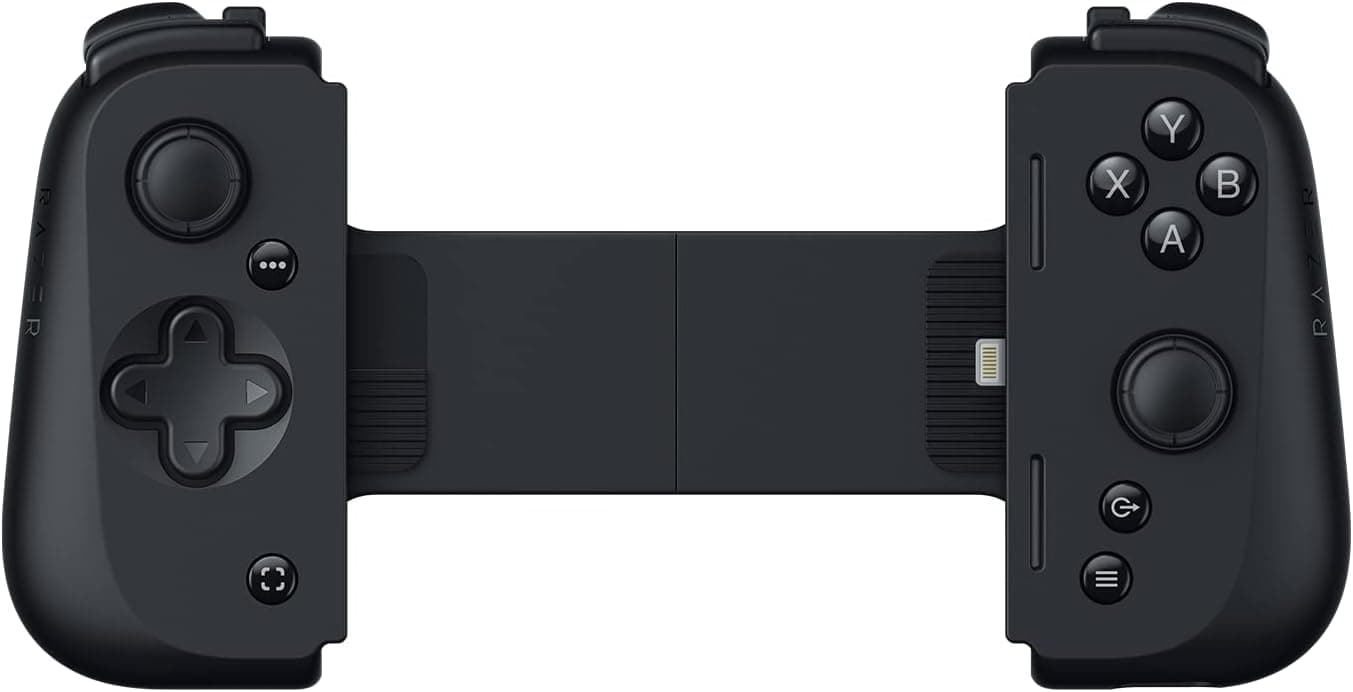
The Razer Kishi V2 is a clamp-style mobile controller that grips an iPhone from both sides and turns it into something close to a handheld console. Because it plugs directly into the Lightning port rather than pairing over Bluetooth, input lag and battery management simply stop being concerns.
This article works through what the Amazon.co.jp rating of 4.0 out of 5 stars across 341 reviews actually reflects, which iPhones can genuinely use it, and where you should expect to compromise.
Overview
The Kishi V2 targets people who want physical controls for cloud gaming and native mobile titles. A collapsible bridge extends the body so the phone sits locked between two grips.
The short verdict: if you still carry a Lightning iPhone and play Xbox Game Pass Ultimate or GeForce NOW away from home, this remains a strong option. If you have moved to a USB-C iPhone, it will not physically connect at all.
The control layout follows console conventions — two clickable analog sticks, a low-latency D-pad, face buttons, shoulder buttons, triggers, and two programmable buttons. Those programmable buttons matter more than the spec sheet suggests, since they let you remap awkward inputs per title.
In mobile shooters, where touch controls break down the moment you need to move, aim, and fire at once, the difference is immediately obvious.
Amazon.co.jp lists 341 reviews at 4.0 out of 5 stars as of the June 2026 capture.
For this product category that is a solid sample size and a stable score. But 4.0 does not mean flawless — the caveats section below is essentially an explanation of where that missing star comes from.
Compatibility Guide
There is really only one question to answer first: does your iPhone have a Lightning port? The stated connection type is wired Lightning only, with no Bluetooth pairing whatsoever.
Officially supported models are the iPhone X, 11, 12, 13, and 13 Max. iPhone 15 and later use USB-C, so the connector will not mate, and adapter workarounds are not practical with a clamp design.
USB-C phone owners should look at a USB-C generation controller instead.
The second constraint is your case. As the compatibility notes state plainly, the phone case must be removed.
The bridge travel and the Lightning plug depth are dimensioned around a bare iPhone, so even a slim case can stop the plug from seating fully or prevent the phone from sitting properly in the grips. If you normally run a thick rugged or folio case, budget for taking it off every session.
That is a deliberate design tradeoff rather than a defect, but it is the kind of thing that becomes a complaint after purchase.
Software compatibility is straightforward. iOS recognizes it as a standard game controller, so any iOS game advertising controller support should work without setup.
On the cloud side, Xbox Game Pass Ultimate, Amazon Luna, GeForce NOW, and Steam Link are listed as supported. Native titles include Call of Duty Mobile (iPhone), Fortnite, Minecraft, Genshin Impact, and Asphalt 9: Legends.
It also functions as a wired PC controller over USB, so it can serve double duty.
| Check | Requirement | What it means |
|---|---|---|
| Port | Lightning only | iPhone 15 and later (USB-C) will not work |
| Case | Must be removed | Thick-case users will find this tedious |
| Connection | Wired, no pairing | No charging, no battery to manage |
| PC | Works over USB | Doubles as a desktop controller |
| Games | Standard controller detection | Touch-only titles gain nothing |
The last row is the one most people overlook. A mobile game without controller support cannot be played with any controller, however good.
If you have a specific title in mind, check its settings menu for a controller option before buying.
Product Info
Pricing varies sharply depending on when it was captured. The Amazon listing showed ¥14,990 as of June 4, 2026, while an August 27, 2026 capture recorded ¥28,523 on the same page.
That kind of spread usually appears when manufacturer stock thins out and third-party sellers set the price. Treat the figures here as reference points only and check the current price and seller on the product page before ordering. If you see a price far above the original retail level, compare it against current successor models before committing.
On specifications: wired Lightning connection, supported models iPhone X / 11 / 12 / 13 / 13 Max, two clickable analog sticks, a low-latency D-pad, face buttons, shoulder buttons, triggers, and two programmable buttons. Supported services are Xbox Game Pass Ultimate, Luna, GeForce NOW, and Steam Link, with PC support over USB.
Since it draws power through the port, there is no internal battery and no chance of finding it dead when you want to play.
The review score sits at 4.0 out of 5 across 341 reviews as of June 4, 2026.
For a product with hundreds of reviews, that pattern typically means it works as expected for most buyers while a meaningful minority hit a mismatch. Case removal, Lightning port fit, and grip ergonomics are the usual contents of that minority.
How It Compares
Among clamp-style controllers, the port is the biggest fork in the road. Where this model is Lightning-only, later generations and competing products use USB-C and therefore cover USB-C iPhones, Android phones, and some tablets.
If your devices have already moved to USB-C, or will at your next upgrade, matching generations costs less overall than buying twice.
The second fork is clamp versus a conventional wireless controller plus a phone mount. Clamps travel as a single unit, but the grip size is dictated by the phone, and larger hands can find them cramped.
Conventional controllers win on grip comfort and stick precision at the cost of bulk. A practical rule: clamp if it lives in your commuter bag, conventional plus mount if most of your playtime happens on the couch.
Stick technology is another axis. Hall-effect sticks, which resist drift over long-term use, have become common in recent releases.
The specifications provided for this unit do not state the stick type, so this article makes no claim either way — check the product page specs if long-term drift resistance matters to you.
What Actually Matters In Use
The benefit of a wired connection shows up less as raw speed and more as consistency. Wireless controllers occasionally drop inputs in crowded RF environments; a direct plug does not.
In cloud gaming, where network latency dominates anyway, keeping controller latency near zero also makes it much easier to tell whether a laggy session is the network's fault.
The flip side is that it occupies the iPhone's only port. Wired headphones during play, or long sessions without pass-through power, require planning.
Cloud gaming drains battery quickly, so confirm your power arrangement if you expect long sessions.
Heat is easy to underestimate. Decoding a cloud stream, or running something demanding like Genshin Impact, will make the phone hot.
Running without a case helps dissipation, but the grips still cover part of the rear panel. Thermal throttling in summer is a phone-side reality that no controller can fix.
Best Use Cases
The strongest fit is someone actively using a Lightning iPhone who plays cloud games regularly. Most Game Pass and GeForce NOW titles were designed around controllers in the first place, so touch overlays are a poor substitute.
Adding real sticks and triggers widens the range of genres that are actually playable.
Second are serious mobile FPS and action RPG players. In titles like Call of Duty Mobile or Genshin Impact, where you move, aim, and attack simultaneously, the number of fingers you have is the hard ceiling on touch input.
Physical controls remove that ceiling, and the gap widens on harder content.
Third are casual players filling commute or travel time. The bridge collapses down for storage and there is no battery to monitor, so it can simply live in a bag.
Never finding your controller dead is a genuine daily-use advantage.
It is a poor fit for anyone on an iPhone 15 or later, anyone unwilling to remove a thick case, and anyone who mostly plays at home.
Before You Buy
The Lightning-only requirement is the single biggest caveat. iPhone 15 and later moved to USB-C, so this controller cannot connect.
If an upgrade is on your horizon, the controller becomes obsolete before the phone does. Buy with that replacement cost understood, not discovered later.
The no-case requirement is the complaint that surfaces after purchase. Removing and refitting a case every session gets old fast, especially at high play frequency.
People who use thick drop-proof cases rarely stick with this routine; people who run bare or with an easily removed slim case barely notice it.
Watch the price swing. As noted, captures show ¥14,990 and ¥28,523 at different dates.
For an older product, thinning official supply can leave inflated third-party listings in place. When you see a price far from the original level, compare it against successor models and competing brands before buying.
Listing details on the product page can disagree with the physical item. Amazon pages record manufacturer, seller, and fulfiller separately, and metadata errors do occur.
Confirm from the product images and title that you are buying the iPhone (Lightning) version of the Kishi V2. Other Kishi models exist for Android and USB-C, and picking the wrong variant leads straight to a return.
Finally, a controller does nothing for games that lack controller support. If your main titles are tap-driven social or puzzle games, this purchase will not improve anything.
Checking your target titles first is the most reliable way to avoid regret.
FAQ
Q. Does it work with the iPhone 15 or 16? A.
No. It is Lightning-only and cannot physically connect to a USB-C iPhone.
Choose a USB-C model for those phones.
Q. Can I leave my case on?
A. No. It is designed to be used with the case removed. Even slim cases can affect plug seating and fit.
Q. Does the controller need charging? A.
No. It draws power through the Lightning connection, so there is no controller battery to run flat.
Your phone battery drains as usual.
Q. Can I use it with a PC?
A. Yes, over USB, so the same controller covers both mobile and desktop play.
Q. Is there a Bluetooth mode? A.
No. Wired Lightning is the only connection method.
That is a limitation, but it also removes latency and battery concerns.
Q. Which games are supported? A.
It is detected as a standard iOS game controller, so any controller-compatible iOS title should work. Listed cloud services are Xbox Game Pass Ultimate, Luna, GeForce NOW, and Steam Link.
Product Disclosure (Amazon)
- Manufacturer: Razer(レイザー)
- Seller: Game Gadgetz JP
- Fulfilled by: Amazon
- ASIN: B09ZPQ91LF
- Note: This article covers a manufacturer-made product based on Amazon listing details.