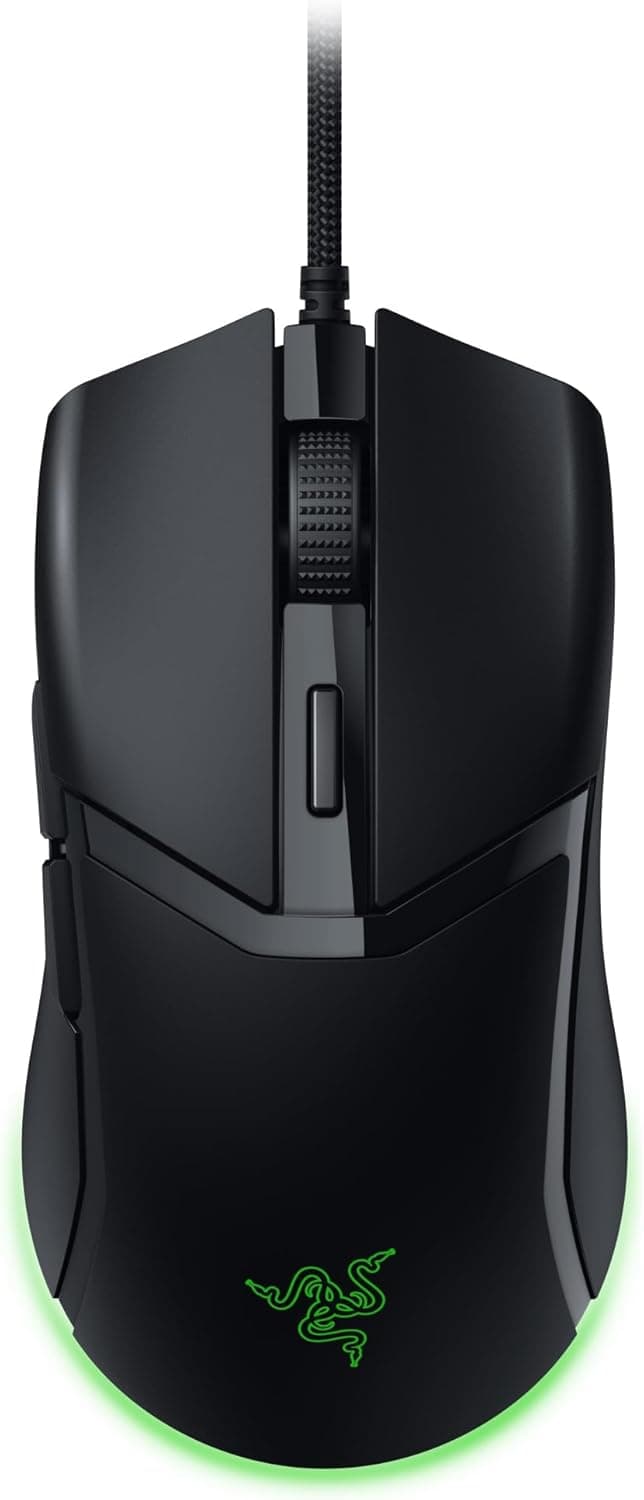
This article covers Razer レイザー Cobra ゲーミングマウス 58g 軽量コンパクトつかみ持ち — a wired mouse that combines three things in one body: light, small, and cable-driven. Below we look at how the spec sheet translates into actual use, and just as importantly, who should not buy it.
Overview
The Razer Cobra fits best if you use a claw or fingertip grip, have small-to-average hands, and want a light mouse without paying the wireless premium. At 58g, moving over from a 100g-class mouse changes the feel of flick and reset motions noticeably, and micro-corrections take less wrist effort.
For an entry-to-mid-tier wired mouse, there are no obvious gaps in the spec list.
With a sample that large, the odds of hitting a bad unit are relatively low. Note that these figures reflect the capture date and may differ today.
Reading the Spec Sheet
| Item | Value | What it actually affects |
|---|---|---|
| Weight | 58g | Clearly less inertia than 100g-class mice; less arm fatigue |
| Switch lifespan | 90 million clicks | Decades of use at 5,000 clicks/day |
| Connection | USB wired (Speedflex cable) | No charging or battery management; cable routing required |
| Buttons | 6 (programmable) | Enough for FPS; not enough for MMO binding |
| Lighting | Underglow Chroma RGB (16.8M colors) | Lights the desk surface, not visible while gripping |
A DPI ceiling describes adjustment range, not ranking. Maximum tracking speed (IPS), maximum acceleration (G), and polling rate are not included in the data available here, so check the official spec table if you need exact competitive comparisons.
The 90-million-click rating effectively means switch failure is not something you need to plan around — which is not always true in the budget lightweight segment.
Compatibility Guide
The mouse connects over USB and works with Windows, macOS, Xbox, and PlayStation. It is plug and play, so the cursor moves as soon as you connect it and no driver install is required.
All you need is one free USB Type-A port, which also means no Bluetooth pairing or dongle compatibility headaches.
The caveat is Razer Synapse. Synapse is Windows-centric, and on macOS or consoles you may not be able to change settings at all, or only partially.
If you plan to use the mouse on a Mac or a console, set your DPI, button assignments, and lighting on a Windows machine first, then reconnect. Whether settings can be stored on the mouse itself — and how many onboard profiles it holds — should be confirmed on the product page.
"Works with consoles" also needs qualifying. On PlayStation and Xbox, only a limited set of titles accept mouse input.
The console recognizing the device and your game accepting mouse control are two different things, so check your target titles first if console use is the main purpose.
Physically, cable routing is the one real consideration. The bundled Speedflex cable is on the flexible side, but with a 58g mouse the cable's weight and drag matter proportionally more.
A mouse bungee or a simple cable clip makes a clear difference, so plan on using one. As with any optical sensor, glass desktops and mirrored surfaces can cause tracking errors — use a cloth or hard mousepad.
Grip and Hand Size
The shape is compact and close to symmetrical, with side buttons on the left side only. Claw and fingertip grips benefit from the small body because control comes from the fingertips.
With a palm grip, the rear of your hand tends to float and the back of the mouse fails to support it — and the larger your hand, the stronger that feeling gets.
A practical check: measure the length and height of your current mouse and accept that you are moving to something distinctly smaller. Exact dimensions for the Razer Cobra are not part of the data referenced here, so consult the product page's dimension table if you need millimeter-level comparison.
Size mismatch is the single most common reason lightweight mice get returned, so it is worth verifying with numbers.
Product Info
Released in 2023, the Razer Cobra sits in Razer's entry-to-mid-tier wired lineup. It carries a 2-year warranty through the official Japanese distributor and ships with the mouse, a quick start guide, and Razer stickers.
It is widely available through online retailers and electronics stores, positioned as a balanced choice pairing 58g with durable optical switches.
Two price data points are available, both tied to their capture dates. Rakuten (Sorabo Store) listed ¥14,033 as of 2026-08-11, and eBay US listed $45.00 as of 2026-07-09.
That gap is unusually wide for the same product, and the Rakuten figure sits well above the ¥6,000–¥7,000 range this model launched into. A third-party markup, low-stock pricing, or a parallel-import or differently configured listing are all plausible explanations.
Check the retailer's page for the latest price. Prices move constantly and drop further during sales.
Check the current price, the seller, and whether official distributor warranty applies before ordering. If the street price is near the original range, the combination of 58g, optical switches, and a 2-year warranty represents solid value.
How It Compares
In other words, the Cobra is Razer's lightest and smallest wired option — on weight alone it has no in-house rival.
Looking at wireless, models at 53g, 63g, and even 38g exist. They generally cost more and add charging and dongle management.
The rational case for wired is simple: if you can live with a cable, the same budget buys better switches and sensors. The Razer Cobra is a textbook example.
Conversely, if cable drag has ever genuinely bothered you, going back to wired is unlikely to make you happy.
Best For
- FPS and battle royale players who rely on fast flicks and rapid resets: 58g lowers the effort of every directional change.
- Claw and fingertip grip users with small-to-average hands: the compact body suits fingertip control and quick lift-offs.
- Anyone tired of managing batteries and dongles: a wired connection never dies mid-match.
- Players with wrist or forearm fatigue: lighter weight means less load per unit of movement over long sessions.
Before You Buy
This model is wired only. The similarly named Razer Cobra Pro is a separate wireless product with different specs and pricing.
Listing photos look alike, so confirm the model name and part number — mistaking one for the other is the most common purchase error here.
Left-handed users should look elsewhere. The shell is near-symmetrical, but the side buttons sit on the left side only.
Held in the left hand they fall under the ring and little fingers and cannot be pressed reliably. A symmetrical shape does not guarantee symmetrical button placement.
Palm-grip users with large hands are also outside the target. A small, light body offers too little support when you wrap your whole hand around it.
A larger, heavier model such as the DeathAdder line will be more comfortable. Low weight is only an advantage in combination with the right grip.
** No polling rate figure appears in the data referenced here, so if high polling is a hard requirement, choose a product that states it explicitly. Likewise, do not expect adjustable weights or software-free profile switching. The Chroma lighting is underglow only and is essentially invisible while you are holding the mouse — buying it for visual flair will disappoint.
**Watch for inconsistent price listings. Treat unusually high or suspiciously low listings as possible third-party, parallel-import, or alternate-configuration offers. Parallel imports may fall outside the 2-year official distributor warranty, which changes how defects are handled.
Listing metadata itself can be wrong. Manufacturer, brand, model number, and ASIN fields sometimes carry data from a different product.
Do not judge by the spec fields alone — confirm the product image, the title, and the seller match the item you intend to buy before ordering.
FAQ
Q. Is 58g actually noticeable? A.
Coming from a 100g-class mouse, yes — in initial movement and lift-off especially. Coming from around 70g the difference is small, and shape compatibility should drive your choice instead.
Q. Can left-handed users use it? A.
Cursor control works, but the left-only side buttons are not practically reachable with the left hand. Choose an ambidextrous model with buttons on both sides instead.
Q. Does it work on PS5 or Xbox out of the box? A.
It connects and is recognized, but only some titles accept mouse input. Verify your specific games support mouse control first.
Q. Is Razer Synapse required? A.
No. The mouse is plug and play.
Synapse is only needed to change DPI, remap buttons, or customize lighting — do that on a Windows machine to be safe.
Q.
A. The DPI ceiling indicates adjustment range, not performance ranking.
Q. Does the cable get in the way? A.
The Speedflex cable is flexible, but drag is proportionally more noticeable on a light mouse. A bungee or cable clip improves the feel considerably.