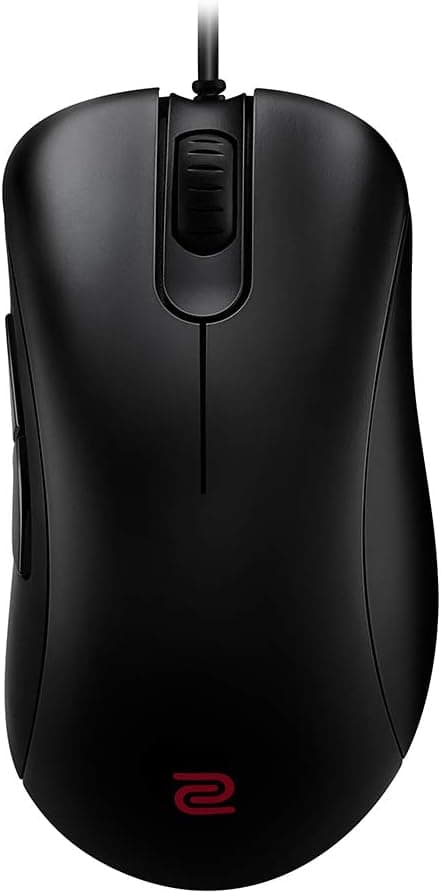
The Pulsar Gaming Gears X2 packs PixArt's flagship PAW3395 sensor into a 56 g ambidextrous shell. This article goes past the spec sheet: which grip styles it actually suits, how it differs from other ultralight mice, and the pitfalls buyers only notice after unboxing.
Overview
The Pulsar X2 targets competitive FPS players. It weighs 56 g, uses the PixArt PAW3395 sensor with up to 26,000 DPI, and connects over 2.4 GHz wireless at a 1 ms (1000 Hz) polling rate.
Main switches are Kailh GM 8.0 rated for 80 million clicks, and the wheel uses a TTC Gold encoder.
The short verdict: this is a mouse for people who prioritise low weight and a symmetrical shape over button count or extra features. The shell suits claw and fingertip grips naturally — you feel the benefit of 56 g most when you flick with your fingers rather than anchor your whole palm.
If you prefer full palm contact for stability, that same lightness can read as a lack of substance.
On Amazon.co.jp it holds 4.2 out of 5 across 553 reviews (84% positive, captured July 2026).
A 4.2 across several hundred reviews usually means no fatal flaw, but a consistent minority of dissatisfied buyers.
With ultralight wireless mice, that dissatisfaction tends to cluster around size, grip fit, and software rather than sensor performance. The later sections deal with exactly that side.
How to Read the Spec Sheet
| Item | Value | What it means in practice |
|---|---|---|
| Weight | 56 g | Light even within the ultralight class. Pays off in low-sensitivity play with frequent lift-offs |
| Sensor | PixArt PAW3395 | A flagship-generation sensor widely used in premium mice. Tracking is rarely a complaint |
| Max DPI | 26000 | Most players use 400–1600 DPI. The ceiling is a marketing number, not a buying criterion |
| Polling rate | 1000 Hz / 1 ms | The current standard. If you specifically need 8K polling, look elsewhere |
| Main switches | Kailh GM 8.0 (80M) | A durability-focused standard; click feel is often described as on the firm side |
| Encoder | TTC Gold | Distinct wheel notches, which helps avoid mis-scrolls when swapping weapons |
| Connection | 2.4 GHz wireless | Bundled receiver. No Bluetooth is listed, so treat the dongle as mandatory |
The 26,000 DPI figure draws the eye, but it should not drive your decision. Competitive play typically sits around 800–1600 DPI; beyond that you are testing your mousepad surface, not the sensor.
What matters is the PAW3395 generation itself, known for a low lift-off distance and stable tracking during fast swipes. In other words, the sensor side of the X2 is unlikely to disappoint anyone.
The real variables are weight and shell shape. At 56 g there is very little inertia, so micro-adjustments land easily — but hand tremor shows up on screen just as readily.
Lighter is not automatically better, and that is the premise you should start from in this category.
Compatibility Guide
The X2 supports Windows 7 and later, and the configuration software for button assignments and DPI steps is Windows-only. You also need a USB Type-A port for the bundled receiver.
That is the first thing to check: thin laptops and Type-C-only mini PCs cannot take the dongle directly. A hub or adapter works, but a direct port near the mouse gives the most stable link.
On macOS or Linux, basic mouse functions — movement, clicks, scrolling — should be recognised through the 2.4 GHz receiver.
However, since the software is Windows-only, you cannot change DPI or remap buttons on those systems. Mac-first users may need to configure the mouse on a Windows machine and save settings on-board.
If that workflow is not realistic for you, pick a product that advertises multi-OS support instead.
Physical fit is easy to overlook. The shell is symmetrical, but the side buttons sit on the left side only, so left-handed users get no thumb-side buttons.
"Symmetrical" does not mean "left-handed ready" here. And as with any 2.4 GHz device, congestion matters: USB 3.0 devices, a router placed right beside the receiver, or a crowded desk can cause interference.
When behaviour gets erratic, move the receiver first.
Product Info
The Pulsar X2 launched in late 2022 as the ambidextrous counterpart to the company's ergonomic Xlite line. The box contains the mouse, a USB receiver, and a charging cable, with a one-year manufacturer warranty on domestic (Japan) retail units — which practically means local support if you hit an early failure.
Pricing varies by capture date. The listed Amazon price was ¥10,800 as captured in July 2026, and ¥4,718 as captured in August 2026.
Both are snapshots and shift with sales, stock, and seller. Drops into the few-thousand-yen range do happen for older stock, but always check the current price and seller on the product page before buying.
A price in an article means only "this is what was shown at that moment."
On the review side, Amazon.co.jp shows 4.2 out of 5 across 553 reviews (84% positive, captured July 2026).
A review count in the high hundreds is useful evidence: any launch-batch defect would have surfaced by now.
Where It Sits Against Rivals
Weight alone no longer separates ultralight mice. Plenty of 55 g-class options exist, and 26,000 DPI sensors are common.
The X2's differentiation comes down to three things: the symmetrical shell, the tactile TTC Gold wheel encoder, and a stable dedicated 2.4 GHz link.
If you are comparing shapes, the opposite pole is a right-hand-only ergonomic design. For players who want to rest their hand and let the mouse support it, a symmetrical shell will always feel short on support.
That is a body-fit question, not a performance one, and no spec sheet answers it. Handling a similarly sized mouse in a store is the fastest way to know.
Against wired ultralights, the X2's advantage is that cable drag disappears entirely — most noticeable if you play at low sensitivity with big arm swings. In exchange you manage charging and carry battery weight.
If cable drag never bothered you, a wired mouse in the same price bracket can be lighter, cheaper, and free of charging altogether.
Details That Change the Experience
Start with DPI. The 26,000 ceiling looks impressive, but FPS players typically run 800 or 1600 DPI.
Excessively high DPI exposes the limits of your pad surface rather than the sensor, and aim gets less consistent. Set it from your own arm swing, not from the maximum.
Next, skates and mousepad. At 56 g, differences in glide translate directly into feel.
A control-oriented cloth pad turns the low weight into easier stopping; a speed pad can make it feel like it slides too freely. Replacing the pad often fixes more than replacing the mouse.
Finally, receiver placement. 2.4 GHz stability depends on distance, obstructions, and nearby wireless gear.
If the dongle lives in a rear USB port and the cursor occasionally jumps, an extension cable that brings it onto the desk frequently solves it. This applies to wireless mice generally, and it is worth trying before blaming the product.
Best Use Cases
- FPS players who want a light mouse — 56 g suits low-sensitivity play with frequent lift-offs, and the symmetrical shell fits claw and fingertip grips well.
- Players who prefer symmetrical shapes — if ergonomic shells do not fit your hand, options are limited. Having PAW3395 and wireless in a symmetrical body is the value here.
- Anyone who wants cable drag gone — the larger your arm movements, the more you feel the difference coming from a wired mouse.
- Players who care about wheel feel — the TTC Gold encoder gives clear notches, useful when you need exactly one step per weapon swap.
It is a weaker fit for MMO/MOBA players who need many buttons, for palm-grip users who want full support, and for Mac-only setups. The next section explains why.
Things to Check Before Buying
"Ambidextrous" does not mean "left-handed." The side buttons are on the left side only, so in a left hand they fall under your ring and little finger and become effectively unusable.
Shape symmetry and control symmetry are different things, and confusing them leads to returns. If you need left-hand use, require buttons on both sides.
56 g is not for everyone. With so little inertia, hand tremor and even breathing show up in cursor movement.
Coming from a 90 g-plus mouse, expect a few days where aim feels unsettled. Most people adapt, but some genuinely go back to heavier mice.
Light is not automatically correct.
The software is Windows-only. DPI steps and button remapping can only be changed on Windows.
If macOS or Linux is your main environment, you will need a Windows machine every time you want to adjust settings. There is no hardware workaround, so decide before you buy.
Charging becomes part of your routine. Batteries run out.
You can play while charging over the bundled cable, but at that point it handles like a wired mouse and the reason you bought an ultralight wireless temporarily evaporates. If checking battery level before a session is not a habit you will keep, a wired mouse causes less friction.
Verify the price and seller yourself. Captured listing prices differed between ¥10,800 (July 2026) and ¥4,718 (August 2026), and conditions vary by seller even on one page.
Amazon listing metadata — manufacturer, model number, bundled items — can occasionally carry details from a different product. When you open the page, confirm from the images and title that it is the Pulsar X2 and that it is sold as a domestic retail unit before ordering.
FAQ
Q. Do I actually need 26,000 DPI? A.
Almost certainly not. FPS players generally use 400–1600 DPI; the ceiling only indicates what the sensor supports.
Buy it for the PAW3395 generation's tracking quality, not for the number.
Q. Can left-handed players use it? A.
You can hold it, since the shape is symmetrical, but the side buttons exist only on the left, so left-hand use is impractical. Look at other models if that is your requirement.
Q. Does it work on a Mac? A.
Basic mouse functions should work through the 2.4 GHz receiver, but the configuration software is Windows-only, so you need Windows to change DPI or remap buttons.
Q. Is there Bluetooth? A.
The stated connection method is 2.4 GHz wireless.
You need a USB Type-A port for the receiver, so Type-C-only laptops require an adapter. Confirm Bluetooth support on the product page if it matters to you.
Q. Is it usable with a palm grip? A.
Yes, but it shines with claw and fingertip grips. If you want full palm contact for stability, an ergonomic shape tends to satisfy more.
Q. How is it reviewed? A.
4.2 out of 5 across 553 Amazon.co.jp reviews (84% positive, captured July 2026).
Core performance draws few complaints; opinions split mainly on size, grip fit, and software.
Product Disclosure (Amazon)
- Manufacturer: Pulsar Gaming Gears
- ASIN: B0B9N2F3BF
- Note: This article covers a manufacturer-made product based on Amazon listing details.
![Logitech ロジテック G502 LIGHTSPEED ワイヤレスゲーミングマウスブラック [並行輸入品]](/_next/image?url=https%3A%2F%2Fm.media-amazon.com%2Fimages%2FI%2F613ieTi2alL._AC_SL1500_.jpg&w=1920&q=75)