Overview
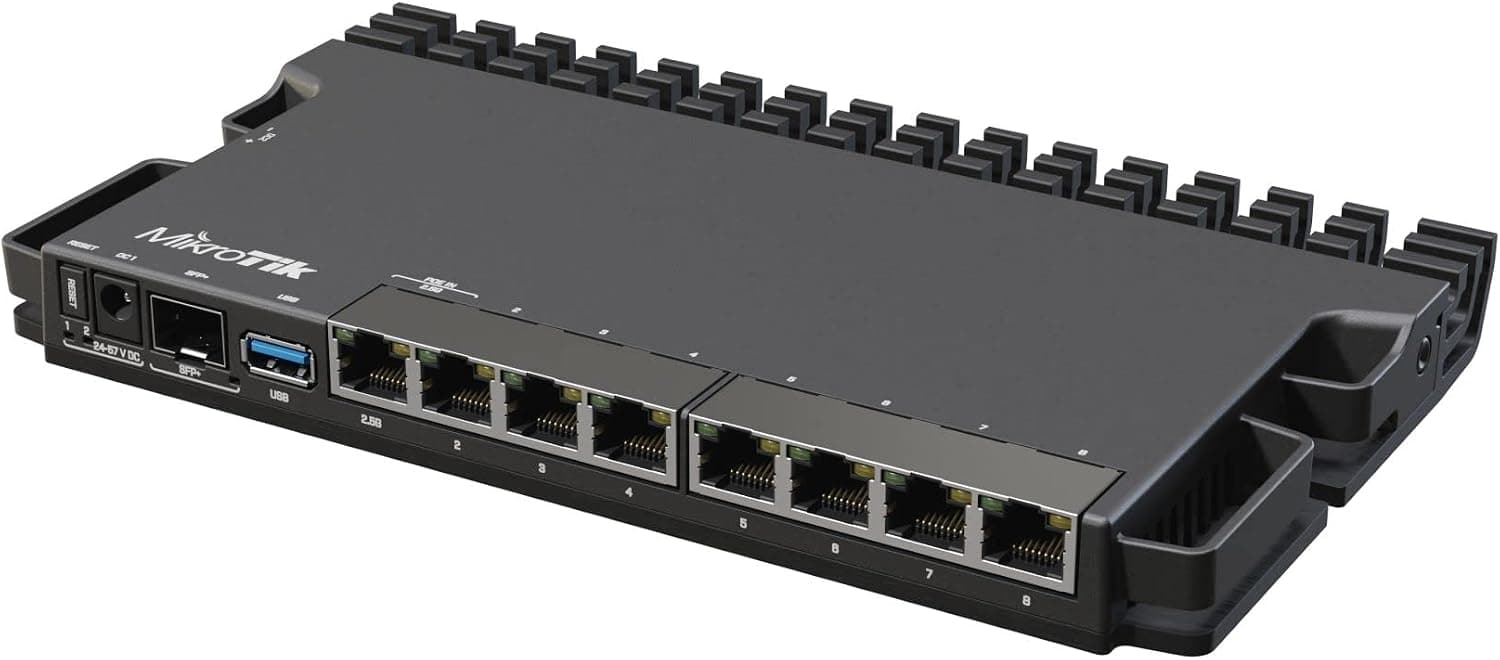
The MikroTik RB5009UG+S+IN is a compact wired router designed for home lab enthusiasts and small office environments. At its core sits a Marvell Armada ARMv8 processor with four cores running at 1.4GHz each, paired with 1GB of DDR4 RAM and 1GB of onboard storage. It runs MikroTik's RouterOS, offering enterprise-level networking features in a small, metal chassis.
What sets this router apart is its single 10 Gigabit SFP+ port, allowing for high-speed WAN connectivity or direct attachment to a 10GbE NAS. Combined with five Gigabit RJ-45 LAN ports, it provides a solid foundation for a wired network that can handle modern bandwidth demands. Power consumption is remarkably low at around 10W under load, making it suitable for 24/7 operation.
Positioned as a prosumer device, the RB5009UG+S+IN bridges the gap between consumer routers and expensive enterprise hardware.Check the retailer's page for the latest price. It's not a plug-and-play device, but for those willing to invest time in learning RouterOS, the rewards are substantial.
Compatibility Guide
Unlike standard PC components, compatibility for the RB5009UG+S+IN revolves around network interfaces and power requirements rather than sockets or memory slots.
- WAN/LAN Ports: The SFP+ cage accepts standard 10G SFP+ modules (fiber or copper). MikroTik's own S+RJ10 module is recommended for RJ-45 10GbE connections. The five Gigabit ports are auto-sensing and work with any standard Ethernet cable.
- Power Supply: The router ships with a 12V/2A DC adapter using a 2.1mm/5.5mm barrel jack. Third-party power supplies with the same specs can be used, but ensure polarity is center-positive.
- Console Access: A serial console port (RJ-45, RS-232) is available for initial configuration via CLI. This is useful for headless setups or when the network is not yet configured.
- Mounting: The metal case can be placed on a desk or mounted on a wall using the included brackets. It is not rack-mountable out of the box, but third-party rack-mount kits are available.
Product Info
Released in 2021, the RB5009UG+S+IN remains a current product in MikroTik's lineup. It is widely available through Japanese online retailers, as well as specialized networking retailers like Techno Launcher and PC4U. The standard warranty is one year from the manufacturer.
Market positioning is squarely in the entry-to-mid-range 10GbE router segment. Compared to alternatives like the TP-Link ER707-M2 (which offers 2.5GbE ports) or the QNAP QHora-301W (which includes Wi-Fi 6), the MikroTik stands out for its raw 10GbE capability and the unparalleled flexibility of RouterOS. It lacks Wi-Fi entirely, so a separate access point is required for wireless devices.
Best Use Cases
- Home Lab Enthusiasts: If you're studying for CCNA or just want to experiment with VLANs, BGP, or firewall rules, this router is an excellent learning platform. RouterOS provides a sandbox for real-world networking concepts. The 10GbE port lets you connect a lab server or NAS for high-speed data transfer. However, complete beginners may find the initial setup challenging.
- Small Office / Home Office (SOHO): For a wired network supporting up to 10 users, the RB5009UG+S+IN offers reliable performance. Its five Gigabit ports can handle PCs, printers, and a NAS directly. The low power draw and quiet fan make it unobtrusive in an office setting. If Wi-Fi is needed, simply add an access point to one of the LAN ports.
- Energy-Conscious Users: With a maximum power consumption of around 10W, this router is ideal for those who want to minimize electricity costs. It generates very little heat, so it can be placed in a closed cabinet without overheating. For heavy VPN or NAT workloads, however, an x86-based model like the RB4011 might offer better throughput.
Things to Consider
- No Built-in Wi-Fi: This is a wired-only router. You must purchase a separate wireless access point if you need Wi-Fi. This adds cost and complexity but also gives you the freedom to choose the best AP for your needs.
- Steep Learning Curve: RouterOS is powerful but not user-friendly. First-time users should expect to spend several hours reading documentation and watching tutorials just to get basic internet connectivity working. The Quick Set wizard helps, but advanced features require manual configuration.
- SFP+ Module Compatibility: Not all SFP+ modules work flawlessly. Stick with MikroTik-branded modules (e.g., S+RJ10 for copper 10GbE) to avoid compatibility headaches. Also, ensure your other devices (NAS, PC) have 10GbE NICs to take full advantage of the port.
- Competitor Comparison: The TP-Link ER707-M2 is easier to set up and includes two 2.5GbE ports, but lacks 10GbE. The QNAP QHora-301W adds Wi-Fi 6 but costs more.
Product Disclosure (Amazon)
- Manufacturer: Mikrotik
- Seller: Amazon US
- Fulfilled by: Amazon US
- ASIN: B09GW641SL
- Note: This article covers a manufacturer-made product based on Amazon listing details.