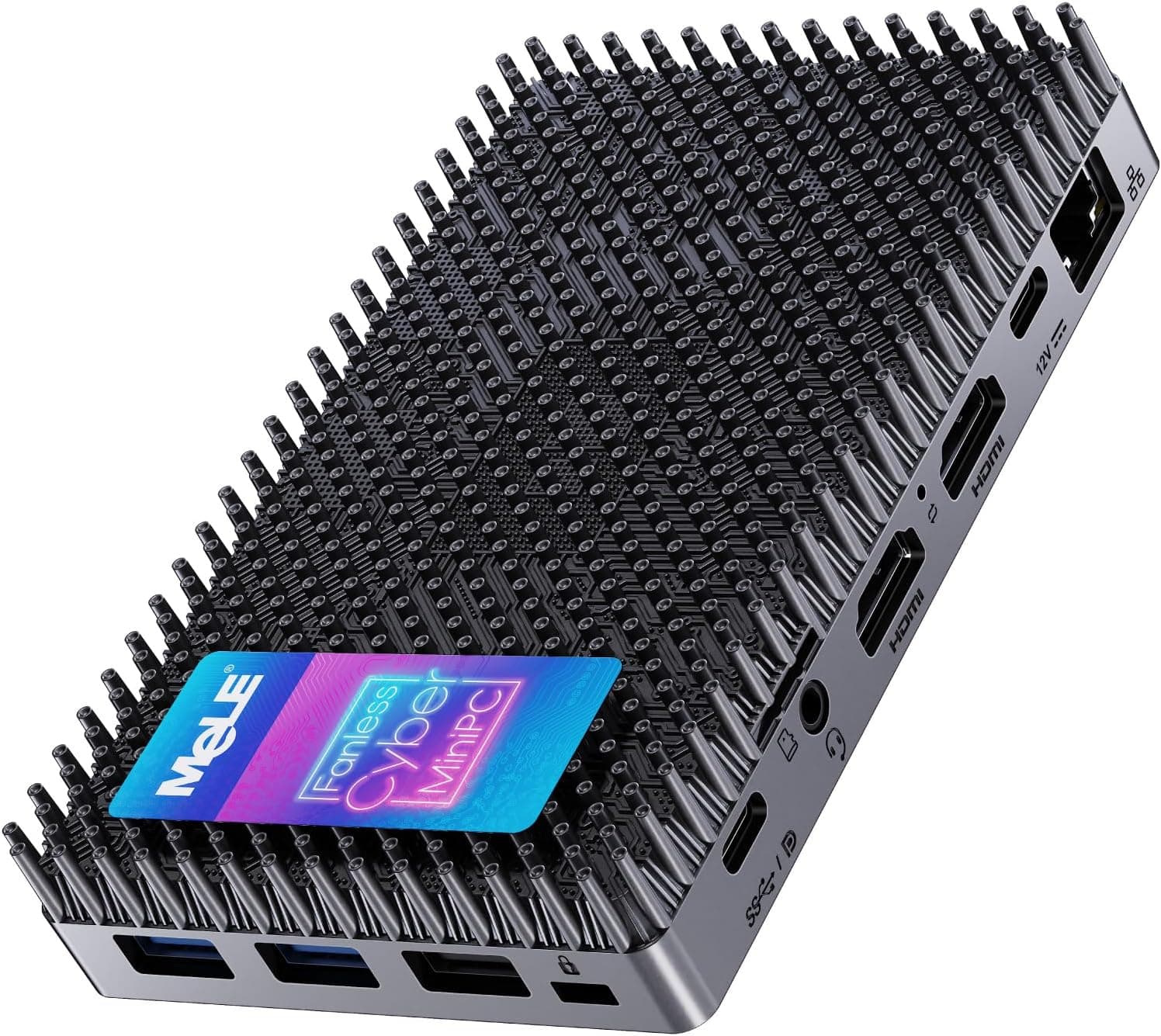
This article takes a close look at the MeLE PCG02 Pro — Ultra-compact fanless N100 mini PC stick (8GB RAM, 128GB storage). The short version: buy it if you value silence, a tiny footprint and the ability to run from USB PD power.
It is not the product to pick if you want the most performance or expandability for your money.
Overview
The MeLE PCG02 Pro is a fanless mini PC stick built around the Intel N100 processor. It fits in the palm of your hand and disappears behind a monitor or in a corner of the desk.
It uses passive cooling with no fan, so it runs essentially silently.
Its headline feature is a USB-C port with USB PD 3.0 power input.
You can run it directly from a suitable mobile battery or portable power station, so you can set up a PC where there is no wall outlet. It comes with 8GB of LPDDR4 memory (4266MHz) and 128GB of eMMC storage, with Windows 11 Pro preinstalled and ready to use.
It is suited to light work: Office documents, web browsing, video calls, video playback, and always-on digital signage or kiosk displays. It is not suited to heavy tasks such as 3D gaming or video editing, or to keeping large amounts of data on the device.
The sections below spell out where that line falls.
Key Specs and What They Mean
| Item | Spec | What it means |
|---|---|---|
| CPU | Intel N100 (4 cores/4 threads, up to 3.4GHz) | Low-power chip for office work and video playback |
| Memory | 8GB LPDDR4 4266MHz | LPDDR is normally soldered; assume no upgrades |
| Storage | 128GB eMMC | Smaller and slower than SSD-based mini PCs |
| Expansion | MicroSD (up to 2TB) | Use it for data, not apps |
| Video output | HDMI 2.0 x2 (up to 4K) | Dual-display output supported |
| USB | USB-A 5Gbps x2, USB-C x2 (PD 3.0) | Enough for an external SSD, keyboard and mouse |
| Wired LAN | Gigabit Ethernet x1 | The stable choice for signage |
| Wireless | Wi-Fi 5 (802.11ac), Bluetooth 4.2 | Not the latest, but fine for everyday use |
| Power draw | About 6W idle, about 15W at full load | Running costs are negligible even 24/7 |
The N100 handles a few browser tabs, document editing, video playback and video calls without trouble. With dozens of tabs open, large spreadsheets or photo editing, the waiting becomes noticeable.
8GB of memory leaves little headroom once Windows 11 and a browser are running, so plan on doing one light task at a time.
The power figures are also why it works well as an always-on machine. Even at the full-load figure of about 15W around the clock, it uses 0.36kWh per day; near idle at about 6W, it uses 0.144kWh.Check the retailer's page for the latest price.
Compatibility Guide
Power: 'supports USB PD' is not enough
Power is the most common stumbling block. The manufacturer recommends 12V-23V, 24W or more over USB PD.
If you buy a battery just because it says PD, you may end up with one that only outputs 5V or 9V, and the PC will fail to boot or shut down under load.
Check the USB-C output section of the battery's spec sheet for at least 15V/2A or 20V/1.5A (both 30W).
A battery that only lists up to 9V/2.22A (20W) fails on both voltage and wattage.
For the cable, a USB-C to USB-C cable rated for 3A (60W) is a safe choice; you do not need a 100W e-marked cable at this power level.
With a portable power station, feed the PC from its USB-C PD output rather than plugging an adapter into its AC outlet. You lose less energy to conversion and get more runtime from the same capacity.
Video output
Two HDMI 2.0 ports support dual displays at up to 4K.
Driving two 4K screens with the N100's integrated graphics can make window handling and video playback sluggish, though. For office work, two Full HD displays or a single 4K display is the safer setup.
Despite the 'stick' name, it is not a dongle that plugs straight into a TV's HDMI port; you connect its HDMI ports to the display with a cable. The spec sheet does not say whether the USB-C ports output video, so if you want to drive a USB-C portable monitor with a single cable, check the product page.
Storage
Internal storage is 128GB of eMMC. Windows 11 and its update files take up tens of gigabytes, so the space you can actually use is well below the label.
The official expansion option is a MicroSD card of up to 2TB.
MicroSD works well for photos, documents and video, but apps installed there tend to run slowly. If you need more room, an external SSD on a 5Gbps USB-A port is faster and easier to manage.
Network and peripherals
With Gigabit Ethernet on board, use a wired connection for signage and other always-on duties. Wireless is Wi-Fi 5 and Bluetooth 4.2.
These are not current standards, but they are fine for browsing and a wireless keyboard and mouse. With Bluetooth earbuds, do not expect newer features such as LE Audio.
Product Info
The MeLE PCG02 Pro is described as a model that appeared around 2024 (check the product page for exact release details). It sits in the entry-to-mid-range segment, aimed at people who want a compact, low-power PC.
Prices at the time of capture, both from the same listing (ASIN B0CWV439YW):
- As of July 18, 2026: ¥57,058
- As of August 19, 2026 (Amazon.co.jp): ¥61,284
Check the current price on the product page before buying; it also changes during sales.
On Amazon.co.Check the retailer's page for the latest user reviews.
The rating is decent, but with so few reviews a handful of new ones can move the average noticeably. Reading reviews from people who use it the way you plan to (battery power, signage and so on) tells you more than the score does.
Always check the listing for the warranty period and included accessories (AC adapter, HDMI cable, manual and so on). Whether an AC adapter is included matters most: if it is not, you will need a separate USB PD charger that meets the 12V-23V, 24W+ requirement.
Comparison with Competing Products
There are many palm-sized box mini PCs in the N100 class. Compared with the general traits of that category, the PCG02 Pro looks like this.
| Aspect | MeLE PCG02 Pro | Box mini PCs (general traits) |
|---|---|---|
| Cooling | Fanless, near silent | Often have a fan that is audible under load |
| Storage | 128GB eMMC + MicroSD | Many use a replaceable or expandable M.2 SSD |
| Memory | 8GB LPDDR4 (assume no upgrade) | Some use upgradable SO-DIMM slots |
| Power | USB PD (12V-23V, 24W+) | Usually a dedicated AC adapter |
| Placement | Fits behind a monitor or in tight gaps | Small, but needs some desk space |
In other words, the PCG02 Pro gives up expandability and performance per yen in exchange for silence, size and PD power. If storage capacity or future upgrades matter more, a box mini PC such as the Beelink MINI S12 is a better fit.
If you want to compare fanless models from the same maker, look at the MeLE Cyber X1. If you want more performance headroom, the Ryzen-based BOSGAME P4 Plus or the Core i5-based MINISFORUM NAB6 Lite are also worth a look.
Recommended Users
Remote workers who want a second PC. It is a good fit for a dedicated document-editing and video-call machine separate from your main PC.
It takes up almost no space and draws so little power that leaving it on costs next to nothing. It is not suitable for demanding work like 3D gaming or video editing.
Digital signage and kiosk operators. The fanless design is near silent, which suits quiet spaces such as shops and office receptions.
It is said to be designed for 24/7 operation, and with no fan there is less risk of failure from dust being drawn in. The chassis surface is said to reach around 55-70°C, so avoid places where people touch it or where heat builds up.
People who want a portable PC. Because it runs from a USB PD mobile battery, you can set up a workspace on the go.
Runtime depends on the battery's capacity, so long sessions need a large battery.
Who should skip it. Anyone who wants to play PC games, store lots of photos or video locally, or is shopping for a first, main PC.
People who simply want the cheapest N100 machine should also look elsewhere (see the next section).
Before You Buy
**It is not cheap for an N100 machine. The premium pays for the stick form factor, the fanless design and PD power. If you do not need those three things, the same budget buys a box mini PC with more storage and more performance.
128GB of eMMC fills up fast. Major Windows updates need temporary free space and can fail when space is tight.
Set up a MicroSD card or an external SSD for data from day one, and keep only the OS and essential apps on the internal storage.
8GB is all you will ever have. LPDDR4 is normally soldered to the board, so assume you cannot add memory later.
The usual 'buy 8GB now and upgrade later' plan does not apply here.
Choose a mobile battery by its specs. As covered in the compatibility guide, you need PD output of 12V-23V at 24W or more.
Assume your current battery works without checking, and the PC may not boot when you are away from an outlet.
Give the heat somewhere to go. With no fan, heat leaves through the whole chassis.
On fabric, inside a closed cabinet or in direct sunlight, it gets hotter and is more likely to slow itself down to stay cool. Avoid long stretches of heavy processing.
Check the seller on the product page. The listing shows the seller and shipper as Amazon US.
If it ships from overseas, the warranty contact, the charger's plug type and the domestic certification status of its wireless features may differ from a Japan-market unit. Confirm the seller, shipper and warranty terms before ordering.
Automatically collected listing data can also contain errors, so confirm from the photos and product name that it is the MeLE PCG02 Pro (N100, 8GB, 128GB).
FAQ
Q. How long will it run on a mobile battery? A.
It depends heavily on battery capacity and load. For example, with a 20,000mAh (about 72Wh) battery and light work averaging around 10W, expect roughly five hours after conversion losses.
Heavier work shortens that.
Q. Can it play games? A.
Some browser games and light 2D indie games may run, but it is not suited to 3D games. If gaming is your main goal, choose another product.
Q. Can I add storage? A.
The official expansion option is MicroSD up to 2TB. For installing apps, an external SSD on a 5Gbps USB-A port is the better choice.
Q. Can it drive two 4K monitors? A.
It has two HDMI 2.0 ports with output up to 4K.
For comfortable office work, though, two Full HD displays or one 4K display is the safer choice.
Q. Is it OK to leave it on 24/7? A.
It is said to be designed for continuous operation and draws only about 6-15W, so it suits always-on roles like signage. The surface gets hot, so place it somewhere with good airflow.
Product Disclosure (Amazon)
- Manufacturer: MeLE
- Seller: Amazon US
- Fulfilled by: Amazon US
- ASIN: B0CWV439YW
- Note: This article covers a manufacturer-made product based on Amazon listing details.