Overview
The Logitech Z200 - Speakers - for PC - black is a 2.0-channel multimedia speaker set built around one idea: get better-than-laptop audio on a desk with as little effort as possible.
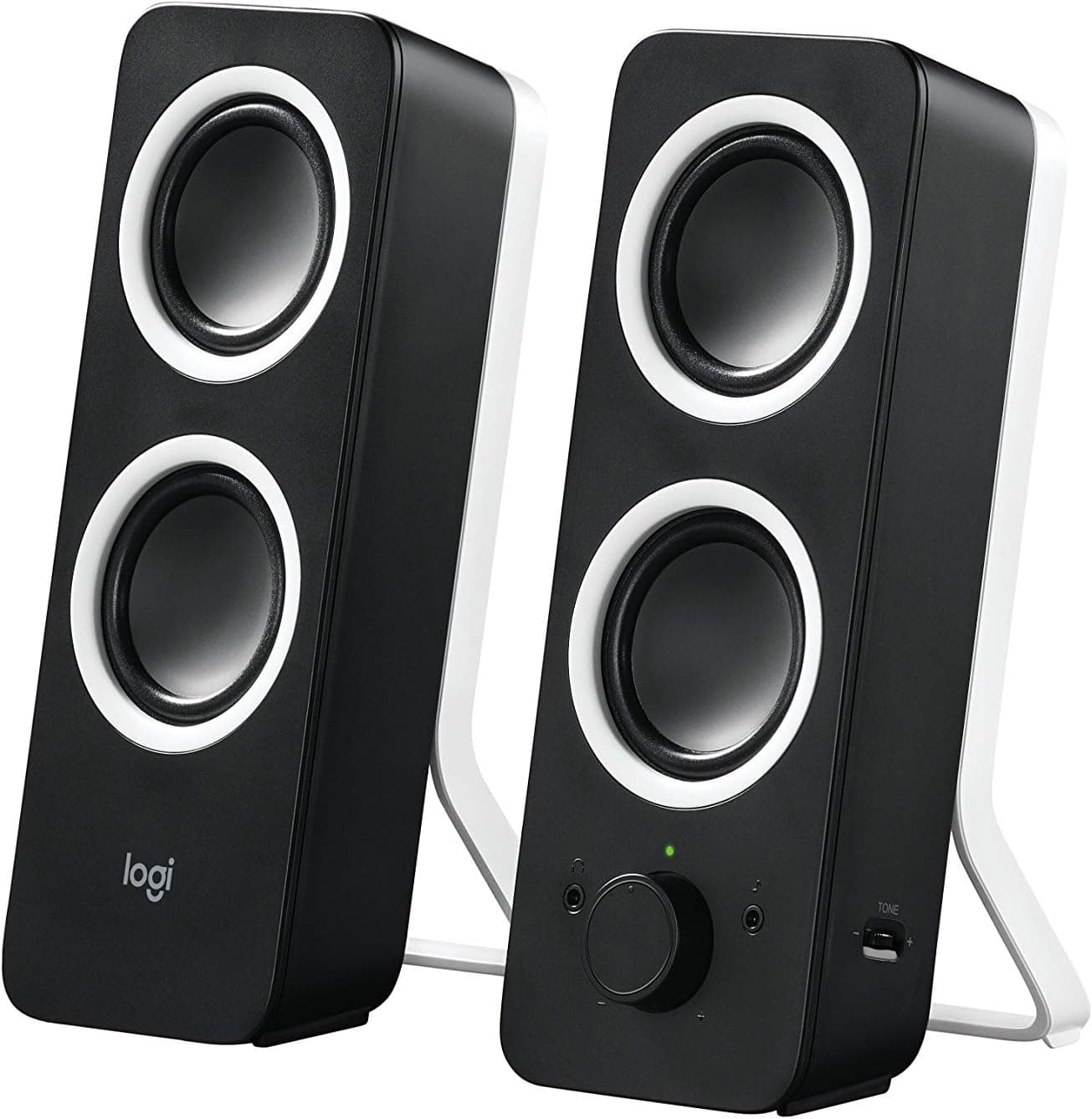
It delivers 10 watts peak, 5 watts RMS, through two cabinets that each pair a single active full-range driver with a passive radiator.
The honest reason to buy this is not fidelity — it is the absence of friction. Plug in the AC adapter, connect the 3.5mm cable, and you are done.
No driver, no companion app, no firmware. On Amazon.co.Check the retailer's page for the latest user reviews.
The passive radiator deserves a word. It is an undriven diaphragm that reacts to air pressure inside the cabinet, adding low-frequency weight without a powered subwoofer.
It is the standard cost-effective fix for the thin bass that small 2.0 sets otherwise suffer from — useful, but not a substitute for a real sub.
Compatibility Guide
Input is 3.5mm stereo mini only.
Any device with an analog output works, regardless of operating system: Windows, macOS, Linux, ChromeOS, tablets, portable players, and many consoles. Because there is no USB audio handshake, the class of problem where a speaker is "not detected" simply cannot happen here.
The realistic obstacle is on the host side. Many recent thin laptops, small-form-factor desktops, and nearly all modern phones have dropped the 3.5mm jack.
If yours has, you need a USB-DAC dongle (USB-A or USB-C to 3.5mm), and that cost belongs in your budget.
On machines with only a 4-pole (CTIA) headset jack, line output usually works fine, but cheap splitters can leave you with a single channel.
There are two inputs: a rear main input and a front aux input. Keep the PC wired to the back permanently and use the front jack for a phone or console.
Note that this is a mixer, not a selector — if both sources play, you hear both. Plan to mute the unused device at the source.
Power comes from an AC adapter, not USB. That matters for desk planning: USB-powered speakers draw from a monitor or PC port and need one cable, while the Z200 occupies a wall outlet, and the adapter may block an adjacent socket on a power strip.
The upside is independence — the speakers still work when the PC is off, which suits phone playback.
Televisions are a common misfire. Many modern TVs output audio only over optical S/PDIF or HDMI ARC, and neither connects to the Z200 directly.
You would need a separate optical-to-analog converter with a built-in DAC.
Product Info
The published specification is 10W peak output, 5W RMS, 20Hz–20kHz frequency response, a 2.0 configuration with one active driver plus one passive radiator per speaker, two 3.5mm stereo inputs (rear main and front aux), and AC adapter power.
The box includes the adapter, a 3.5mm audio cable, and documentation.
Read the 20Hz figure with skepticism. A cabinet and driver of this size cannot reproduce 20Hz at any useful level; the number reflects a nominal response window with unstated tolerance.
What you actually hear starts considerably higher, and the passive radiator mainly fills in upper-bass warmth. The fact that this is a 2.0 set with no subwoofer predicts the sound far better than the number does.
All controls sit on the front of the right speaker: power, volume, bass, headphone jack, and the aux input. Having the bass dial reachable is genuinely practical — dial it up for games and films, back it off for calls and background music.
Plugging in headphones mutes the speakers, which makes late-night sessions or shared rooms easy to handle.
On price, the data captured for this article listed an amount wildly out of proportion for an entry-level 2.0 set, which points to a collection error rather than a real listing.
For that reason no figure is quoted here. Street pricing for the Z200 varies substantially by retailer, stock, and import channel, so check the current price on the product page before buying.
Logitech's standard warranty applies, but terms differ by region, seller, and purchase date. Keep the serial number and proof of purchase.
How It Compares
Against its direct rivals, the Z200's distinguishing features are the dual analog inputs and the front-mounted controls. USB-powered desktop speakers need only one cable and install faster, but they usually offer a single input and depend on the PC being on.
Bluetooth gaming speakers and powered bookshelf monitors clearly beat the Z200 on output, fidelity, and flexibility — at a higher price and a larger footprint.
The decision reduces to one question: do you need wireless? If yes, drop the Z200 from the list.
If you care most about desk space, budget, and leaving two sources permanently connected, it fits well. Logitech's own Z207 covers the Bluetooth-equipped end of the same family, so settle the wireless question first.
Living With It
Placement changes small 2.0 speakers more than any setting.
Separate the cabinets as far as the desk allows, raise them a few centimetres on stands or books so the drivers sit closer to ear height, and angle them slightly inward toward your seat. Imaging and clarity improve noticeably compared with sitting them flat on the desk.
Resist the urge to max the bass dial. Boosting low frequencies on a small cabinet smears the midrange and makes voices harder to follow.
If footsteps in games or dialogue in video matter to you, start the bass just below centre and raise it gradually.
As 5W RMS implies, this is a desk-and-small-room product. It will not fill a living room or carry a party, and it tends to distort near maximum volume.
Staying around 70–80% of the range keeps the sound clean.
Best Use Cases
First-time desktop speaker buyers benefit most. There is essentially nothing to configure and no way to get it wrong, and the jump from built-in laptop audio is immediate and obvious.
It also suits people juggling a PC and a phone or console. With rear and front inputs both occupied, you never reach behind the desk again, and the front dials let you adjust volume and bass without moving.
Beyond that, it is a practical replacement for weak monitor speakers and a real help for hearing colleagues clearly on calls. It is not for anyone chasing deep bass at volume, wireless streaming, surround processing, or accurate monitoring for music production — those needs point toward 2.1 systems or powered bookshelf monitors.
Before You Buy
Start with price. The listing data referenced for this article contained a figure far too high for an entry-level 2.0 speaker set.
Amazon prices swing widely by seller, and grey-import or marketplace listings sometimes sit well above the normal street price. If the price you see looks disproportionate to the product class, stop and compare other offers and sellers first.
Listing metadata can also be wrong outright. Check that the manufacturer, model, and images agree with the product title before ordering.
In this data the seller and shipper are both Value Market Tokyo, which means a marketplace listing rather than Logitech's own storefront — warranty and support routes may differ, so confirm the seller details.
Three specification traps catch buyers after delivery. First, there is no Bluetooth and no USB audio, so devices without a 3.5mm jack need a dongle.
Second, power is AC, not USB; assume otherwise and your cable plan breaks. Third, the two inputs mix rather than switch — "two inputs" does not mean "source selector."
Calibrate output expectations too. 5W RMS is plenty at arm's length and insufficient across a room, and a subwoofer-less 2.0 design cannot produce cinematic sub-bass.
That is the trade you accept at this price; if it bothers you, buy a 2.1 set instead.
Finally, durability. On speakers of this class, the analog volume pot and the jacks are the parts that degrade first — crackling usually means contact trouble rather than a dead driver.
The flip side is that a design this simple never breaks because of a software update.
FAQ
Q. Can it run on USB power?
A. No. It requires the bundled AC adapter and cannot be powered over USB, so reserve a wall socket.
Q. Can I connect a phone over Bluetooth? A.
No. Connectivity is 3.5mm analog only.
If you need wireless, choose a Bluetooth-capable model.
Q. What happens if a PC and a phone are both connected?
A. The two signals are mixed, not switched, so both play at once.
Q. Will it work with a laptop that has no headphone jack? A.
Yes, with a separate USB-DAC adapter. The speakers alone cannot connect, so budget for the dongle.
Q. Does plugging in headphones mute the speakers? A.
Yes. The front headphone jack redirects output, which makes late-night listening straightforward.
Q. How good does it actually sound? A.
Clearly better than built-in laptop speakers, but not comparable to a 2.1 system or proper bookshelf monitors.
Its 4.4-star average across 10,511 Amazon reviews reflects satisfaction appropriate to the price class.
Product Disclosure (Amazon)
- Manufacturer: Logitech
- Seller: Value Market Tokyo
- ASIN: B00EZ9XKCM
- Note: This article covers a manufacturer-made product based on Amazon listing details.

![YOFANQI [6W] — Compact USB-powered desktop computer speakers](/_next/image?url=https%3A%2F%2Fm.media-amazon.com%2Fimages%2FI%2F71oYTOys5yL._AC_SL1500_.jpg&w=1920&q=75)