Overview
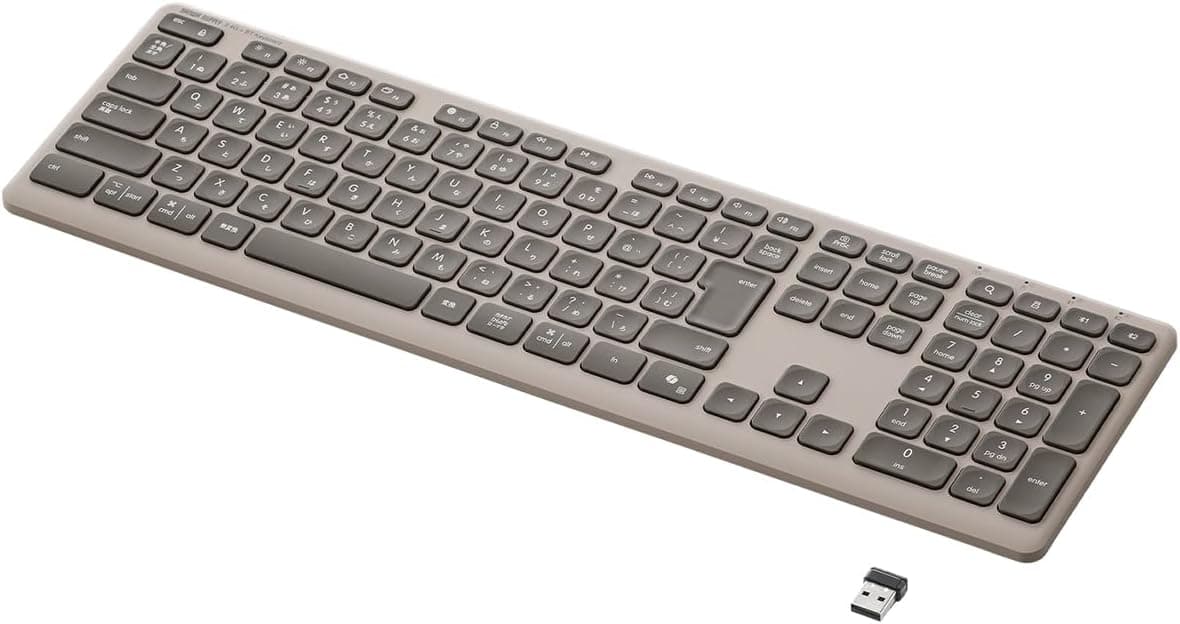
The Logitech K250GRd is a compact wireless keyboard that connects over Bluetooth. It keeps a Japanese key layout with a numeric keypad and arrow keys while trimming the overall footprint, so there is still room to move a mouse on a crowded desk. The graphite finish is understated enough for an office or a living room setup.
Because the connection is wireless over Bluetooth, there is no cable to route. Power comes from two AAA batteries, and Logitech rates battery life at up to 12 months. The keys are built for long-term durability, and the keyboard also carries a water-resistant design tested against up to 60 ml of liquid. Physical dimensions are 370 mm long, 137 mm wide and 23 mm high, with a weight of 380 g.
For anyone who types numbers every day, this sits in a useful middle ground: smaller than a full-size board but more capable than a tenkeyless one. The F-key shortcuts are available too, which makes it flexible enough for office work and a secondary home machine.
Connectivity & Compatibility
The K250GRd pairs over Bluetooth rather than through a USB receiver. Logitech lists support for Windows, macOS, ChromeOS, Linux, iPadOS, iOS and Android, so it can serve a desktop PC as readily as a tablet or phone.
The Japanese key layout suits people who work in a Japanese input environment. A numeric keypad, arrow keys and convenient F-key shortcuts are all present, while the compact layout keeps the desk footprint modest.
Since it runs on batteries, there is no charging cable or dock to keep track of; two AAA cells are all it takes to get started. That makes it a practical choice for anyone trying to keep a desk cable-free or to move between several devices.
Product Info
The K250GRd launched on 24 July 2025 and sits in the entry-to-mid range at roughly the low 2,000 yen bracket. What sets it apart at that price is the combination of a numeric keypad in a narrower body, a water-resistant design and a rated 12-month battery life. It is a focused everyday board for people who want a Japanese layout and Bluetooth in one package.
Best Use Cases
- Home office and paperwork: the numeric keypad speeds up number entry, and the narrower body leaves room for a mouse on a small desk. Not the right pick for gamers who prioritize key response speed.
- Laptop and tablet companions: Bluetooth pairing and broad OS support mean you can set it down and start typing without plugging anything in. Not ideal for anyone who wants a wired connection for the lowest possible latency.
- People who dislike charging routines: two AAA batteries and a rated 12-month life make it easy to live with. Those who want elaborate key feel or lighting may find it plain.
Product Disclosure (Amazon)
- Model: K250GRd
- ASIN: B0FDQL8KNL
- Note: This article covers a manufacturer-made product based on Amazon listing details.