Overview
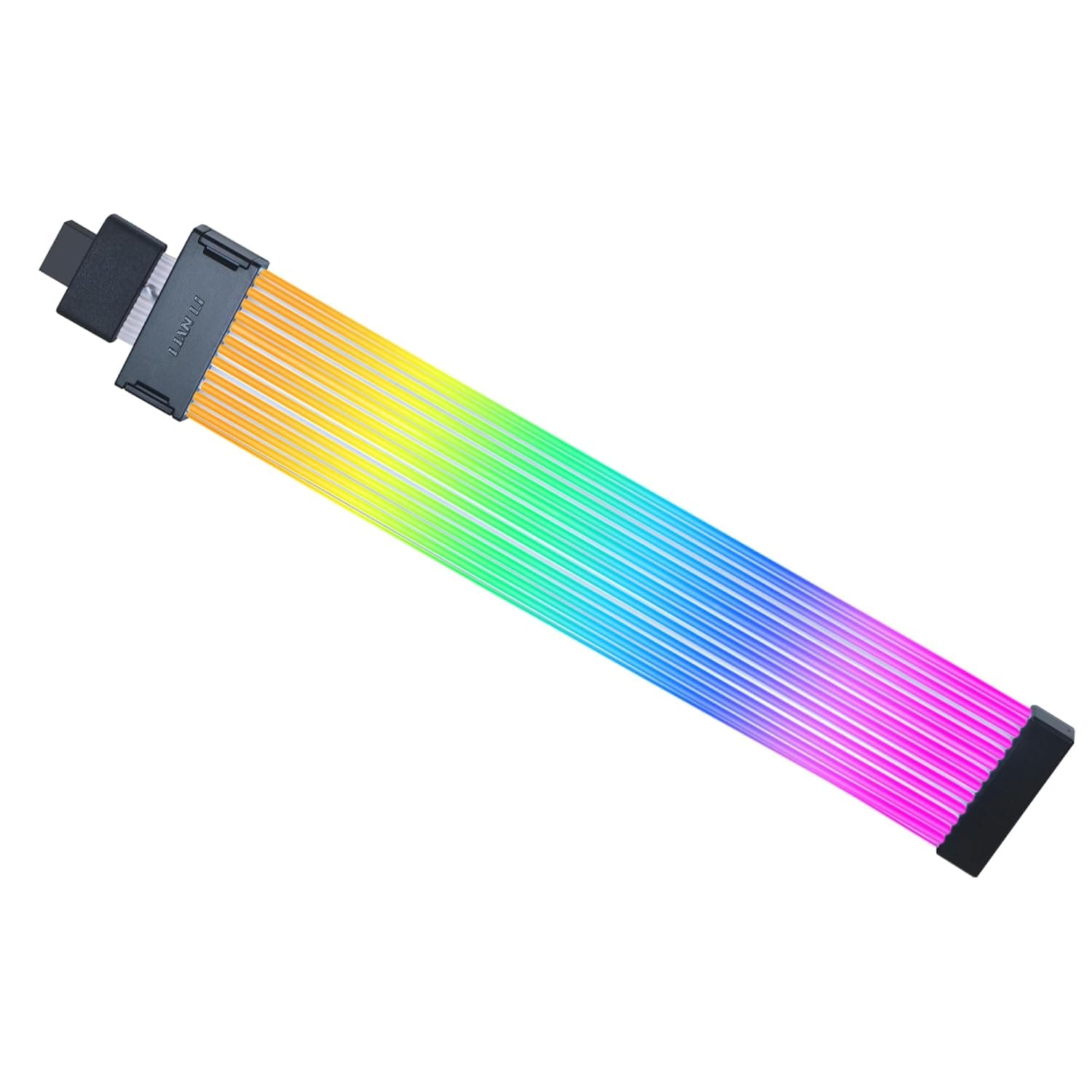
The Lian Li Strimer Wireless 16-pin — Wireless RGB power extension cable with 12 LEDs (model PW16-121W) attaches to your graphics card's 16-pin (12VHPWR) power cable and turns the cable itself into an addressable RGB light. It's a strong pick if you already own a Lian Li wireless controller or plan to build around UNI FAN SL WIRELESS fans.
On its own, though, this product cannot light up. That's the first thing to understand.
The cable has 12 integrated LED strips and an improved light guide that carries light out to the sides of the cable. Control runs over next-generation 2.4GHz wireless, so you don't need to route a separate ARGB signal lead to your motherboard or a controller like older wired Strimer cables required.
Lighting effects are set in Lian Li's L-Connect 3 software.
On Amazon.co.Check the retailer's page for the latest user reviews.
There are still several conditions that people tend to discover only after buying, such as the separately sold controller and the care a 16-pin connector needs. This article focuses on those compatibility points and pitfalls.
Compatibility Guide
16-pin (12VHPWR) only
The only supported connector is ATX 12VHPWR (16-pin), the type mainly used on NVIDIA GeForce RTX 40-series and later cards. It physically won't fit cards that use 2x or 3x 8-pin power.
Before anything else, check whether your card has a 16-pin input.
The 12V-2x6 connector found on RTX 50-series cards and other newer cards is generally described as plug-compatible with 12VHPWR. This product, however, is listed for 12VHPWR.
If you're using a newer card, check Lian Li's product information or the listing's compatibility notes first.
How it connects
The Strimer sits between your existing cables. Plug the Strimer into the GPU's 16-pin socket, then plug the power supply's 16-pin cable into the other end of the Strimer.
A PSU with a native 16-pin cable, such as an ATX 3.0/3.1 unit, keeps things simple.
Going through the GPU's bundled 8-pin-to-16-pin adapter adds more connection points and more bulk inside the case.
Wireless controller (sold separately)
RGB control requires a separately sold Lian Li wireless controller. You can reuse the controller bundled with a UNI FAN SL WIRELESS triple pack or with the Strimer PW24-1W-T.
Running everything from one controller lets the fans and the cable sync within the same ecosystem.
Dimensions and routing
The cable is 41.6 cm long.
The listing also gives a width of 71 mm and a height of 49 mm, but it isn't clear whether those describe the connector or the package. Treat them as rough reference figures when you measure your case.
| Check | How to verify | Common mistake |
|---|---|---|
| GPU power input | Is the socket on the card 16-pin? | Card uses 2x 8-pin, so the cable won't fit |
| Length | Is 41.6 cm enough to reach from the GPU to the PSU cable? | Too much slack, or it falls short |
| Side panel clearance | Is there room to bend the cable gently above the GPU socket? | Closing the panel presses on the connector |
| Controller | Do you already own a Lian Li wireless controller? | Installed, but it never lights up |
| Software | Do you run Windows for L-Connect 3? | No way to change lighting effects |
Be especially careful in mid-tower and smaller cases where the GPU's power socket faces the side panel. The Strimer adds thickness around the connector, so do a test fit and make sure closing the panel doesn't put pressure on the base of the cable.
Software
Lighting is configured in L-Connect 3, which runs on Windows. If you use macOS or Linux day to day, keep in mind that you won't be able to use the configuration software.
Product Info
The full Amazon.co.jp listing title states that the wireless controller is not included and is required for use.
The box contains only the cable.
| Item | Detail |
|---|---|
| Model | PW16-121W |
| LEDs | 12 LED strips |
| Connector | ATX 12VHPWR (16-pin) |
| Cable length | 41.6 cm |
| Width / height (per listing) | 71 mm / 49 mm |
| Control | 2.4GHz wireless (separate controller required) |
| Software | L-Connect 3 |
On Amazon.co.Check the retailer's page for the latest price.
Prices change with sales and stock, so check the product page for the current price before buying. If you don't have a controller yet, remember that it adds to the total cost.
The Strimer Wireless line appeared around late 2024, and its main selling point is removing the signal-cable clutter that comes with wired RGB cables. Warranty terms can vary by retailer and regional distributor, so confirm them with the seller if they matter to you.
Installation Tips
Installation is simple, but a 16-pin connector must be fully seated.
- Shut down the PC and switch off the PSU, then unplug the GPU's 16-pin cable 2.
Push the Strimer's GPU-side connector straight in until the latch engages 3. Plug the PSU's 16-pin cable fully into the other end of the Strimer 4.
Don't bend sharply at the connector; run the cable straight for a bit before turning it 5. Close the side panel and check that nothing is pressing on the connectors 6.
After booting, have the controller recognized in L-Connect 3 and set your lighting
The most common problem is a connector that looks seated but is only partly inserted. An extension adds one more joint, so make a habit of checking both ends for gaps or uneven edges.
How It Compares
| Option | Cabling | Also needed | Best for |
|---|---|---|---|
| This product (wireless Strimer) | Power cable only; no RGB signal lead | Lian Li wireless controller | Users already in Lian Li's wireless ecosystem |
| Wired RGB power extension | Separate RGB signal lead to route | ARGB header or dedicated controller | Users fine with extra wiring and no wireless setup |
| Non-lit sleeved cable | Power cable only | Nothing | Users who want tidy cables without lighting |
The wireless version's value comes from one less signal lead and from managing its lighting in the same software as Lian Li wireless fans. If you've standardized on another brand's fans and RGB software, though, you'll be running L-Connect 3 alongside it, and an extra piece of software can be a drawback.
Recommended Users
- Owners of Lian Li wireless gear such as UNI FAN SL WIRELESS. You can reuse your controller and sync the cable with your fans right away.
- Builders with a 16-pin GPU, such as an RTX 40-series card, in a tempered-glass case. The GPU power cable sits in plain view, so lighting it changes the look of the build a lot.
- People who want fewer RGB leads behind the motherboard tray. Unlike wired versions, there's no RGB cable to route around the back.
If this would be your first Lian Li wireless product, compare the total cost including the controller against other options before deciding.
Before You Buy
It won't light up without a controller. The wireless controller isn't included, and without one you have no RGB control at all.
Here, controller means the RGB control device, not a gamepad, so don't be misled by the product name.
It is 16-pin only. It won't work with GPUs that use 8-pin or 6-pin power. For 12V-2x6 cards, check the compatibility listing first.
16-pin connectors must be fully seated. 12VHPWR is widely reported to be prone to problems when it isn't fully inserted or is bent sharply at the base.
An extension adds one more joint, so seat both ends fully and avoid tight bends at the connector. Some GPU makers publish guidance on extension cables, so check your card's warranty terms if you're concerned.
The length is 41.6 cm. Large cases or long routing paths may leave little slack, while compact cases may leave extra cable to manage.
Measure the distance from the GPU socket to the PSU cable beforehand.
The software is L-Connect 3 for Windows. You can't configure lighting on other operating systems.
The price moves. It went from ¥14,439 when captured in May 2026 to ¥15,273 when captured in August 2026.
Prices in this article reflect those capture dates only, so always check the product page.
It needs a build that shows it off. With an opaque side panel the light is barely visible, and the cost is hard to justify.
FAQ
Q. Does it light up without a controller? A.
No. You need a separately sold Lian Li wireless controller.
Controllers from the UNI FAN SL WIRELESS triple pack or the Strimer PW24-1W-T can be reused.
Q. Can I use it with a 2x 8-pin graphics card?
A. No. It is for ATX 12VHPWR (16-pin) only.
Q. How long is the cable?
A. 41.6 cm. Measure your case to make sure it reaches comfortably.
Q. What software controls the lighting?
A. Lian Li L-Connect 3, which runs on Windows.
Q. How well is it rated? A.co.jp (as captured in May 2026).
Buyers rate the look highly, but make sure you know the controller is sold separately.
Product Disclosure (Amazon)
- Manufacturer: LIAN LI
- Brand: Lian Li
- Seller: ブルーアステール
- Fulfilled by: ブルーアステール
- Model: PW16-121W
- ASIN: B0DJVMLB9L
- Note: This article covers a manufacturer-made product based on Amazon listing details.