Overview
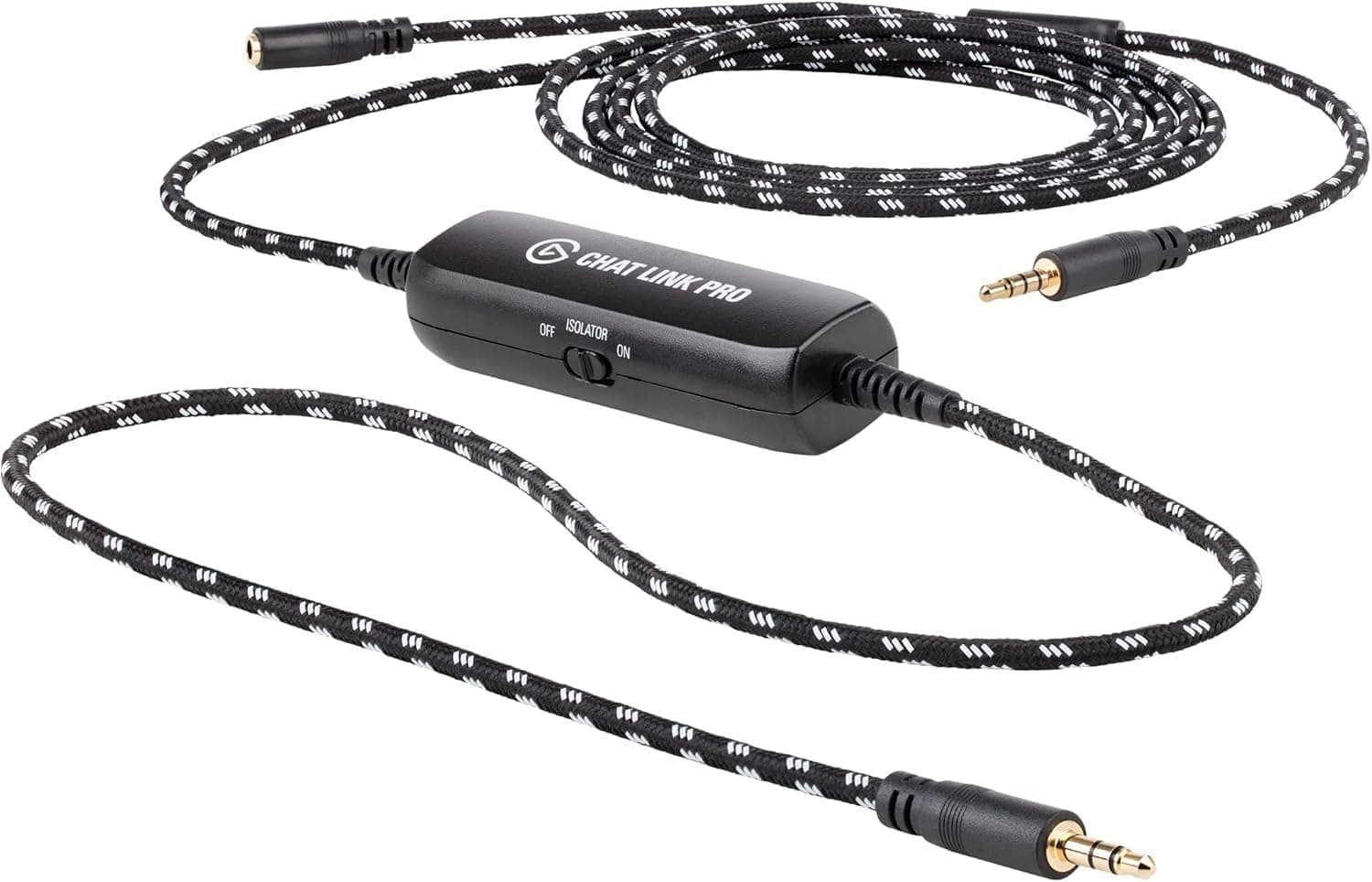
The Elgato Chat Link Pro is an audio adapter that plugs into the headset jack of a PS5, PS4, or Nintendo Switch controller and sends party chat plus game audio to a capture card as a single 3.5mm line signal.
Put bluntly, it exists for one job: letting console streamers record voice chat alongside gameplay. For that job it is far cheaper and far more reliable than adding a mixer or wrestling with software routing.
For anything else it is unnecessary.
On Amazon.co.jp it holds 4.4 out of 5 (88% positive) across 3,738 reviews as of the June 2026 capture — a large sample for a small accessory, and a sign of how many people hit the "my chat audio isn't in the recording" wall.
Note that this article is filed internally under "sound card," but the product is neither a PCIe card nor a USB audio interface. It is not a PC component.
What Problem It Actually Solves
When you capture a PS5 or Switch over HDMI, only game audio travels down that cable. Voice chat is handled by the controller, so it never reaches the capture card.
The classic failure: you watch your own VOD back and the conversation is missing entirely.
Chat Link Pro intercepts the chat audio at the controller's headset jack, gives your wired headset a place to plug back in, and hands the mixed result to your capture card's line input. No software routing required — it is solved in the cabling.
The built-in line isolator galvanically breaks ground loops, the cause of that low "hummm" between mains-powered devices. A side switch lets you leave it off when there's no hum and flip it on when there is.
Compatibility Guide
Officially supported: PS5, PS4, and Nintendo Switch controllers. The connector is a 3.5mm 4-pole CTIA plug — the same wiring as a phone headset.
| Setup | Works? | Notes |
|---|---|---|
| PS5 / PS4 controller | Yes | Straight into the headset jack |
| Nintendo Switch | Yes | Via the console's own headphone jack |
| Capture card with 3.5mm line-in | Yes | Not limited to Elgato cards |
| PC-only streaming | Not needed | Software routing already covers it |
Three things trip people up. First, your headset must be 4-pole CTIA.
PC headsets with separate mic and headphone plugs won't work without an adapter, and older OMTP wiring can misbehave. Second, your capture card needs a 3.5mm line or mic input — budget HDMI-only cards give this adapter nowhere to go, so check before buying.
Third, on Switch handheld play you're cabling from the console itself, not the controller. The unit is small at 19 x 80 x 26 mm, but it hangs off the jack, so route the bundled extension cable to take strain off the plug during long sessions.
Product Info
| Spec | Value |
|---|---|
| Compatible devices | PS5, PS4, Nintendo Switch |
| Connector | 3.5mm 4-pole AUX (CTIA) |
| Dimensions | 19 x 80 x 26 mm |
| Line isolator | On/off switch |
| Color | Black |
Pricing captured on Amazon.co.jp was ¥2,599 as of 26 August 2026, while an earlier capture of the same ASIN on 19 June 2026 showed ¥3,598.
An eBay listing was $15.95 as of July 2026.
A ~¥1,000 swing in two months tells you this item moves with sales — treat every figure above as a snapshot and check the live product page.
The box contains the adapter cable, an extension cable, and a quick-start guide. It launched around 2021 and remains a current product.
Warranty terms depend on your purchase channel, so confirm on the listing whether you're buying through an authorized seller.
Alternatives Compared
- Chat Link Pro: cheapest and simplest, but chat and game audio arrive mixed into one channel — you cannot lower the chat later in editing.
- USB audio interface + mixer: records chat as a separate track, giving full editing freedom, at several times the cost and setup effort.
- Dedicated stream mixer: ideal per-source control, but typically 10x the price.
If your goal is "get the stream working," this is the answer. If your goal is polished, editable audio, spend more.
Before You Buy
1. The audio cannot be separated. This is the single biggest misconception.
Chat and game audio arrive as one mixed signal. You can't split them into OBS tracks, can't mute chat in the archive, can't rebalance later.
If your workflow depends on editing chat out, this product cannot meet the requirement.
2. PC-only streamers don't need it. Windows audio devices plus OBS sources already do this.
Same if you already capture chat through a USB interface.
3. Wireless headsets are out. Dongle and Bluetooth headsets have nowhere to plug in. A wired 4-pole CTIA headset is mandatory.
4. The isolator is not a noise gate. It kills ground-loop hum only.
Room noise picked up by your mic and analog hiss from the controller stay exactly as they were.
5. Verify the listing. One of the collected price entries is labeled "Amazon US" yet points to a yen-denominated Japanese page — listing metadata is inconsistent in places.
Amazon product pages can carry the same kind of mismatch, so confirm from the image and title that you're buying the Chat Link Pro itself, not a plain 3.5mm splitter or the older non-Pro "Chat Link."
6. Treat it as a consumable. It's a thin cable hanging off a controller.
Pull the plug, not the cable, and route slack through the extension — that alone decides whether it lasts.
Best Use Cases
- Console streamers who want party chat in the broadcast. The fastest, cheapest fix for a specific, common problem.
- Multi-platform creators switching between PS5, PS4, and Switch — one adapter covers all three.
- Anyone fighting hum in their stream audio, where the cause is a ground loop.
- People who want fewer software layers and easier troubleshooting when something breaks.
Not for: PC-only streamers, wireless-headset users, and anyone who needs chat on its own editable track.
FAQ
Q. Does it work with Xbox? A.
The officially listed devices are PS5, PS4, and Nintendo Switch. Anything else is unsupported — check the current product page.
Q. Can I record chat and game audio separately? A.
No. They are mixed into one signal.
Use a USB interface or mixer if you need separate tracks.
Q. Will it work with my wireless headset?
A. No. You need a wired 4-pole CTIA headset plugged into the controller.
Q. Does it work with non-Elgato capture cards? A.
Generally yes, as long as the card has a 3.5mm line or mic input.
HDMI-only cards won't work.
Q. Should the isolator always be on?
A. Leave it off unless you hear hum; switch it on and see whether the noise disappears.
Q. How is it rated? A.
4.4 out of 5 (88% positive) from 3,738 Amazon.co.jp reviews as of the June 2026 capture.
Check the page for current numbers.