This article covers ミリタリー CAC & 政府機関 PIV カードリーダー USB-C.
Overview
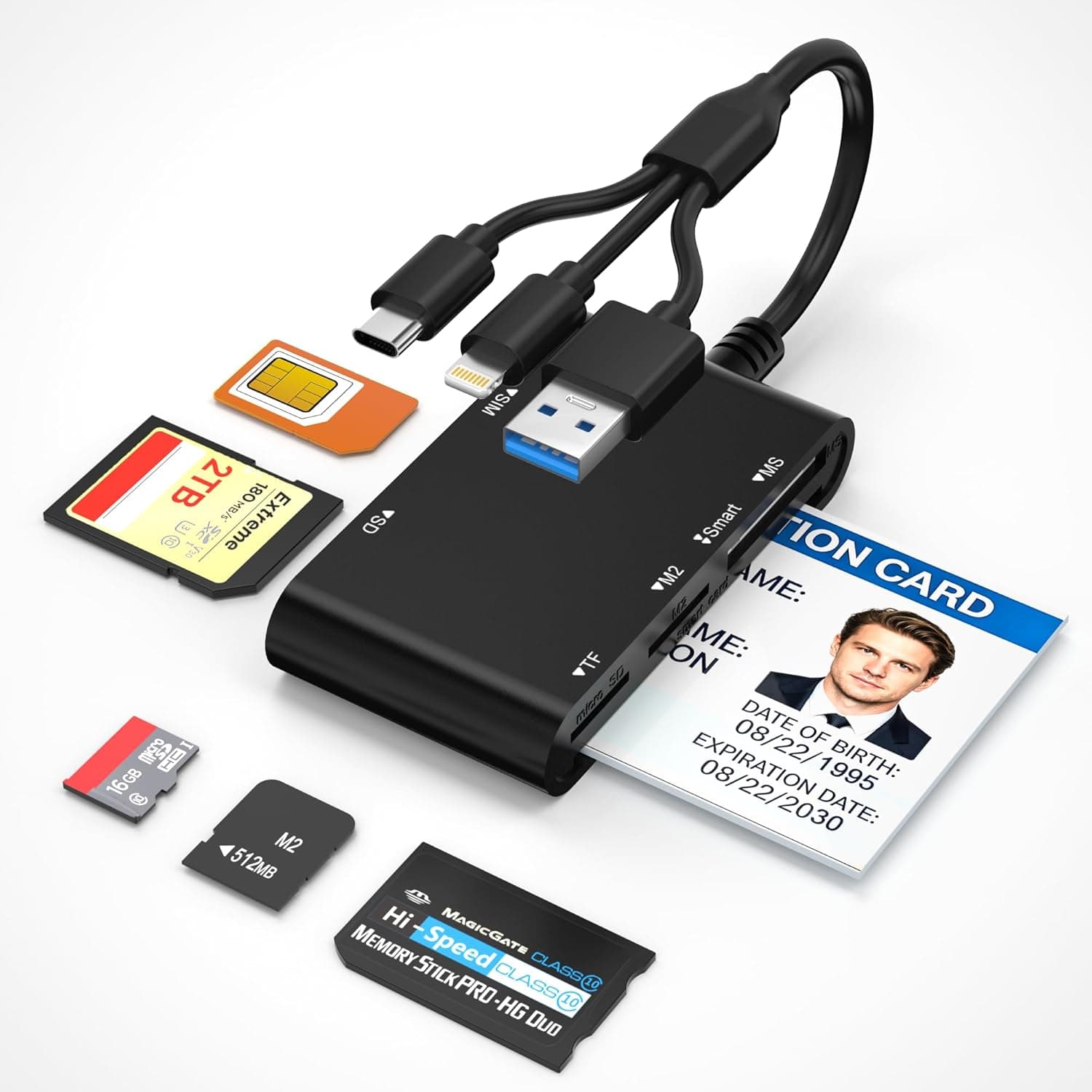
The Bawanfa Plus 7-in-1 CAC/PIV Card Reader is a versatile multi-card reader designed to handle military CAC cards, government PIV cards, standard memory cards, and SIM cards all in one compact device. It features three built-in connectors — USB-C, USB-A, and Lightning — allowing direct connection to iPhones, iPads, MacBooks, Android phones, Windows laptops, and desktop PCs without any additional adapters. What sets this reader apart is its support for both CAC (Common Access Card) and PIV (Personal Identity Verification) authentication, making it a practical tool for Department of Defense personnel and federal government employees. Beyond smart cards, it reads SD, microSD, Memory Stick Pro Duo, M2, and MMC cards, with support for individual cards up to 2TB. Transfer speeds reach up to 480Mbps (approximately 40MB/s), which is adequate for most everyday file transfers.
Connectivity & Compatibility
Three built-in connectors: USB-C, USB-A, and Lightning — no cables needed for direct device connection. CAC and PIV card reading requires Windows (XP through 11) or Linux (Kernel 2.6+, Fedora FC8+) with organization-provided software such as ActivClient. macOS, iOS, and Android can read CAC/PIV cards via third-party apps, but full functionality is not guaranteed. For reliable authentication, use Windows or Linux. Memory cards (SD, microSD, Memory Stick Pro Duo, M2, MMC) work plug-and-play on Windows, macOS, Linux, iOS, and Android — no drivers or apps required. * SIM card slot is included, useful for travelers managing multiple SIMs or performing data recovery.
Product Info
Released in late 2024, the Bawanfa Plus 7-in-1 CAC/PIV Card Reader is priced around ¥5,439 on . It comes with a 12-month warranty and includes only the reader unit and a user manual in the box. Positioned in the mid-range multi-card reader market, this device stands out for its dual smart-card support combined with broad memory card compatibility. It appeals to military and government personnel who need CAC/PIV functionality, while also serving photographers, travelers, and general users who want a single reader for multiple card formats.
Best Use Cases
Military & Government Personnel: Ideal for anyone who needs to access DoD portals or federal authentication systems using CAC or PIV cards. Pair it with ActivClient or similar software on Windows or Linux for reliable, secure access. Photographers & Creatives: If you work with SD cards, microSD, or Memory Stick Pro Duo from cameras and drones, this reader handles them all. The dual USB-C and USB-A connectors ensure compatibility with both modern MacBooks and older Windows laptops. * Travelers & Mobile Workers: The built-in Lightning connector lets you transfer photos and files directly to an iPhone or iPad without a separate adapter. The SIM card slot is handy for managing international SIMs or recovering data from old phones.
Things to Consider
CAC/PIV card functionality is limited to Windows and Linux with dedicated software. macOS, iOS, and Android support is experimental and not guaranteed. Verify your operating system compatibility before purchasing. Only one card can be read at a time. If you need to access multiple cards simultaneously, look for a multi-slot reader. Transfer speeds max out at 480Mbps (about 40MB/s), which is slower than modern USB 3.2 Gen 2 readers. Professional photographers transferring large RAW files frequently may prefer a faster option. The built-in short cable is convenient for portability but may feel too short for desktop use. An extension cable might be necessary depending on your setup. ## FAQ
Q: Does this work with iPhone 15 (USB-C)? A: Yes, the USB-C connector allows direct connection to iPhone 15 series for memory card reading. However, CAC/PIV authentication may not work fully on iOS, so stick to Windows or Linux for that purpose. Q: How do I set up CAC card reading on Windows 11? A: First, install the CAC-compatible software provided by your organization (e.g., ActivClient). Then connect the reader to your PC — Windows 11 should automatically recognize it via the built-in CCID driver. Follow the software prompts to complete setup. Q: Can I use this reader for data recovery from SD cards? A: Yes, you can read SD and microSD cards on a computer and use data recovery software. The reader itself does not have recovery features, so you will need separate recovery tools.
Product Disclosure (Amazon)
- Manufacturer: Bawanfa Plus
- Seller: Amazon US
- Fulfilled by: Amazon US
- ASIN: B0GKDFMN8N
- Note: This article covers a manufacturer-made product based on Amazon listing details.