Overview
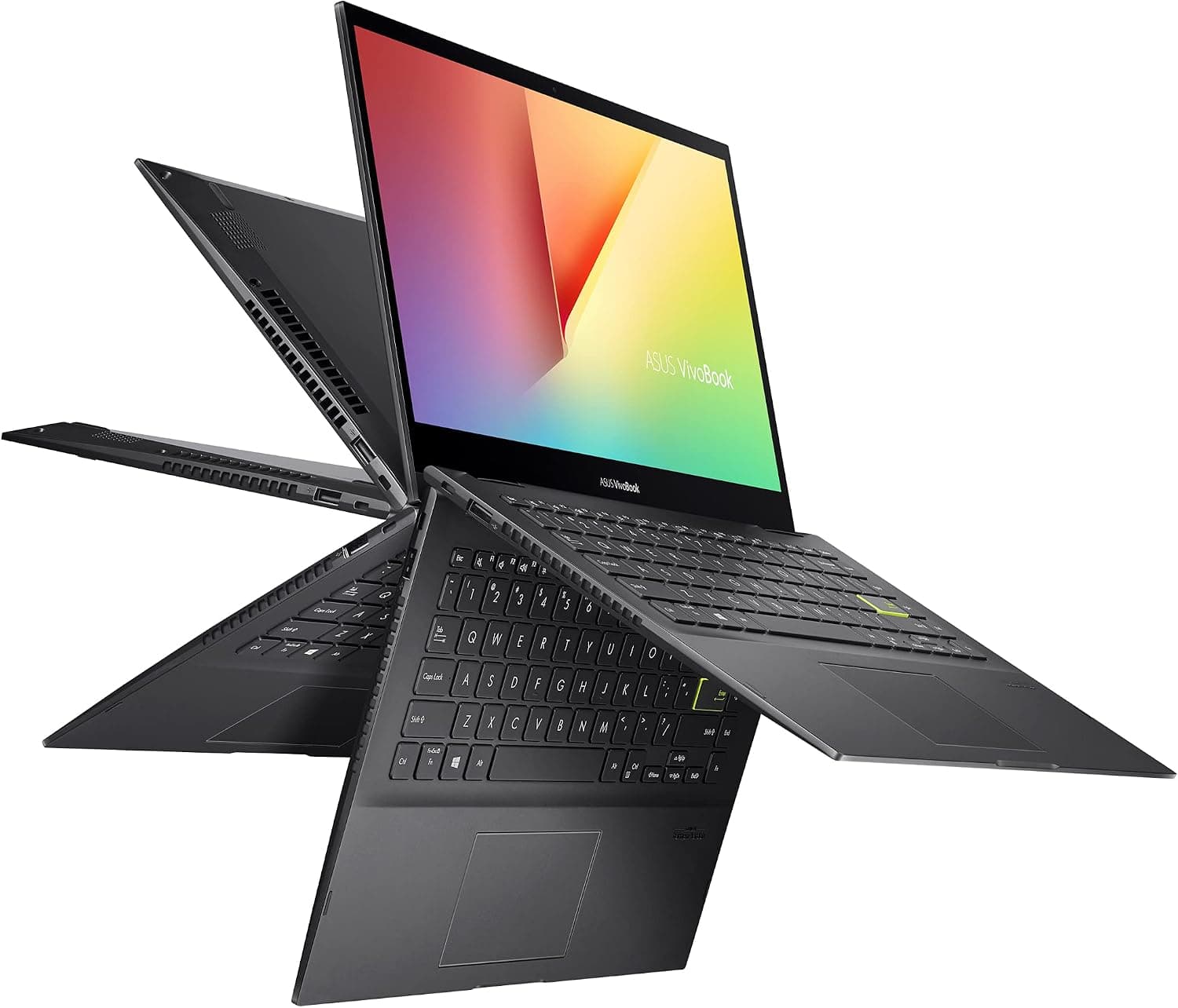
This review covers the ASUS VivoBook Flip 14 TP470EA-AS34T — Slim convertible laptop with FHD touch display. It has a 14-inch Full HD (1920×1080) touch screen, and the hinge folds the display all the way back so the laptop works as a tablet.
Inside are an 11th Gen Intel Core i3-1115G4 (2 cores/4 threads, up to 4.1GHz, 6MB cache), 4GB of LPDDR4X memory and a 128GB SSD.
It came out around 2021 as an entry-to-mid-range machine. For its price class at the time it was well equipped, with a Thunderbolt 4 port, a fingerprint reader and Wi-Fi 6.
The short version: if you mainly write documents, browse the web, watch video and take handwritten notes, this configuration still works. If you keep many browser tabs open or build slides during video calls, the 4GB of memory runs out quickly.
LPDDR4X is soldered to the motherboard, so you can't add memory later. Whether you can live with 4GB that can never be upgraded decides almost everything about this purchase.
On Amazon.co.Check the retailer's page for the latest user reviews.
We can't tell when or at what price those reviewers bought it, though, so don't assume you'll be as happy at today's price. We cover pricing in Product Info and Before You Buy.
Performance Expectations
The Core i3-1115G4 is a 2-core, 4-thread low-power CPU with Intel UHD Graphics (not the Iris Xe found on Core i5/i7 models). Its raw speed is fine for everyday work.
Once you run several tasks at once, though, the 4GB of RAM usually becomes the bottleneck before the CPU does.
| Use | Comfort level | Notes |
|---|---|---|
| Web browsing and email | Comfortable | Switching gets sluggish past about 10 tabs |
| Word/Excel documents | Comfortable | Large sheets or several open files cause waits |
| Full HD video playback | Comfortable | Streaming services are rarely a problem |
| Video calls | Usable | Fine on their own; heavy if you also edit documents |
| Handwritten notes and PDF markup | Usable | Requires a compatible pen (sold separately) |
| Light photo touch-ups | Conditional | OK for small batches without RAW processing |
| Video editing and 3D games | Not suitable | CPU, GPU and memory all fall short |
This table is our estimate based on the configuration, not benchmark results. Even the comfortable tasks can slow down while Windows Update or an antivirus scan runs in the background.
On a 4GB machine it helps a lot to cut background apps and stick to one browser.
Compatibility Guide
This is a laptop, so CPU sockets and PCIe versions don't matter. Pairing it with accessories still has a few common pitfalls.
| Item | Spec | Notes |
|---|---|---|
| Memory | 4GB LPDDR4X (soldered) | Can't be upgraded or replaced; there is no SO-DIMM slot |
| Charging | Included 19V/3.42A adapter, USB-C PD | Aim for a PD charger of about 65W |
| Video output | Thunderbolt 4 (USB-C), HDMI | 4K output over Thunderbolt 4 |
| Expansion | USB 3.2 Type-A, microSD reader | Add a hub if you need more ports |
| Wireless | Wi-Fi 6 (802.11ax), Bluetooth 5.0 | Pair with a Wi-Fi 6 router to get the full speed |
| OS | Windows 10 Home (S mode) | Free upgrade to Windows 11 |
Charging. The included adapter outputs 19V/3.42A, about 65W.
The Thunderbolt 4 port also takes USB-C Power Delivery, so you can share a charger with your phone or tablet. A small 20–30W PD charger may charge slowly, or the battery may drain while you use the laptop.
If you buy a PD charger, get one rated around 65W like the included adapter.
External displays. The Thunderbolt 4 port uses the USB-C connector and outputs video.
A monitor with USB-C input needs only one cable, and a Thunderbolt dock can carry power, video and USB devices over a single connection. HDMI also outputs video, but Thunderbolt 4 is the safer choice for 4K.
Check the product page for the resolutions HDMI supports.
Port planning. There is only one Thunderbolt 4 port.
If you charge through it, you can't use it for anything else. Powering the laptop with the included 19V adapter keeps the Thunderbolt 4 port free, so docking and external-monitor users should keep the adapter in use.
Pen input. Touch works with your finger, but no pen is included.
For handwriting you'll need a compatible ASUS pen. Pens use different protocols and won't respond if the protocol doesn't match, so check the supported pen model on the product page before buying.
Storage. The internal drive is a 128GB SSD.
Moving photos and videos to a microSD card keeps space free on the internal drive. Replacing the internal SSD means taking the laptop apart and may void the warranty, so an external SSD or cloud storage is the safer option unless you're confident.
Product Info
| Item | Detail |
|---|---|
| CPU | Intel Core i3-1115G4 (2 cores/4 threads, up to 4.1GHz, 6MB cache) |
| Memory | 4GB LPDDR4X |
| Storage | 128GB SSD |
| Display | 14-inch FHD (1920x1080) touch, 178° viewing angle |
| Weight | About 1.6 kg |
| OS | Windows 10 Home (S mode), free Windows 11 upgrade |
| Wireless | Wi-Fi 6 (802.11ax), Bluetooth 5.0 |
| Ports | Thunderbolt 4, USB 3.2 Type-A, HDMI, microSD, headphone jack |
It was released around 2021 as an affordable 2-in-1 for people who value touch input and portability. The 360-degree hinge gives you laptop, tablet, tent and stand modes.
The fingerprint reader supports Windows Hello, so you can sign in without typing a password. The box includes the AC adapter and documentation.
We found it at ¥139,800 on Amazon.co.jp (captured August 25, 2026) and $208.24 on eBay US (captured August 17, 2026).
Both prices change a lot with sales and stock, so check the latest price on the listing before you buy. The Amazon.co.jp price is very high for a 2021-era Core i3 / 4GB / 128GB machine.
For that money you could also look at current laptops with 16GB of RAM and a 512GB SSD. eBay listings may be used or refurbished units, so check each listing for condition, accessories and battery wear.
In Japan this model is sometimes sold as a parallel import. In that case the keyboard may use a US layout, and Japanese manufacturer warranty may not apply.
Warranty coverage and length depend on the seller, so read the listing carefully.
Product Disclosure (Amazon)
- Manufacturer: ASUS
- Product: VivoBook Flip 14 TP470EA-AS34T
- Category: 2-in-1 laptop
- Configuration: Core i3-1115G4, 4GB memory, 128GB SSD
- Note: This article covers a manufacturer-made product based on Amazon listing details.
Alternatives
Buyers usually compare this model with other light laptops around 14 inches and with touchscreen laptops. Among the models we cover, the LG gram 14 (Core i5-1334U, 16GB RAM, 512GB SSD) has far more memory and storage headroom and stays responsive with many apps open.
If touch is essential, the Dell 15 2026 FHD touchscreen laptop is another option, but it's a 15-inch class machine, so the VivoBook Flip 14 is easier to carry.
The VivoBook Flip 14's main strength is that the screen folds back into a tablet. A regular clamshell laptop can't flip its screen even if it has touch, so it can't stand up like a stand for video or lie flat for handwritten notes.
If you don't need a 2-in-1, a clamshell with more memory at the same budget will usually satisfy you more.
Who Should Buy
- Students who mostly take handwritten notes or mark up PDFs: Fold it into a tablet and write directly on lecture slides with a compatible pen (sold separately). It also handles report writing, so it can serve as both notebook and tablet.
- Mobile users focused on documents and browsing: The roughly 1.6 kg body and Wi-Fi 6 suit light work on the go. It isn't a good fit for running many apps side by side.
- People who present or explain things face to face: Tent and stand modes turn the screen toward your audience, and you can flip through slides with a tap.
- Users who want fast fingerprint sign-in: The Windows Hello fingerprint reader means no password typing in public.
- Those who connect to a monitor at home: A single Thunderbolt 4 port connects an external display or a dock.
Before You Buy
The 4GB of RAM can't be upgraded. This matters most.
LPDDR4X is soldered on, so you can't move to 8GB or 16GB later. Windows 11 needs at least 4GB, so the OS runs, but with almost no headroom.
If you plan to keep many tabs open or run video calls while editing documents, buy a machine with 8GB or more from the start.
128GB fills up within a few years. The OS and the working space for major updates eat free space faster than you'd expect.
This capacity suits people who install few apps and keep their files on microSD or in the cloud.
S mode blocks some apps. Out of the box, Windows 10 Home in S mode only installs apps from the Microsoft Store.
Browsers outside the Store such as Google Chrome, business software and game launchers all require leaving S mode. Switching out is free but one-way; you can't go back to S mode.
Windows 10 support has already ended. Microsoft ended Windows 10 support in October 2025.
The laptop qualifies for a free Windows 11 upgrade, so upgrade as soon as it arrives. With a used unit, check whether it has already been upgraded.
It's heavy as a tablet. About 1.6 kg is normal for a laptop but heavy to hold in one hand as a tablet.
Plan to use tablet mode on a desk or your lap.
Check that the price fits the specs. As noted above, the Amazon.co.Check the retailer's page for the latest price.
We strongly recommend checking whether the same budget buys a newer model with more memory.
Watch for listing inconsistencies. Some listings for this product show a manufacturer other than ASUS or point to a different ASIN.
Listing data can be wrong, so check the photos, title, model number (TP470EA-AS34T) and seller to make sure you're getting the ASUS VivoBook Flip 14 itself.
FAQ
Q. Can I upgrade the memory to 8GB or 16GB? A.
No. The LPDDR4X memory is soldered to the motherboard and there is no slot.
If 4GB isn't enough, the only fix is a different laptop.
Q. Can it run Windows 11? A.
Yes. It qualifies for the free upgrade, and 4GB meets the Windows 11 minimum.
It won't feel fast, so trimming background apps helps keep it responsive.
Q. Can I charge it with a USB-C phone charger? A.
Yes, with a charger that supports USB-C PD, because the Thunderbolt 4 port accepts PD charging. The included adapter is about 65W (19V/3.42A), so aim for a 65W-class charger.
A low-wattage charger may not keep up while you use the laptop.
Q. Can it play Steam games? A.
The integrated Intel UHD Graphics isn't suited to 3D games. Some light 2D indie games may run, but check each game's requirements.
Many games also need more than 4GB of memory.
Q. Does it come with a pen? A.
No. For handwriting you need to buy a compatible pen separately.
Pens with the wrong protocol won't respond, so check the supported pen model on the product page.