Overview
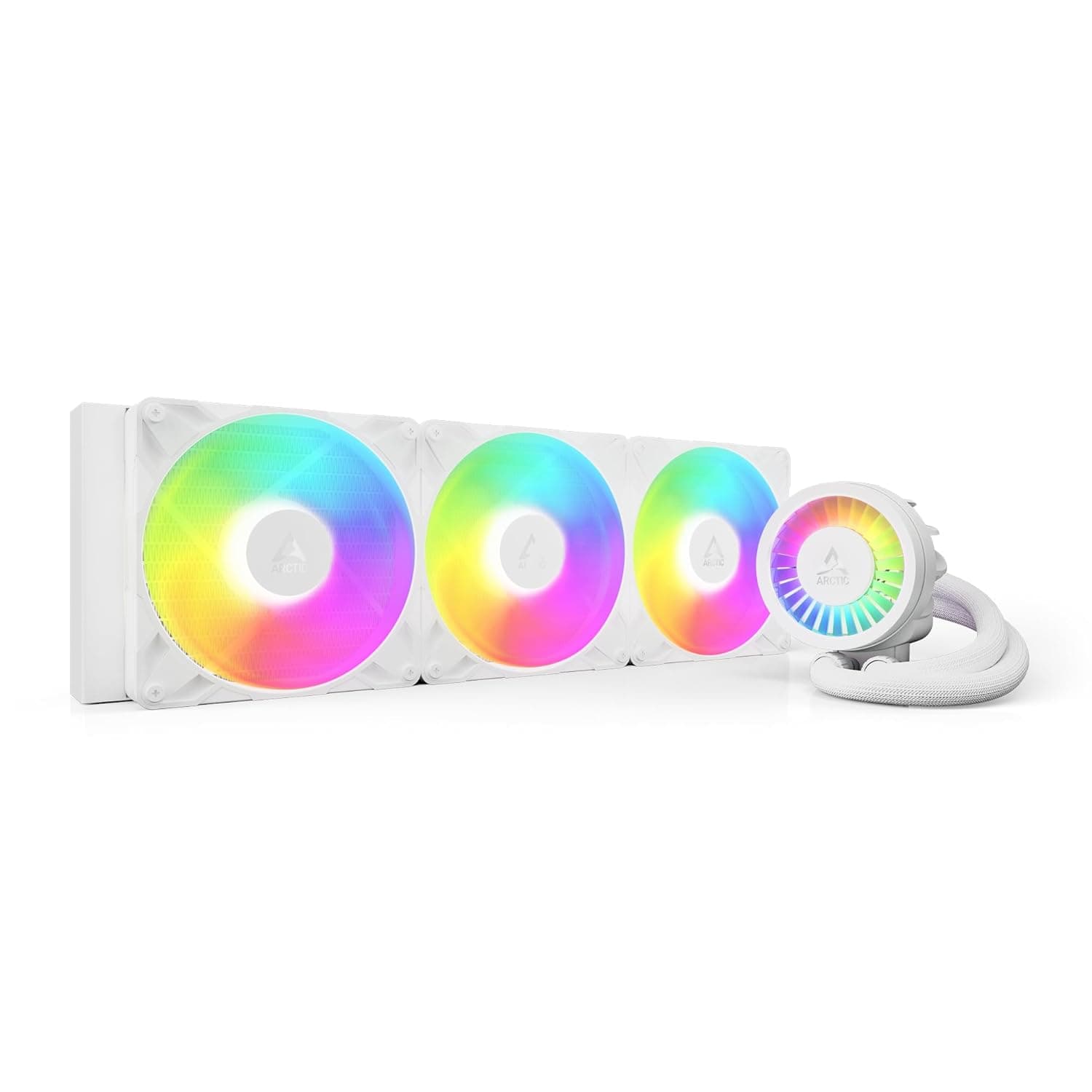
ARCTIC Liquid Freezer III Pro 420 A-RGB (ホワイト) - AIO CPUクーラー 3 x 140 mm 水冷 38mm ラジエーター PWM ポンプ VRM ファン AMD AM5 is an all-in-one liquid CPU cooler that pairs a 420mm radiator (three 140mm fans in a row) with a 38mm-thick core. The short version: it only makes sense when two conditions are both true.
You need a genuinely hot CPU such as a Core i9 or Ryzen 9, and you need a case that officially supports a 420mm radiator. Miss either one and a 360mm AIO or a dual-tower air cooler will serve you better for less money and far less hassle.
Most AIO radiators are around 27mm thick; this one is 38mm. The real benefit of a thicker core is not a dramatic jump in peak cooling but the ability to hold the same temperature at a lower fan speed.
In other words, you are buying headroom that can be converted into quiet operation. The pump unit also integrates a PWM fan that blows across the VRM area of the motherboard, compensating for the airflow you lose around the socket when you move from an air cooler to a liquid one.
The chassis is white and the three P14 Pro fans are addressable RGB. On Amazon.co.Check the retailer's page for the latest user reviews.
That is a small but consistently positive sample, which also means long-term durability data is still accumulating.
Quick verdict by use case
| Use case | Fit | Why |
|---|---|---|
| Core i9 / Ryzen 9, long renders and encodes | Excellent | Sustained loads are where 420mm and 38mm pay off |
| Mid-range CPU, mostly gaming | Marginal | Overkill; spend the difference on the GPU or storage |
| Quiet build that still handles heavy loads | Excellent | Enough surface area to stay slow under load |
| Mid-tower or smaller chassis | Poor | A 420mm radiator simply will not fit |
| All-white aesthetic build | Good | White plus ARGB matches, if the mount is visible at all |
As the table shows, the verdict rests on two things: how hot your CPU runs, and whether the radiator fits. The sections below work through both.
Compatibility Guide
Supported sockets are Intel LGA1851 and LGA1700 plus AMD AM5 and AM4. For Intel, a dedicated contact frame replaces the stock ILM, reducing CPU bending and evening out the pressure between the die and the cold plate.
For AMD, native offset mounting shifts the cold plate center toward the CPU hotspot. Both address mounting quality, which is one of the few variables that directly moves your temperatures.
The case is the real gate. A 420mm radiator lines up three 140mm fans, so the overall length including the frame lands around 450 mm; check the exact figure on the manufacturer page.
Confirm that your case spec sheet explicitly lists 420mm radiator support, and check which surface accepts it, top or front. A chassis that tops out at 360mm will not take this cooler, and buying without that check is the most common mistake with this product.
Thickness is the second trap. The 38mm radiator plus fan thickness (140mm fans are typically 25-27mm) needs roughly 63-65mm of space.
In a top mount that stack fights tall heatsink memory, VRM heatsinks, and the 24-pin cable run. Compare it against the clearance your case lists between the top of the motherboard and the top panel.
A front mount avoids that problem but introduces clearance questions with drive cages and the end of your graphics card.
Wiring is standard 4-pin PWM, rated 12V at 4.2W, which sits comfortably within a normal CPU_FAN header.
The fan cables are routed inside the hose sleeve, so only one cable emerges at the motherboard end. Cable management becomes wonderfully clean, but hose orientation now dictates cable routing, so decide which way the hoses face before you commit to a mounting position.
Check the manual for the header and adapter required by the ARGB lighting.
Product Info
| Item | Value |
|---|---|
| Radiator size | 420 mm |
| Radiator thickness | 38 mm |
| Fans | 140 mm x 3 (P14 Pro, A-RGB) |
| Max fan speed | 2500 rpm |
| Noise level | 1 sone |
| Supported sockets | Intel LGA1851 / LGA1700, AMD AM5 / AM4 |
| Connector | 4-pin PWM |
| Voltage / power | 12 V / 4.2 W |
| Cooling method | Liquid (all-in-one) |
| Supported devices | Desktop |
The 2500 rpm ceiling is high for a 140mm fan. It gives you something in reserve, but running there day to day is loud.
Treat the 1 sone figure as a representative value rather than a full-speed number, and plan on drawing a custom fan curve that caps the top end. The large surface area is exactly what lets you do that without temperatures falling apart.
On Amazon.co.Check the retailer's page for the latest price.
That is premium territory for a cooler, but reasonable for a 420mm, 38mm-thick unit. Prices move constantly with sales, stock, and exchange rates, so check the product page for the current figure.
An eBay US listing showed $84.95 as of July 14, 2026, but marketplace listings mix used, grey-import, and incomplete units, and shipping plus duties are extra.
If warranty support matters, buy through normal domestic retail.
The bundle includes three P14 Pro fans, Intel and AMD mounting kits, the Intel contact frame, and thermal compound. Check the official ARCTIC site for warranty length.
Versus 360mm AIOs and Air Coolers
Against a 360mm unit (three 120mm fans), the core area works out to roughly 1.3x based on 420x140mm versus 360x120mm, and the core is 38mm rather than about 27mm.
By volume the gap is wider still. That shows up as a few degrees at peak, but more usefully as the ability to hold a target temperature at lower rpm.
Larger 140mm fans also move the same air more slowly than 120mm units, which helps again on noise.
Against a dual-tower air cooler, the clear win is sustained all-core load, where a heatsink eventually saturates and a large liquid loop keeps absorbing heat. Air coolers win on having no pump to fail, easier installation, and a much lower price.
For gaming, which is mostly bursty load, the money saved is usually better spent on the GPU.
Noise and Day-to-Day Operation
Redraw the fan curve in BIOS or your motherboard utility on day one. Default profiles react sharply to CPU temperature, so short bursts of load make the fans ramp audibly.
With this much radiator, you can pin the low-load range at a genuinely low rpm and only ramp past a set temperature without the temperatures running away.
Pump noise varies between units. Trapped air can produce a gurgling sound early on, which is common to AIOs generally and often settles after some running time.
If it persists after several days, or if you hear a clearly abnormal noise, treat it as a possible defect and contact the retailer or manufacturer.
Recommended Users
- Owners of high-TDP CPUs who want maximum headroom: For Core i9 or Ryzen 9 chips running long encodes or 3D renders, the 420mm area plus 38mm depth matters most during hours-long loads, not in short benchmarks.
- Builders chasing quiet plus cooling: Surface area converts directly into permission to run slower fans, so a gentle curve stays viable under real workloads.
- Anyone who already owns a 420mm-capable case: If your full tower officially supports a 420mm radiator, this is one of the best ways to use that space.
- All-white builds: The white chassis and ARGB P14 Pro fans let you add top-tier cooling without breaking the color scheme.
Before You Buy
Case incompatibility is the number one failure. Few cases officially support a 420mm radiator, and mid-towers essentially never do.
If the spec sheet stops at 240/280/360mm, this cooler is out. Verify 420mm support and the mounting surface on the manufacturer page before ordering.
Thickness interference is close behind. The 38mm radiator plus fans needs roughly 63-65mm.
In a top mount that collides with tall memory, VRM heatsinks, and cable routing, and some cases advertise 420mm support while designing clearance around 27mm radiators. If in doubt, plan for a front mount.
It is clearly overkill for mid-range CPUs. With a 65-105W chip you will rarely use what you paid for.
A cheaper AIO or a strong air cooler plus a better GPU will produce more noticeable gains. Nothing breaks from cooling too well, but the spend will not show up on the thermometer.
Mind the installation details. The Intel contact frame replaces the stock ILM, so read the manual through and understand how that interacts with your CPU warranty.
On AMD, installing the offset mount the wrong way round misaligns the cold plate. The radiator is heavy enough that it is easy to crush fins or strain the tubing, so settle the layout before the motherboard is buried in the case.
Do not trust store listing metadata blindly. Retail pages often carry auto-registered manufacturer, model, and compatibility fields, and data from a different variant (black versus white, Pro versus standard, different size) can slip in.
Confirm that 420mm, Pro, A-RGB, and white all match in both the product images and the title before ordering, and assume the displayed price has moved since capture.
The review count is still 115 as of June 6, 2026. The 4.3-star average is good, but long-term pump life data is thinner than for older mainstream models.
As a general matter, white plastics and sleeving can also shift in color over years of use.
FAQ
Q. How much cooler is it than a 360mm AIO? A.
This article has no like-for-like temperature comparison, so no specific delta can be quoted. From dimensions alone, core area is roughly 1.3x (420x140mm versus 360x120mm) and the core is 38mm rather than about 27mm.
In practice the gain shows up more as quieter operation at the same temperature than as a higher ceiling.
Q. Is it worth using on a mid-range CPU? A.
For cooling, no. For silence, possibly, since low fan speeds are enough.
Whether that justifies the price depends on your priorities; gaming builds usually gain more from putting the money into the GPU.
Q. Do I have to use the VRM fan? A.
It is integrated into the pump unit, so it works as part of normal installation. Check the bundled manual for wiring and control specifics.
Since switching to liquid cooling removes the airflow an air cooler used to provide around the socket, the fan exists for a good reason.
Q. What if my case does not support 420mm? A.
Do not force it. Choose a 360mm AIO or a dual-tower air cooler instead.
Even if the radiator physically squeezes in, blocked intake or exhaust and strained cabling will cost you the performance you paid for.
Q. How long is the warranty? A.
The warranty period is not included in this article's data, so check the official ARCTIC site or your retailer. Because AIOs carry a non-zero risk of pump failure or leakage, it is worth knowing the terms before you buy.