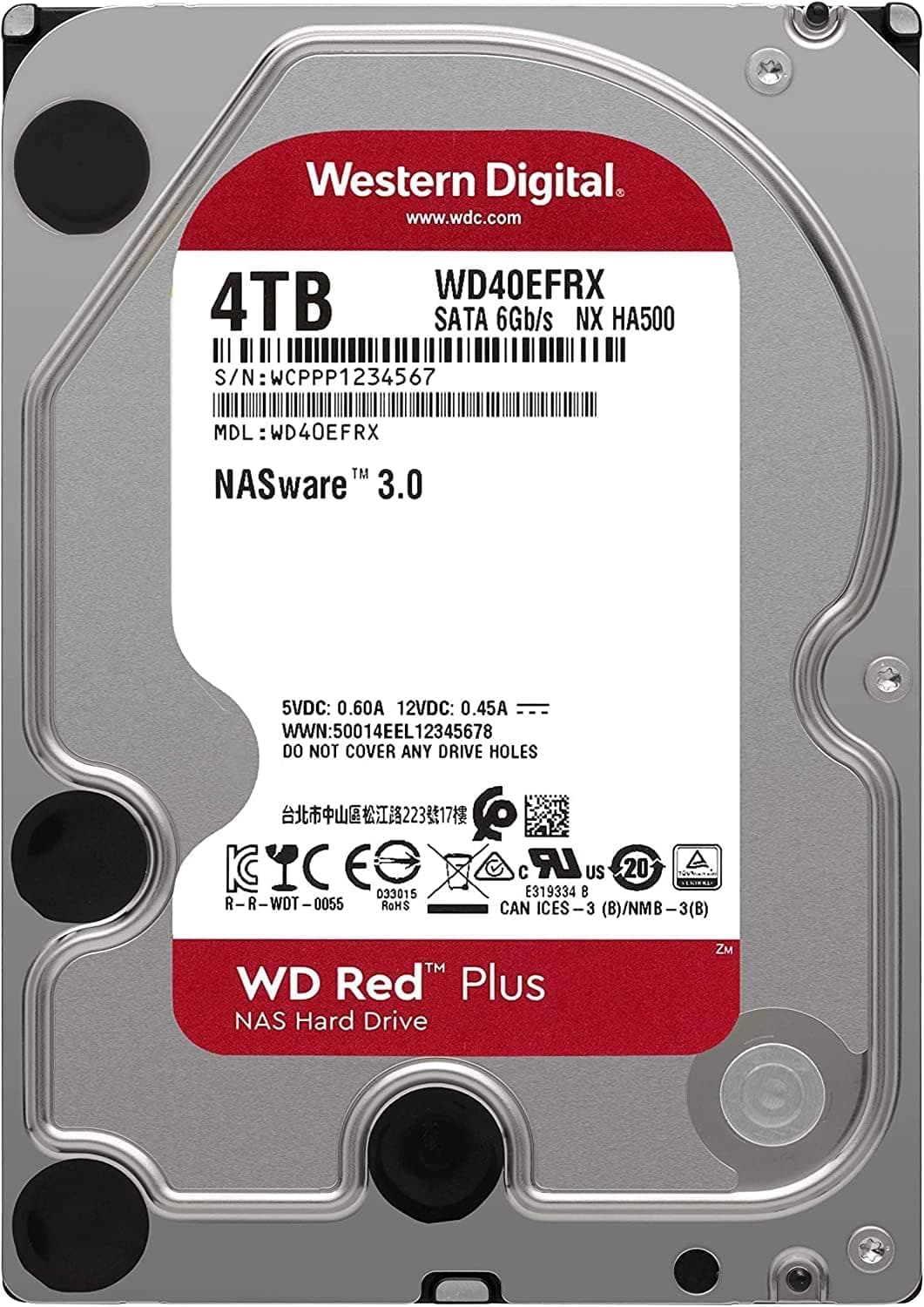
This article covers the WD Red 4TB SATA3.0 NAS 5400rpm (model WD40EFRX), assuming you plan to put it in a home or small-office NAS.
Beyond the spec sheet, it explains how this drive differs from other drives also sold as "WD Red", what to watch out for when adding it to a RAID array, and who should skip it.
Overview
The short answer: the WD Red 4TB (WD40EFRX) is a long-standing internal HDD for people who want a quiet 4TB disk running 24/7 in a NAS. It is not built for speed.
Its design puts continuous operation and low noise first.
The Western Digital WD Red series is built specifically for NAS (Network Attached Storage). The WD40EFRX offers 4TB of storage, a 5400rpm spindle speed and 64MB of cache.
It connects over SATA 3.0 (6Gb/s) and uses the 3.5-inch form factor.
It is designed to run 24/7 and works well in RAID arrays. That makes it a reliable, cost-effective choice for home and small-office NAS systems.
The most important point comes first: do not buy by the name "WD Red" alone. Check that the model number is WD40EFRX. In the 2-6TB range, some drives sold as WD Red used SMR (shingled magnetic recording), and they carry the EFAX suffix.
The EFRX uses conventional magnetic recording (CMR). If you run RAID, this difference matters a lot (details below).
Compatibility Guide
This drive is a 3.5-inch internal HDD with a standard SATA interface.
It works in any NAS or PC with a free SATA port and a SATA power connector. Many NAS makers have listed WD Red drives as recommended drives for their systems.
It will not fit in 2.5-inch bays, so make sure your enclosure or case has a 3.5-inch slot.
It works with most RAID setups and supports hot-swapping in NAS units that offer it.
| Check | This drive | Common mistake |
|---|---|---|
| Drive bay | 3.5-inch | Will not fit laptops or 2.5-inch-only compact NAS units |
| Interface | SATA 6Gb/s | Works on older SATA 3Gb/s ports, with little real-world difference for an HDD |
| Power | SATA power | Some older PSUs only have 4-pin peripheral (Molex) connectors |
| Dimensions | 147 x 102 x 25 mm | Standard 3.5-inch size; fits NAS drive trays as-is |
| Weight | 680g | Several drives add real weight to a case or external enclosure |
Check your NAS compatibility list. Most NAS makers publish lists of drives they have tested.
On some models, third-party drives trigger warnings or lose certain features. This is especially worth checking with vendors that sell their own drives, such as Synology.
Look for WD40EFRX on the list for your exact model before you buy.
Do not mix CMR and SMR in one array. If you are adding to or replacing drives in an existing NAS, first check the recording type of the drives already in it.
A single SMR drive in a CMR array can make RAID rebuilds extremely slow, or cause them to fail. Because the WD40EFRX is CMR, it suits arrays built from CMR drives.
Match capacities in RAID. In RAID 1 and 5, the whole array is limited to the smallest drive.
Adding a 4TB drive to a 4TB array wastes nothing, but this drive cannot replace a failed disk in an 8TB array.
It also works in a PC or USB enclosure. Although it is aimed at NAS use, it is an ordinary SATA HDD.
It works as a data drive in a desktop PC or in a USB 3.5-inch enclosure.
A 3.5-inch HDD needs 12V, so choose an enclosure that has its own AC adapter.
CMR vs SMR: The Key Difference When Choosing WD Red
In 2020, it came to light that some WD Red capacities (2-6TB) had been sold as SMR models with the EFAX suffix, and this became a major issue among NAS users. SMR fits more data by overlapping tracks like roof shingles.
In everyday use the difference is hard to notice, but write speed can drop sharply during long, heavy writes. A RAID rebuild is exactly that kind of workload.
Western Digital later split the lineup: CMR NAS drives became "WD Red Plus", and SMR drives stayed under the plain "WD Red" name. The WD40EFRX is a CMR model that was on sale before this change.
So it is CMR, but it shares its name with what is now the SMR line, which makes it easy to confuse.
When shopping for used or old stock, go by the model number, not the name. The EFRX suffix means CMR; EFAX means SMR.
Product Info
The WD Red 4TB (WD40EFRX) is part of Western Digital's NAS-focused WD Red lineup. It has been on sale since the mid-2010s and is still in demand.
It comes with a 3-year manufacturer warranty. In the market it sits at the entry-to-mid tier of NAS HDDs, balancing cost and reliability.
The 5400rpm speed keeps noise and power draw low, which suits always-on setups.
| Item | Value |
|---|---|
| Capacity | 4TB |
| Interface | SATA 6Gb/s |
| Rotational Speed | 5400rpm |
| Cache | 64MB |
| Weight | 680g |
| Dimensions (WxHxD) | 147 x 102 x 25 mm |
| Warranty | 3 years |
On Amazon.co.Check the retailer's page for the latest price.
An eBay (US) listing was $142.89 when captured in July 2026.
On eBay, whether a drive is new, used or refurbished, and whether any warranty remains, varies by listing, so do not compare on price alone. Prices change with sales and stock, so check the current price on the product page before you buy.
On Amazon.co.Check the retailer's page for the latest user reviews.
Because the drive has been sold for so long, that is a large and meaningful sample. However, some reviews describe units bought years ago, so they tell you nothing about when the unit you receive today was made.
Comparison With Alternatives
This section compares the general direction of drives that often come up in the same price range or for NAS use. Details are limited to what each product's title states.
| Drive | Direction | Compared with this drive |
|---|---|---|
| WD Red 4TB (WD40EFRX) | CMR, 5400rpm, 64MB | Baseline: quiet and easy to use in RAID |
| WD Red 3TB (WD30EFAX) | SMR, 5400rpm, 256MB | More cache, but tends to struggle during RAID rebuilds |
| WD Red Plus 12TB | 7200rpm, high capacity | More capacity and speed per drive, but more noise and heat |
| Seagate IronWolf 12TB | NAS, high capacity | The pick if capacity matters most; a different scale of use |
| WD Blue 6TB (WD60EZAZ) | SMR, 5400rpm, PC-oriented | Fine as a single-PC data drive; a poor fit for NAS RAID |
In short, the WD40EFRX's strength is guaranteed CMR at a manageable 4TB. On cost per terabyte, 8TB-and-up drives often win.
It shines in setups like a two-bay NAS running RAID 1 where 4TB is enough.
Best Use Cases
This drive is a good fit for:
- Home users building a NAS for photo and video backups. WD Red drives are built for NAS use and rated for 24/7 operation. At 5400rpm, it stays quiet even near a living room or bedroom.
- Small offices running a file server. RAID 1, 5 or 10 gives you redundancy on a budget. For a few people sharing documents and spreadsheets, speed is unlikely to be a problem.
- Anyone expanding an existing NAS or replacing a failed drive. In an array of 4TB CMR drives, adding another 4TB CMR drive is one of the safest choices for compatibility.
- Users for whom 4TB is enough. 4TB is plenty for most home NAS setups built around documents, music and photos.
Things to Consider
Do not expect speed. At 5400rpm, sequential read/write speeds are lower than on 7200rpm drives.
It is not a good fit for frequent large file transfers. It is far slower than an SSD, so do not use it as an OS drive.
For main data storage in a desktop PC, a faster drive such as a 7200rpm WD Blue is a better choice.
Cost per terabyte tends to be higher. 4TB is standard capacity today, but if you handle a lot of data, 8TB-and-up drives are worth considering.
A NAS has a fixed number of bays, so running out of space later can mean replacing every drive. Estimate how much data you will have in a few years before choosing a capacity.
Do not confuse it with the SMR EFAX. As explained above, SMR models have been sold under the same WD Red name.
If a listing just says "WD Red 4TB" without a model number, check the label in the product photos or the description.
Stock condition varies for a long-running model. Because the drive has been on sale for years, some listings may be old warehouse stock or have unclear warranty terms.
Warranty claims require proof of purchase date, so check who the seller is and whether it is an official domestic product.
RAID is not a backup. RAID 1 and 5 keep the NAS running if one drive fails.
Deleted files and ransomware damage are copied to every drive. Keep a separate copy of important data somewhere other than the NAS.
It is not silent. Spindle noise is low, but you will still hear seek clicks during reads and writes.
If your NAS runs scheduled scrubs at night, you may notice them in a bedroom.
Check the Amazon listing, too. For this listing, the manufacturer name and ASIN match the product.
However, long-running product pages sometimes end up with other models added to them over time. When you unbox the drive, check that the label says WD40EFRX.
FAQ
Q. Is the WD40EFRX CMR or SMR? A.
CMR. The SMR drives are the EFAX models sold under the same WD Red name, such as the WD40EFAX.
Check the model suffix before buying.
Q. Can I use it in a regular desktop PC instead of a NAS? A.
Yes. It is a standard 3.5-inch SATA HDD and works fine as a data drive.
If speed matters, a 7200rpm desktop drive will feel faster.
Q. Can I mix it with WD Red Plus or other NAS drives in one RAID array? A.
Usually yes, if the capacities match and all drives are CMR. The array will run at the speed of the slowest drive.
Avoid mixing CMR and SMR.
Q. Is 5400rpm enough to stream video from a home NAS? A.
Yes. For streaming over a home network, 5400rpm is enough.
In most homes, network speed is the limit before the drive is.
Q. How long is the warranty? A.
3 years from the manufacturer. Keep your order history or receipt, since warranty claims need proof of purchase date.
Product Disclosure (Amazon)
- Manufacturer: ウエスタンデジタル(Western Digital)
- ASIN: B00EHBERSE
- Note: This article covers a manufacturer-made product based on Amazon listing details.