Overview
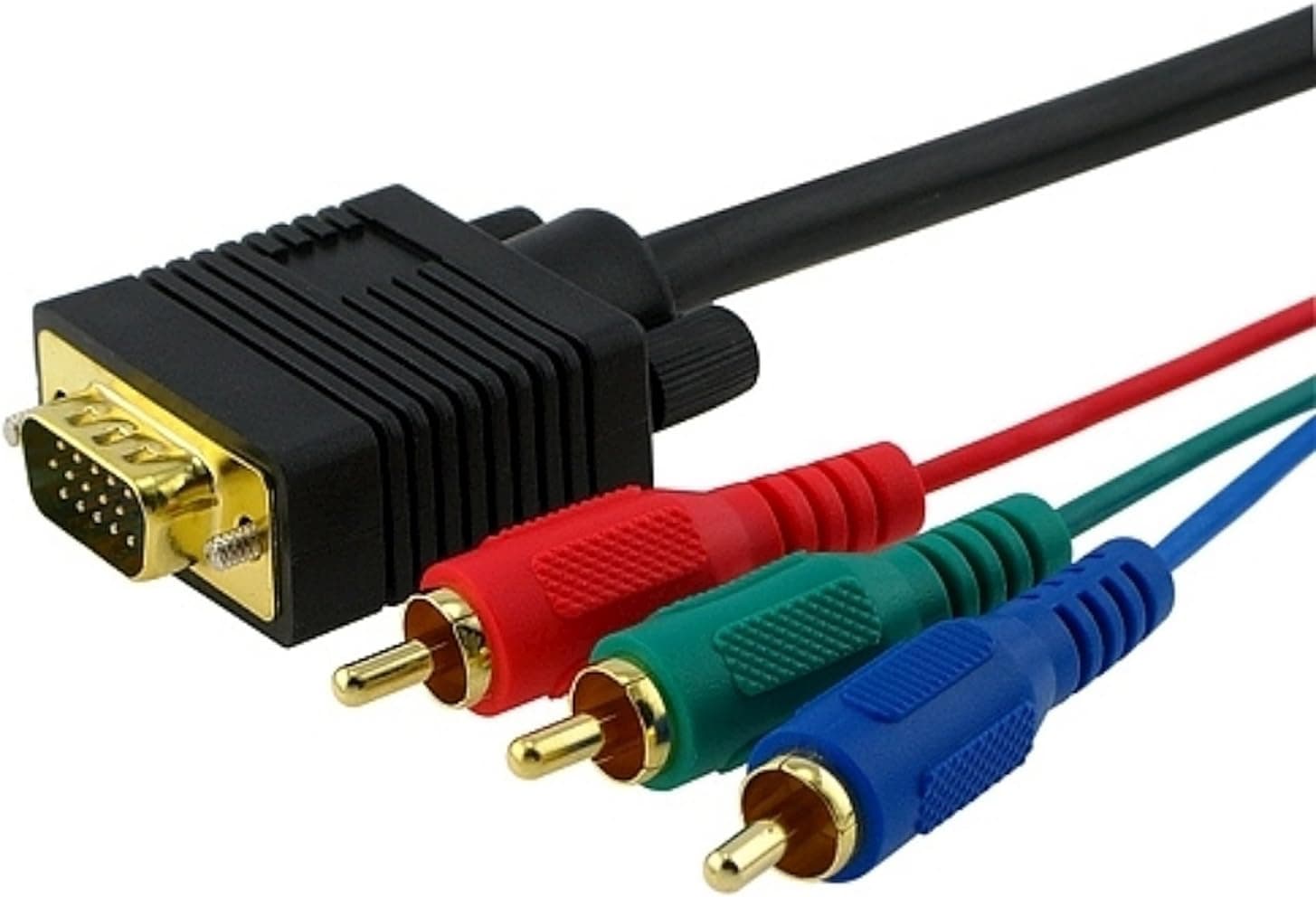
The Befenybay VGA-to-RGB cable (1.8 m) joins a 15-pin D-sub (VGA-shaped) connector to three RCA plugs carrying Y, Pr and Pb.
Here is the conclusion first: this is not a cable for putting your computer's picture on a TV. It only makes sense when the source device already outputs component video through a VGA-shaped port, which makes it a narrow, specialised product.
Devices that fit include DVD and Blu-ray players, set-top boxes, and older or professional projectors and large displays that consolidated three component channels into a single 15-pin socket to save space. If your device was not designed that way, nothing will appear on screen no matter how good the cable is.
The Amazon listing shows 60 reviews at 4.0 out of 5 stars (captured June 2026), which is respectable — and the negative reviews for cables like this almost always come from buyers who misread the use case.
Everything worth checking is knowable before you buy, so let's work through it.
Signal Basics: Same Shape, Different Content
A VGA port carries RGBHV — red, green and blue plus separate horizontal and vertical sync. Component video builds a picture from just three lines: Y (luminance plus sync), Pb and Pr (colour difference).
The two encode colour in fundamentally different ways, so converting one into the other normally requires active circuitry and a power supply.
This cable has no such circuitry. A passive cable can only re-route specific pins of the 15-pin connector onto three RCA cores.
Feed it the RGBHV from a PC graphics card and the display has no way to interpret it as colour-difference signals, and no wire on which to receive H/V sync — the result is a black screen or an unstable green-tinted image. Gold plating is irrelevant here; the combination simply cannot work.
When the source genuinely emits Y/Pb/Pr from its 15-pin port, the signals are already in the right form and re-routing the wiring is all that is needed. That is the entire job of this product.
Compatibility Guide
The published specifications are as follows.
| Item | Value |
|---|---|
| Connector type | VGA male to 3× RCA male (component video) |
| Cable length | 1.8 m |
| Weight | approx. 0.4 lb (about 181 g) |
| Colour | Black |
Check these in order before buying.
- Does the source manual list component output on a 15-pin D-sub? This is the decisive point. If it only says analog RGB or PC monitor output, treat the device as incompatible.
- Match the RCA colours. Component convention is Y = green, Pb = blue, Pr = red. This is not the yellow/white/red of composite plus audio, so pick the input group that shows green, blue and red.
- Expected resolutions. Component links typically handle 480i, 480p, 720p and 1080i. Do not expect 4K or high-refresh PC output.
- No audio. Three video lines only; route sound separately via RCA stereo or optical.
- 1.8 m in practice. Fine between shelves inside an AV rack, not enough to reach a wall-mounted TV. Analog signals degrade as you add length and connectors, so buy the right length rather than stacking extensions.
- Not supported: PC VGA output into a TV's component input.
Product Info
rmation
The listing is on Amazon.co.jp (ASIN B0096TTOHG), and the price captured on 9 June 2026 was ¥7,156 including tax.
Prices move, so confirm the current figure on the product page. The eBay entry only shows "See listing" with no figure, so it cannot serve as a price comparison here.
Bluntly, that is not cheap for a single passive cable with no electronics inside. It is not an implausible, wrong-by-an-order-of-magnitude figure, but many readers will find it steep for 1.8 m of analog video wire.
The likely explanation is scarcity: this pinout is hard to source and the category sells in small volumes. If you are not in a hurry, compare a few equivalently wired products first.
The quality claim is gold-plated connectors, which resist oxidation and help avoid intermittent contact in humid rooms or with frequent re-plugging. They do not change the nature of the signal, so they will never make an incompatible device work.
The rating stands at 4.0 stars from 60 reviews (captured June 2026) — a small sample, so treat the average as a rough indicator only.
Alternatives Compared
There are really three ways to solve "I need video out of this VGA-shaped port." Decide which case you are in first.
| Option | Requirement | Best for |
|---|---|---|
| This passive cable | Source must already output component over VGA | DVD/BD players, older projectors with dual-purpose ports |
| Active VGA-to-component converter (sold separately) | Needs power; supported resolutions vary | Forcing a PC's RGBHV into a component input |
| VGA-to-HDMI converter (sold separately) | Needs power; some models accept separate audio | Source has only VGA, display has only HDMI |
If your goal is a PC on a modern TV, the answer is an active converter, not this cable. If your device has a dual-purpose port, the passive cable is the cleaner choice — no power, no processing, nothing added to the signal path.
Setup and Troubleshooting
The procedure is simple. With both devices powered off, insert the VGA end and tighten the thumbscrews — analog connectors misbehave as soon as they hang loose, so do not skip this.
Connect the RCA ends by colour, then switch the display to its component input. If the source has an output menu, change it from RGB or PC to Component / YPbPr, otherwise nothing is sent.
Symptoms narrow the cause quickly:
- Completely black — most likely the source is not emitting component at all; then check its output setting, then the input selection.
- All green, or black and white only — the two colour-difference lines (Pb/Pr) are not arriving; a plug is loose or in the wrong socket.
- Unnatural colour (skin tones turn blue or red) — Pb and Pr are swapped; exchange the blue and red plugs.
- Picture but no sound — working as designed; this cable carries no audio.
Best Use Cases
- Owners who have confirmed their AV gear uses a 15-pin D-sub as a component output. This is the one true use case, and the cable handles it without fuss.
- People keeping older projectors or professional monitors in service. Cables with this pinout get harder to buy new every year, so a spare has real value.
- Short runs inside an AV rack. 1.8 m is a convenient length between stacked components.
- Environments where contacts corrode. Frequent re-plugging or high humidity is where gold plating earns its keep.
Before You Buy
The biggest trap is that it will not work with a PC. The word VGA in the name invites that assumption, but a passive cable cannot convert signals and does not carry sync.
If you want your computer on a TV, look for a powered active converter instead — otherwise all you gain is a return shipment.
Retro gamers should read this twice. The PS2 and original Xbox do support component video, but their console-side connector is a proprietary AV multi-out, not a 15-pin D-sub.
This cable alone cannot connect them; you need the console's own component cable first. Realistically, the console-adjacent cases here are arcade boards and industrial equipment that genuinely expose a VGA port.
No audio and resolutions limited to the component range are the other after-the-fact disappointments. Many recent TVs have dropped component inputs entirely, so physically look at the back of your display before ordering.
On price and ratings: ¥7,156 as captured in June 2026 is on the high side for a passive cable, and the figure changes often — judge by the live listing, not by this article. The 4.0-star average across 60 reviews is decent, but the sample is small and this category mixes "wrong use case" one-star reviews with legitimate praise.
Reading which device each reviewer connected is more useful than the average.
Finally, about listing metadata. Cables like this are frequently miscategorised on Amazon, and product pages often use "RGB", "component" and "composite" interchangeably.
Do not take the listed category or model text at face value: check the product photo (are the RCA ends green/blue/red, or yellow/white/red?) and the title to confirm it is what you need.
FAQ
Q. Can I connect my PC's VGA output to a TV's component input? A.
No. The cable is passive, so it cannot convert the signal and does not carry sync.
You need a powered active converter.
Q. Can it replace a yellow/white/red composite cable? A.
No. Despite three RCA plugs, these are three video lines (Y/Pb/Pr), not composite video plus stereo audio.
Q. How do I get sound?
A. Video only. Use a separate RCA stereo or optical connection.
Q. What resolutions will it pass? A.
As a general guide for component links, 480i/480p/720p/1080i. The actual figure depends on your source device, so check its manual.
Q. 1.8 m is too short — can I extend it? A.
You can, but analog quality drops with added length and connectors. A single cable of the right length is more reliable.
Q. Does gold plating improve picture quality? A.
It resists oxidation and reduces intermittent contact, but it will never make an incompatible device display an image. Verify compatibility first.
Product Disclosure (Amazon)
- Manufacturer: Befenybay
- Seller: azkcom (エイゼットケイドットコム)
- Fulfilled by: azkcom (エイゼットケイドットコム)
- ASIN: B0096TTOHG
- Note: This article covers a manufacturer-made product based on Amazon listing details.