Overview
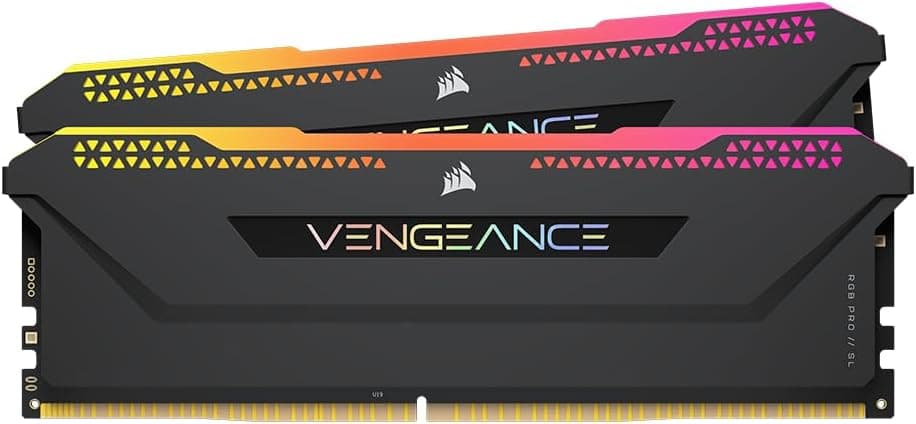
The CORSAIR CMHLEKIT2K — Vengeance RGB PRO SL Light Enhancement Kit is a pair of DDR4 dummy modules with no memory function. Here is the short version: it makes sense only if you have two VENGEANCE RGB PRO SL DDR4 sticks on a four-slot motherboard and want the empty slots to match behind a glass side panel.
Almost everyone else can skip it. It adds 0 GB of RAM and does nothing for performance.
The modules look like real VENGEANCE RGB PRO SL memory. Each one has 10 addressable RGB LEDs, so the kit adds 20 in total.
With them in the empty slots, all four slots light up. The lighting is meant to be controlled through CORSAIR iCUE.
On Amazon.co.Check the retailer's page for the latest user reviews.
Keep in mind that only people who already want a purely cosmetic part buy dummy modules. The high rating shows that it lit up the way buyers expected.
It does not mean the kit is right for everyone.
Compatibility Guide
The kit fits DDR4 DIMM slots only, and this is the easiest thing to get wrong. DDR4 and DDR5 have the notch in different places, so the modules physically will not go into a DDR5 board.
AM5 boards (Ryzen 7000 and later) are DDR5-only. Intel 600/700-series chipsets come in separate DDR4 and DDR5 boards, sometimes with nearly identical names.
Check your board's spec sheet for DDR4 before you buy.
| Your setup | Worth it? | Why |
|---|---|---|
| DDR4, 4 slots, 2 real sticks | Ideal | Fills exactly the two empty slots |
| DDR4, 4 slots, 4 real sticks | No | No free slots |
| DDR4, 2 slots (most Mini-ITX) | Effectively no | Two real sticks already fill the board |
| DDR4, 4 slots, 1 real stick | Fits, but wrong priority | One stick runs single-channel; add a second real stick first |
| DDR5 motherboard | No | Different notch; will not fit |
| Laptop (SO-DIMM) | No | Different form factor |
So the older claim of ATX, Micro-ATX and Mini-ITX support only means the modules physically fit. Most Mini-ITX boards have two memory slots, and two real sticks fill both.
That leaves nowhere for the dummies to go.
Cooler clearance is easy to miss. With two sticks, most four-slot boards recommend the second and fourth slots from the CPU (A2/B2).
That usually leaves the slot closest to the CPU empty. Putting a dummy there can create a clash with a large air cooler's heatsink or fan that you did not have before.
The dummies are the same shape as real VENGEANCE RGB PRO SL sticks, so check clearance as if you were installing four real modules. AIO liquid coolers rarely have this problem.
For lighting control, the product data says an iCUE-compatible controller is required and recommends pairing the kit with VENGEANCE RGB PRO SL memory. It says nothing about control from motherboard RGB software alone, so plan on installing iCUE.
Slot Placement and Installation
- Check your motherboard manual for the recommended slots when using two modules.
Keep your real memory in those slots. Moving it to make room for the dummies can break dual-channel operation.
Power off, unplug the PSU cable, and touch the case metal to discharge static.
Seat the dummies in the two remaining slots.
Line up the notch and press straight down until both latches click, just as you would with real memory. 4.
After boot, confirm that the memory capacity in BIOS and the OS has not changed. That is expected: the dummies are not detected as memory, so no extra capacity is normal.
- Open iCUE and check that all four modules light in sync.
If the dummies do not show up, update iCUE first. Then make sure no other vendor's RGB software is running and fighting over the lighting.
Product Info
| Item | Detail |
|---|---|
| Model | CMHLEKIT2K |
| Form factor | DDR4 DIMM (dummy) |
| Contents | 2 dummy modules |
| RGB LEDs | 10 per module (20 total) |
| Software | CORSAIR iCUE |
| Color | Black |
| Memory capacity | None (no memory function) |
Check the retailer's page for the latest price.co.jp on July 9, 2026.
The two prices are about two months apart, so they are not a direct comparison. Sales change it too, so check both listings before buying.
See CORSAIR's official site for warranty terms.
To repeat: this part has zero effect on system performance. It is purely cosmetic, and you are likely to regret it if you buy it without understanding that.
Dummy Kit vs. Adding Real Memory
The dummy kit is not the only way to fill empty slots. You can also add two more real sticks.
Which one to pick depends on whether you need more capacity.
| Dummy kit (this product) | Two more real sticks | Do nothing | |
|---|---|---|---|
| Capacity | No change | Increases | No change |
| Look | All four lit | All four lit if same series | Only two lit |
| Memory behavior | No effect | Four sticks can make high-speed XMP unstable | No effect |
| Cost | This kit | Depends on capacity | Zero |
On some platforms, four sticks will not run stably at the XMP speed on the box, and you end up lowering the clock. If you have enough RAM, do not want to give up speed, and still want a full set of lit slots, the dummies are the logical choice.
If you are actually short on RAM, the same money will do far more as real memory.
Other brands make dummy modules as well. They differ in design and lighting software, though.
If your goal is a matched look next to CORSAIR memory, the kit made for the same series is the straightforward pick.
Who It's For
- Owners of two VENGEANCE RGB PRO SL DDR4 sticks with two empty slots on a four-slot board. It fills the visible gap. This is the use case the product was made for.
- Glass-panel builds meant to be seen. On stream or at an event, four matching lit modules look cleaner.
- Users who already run fans and LED strips through iCUE. The dummies join the same software, so syncing effects is easy.
- Users who have enough RAM and do not want four-stick speed trade-offs. You get the four-stick look without four real sticks.
Things to Check Before Buying
It adds no RAM. That sounds obvious, but the most common mistake is buying it as a memory upgrade.
The name says dummy, yet it can appear right next to real VENGEANCE RGB PRO SL kits in store listings. The easy tell is that it has no capacity figure such as 16GB.
It will not fit DDR5 boards. Most new builds in 2026 use DDR5.
If you are shopping for a future build, check the board's memory type first. This kit is for existing DDR4 systems.
The product name is spelled inconsistently. Some listings spell it VENGANCE instead of VENGEANCE.
If a search comes up empty, search for the model number CMHLEKIT2K. There are also similarly named series, such as plain VENGEANCE RGB PRO and the DDR5 VENGEANCE RGB, and each looks different.
Confirm your own sticks' series name first. Next to memory without the SL suffix, differences in shape and lighting can stand out.
It assumes iCUE. The product data says RGB control needs an iCUE-compatible setup.
If you want to control everything from your motherboard's RGB software, or you avoid extra background apps, this is a poor fit.
It cannot work alone. The dummies are not memory, so a PC with only dummies installed will not boot.
You always need real memory alongside them.
A future upgrade makes them useless. If you plan to add real memory later, the dummies come out at that point.
If that upgrade is coming soon, buying real memory now wastes less money.
It is pointless in a closed case. With a solid side panel, or a PC that sits hidden under the desk, there is little reason to buy it.
Cooling impact is minor. With no memory chips, the dummies are not a real heat source; the LEDs give off only a little heat.
Filled slots do narrow the airflow gaps between modules slightly. Whether that is acceptable for the look is up to you.
FAQ
Q: Will they affect performance or stability? A: No.
They are not detected as memory, so capacity, speed and stability stay the same. Seeing no extra capacity in BIOS is normal.
Q: Do they work on DDR5 motherboards?
A: No. DDR4 and DDR5 have different notch positions, so they will not physically fit.
Q: Can I pair them with memory other than VENGEANCE RGB PRO SL? A: They fit any DDR4 slot.
The product data still recommends the VENGEANCE RGB PRO SL series. Next to other series or other brands, differences in shape and lighting may stand out, so use the same series for a matched look.
Q: Can I control the lighting without iCUE? A: The product data says RGB control requires an iCUE-compatible setup.
Control from motherboard RGB software alone is not guaranteed, so plan on using iCUE.
Q: Can I boot with only the dummy modules installed? A: No.
At least one real memory module is required. The most common setup is two real sticks plus two dummies across four slots.
Product Disclosure (Amazon)
- Manufacturer: CORSAIR
- Seller: Amazon.co.jp
- Fulfilled by: Amazon.co.jp
- ASIN: B0CFZWBT5N
- Note: This article covers a manufacturer-made product based on Amazon listing details.